


 Menu
MenuMenu


Get Sales Advice from Mon - Fri 9am - 5:00pm:
020 3337 8950LAST UPDATED: June 02, 2026
Intel XeSS vs AMD FSR vs NVIDIA DLSS: Which Upscaling Technology Is Best for Gaming?
Modern games are pushing graphics cards harder than ever, especially at 1440p and 4K with ray tracing, high-resolution textures and bigger open worlds. That is why upscaling technologies have become such a big part of PC gaming. They help boost FPS by rendering the game at a lower internal resolution, then rebuilding the image so it still looks sharp on your display.
The tricky part is choosing between Nvidia DLSS, AMD FSR and Intel XeSS. All three are built to improve performance, but they differ in hardware support, image quality, frame generation, game compatibility and how they feel during actual gameplay.
This FSR vs DLSS vs XeSS guide breaks everything down clearly, including how each technology works, what the latest versions add, which games support them, and which one makes the most sense for your gaming setup.
Intel XeSS vs AMD FSR vs NVIDIA DLSS: A Quick Comparison
Before getting into the full breakdown, here is the simple version. FSR vs DLSS vs XeSS is mainly a choice between image quality, GPU support and how well each game uses the technology.
| Feature | NVIDIA DLSS | AMD FSR | Intel XeSS |
| Best for | NVIDIA RTX users | Wide GPU compatibility | Intel Arc users |
| Main strength | Strong image quality and AI feature depth | Works across more GPU brands | Clean AI upscaling on Intel hardware |
| Hardware support | Requires RTX hardware for DLSS | Supports AMD, NVIDIA and Intel GPUs, depending on the version and game | Best on Intel Arc, with wider support depending on the version |
| Frame generation | Yes, depending on the DLSS version and the GPU | Yes, depending on the FSR version and the GPU | Yes, with newer XeSS versions |
| Image quality | Usually, the strongest overall | Good, but it can vary more by mode and game | Can look sharp, but implementation matters |
| Best use case | 1440p, 4K, ray tracing and RTX builds | AMD systems, older GPUs and mixed hardware | Intel Arc systems and supported games |
What These Upscaling Technologies Actually Do
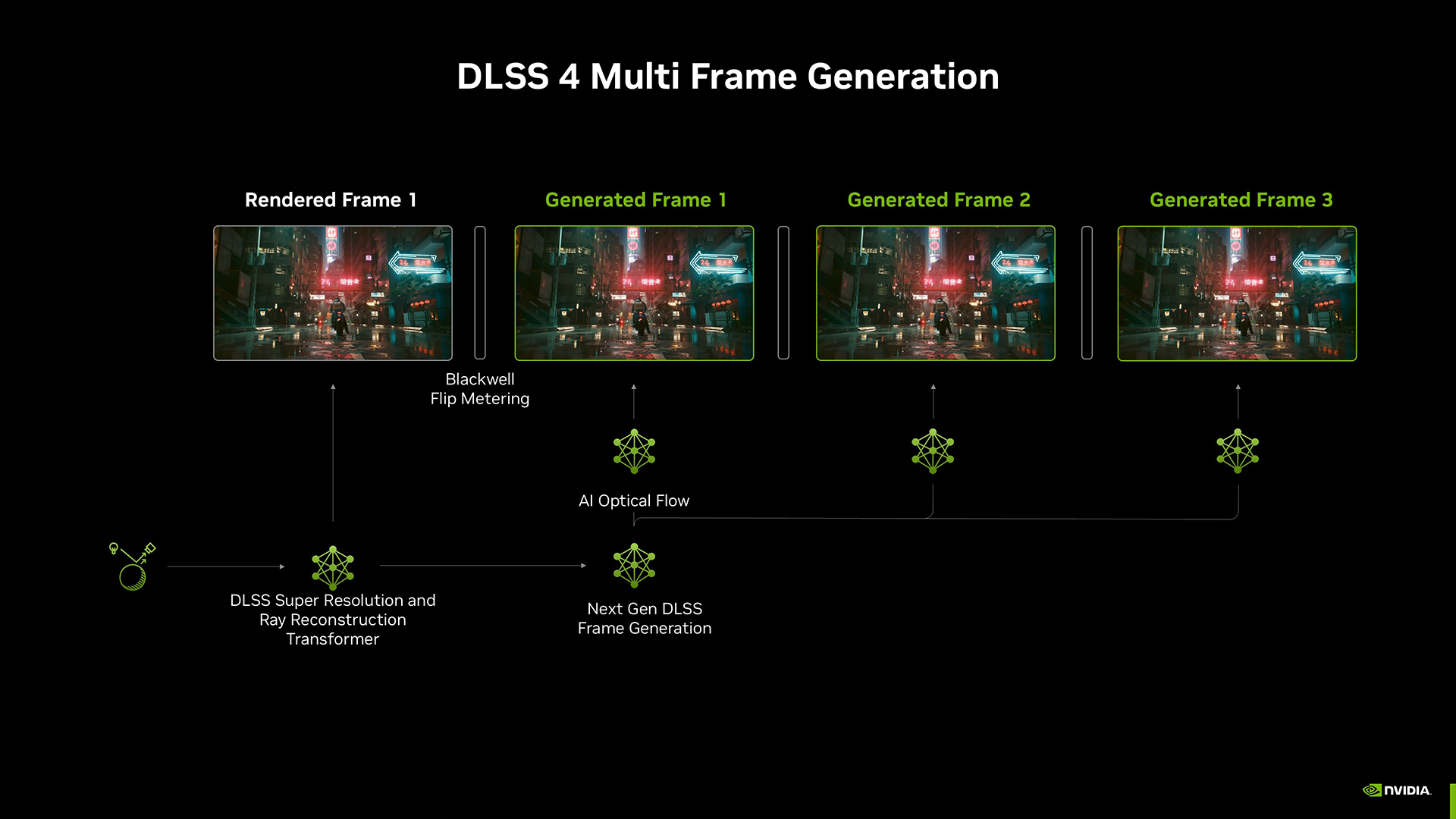
DLSS, FSR and XeSS all try to solve the same problem: how to improve performance without making the game look heavily downgraded. Instead of rendering every frame at full native resolution, the game first renders at a lower internal resolution. The upscaler then rebuilds the image so it matches your chosen output resolution.
This is why FSR vs DLSS vs XeSS matters for gaming. These technologies can raise FPS, reduce GPU load and make demanding settings more playable, especially at 1440p or 4K. Modern upscalers also work a bit like anti-aliasing tools, because they use previous frames, motion data and reconstruction techniques to smooth jagged edges, reduce shimmer and rebuild fine detail. The latest DLSS models improve stability, anti-aliasing and visual clarity, while AMD says FSR 2 can produce an anti-aliased output from an aliased input.
NVIDIA DLSS
DLSS is NVIDIA’s AI-powered upscaling and frame generation technology for RTX graphics cards. It uses dedicated Tensor Cores, motion data, and AI models to rebuild frames at a higher output resolution while reducing the GPU workload. In simple terms, it is designed to improve frame rates without making the image look heavily downgraded.
The main advantage of DLSS is image quality. In supported games, DLSS performance is usually strongest at 1440p and 4K, especially when ray tracing is enabled. The catch is hardware support. You need NVIDIA GPUs with DLSS support, as some newer Nvidia features only work on newer RTX generations.
Here is a simple version-by-version breakdown of how DLSS has developed over time.
| DLSS Version | Release/Announcement Date | What It Added | Supported Games |
| DLSS 1 | Announced 2018, early game support in 2019 | Early AI upscaling with mixed image quality and limited adoption | Battlefield V, Metro Exodus |
| DLSS 2 | March 2020 | Major image-quality improvement with temporal reconstruction and wider game support | Control, Death Stranding, Cyberpunk 2077 |
| DLSS 3 | September 2022 | Frame Generation for RTX 40 Series GPUs, alongside Super Resolution and NVIDIA Reflex | Microsoft Flight Simulator, The Witcher 3: Wild Hunt, Marvel’s Spider-Man Remastered |
| DLSS 3.5 | August 2023 | Ray Reconstruction for cleaner ray-traced lighting and reflections | Cyberpunk 2077: Phantom Liberty, Alan Wake 2, Portal with RTX |
| DLSS 4 | January 2025 | Multi-frame generation for RTX 50 Series and transformer model improvements for supported RTX users | Alan Wake 2, Cyberpunk 2077, Indiana Jones and the Great Circle, Star Wars Outlaws, Black Myth: Wukong |
| DLSS 4.5 | Announced January 2026, wider Dynamic MFG/6X rollout from March/April 2026 | Dynamic Multi Frame Generation, 6X mode and second-generation transformer improvements | Forza Horizon 6, Crimson Desert, Luna Abyss, 007 First Light |
| DLSS 5 | Announced for Fall 2026 | Upcoming AI-driven visual fidelity improvements for lighting, materials and neural rendering | Likely: Resident Evil Requiem, Starfield, Hogwarts Legacy, Assassin’s Creed Shadows, EA SPORTS FC |
PC Requirements for DLSS
This is where DLSS becomes more specific than FSR. Basic DLSS Super Resolution works across RTX cards, but the newer frame generation features depend heavily on GPU generation.
| DLSS Feature | Hardware Needed |
| DLSS Super Resolution | NVIDIA RTX GPU |
| DLSS Frame Generation | RTX 40 Series or newer |
| DLSS Multi-Frame Generation | RTX 50 Series |
| DLSS Ray Reconstruction | Supported RTX GPU and supported game |
| DLSS 4.5 Dynamic Multi Frame Generation | RTX 50 Series for Dynamic MFG and 6X mode |
| DLSS 5 | Expected: RTX 50 series, To be confirmed by NVIDIA |
For most gamers, DLSS is the best option if you already have an RTX card. If you are using an older GTX card or an AMD GPU, DLSS will not be available, so FSR or XeSS becomes the more realistic route.
AMD FSR
FSR is AMD’s upscaling and frame generation technology, built to improve frame rates without locking players to one GPU brand. Its biggest strength is compatibility. Depending on the version and game, FSR can work across AMD, NVIDIA and Intel graphics cards, which makes it a practical option for players who do not have RTX hardware.
In real gaming use, FSR performance is strongest when you need extra FPS on AMD Radeon systems, older GPUs or mixed hardware setups. It may not always look as clean as DLSS in difficult scenes, but it is often the easiest way to make demanding games feel more playable. For Radeon users, AMD GPUs with FSR support are the natural match, especially as newer AMD GPU features move further into AI-powered upscaling and frame generation.
Here is how AMD FSR has developed so far, including the release period, main feature jump and example games for each version.
| FSR Version | Release/Announcement Date | What It Added | Supported Games |
| FSR 1 | June 2021 | Spatial upscaling with wide hardware support and simple integration | Godfall, Anno 1800, Dota 2 |
| FSR 2 | May 2022 | Temporal upscaling for better image quality and anti-aliased output | Deathloop, The Callisto Protocol, Baldur’s Gate 3 |
| FSR 3 | September 2023 | Frame Generation alongside temporal upscaling for higher perceived smoothness | Forspoken, Immortals of Aveum, Avatar: Frontiers of Pandora |
| FSR 3.1 | March 2024 announcement, June 2024 game availability | Improved image stability, reduced ghosting and frame generation decoupled from FSR upscaling | Ratchet & Clank: Rift Apart, Ghost of Tsushima Director’s Cut, Horizon Forbidden West |
| FSR 4 / FSR Upscaling | 2025 | ML-powered upscaling for newer Radeon RX 9000 Series hardware | Call of Duty: Black Ops 6, Civilization VII, Marvel Rivals |
| FSR Redstone | December 2025 | Wider ML feature stack including FSR Upscaling, Frame Generation, Ray Regeneration and Radiance Caching | Cyberpunk 2077, F1 25, Mafia: The Old Country, Call of Duty: Black Ops 7 |
FSR’s biggest advantage in the FSR vs DLSS comparison is hardware reach. DLSS is usually stronger for image reconstruction on RTX cards, but FSR is the more flexible fallback when DLSS is not available or when the system uses AMD or older non-RTX hardware.
PC Requirements for FSR
FSR requirements depend on the version. Older FSR features support a wide range of GPUs, while newer AI-driven FSR features are more closely tied to Radeon RX 9000 Series hardware.
| FSR Feature | Hardware Needed |
| FSR 1 | Very broad GPU support, including older Radeon and GeForce cards |
| FSR 2 | Broad modern GPU support, including AMD, NVIDIA and Intel, depending on the game |
| FSR 3 Upscaling | Modern AMD, NVIDIA and Intel GPUs, depending on the game support |
| FSR 3 Frame Generation | AMD Radeon RX 5000 Series and above recommended, with wider support depending on the game |
| FSR 4 / FSR Upscaling | AMD Radeon RX 9000 Series and newer |
| FSR Redstone features | Mainly Radeon RX 9000 Series support, depending on feature, driver and game integration |
Intel XeSS
XeSS is Intel’s AI-enhanced upscaling technology. It is designed to improve frame rates by rendering games at a lower internal resolution, then rebuilding the image for a sharper final output. It works best on Intel Arc graphics, where dedicated Intel hardware can accelerate the AI model, but some XeSS features can also work on supported non-Intel GPUs, depending on the game.
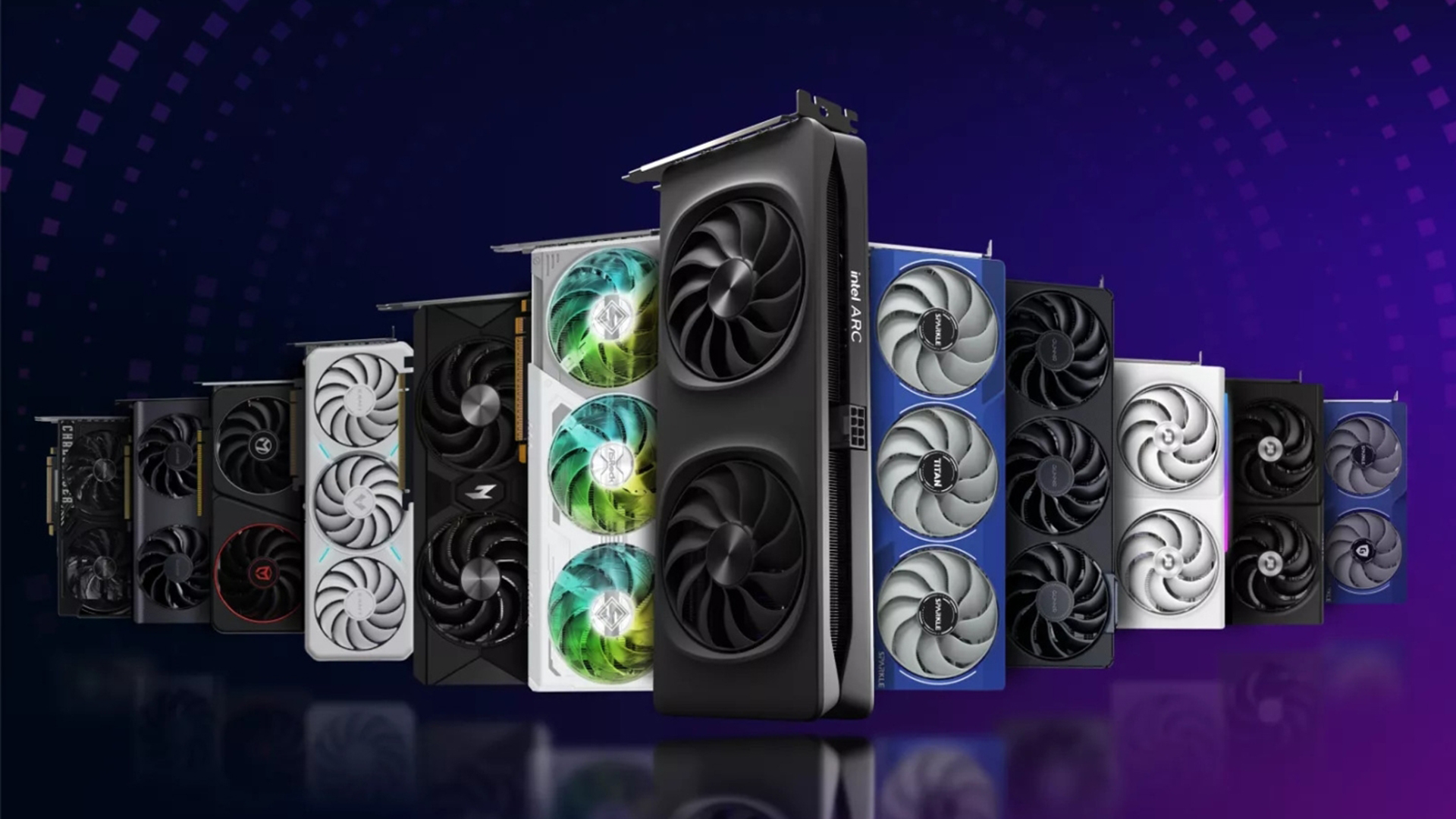
In real use, XeSS performance can be impressive when the game supports it properly, especially on Intel Arc systems. The main limitation is support. XeSS is growing, but it is still not as common as DLSS or FSR across major PC releases. Whether you are doing a XeSS vs FSR or XeSS vs DLSS, one of the main things to consider is the availability.
Here is a simple breakdown of how XeSS has developed so far.
| XeSS Version | Release/Announcement Date | What It Added | Supported Games |
| XeSS 1 | 2022 | AI-based Super Resolution with Intel Arc acceleration and wider fallback support | Shadow of the Tomb Raider, Hitman 3, Death Stranding Director’s Cut |
| XeSS 1.1 to 1.3 | 2023 to 2024 | Image-quality, stability and performance refinements | Cyberpunk 2077, Hogwarts Legacy, Forza Horizon 5 |
| XeSS 2 | December 2024 | XeSS Super Resolution, XeSS Frame Generation and Xe Low Latency | Assassin’s Creed Shadows, Black Myth: Wukong, Avatar: Frontiers of Pandora, Battlefield 6 |
| XeSS 3 | 2025 announcement, 2026 driver rollout | Multi-Frame Generation for smoother perceived motion, plus XeSS Super Resolution and Xe Low Latency | Assassin’s Creed Mirage, Marvel Rivals, Borderlands 4, supported XeSS 2 titles |
PC Requirements for XeSS
XeSS requirements vary by feature. Basic XeSS upscaling has wider support, but the best experience is usually on Intel Arc graphics because those GPUs are built to accelerate Intel’s AI upscaling path.
| XeSS Feature | Hardware Needed |
| XeSS Super Resolution | Best on Intel Arc, with wider GPU support depending on the game and implementation |
| XeSS Frame Generation | Intel Arc and supported non-Intel GPUs, depending on SDK, driver and game support |
| Xe Low Latency | Supported games and compatible Intel graphics features |
| XeSS 3 Multi-Frame Generation | Arc A-Series, Arc B-Series and supported newer Intel graphics platforms, depending on driver and game integration |
For Intel Arc users, XeSS should usually be the first option to test when a game supports it. For non-Intel systems, FSR may still be easier to find, but XeSS is worth comparing if the game offers both.
Image Quality: Which One Looks Best?
Image quality is where FSR vs DLSS vs XeSS becomes more than just an FPS discussion. All three can make games run faster, but the best option is the one that keeps motion clean, edges stable and fine detail intact. Another important thing to note here is that if you are not using the best monitors for sharper gaming visuals, the results might not be fully noticeable, since display quality also plays a major role in how clearly these upscaling technologies perform.
- NVIDIA DLSS: Usually the strongest option for image quality on supported RTX cards. NVIDIA says newer DLSS models improve stability, anti-aliasing and visual clarity, which is why DLSS often looks cleaner in motion, especially at 1440p and 4K. DLSS performance is particularly useful when ray tracing is enabled, because it can recover FPS while keeping the image sharper than more aggressive upscaling modes.
- AMD FSR: The main advantage is flexibility. AMD’s FSR works across a wider range of hardware, and newer FSR Upscaling is designed to improve temporal stability, preserve detail and reduce ghosting compared with older versions. In practice, FSR performance is strong when you need extra frames on AMD or non-RTX hardware, but lower modes can still look softer or show more shimmer depending on the game.
- Intel XeSS: It looks great when a game supports it properly, especially on Intel Arc hardware. Intel positions XeSS 3 around Super Resolution, Multi-Frame Generation and Xe Low Latency, so XeSS performance is not just about FPS, but also smoother output and better responsiveness. For non-Intel systems, results can vary more, so it is worth comparing XeSS upscaling against FSR in the same game before choosing.
FPS Boost vs Real Smoothness
A higher FPS counter does not always mean the game feels better. FSR vs DLSS vs XeSS should be judged by smoothness, not just the biggest number on-screen.
Upscaling helps most when your graphics card is the main limit. If the game is GPU-bound, reducing internal render resolution can free up performance and make higher settings more playable. NVIDIA, AMD and Intel all position their technologies around better performance, with newer versions adding frame generation or low-latency features to improve smoothness.
However, upscaling will not fix every performance issue. If your CPU is overloaded, your system is overheating, or the game has poor optimisation, the FPS boost may not feel as clean as expected. Stable frame pacing, responsive controls and clear motion matter more than chasing the highest possible number.
Frame Generation and Input Lag
Frame generation can make gameplay look smoother, but it is not the same as rendering more frames. It creates extra frames between the frames your GPU actually renders, which can raise the FPS counter while still adding some input delay.
In the FSR vs DLSS vs XeSS comparison, this matters most in fast-paced games. NVIDIA pairs DLSS Frame Generation with Reflex, AMD says FSR Frame Generation can work with Radeon Anti-Lag 2 to reduce input latency, and Intel includes Xe Low Latency with XeSS frame generation for a more responsive feel.
- Use frame generation for single-player games, RPGs, racing games and ray-traced titles where smoother motion matters more than instant response.
- Avoid it, or test it carefully, in competitive shooters where input feel matters more than a higher FPS number.
Your gaming monitor can also make or break the deal here. If you are using displays for competitive gaming, you will notice a big difference. It happens because refresh rate, response time and overall input feel all affect how smooth the game actually feels.
Compatibility: What Works on Your GPU?
Hardware support is one of the biggest differences in FSR vs DLSS vs XeSS. DLSS is tied to RTX graphics cards, FSR works across the widest range of GPUs, and XeSS is strongest on Intel Arc but can also work on some non-Intel GPUs depending on the game.
| GPU Type | Best Upscaling Option |
| NVIDIA RTX 50 Series | DLSS 4/5 features where supported |
| NVIDIA RTX 40 Series | DLSS 3/4 features depending on the game |
| NVIDIA RTX 20/30 Series | DLSS Super Resolution and Ray Reconstruction where supported |
| NVIDIA GTX | FSR or XeSS where supported |
| AMD Radeon RX 9000 Series | FSR 4 / FSR Redstone where supported |
| AMD Radeon RX 5000 to 7000 Series | FSR 2/3 features depending on the game |
| Intel Arc | XeSS first, then FSR as fallback |
| Integrated graphics | FSR or XeSS only where supported, with realistic expectations |
What Hardware and Display Setup Helps Most?
The best choice in the FSR vs DLSS vs XeSS debate depends on your GPU. When browsing graphics cards for modern gaming technologies, always keep in mind the technology you want to run and the game support.
Your display also affects how much benefit you actually see. A 1440p or 4K screen makes upscaling more useful because there is more resolution to rebuild cleanly. This is why it is always better to opt for the best gaming monitors so you can get the most out of your GPU.
In simple terms, the GPU decides which upscaler you can use, while the monitor decides how obvious the image-quality difference will be.
Final Words: Which Upscaling Technology Should You Use?
- Use DLSS if you have an RTX GPU: Nvidia DLSS is usually the strongest choice for image quality, ray tracing and advanced frame generation. DLSS is an RTX Tensor Core-powered suite with Super Resolution, Ray Reconstruction and Multi Frame Generation features.
- Use FSR if you want wider hardware support: AMD FSR is the safer pick for Radeon cards, older GPUs and mixed systems. AMD’s current FSR stack includes upscaling, frame generation and newer ML-powered features, but support still depends on the game and GPU.
- Use XeSS if you have Intel Arc: Intel XeSS should usually be tested first on Arc systems, especially where XeSS 3 is supported with Super Resolution, Multi-Frame Generation and Xe Low Latency.
- Use native resolution if the game already runs well: If the image looks cleaner and FPS is already stable, you may not need upscaling at all.
- Start with Quality mode: For most FSR vs DLSS vs XeSS testing, Quality mode is the best first setting because it usually gives extra FPS without making the image too soft.
Frequently Asked Questions
Which is better, DLSS, FSR or XeSS?
DLSS is usually the best option for NVIDIA RTX users, especially if image quality and ray tracing matter. FSR is better for wider hardware support, while XeSS is a strong option for Intel Arc users and supported games. NVIDIA describes DLSS as RTX Tensor Core-powered, AMD positions FSR around broad upscaling and newer Redstone features, and Intel lists XeSS support across its enabled-games library.
When to use FSR or DLSS?
Use DLSS if you have an NVIDIA RTX graphics card and the game supports it. Use FSR if you are on AMD hardware, older non-RTX NVIDIA hardware, Intel hardware, or if the game does not offer DLSS.
Is FSR supported on all graphics cards?
No. FSR has broad support, but not every FSR feature works on every graphics card. Older FSR versions support a wider range of GPUs, while newer FSR Redstone features are focused on the latest AMD RDNA 4 GPUs.
Do you need an RTX GPU for DLSS?
Yes. DLSS requires NVIDIA RTX hardware because it uses RTX Tensor Cores. Some newer features are more restricted, such as Multi Frame Generation for RTX 50 Series GPUs.
What GPUs support XeSS?
XeSS works best on Intel Arc graphics, but some XeSS support can also run on compatible non-Intel GPUs, depending on the game and implementation. Intel’s enabled-games list shows growing XeSS and XeSS 2 support across supported titles.
Does upscaling reduce image quality?
It can. Quality mode usually keeps the image cleaner, while Balanced or Performance modes can introduce softness, shimmering, ghosting or other visual artefacts. The result depends on the game, the upscaling technology, the mode and the resolution.
Do all games support DLSS, FSR and XeSS?
No. Game support varies. Some games support all three, some support only one or two, and some do not support advanced upscaling at all. Checking the in-game graphics menu is usually the quickest way to confirm what is available.
You can pay with:
*PayPal Credit Representative Example: Assumed credit limit £1,200, Representative 23.9% APR (variable). Purchase rate 23.9% p.a (variable).Terms & Conditions apply.


PayPal Credit and PayPal Pay in 3 are trading names of PayPal UK Ltd, 5 Fleet Place, London, United Kingdom, EC4M 7RD. Terms and conditions apply. Credit subject to status, UK residents only, Five Tech LTD acts as a broker and offers finance from a restricted range of finance providers. PayPal Pay in 3 is not regulated by the Financial Conduct Authority. Pay in 3 eligibility is subject to status and approval. 18+. UK residents only. Pay in 3 is a form of credit. Check if affordable and how you will repay. May make other borrowing more difficult or expensive. See product terms for more details.
Copyright © 1996-2026 Fivetech LTD | Terms and Conditions
box.co.uk & Box are trading names of Five Tech Limited. Registered office: Box LTD, Unit 10 Woodford Trading Estate, Woodford Green IG8 8HF