


 Menu
MenuMenu


Get Sales Advice from Mon - Fri 9am - 5:00pm:
020 3337 8950LAST UPDATED: June 08, 2026
Nvidia GPU Features Explained: The AI & Rendering Tools That Transform Performance
Modern Nvidia GPUs are no longer defined by raw clock speeds alone they are intelligent, AI-driven processing engines built to enhance gaming performance, accelerate creative workloads, and optimise real-time rendering in ways traditional hardware couldn’t. Whether you're choosing a gaming video card, upgrading to a 50-series GPU, or researching the capabilities of the RTX 5090 or 5070 Ti, understanding NNvidia’s feature stack is essential. These features determine how well a GPU performs across gaming, streaming, AI, and professional workflows often more than the physical number of cores or teraflops.
From DLSS AI upscaling and multi-frame generation to ray tracing, Tensor Cores, CUDA, NVENC, and Nvidia Reflex, each technology plays a unique role in how smoothly your games run and how efficiently your creative projects render. This guide breaks down every major Nvidia GPU feature in clear, practical terms helping you choose the right Nvidia graphics card and get the best experience on High Resolution Monitors, High Refresh Rate Monitors, and Ultra Wide Monitors.
Why Nvidia’s GPU Features Matter Today
Modern games and creative tools no longer rely on brute-force rendering alone. Instead, they blend AI acceleration, advanced rendering models, and intelligent upscaling to produce higher frame rates, sharper visuals, and more responsive gameplay.
How Games and Apps Rely on AI-Assisted Rendering
Today’s leading titles from Cyberpunk 2077 to Microsoft Flight Simulator, use AI reconstruction, neural rendering, and frame interpolation to achieve impressive visuals without overwhelming the GPU. Nvidia’s Tensor Cores, DLSS, and AI-driven denoisers allow games to render fewer pixels while still outputting a crisp final image.
AI assistance is also crucial in professional software. 3D artists, video editors, and machine learning developers rely on Nvidia’s hardware accelerators for tasks like:
- Real-time denoising
- Scene reconstruction
- Physics simulation
- Neural network training
These AI features turn an Nvidia GPU into a powerful compute device, not just a graphics processor.
Why Features Matter More Than Raw TFLOPS
Two GPUs with similar teraflops can perform dramatically differently in real games. Why?
Because real-world performance comes from:
- DLSS efficiency
- Ray tracing accelerators
- CUDA optimisation
- Tensor Core throughput
- NVENC encode quality
- Driver-level latency features
This is why the latest Nvidia RTX models outperform older cards even when their raw TFLOP numbers appear similar. The architecture and software ecosystem matter more than peak theoretical performance.
How Modern Nvidia GPUs Combine Hardware + Software
Nvidia marries dedicated hardware blocks (RT, Tensor, CUDA cores) with deeply integrated software such as:
- GeForce drivers
- DLSS frameworks
- Studio drivers for creators
- Nvidia Broadcast
- Reflex SDK
- Omniverse and CUDA toolkits
This tight integration is why Nvidia remains the preferred GPU for AI, gaming, and professional workflows.
| For choosing the right card for your needs, see the Nvidia GPU buying guide. |
DLSS Explained: AI Upscaling for Higher FPS
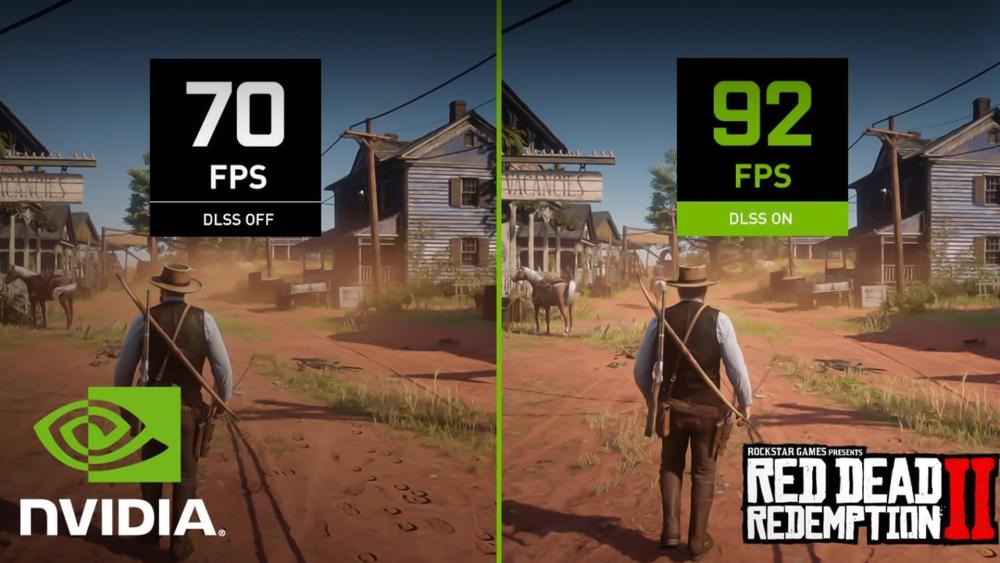
DLSS (Deep Learning Super Sampling) is one of Nvidia’s most influential GPU features. It uses machine learning to reconstruct high-resolution frames from lower-resolution inputs, allowing your GPU to work smarter, not harder.
How DLSS Works (AI Reconstruction)
Instead of rendering every pixel at native resolution, the GPU renders a lower-resolution image and hands it to a neural network (running on Tensor Cores) that reconstructs it into a sharper, higher-quality frame. This reduces GPU workload dramatically while maintaining excellent image fidelity.
DLSS improves:
- Frame rates
- Clarity
- Anti-aliasing
- Overall stability in demanding titles
DLSS Quality vs Balanced vs Performance
DLSS offers multiple modes tailored to your needs:
- Quality Mode: Highest visual detail
- Balanced Mode: Middle ground for most gamers
- Performance Mode: Ideal for 4K or ultrawide monitors
Choosing the right mode ensures you get the best mix of speed and image quality.
When DLSS Boosts FPS Most
DLSS is especially effective when:
- Playing at 1440p or 4K
- Running ray tracing
- Using high-refresh-rate monitors
- GPU bottlenecks limit raw frame rates
With DLSS enabled, even mid-range cards feel significantly faster.
When DLSS Isn’t Ideal
DLSS is less useful in:
- Classic/older games without RTX support
- Esports titles already running 300+ FPS
- Scenarios where CPU not GPU is the bottleneck
Tensor Cores
Tensor Cores perform the neural network operations that make DLSS possible. Without them, AI upscaling, multi-frame generation, and neural rendering would not be feasible.
DLSS Feature Support Across Nvidia GPU Generations
| DLSS Feature | GeForce RTX 50 Series | GeForce RTX 40 Series | GeForce RTX 30 Series | GeForce RTX 20 Series |
| DLSS Multi Frame Generation | ✔ | - | - | - |
| DLSS Frame Generation | ✔ | ✔ | - | - |
| DLSS Ray Reconstruction | ✔ | ✔ | ✔ | ✔ |
| DLSS Super Resolution | ✔ | ✔ | ✔ | ✔ |
| Deep Learning Anti-Aliasing (DLAA) | ✔ | ✔ | ✔ | ✔ |
Frame Generation: Adding Extra Frames Smoothly
Frame Generation is one of Nvidia’s most impressive AI features, allowing supported GPUs to insert entirely new frames between traditionally rendered ones. Instead of relying solely on the game engine, Nvidia uses optical flow analysis, motion vectors, and Tensor Core computation to predict and create additional frames. This results in much higher perceived frame rates without demanding the same workload from the GPU. Players moving from 60 to 120 FPS or from 100 to 200 FPS often describe the improvement as immediate and transformative.
How Frame Generation Works
The feature analyses the difference between two real frames, identifies object and camera motion, and generates an intermediate frame that blends smoothly between them. It effectively doubles frame rate in many titles by computing visually accurate transitions. Because these generated frames bypass traditional rasterisation, the GPU workload remains far lower than if it had rendered both frames natively.
Best Use Cases (1440p & 4K Gaming)
Frame Generation shines when the GPU is limited by rendering cost rather than CPU constraints. High-resolution gaming at 1440p or 4K benefits the most because the GPU has more work per frame and the CPU is less involved in limiting performance. Demanding modern titles such as Cyberpunk 2077 or Alan Wake 2, which use intense ray tracing and complex environments, see the greatest uplift. Paired with a high refresh rate monitor, Frame Generation makes gameplay feel dramatically smoother and more responsive visually.
Latency Considerations
Because Frame Generation inserts frames after input has been processed, it can slightly increase perceived latency without mitigation. Nvidia Reflex offsets this by reducing the input-to-display delay elsewhere in the pipeline. When Reflex is active, Frame Generation offers extremely smooth gameplay with latency levels that remain highly competitive.
Tensor Cores Enabling Frame Generation
As with DLSS, Frame Generation depends on Tensor Cores. These cores handle the neural networks required to analyse motion, predict accurate frame transitions, and maintain image stability. Without Tensor Cores, real-time AI interpolation would not be possible at playable speeds.
Ray Tracing: Realistic Lighting at a Cost
Ray tracing fundamentally changes how light behaves in a rendered scene. Instead of relying on approximations, the GPU simulates realistic light paths, allowing reflections, shadows, global illumination, and ambient lighting to behave far more naturally. This creates a dramatic improvement in visual realism, particularly in scenes involving glass, water, metallic surfaces, or complex shadows.
This is also where the difference between RTX and GTX graphics cards becomes clear. GTX models rely on traditional rasterisation and do not include dedicated RT Cores, meaning they cannot deliver hardware-accelerated ray tracing in modern titles. RTX GPUs, on the other hand, feature specialised RT Cores built specifically to calculate real-time light interactions efficiently. As a result, RTX cards can produce far more realistic lighting effects while maintaining playable performance, especially when paired with DLSS or Frame Generation.
Real-Time Reflections, Shadows & GI
Ray tracing enables dynamic reflections in windows, puddles, and reflective surfaces, along with much more accurate shadow behaviour. Global illumination adds natural bounce lighting and colour diffusion. These features bring a sense of physical authenticity that traditional rasterisation cannot achieve.
RT Performance Impact
Despite its visual beauty, ray tracing is demanding. Even high-end GPUs experience a substantial FPS drop when RT is enabled, especially at higher resolutions. Games using full path tracing intensify this cost significantly. This is why pairing ray tracing with DLSS or Frame Generation has become the new standard; without them, even powerful cards struggle with heavy RT workloads.
RT with DLSS or Frame Generation
In most RT-focused titles, DLSS Quality mode paired with Frame Generation delivers a balanced experience high visual fidelity with excellent frame rates. This combination allows mid-range GPUs to handle effects traditionally reserved for flagship models.
When RT Is Worth Turning On
Ray tracing makes the largest visual impact in cinematic single-player titles where immersion is prioritised. In competitive esports games, the performance drop generally outweighs the benefits, making RT better suited for story-driven experiences rather than high-FPS competitive modes.
CUDA Cores: The Foundation of Nvidia Performance
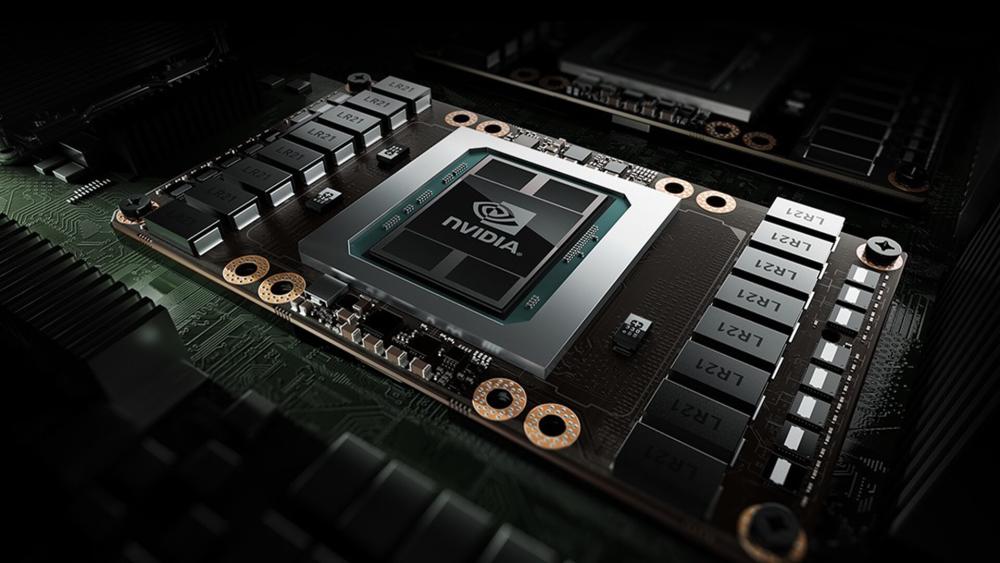
CUDA Cores form the backbone of Nvidia’s rendering and compute capabilities. They carry out the parallel processing tasks responsible for shading, physics, lighting calculations, post-processing, and general GPU computation. While marketing often focuses on the raw number of CUDA Cores in a GPU, what truly matters is how efficiently the architecture uses them.
What CUDA Cores Do
In gaming, CUDA Cores calculate how pixels should appear once lighting, textures, shadows, geometry, particle effects, and shaders are processed. Every modern game relies heavily on CUDA workloads to render frames quickly and accurately.
Why CUDA Impacts Gaming FPS
More CUDA Cores typically mean greater raw rendering potential, but architectural improvements and clock speeds also play a significant role. This is why a newer GPU with fewer cores can outperform an older one with more efficiency matters as much as quantity.
CUDA Cores for Creators (Compute, Physics, Effects)
Creators benefit immensely from CUDA acceleration. Rendering engines, physics simulations, video effects, AI upscaling, denoising tools, and even scientific compute workloads are optimised for CUDA. This is why Nvidia remains the leading choice for 3D artists, editors, and AI researchers.
CUDA vs Tensor vs Ray Tracing
In modern Nvidia GPU cores, CUDA Cores, Tensor Cores, and Ray Tracing Cores each handle a different part of the graphics and AI workload. While they all work together inside the GPU, they are designed for separate tasks across GPU rendering, NVIDIA AI, and NVIDIA ray tracing.
CUDA Cores are responsible for traditional rendering and general compute workloads. They use a parallel processing architecture to process thousands of tasks at once, which helps improve GPU rendering performance in games, creative software, simulations, and 3D applications. In the graphics pipeline, CUDA Cores help with shading, physics, rasterisation support, and other core rendering tasks that affect overall frame rate and responsiveness.
Tensor Cores are different. A tensor core GPU is built to accelerate AI-based workloads, making Tensor Cores the main ai acceleration hardware inside modern Nvidia graphics cards. They are used for deep learning tasks, machine learning inference, DLSS, and frame generation technology. Instead of focusing purely on traditional rendering, Tensor Cores help the GPU use nvidia ai to upscale images, generate smoother frames, and improve performance without relying only on raw graphical power.
Ray Tracing Cores are designed specifically for ray tracing and realistic lighting effects. They accelerate calculations for reflections, shadows, lighting, and global illumination, making real time ray tracing possible in supported games. This improves visual realism and contributes to major gaming visuals improvement, especially in scenes with reflective surfaces, dynamic lighting, and cinematic environments.
So, when comparing cuda cores vs tensor cores, the difference is simple: CUDA Cores handle raw rendering and compute performance, Tensor Cores handle AI acceleration, and Ray Tracing Cores handle realistic lighting through dedicated hardware acceleration. Together, they define the modern Nvidia GPU experience, combining traditional graphics power, DLSS, AI-driven performance, frame generation, and advanced ray tracing in one hybrid rendering model.
Nvidia Reflex: Lower Latency for Competitive Gaming
Nvidia Reflex is designed specifically for players who need every millisecond of responsiveness they can get. Rather than boosting frame rates, Reflex improves the speed at which your actions appear on screen by optimising the communication between the CPU, GPU, and display. This significantly reduces input-to-display latency, which is crucial in fast-paced esports titles where reaction time determines the outcome of a match.
How Reflex Reduces Input-to-Display Delay
The feature works by removing unnecessary buffering in the rendering pipeline. Instead of allowing frames to stack up waiting for the GPU, Reflex ensures that the system processes input as close to real time as possible. This tighter timing means the moment you click, flick, or fire, the action is registered much sooner on screen.
Best for Esports Titles
Games such as Fortnite, Valorant, Apex Legends, and Counter-Strike benefit the most from Reflex. Competitive players often prioritise latency reduction over visual quality, and Reflex provides measurable improvements that can help maintain consistency during high-pressure gameplay. Even mid-range GPUs gain a competitive edge simply by enabling it.
When Reflex Isn’t Necessary
Casual and cinematic games generally do not require ultra-low latency. Story-driven and open-world experiences prioritise immersion, detail, and smoothness, making Reflex unnecessary unless paired with Frame Generation to counteract additional latency.
Reflex + High Refresh Rate Monitors
Reflex performs best when paired with a high refresh rate monitor, as the display can show new frames more frequently. A 144Hz or 240Hz screen makes the latency improvements far more noticeable, creating a smoother and more responsive feel that competitive players rely on.
NVENC & AV1 Encoding: A Creator’s Secret Weapon
One of Nvidia’s most overlooked strengths is its dedicated hardware encoder, NVENC. Unlike CPU-based encoding, which steals resources from games or editing software, NVENC handles video encoding directly on the GPU through dedicated silicon. This means smoother streams, faster exports, and better quality at lower bitrates; all without sacrificing performance.
How NVENC Helps Streamers
For live streamers, the benefit is immediate: NVENC allows you to game and stream simultaneously without the usual performance drop caused by CPU encoding. Nvidia’s latest NVENC versions also provide cleaner image quality, especially in fast-motion scenes, making streams look sharper and more professional.
AV1 Encoding Benefits
AV1 is the next-generation video codec offering significantly better compression than H.264. Nvidia’s RTX 40-series GPUs include an advanced AV1 encoder that delivers higher quality at lower file sizes. This is ideal for creators uploading content, livestreaming at limited bandwidth, or archiving high-resolution footage.
Why Editors & Content Creators Rely on NVENC
Beyond streaming, NVENC dramatically accelerates video exports in editing programs like Adobe Premiere Pro, DaVinci Resolve, and OBS Studio. The encoder frees the CPU to handle timeline rendering and effects while the GPU handles encoding; a division of labour that reduces render times and makes editing workflows much smoother.
GPUs With the Best Encode Engines
Nvidia’s RTX 30 and 40 series GPUs offer the strongest encoding performance, with the 40-series models providing the most advanced AV1 support. For creators, these GPUs offer one of the best performance-to-value ratios available in modern hardware.
How These Nvidia Features Work Together (Real Use Cases)
Nvidia’s ecosystem is most powerful when its features are combined. Games and applications rarely rely on a single technology; instead, they use multiple GPU tools simultaneously to produce the final experience. Understanding how these features interact helps you choose the right GPU based on resolution, workload, and performance goals.
1080p Gaming Example
At 1080p, raw CUDA performance typically dominates. DLSS can still help, especially in demanding titles, but many esports games run at extremely high frame rates without needing additional AI features. Reflex becomes the star here, providing ultra-low latency that competitive players depend on.
1440p Gaming Example
1440p gaming benefits from a balanced approach. DLSS Quality mode provides cleaner edges and higher performance, while Frame Generation gives smoother motion in cinematic titles. Ray tracing can be enabled more comfortably at this resolution, especially when paired with DLSS.
4K + Ray Tracing Example
This is where Nvidia’s full suite comes together. High-resolution rendering requires immense GPU resources, and ray tracing makes the workload even more demanding. DLSS, Frame Generation, RT Cores, and Tensor Cores all contribute simultaneously to create visually stunning results while keeping frame rates playable. Without these technologies, even flagship GPUs would struggle to maintain consistency.
Creative Workloads (Denoising, AI Upscaling, Encoding)
Creators using programs like Blender, Resolve, or Topaz AI rely on CUDA Cores for compute tasks, Tensor Cores for AI acceleration, and NVENC for fast encoding. These features dramatically speed up workflows, enabling faster previews, cleaner denoising, and significantly reduced export times.
Why the Right Combination Matters More Than One Feature
Choosing a GPU isn’t just about one standout spec; it’s about how well the hardware and software features complement each other for your specific use case. A GPU with excellent ray tracing may not be ideal for AI workloads, while a CUDA-heavy card might be overkill for simple esports gaming. Nvidia’s strength lies in offering a balanced package that performs across all scenarios.
See our Nvidia troubleshooting guide for resolving common GPU issues.
Do You Need These Features? (Quick Guide by User Type)
| User Type | Key Nvidia Features They Benefit From Most | Why These Features Matter | Recommended GPU Range |
| Casual Gamers | DLSS, Ray Tracing (optional) | Smoother performance in demanding titles, enhanced visuals without requiring high-end hardware | RTX 4060 – RTX 4070 |
| Competitive Gamers | Nvidia Reflex, DLSS (for high FPS) | Lower latency and higher frame rates improve aiming, responsiveness, and overall competitiveness | RTX 4070 Super – RTX 4080 Super – 5070 Ti |
| High-Resolution / Ultrawide Users | DLSS, Frame Generation, RT Cores | Maintains high performance at 1440p, 4K, and ultrawide resolutions while enabling ray tracing | RTX 4080 Super – RTX 4090 – RTX 5090 |
| Creators (Video, 3D, Motion Graphics) | CUDA Cores, Tensor AI tools, NVENC / AV1 Encoding | Faster rendering, AI denoising, improved productivity, professional-grade encoding quality | RTX 4070 Ti – RTX 4080 Super – RTX 4090 |
| AI & ML Workflows | CUDA, Tensor Cores, large VRAM capacity | Essential for training, inference, matrix operations, and accelerated AI workloads | RTX 4090 – RTX 5080 / 5090 |
Final Thoughts
Nvidia’s modern GPU features from DLSS and Frame Generation to CUDA acceleration and NVENC encoding work together to deliver faster gameplay, smoother visuals, and dramatically improved creative workflows. Understanding these tools helps you choose a GPU that fits your needs, whether you're gaming at high resolutions, competing in esports, or creating content professionally.
If you're ready to upgrade, Box.co.uk has everything you need to unlock the full potential of these technologies. Explore the latest Nvidia graphics cards, browse high-performance Gaming PCs, or pair your GPU with a High Resolution Monitor, High Refresh Rate Monitor, or immersive Ultra Wide Monitor.
Upgrade confidently and experience what modern Nvidia performance truly feels like shop the full range today at Box.co.uk.
Frequently Asked Questions
Does Nvidia DLSS improve gaming performance?
Yes. DLSS uses AI to upscale lower resolution frames into higher resolution ones, reducing GPU workload while increasing frame rates and maintaining image quality, especially at 1440p and 4K.
Is ray tracing worth it on an Nvidia GPU?
Ray tracing greatly enhances visual realism by simulating realistic light behaviour, but has a performance cost. Pairing it with DLSS or Frame Generation makes it much more playable, particularly in story-driven games.
What’s the difference between Nvidia and AMD GPUs?
Nvidia historically leads in AI-driven features and ecosystem support (like DLSS and advanced ray tracing), while AMD offers strong raster performance and value for money. The choice depends on your priorities, whether that’s cutting-edge features or performance per pound.
Do Nvidia GPUs improve performance in creative software?
Yes. Nvidia GPUs accelerate creative apps like Adobe Premiere Pro, DaVinci Resolve, Blender and Unreal Engine. CUDA speeds up rendering, Tensor Cores power AI tools such as denoising, and NVENC enables faster exports, reducing overall workflow time.
Which Nvidia GPU features matter most for 4K gaming?
DLSS and Frame Generation are essential for boosting frame rates at 4K without sacrificing visual quality. Dedicated Ray Tracing Cores also help maintain realistic lighting effects while keeping performance playable at higher resolutions.
You can pay with:
*PayPal Credit Representative Example: Assumed credit limit £1,200, Representative 23.9% APR (variable). Purchase rate 23.9% p.a (variable).Terms & Conditions apply.


PayPal Credit and PayPal Pay in 3 are trading names of PayPal UK Ltd, 5 Fleet Place, London, United Kingdom, EC4M 7RD. Terms and conditions apply. Credit subject to status, UK residents only, Five Tech LTD acts as a broker and offers finance from a restricted range of finance providers. PayPal Pay in 3 is not regulated by the Financial Conduct Authority. Pay in 3 eligibility is subject to status and approval. 18+. UK residents only. Pay in 3 is a form of credit. Check if affordable and how you will repay. May make other borrowing more difficult or expensive. See product terms for more details.
Copyright © 1996-2026 Fivetech LTD | Terms and Conditions
box.co.uk & Box are trading names of Five Tech Limited. Registered office: Box LTD, Unit 10 Woodford Trading Estate, Woodford Green IG8 8HF