


 Menu
MenuMenu


Get Sales Advice from Mon - Fri 9am - 5:00pm:
020 3337 8950LAST UPDATED: January 27, 2026
Do You Really Need a Keyboard, Stylus or Case for Your 10-Inch Tablet?
Accessories can completely change how a tablet feels to use, but not every add-on is essential for every user. When choosing 10 inch tablet accessories, the real question is not what is available, but what actually improves your daily experience.
This guide breaks down whether a keyboard, stylus, case, stand, or hub is genuinely worth buying. By the end, you will know which accessories add real value, which are optional, and which you can safely skip depending on how you use your tablet.
Who Benefits Most from a Keyboard

A keyboard is often the first accessory people consider, but its value depends heavily on how much typing you actually do.
Work Tasks and Typing-Heavy Workflows
For professional use, a keyboard can transform a tablet into a practical work device. Writing emails, editing documents, managing spreadsheets, and joining remote meetings all feel more efficient with physical keys.
Many people building a mobile workstation rely on work tablet accessories to replace or reduce laptop use, especially when paired with productivity apps. A keyboard case or Bluetooth keyboard is often the biggest productivity upgrade for work-focused users.
Study and Note-Heavy Use
Students benefit from keyboards when lectures involve fast-paced note-taking or essay writing. Typing is often quicker than handwriting for large volumes of text, making a keyboard one of the most useful tablet accessories for students.
Home Use and Light Messaging
For casual home use, a keyboard is far less essential. Occasional messages, searches, and short emails are comfortable enough on the on-screen keyboard. In these cases, a keyboard is more about convenience than necessity.
Stylus Use Cases on a 10-Inch Tablet

A stylus is not just for artists. It can also support productivity, organisation, and precision tasks.
Drawing and Creative Apps
For creatives, a stylus is essential. Features such as pressure sensitivity and palm rejection allow natural sketching, shading, and line control. Artists and designers often rely on a stylus for digital art to make full use of creative apps.
This is especially relevant for users exploring workflows similar to those in using a 10-Inch tablet for digital art and design.
Note-Taking and Handwriting Workflows
Handwritten notes feel more natural for many users, especially during meetings or lectures. A stylus allows diagrams, annotations, and quick sketches that typing cannot easily replicate.
For users who switch between typing and handwriting, combining a stylus with a keyboard creates a flexible hybrid setup.
Document Markup and Quick Edits
A stylus is excellent for document annotation. Highlighting PDFs, signing forms, and making quick edits feels faster and more precise than finger input. This makes styluses useful even for non-creative users.
Cases and Screen Protection for a 10-Inch Tablet
Protection is often overlooked until damage happens. A good case can prevent costly repairs and improve usability.
Case Types for Everyday Protection
Folio cases protect both the front and back of the tablet while often doubling as a stand. Rugged cases add impact resistance but increase bulk.
Choosing the right tablet protective case depends on how often the tablet is moved, shared, or used by children. Many users benefit from protective cases for 10-inch tablets that balance safety and portability.
Screen Protectors and Glare Control
Screen protectors reduce scratch risk and, in some cases, glare. Tempered glass protectors offer the best impact resistance, while matte protectors improve visibility and stylus feel.
They are particularly useful for tablets used outdoors or for note-taking.
Carry Protection for Travel and Commuting
For frequent travel, padded sleeves or bags prevent pressure damage and screen cracks. This is especially important when carrying tablets alongside laptops or accessories.
Learning how to properly protect your 10-inch tablet helps extend its lifespan significantly.
Stands, Docks and Hubs for Home and Office Setups

Not all productivity accessories are handheld. Desk-based add-ons can dramatically improve comfort and connectivity.
Stands for Comfort and Posture
A stand raises the tablet to eye level, reducing neck strain and improving posture. Adjustable stands are ideal for switching between typing, reading, and video calls.
This is one of the simplest ways to improve long-session comfort.
Docks and USB-C Hubs for Ports and Storage
Many tablets rely on a single USB-C port. A USB-C hub for tablet use expands connectivity, adding ports for storage drives, external displays, and charging.
These accessories are particularly useful in desk setups where the tablet replaces or supplements a laptop.
Desk Setups for Hybrid Tablet Use
Combining a stand, keyboard, and hub creates a stable hybrid setup. This approach is popular with users following advice from productivity accessories guides to maximise efficiency without sacrificing portability.
How Accessories Change What a 10-Inch Tablet Can Do
Accessories do more than add features. They change how the tablet fits into your routine.
Productivity Improvements and Workflow Speed
Keyboards, styluses, and hubs reduce friction between tasks. Switching apps, editing documents, and managing files becomes faster and more intuitive.
If productivity is your goal, our blog Turn Your 10-Inch Tablet into a Productivity Powerhouse is a great starting point to help you.
Better Comfort for Long Sessions
Stands and cases improve ergonomics, making longer sessions more comfortable. Reduced strain leads to better focus and fewer breaks during work or study.
When Accessories Are Unnecessary
Not everyone needs every accessory. For streaming, browsing, and casual use, the tablet alone is often enough. Accessories add the most value when tasks become repetitive, precise, or time-sensitive.
Choosing the Right Accessories Based on How You Use Your Tablet
Many users struggle not because accessories are confusing, but because they try to buy everything at once. A smarter approach is matching accessories to how the tablet is actually used day to day. Here are some must-have 10-inch tablet accessories you should go for:
Work, Study, and Productivity-Focused Setups
If your tablet is used for work or education, accessories quickly move from optional to essential. Typing, multitasking, and long sessions all benefit from physical input and better ergonomics.
For these users, the most impactful 10 inch tablet accessories usually include:
- A keyboard or keyboard case for sustained typing
- A stand to improve posture during long sessions
- Optional USB-C hubs for desk-based workflows
This setup aligns closely with what users looking for work tablet accessories or typically need. The are also the perfect tablet accessories for students who want to enhance their every day experience.
Creative and Note-Focused Setups
For users who sketch, annotate, or handwrite notes, a stylus delivers the biggest improvement. Precision, palm rejection, and pressure sensitivity unlock workflows that finger input cannot replicate.
A simple creative-focused setup usually includes:
- A stylus for handwriting and drawing
- A folio case that doubles as a stand
- Optional matte screen protectors for better stylus control
This is especially relevant for those exploring digital art or handwritten study methods.
Casual, Home, and Media-First Use
For browsing, streaming, and light admin, accessories are largely about comfort and protection rather than productivity. Many users in this category overbuy accessories they rarely use.
In these cases, a protective case and optional stand are often enough. Keyboards, styluses, and hubs only become useful if usage patterns change over time.
Official vs Third-Party Accessories: What's Worth Paying For?
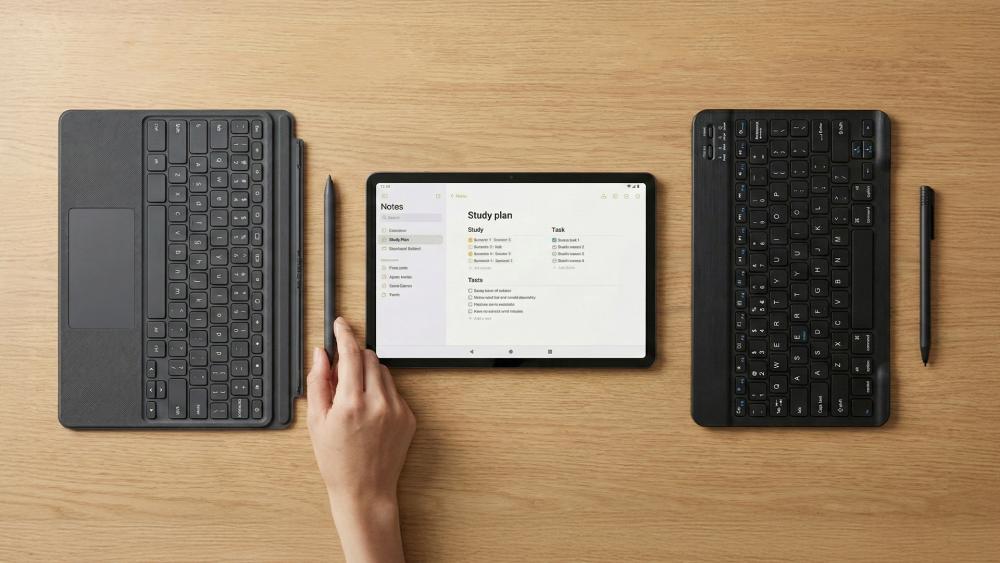
Not all 10 inch tablet accessories are created equal, and many buyers struggle to decide whether official branded accessories are worth the extra cost compared to third-party alternatives. Understanding where quality matters most helps avoid overspending or buying accessories that disappoint.
When Official Accessories Make the Most Sense
Official accessories are typically designed specifically for your tablet model, which improves fit, compatibility, and long-term reliability. They often integrate better with software features such as keyboard shortcuts, stylus pressure sensitivity, or automatic pairing.
Official options are usually worth considering for:
- Keyboard cases that rely on dedicated connectors
- Styluses with advanced palm rejection or pressure sensitivity
- Accessories used daily for work or study
For users building a dependable setup with tablet accessories, official options can reduce friction and reliability issues over time.
Where Third-Party Accessories Offer Better Value
Third-party accessories have improved significantly and often provide excellent value for less demanding use cases. Bluetooth keyboards, tablet stands, USB-C hubs, and protective sleeves are areas where third-party brands perform well without sacrificing usability.
These accessories are ideal when:
- You want flexibility across multiple devices
- Budget is a priority
- The accessory is used occasionally rather than daily
Many users mix official and third-party accessories to balance cost and performance.
Compatibility and Safety Checks Before Buying
Regardless of brand, always check compatibility carefully. Look for confirmation of tablet size support, connector type, and operating system compatibility.
It is also worth checking:
- USB-C power delivery support on hubs
- Stylus compatibility with your tablet model
- Case cut-outs for speakers and ports
Spending a few minutes verifying compatibility avoids returns and ensures accessories actually enhance your tablet experience.
Conclusion
The right 10 inch tablet accessories depend entirely on how you use your device. A keyboard makes a noticeable difference for work and study, a stylus unlocks creative and handwritten workflows, and a good case protects your tablet from everyday damage. Stands and USB-C hubs add comfort and flexibility, especially in home or office setups.
What matters most is not buying every accessory, but choosing the ones that remove friction from your routine. For some users, that means turning a tablet into a laptop alternative. For others, it simply means better comfort and protection during casual use.
If you are unsure where to start, focus on your most frequent tasks first. Accessories should support what you already do, not dictate how you use your tablet. Chosen carefully, the right add-ons can extend the life of your device and make a 10-inch tablet far more capable than it appears out of the box.
FAQs
Does a 10-inch tablet need a keyboard for work or study?
A keyboard is highly beneficial for typing-heavy work or study, but not essential for casual use.
Is a stylus worth it for note-taking on a 10-inch tablet?
Yes, especially for handwritten notes, annotations, and diagram-based learning.
What type of case offers the best protection for a 10-inch tablet?
A folio or rugged case offers the best balance of protection and usability, depending on how the tablet is used.
Do USB-C hubs and docks improve tablet productivity?
Yes, they expand connectivity and make desk-based workflows more efficient.
Which accessories make the biggest difference for daily tablet use?
A keyboard, protective case, and adjustable stand offer the most noticeable improvements for most users.
You can pay with:
*PayPal Credit Representative Example: Assumed credit limit £1,200, Representative 23.9% APR (variable). Purchase rate 23.9% p.a (variable).Terms & Conditions apply.


PayPal Credit and PayPal Pay in 3 are trading names of PayPal UK Ltd, 5 Fleet Place, London, United Kingdom, EC4M 7RD. Terms and conditions apply. Credit subject to status, UK residents only, Five Tech LTD acts as a broker and offers finance from a restricted range of finance providers. PayPal Pay in 3 is not regulated by the Financial Conduct Authority. Pay in 3 eligibility is subject to status and approval. 18+. UK residents only. Pay in 3 is a form of credit. Check if affordable and how you will repay. May make other borrowing more difficult or expensive. See product terms for more details.
Copyright © 1996-2026 Fivetech LTD | Terms and Conditions
box.co.uk & Box are trading names of Five Tech Limited. Registered office: Box LTD, Unit 10 Woodford Trading Estate, Woodford Green IG8 8HF