


 Menu
MenuMenu


Get Sales Advice from Mon - Fri 9am - 5:00pm:
020 3337 8950LAST UPDATED: July 06, 2026
macOS 27 Golden Gate: Top Features, Compatible Macs & Release Date
macOS 27 Golden Gate is Apple’s next major Mac update for 2026. It builds on macOS 26 Tahoe with a stronger focus on Siri AI, Apple Intelligence, Visual Intelligence, Liquid Glass refinements, faster everyday performance, and Apple Silicon support.
The biggest change is compatibility. macOS 27 moves the Mac fully into the Apple Silicon era, with support focused on M-series Macs and the new MacBook Neo. That means Intel Macs that were still hanging on with macOS Tahoe are no longer part of the main macOS 27 upgrade path.
If you are wondering whether you should upgrade to macOS Golden Gate, the answer depends on your Mac. Apple Silicon users should have a clear upgrade path once the final version arrives. Intel Mac users will need to stay on macOS Tahoe or consider newer hardware.
Quick answer: macOS 27 Golden Gate is Apple’s 2026 Mac update. It brings Siri AI, Visual Intelligence on Mac, smarter Safari features, improved Photos tools, refined Liquid Glass settings, stronger parental controls, and better system performance. It supports Apple Silicon Macs, including M1 and later models, plus MacBook Neo.
macOS 27 Golden Gate at a Glance
| What to Know | Details |
|---|---|
| Official name | macOS 27 Golden Gate |
| Previous version | macOS 26 Tahoe |
| Developer beta | Available from 8 June 2026 |
| Public beta | Expected July 2026 |
| Final release | Fall 2026 |
| Price | Free macOS update |
| Main focus | Siri AI, Apple Intelligence, design refinements, and performance |
| Biggest hardware change | Apple Silicon support only |
| Intel Mac support | No main macOS 27 support for Intel Macs |
| Apple Intelligence support | Mac models with M1 and later, plus MacBook Neo |
| Advanced AI requirements | Some features need M3 or later with at least 12GB unified memory |
| Best upgrade candidates | Apple Silicon MacBook Air, MacBook Pro, iMac, Mac mini, Mac Studio, and Mac Pro users |
What is macOS 27 Golden Gate?
macOS 27 Golden Gate is the next major version of macOS after macOS Tahoe. It is designed around Apple Silicon Macs and introduces more AI-driven features across the system.
This is not just a visual update. macOS 27 adds a more capable Siri AI experience, deeper Apple Intelligence features, smarter search, better Safari tools, improved Photos editing, and refinements to the Liquid Glass design introduced with macOS Tahoe.
The update matters because it marks a clear shift for the Mac. Apple is no longer balancing the newest macOS release around Intel and Apple Silicon together. macOS 27 Golden Gate is built for modern Mac hardware.
That should help Apple push newer features more confidently, especially where on-device AI Apple Silicon performance matters.
macOS 27 Golden Gate Release Date and Beta Timeline
Apple has not given one exact public download date yet, but the macOS 27 Golden Gate release date window is clear.
Release Timeline
| Version | Timing | Who It Is For |
|---|---|---|
| Developer beta | Available now | Developers and testers |
| Public beta | Expected July 2026 | Enthusiasts and early adopters |
| Final release | Fall 2026 | General Mac users |
The macOS Golden Gate beta is useful if you want early access, but most users should wait. Beta software can include bugs, app compatibility issues, and missing features.
Should You Install the Beta?
Install the macOS Golden Gate beta only if:
- You have a spare Mac
- You are comfortable with bugs
- You back up your data first
- You need to test apps or workflows
- You are happy troubleshooting problems
Avoid the beta if:
- Your Mac is your main work machine
- You rely on specialist software
- You use older accessories
- You cannot risk downtime
- You want maximum stability
For most Box.co.uk readers, the safer move is to wait for the public release or at least a later public beta.
Which Macs Support macOS 27 Golden Gate?
macOS 27 compatible Macs are now centred on Apple Silicon. If your Mac has an M1 chip or later, you are likely in a good position. If your Mac uses Intel, macOS Golden Gate is not the update for that machine.
macOS 27 Compatible Macs
| Mac Family | Supported Models |
|---|---|
| MacBook Neo | MacBook Neo 2026 |
| MacBook Air | Apple Silicon models from 2020 and later |
| MacBook Pro | Apple Silicon models from 2020 and later |
| iMac | Apple Silicon models from 2021 and later |
| Mac mini | Apple Silicon models from 2020 and later |
| Mac Studio | 2022 and later |
| Mac Pro | Apple Silicon model from 2023 |
If you are moving from an older MacBook, browse the latest Apple MacBook laptops to compare current models before the final macOS 27 release arrives.
Does macOS 27 Support Intel Macs?
No. macOS 27 Intel Mac support is not part of the main compatibility list. That means Intel MacBook Pro, Intel iMac, Intel Mac mini, and Intel Mac Pro models should remain on macOS Tahoe or earlier supported versions.
This does not instantly make Intel Macs useless. Many will still run apps, browse the web, and handle everyday work. However, they will miss the latest macOS 27 Golden Gate features, including the full new Apple Intelligence direction.
The end of Intel Mac support in 2026 is one of the biggest reasons this update matters.
Best New macOS 27 Golden Gate Features
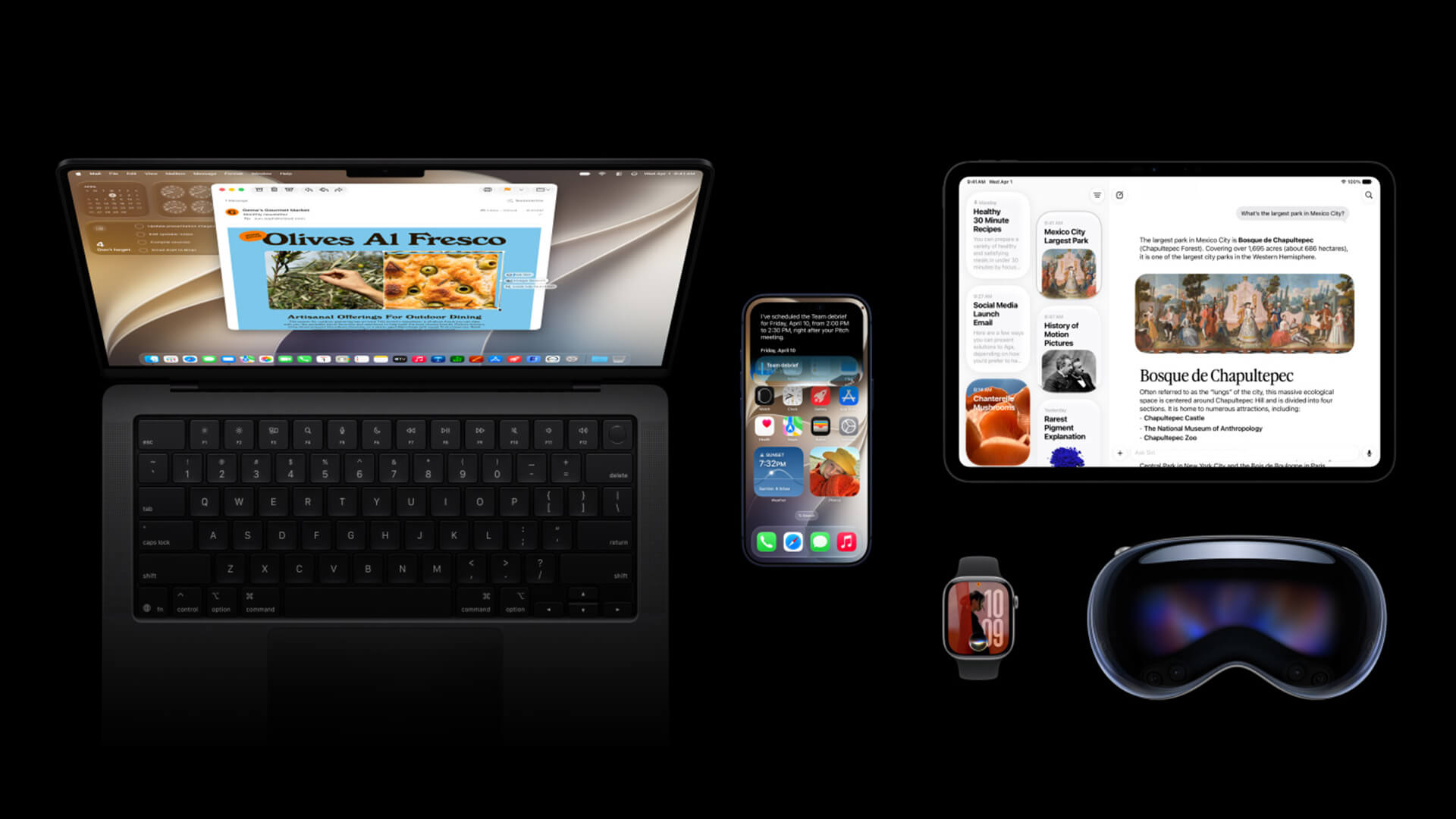
macOS 27 Golden Gate features are focused on AI, usability, and refinement rather than a total redesign.
The main upgrades include:
- Siri AI on Mac
- Visual Intelligence on Mac
- Apple Intelligence across apps
- Smarter Safari features
- Improved Photos editing tools
- Better Liquid Glass settings
- Faster AirDrop and file browsing
- More relevant Mail search
- Stronger parental controls
- Apple Silicon-focused performance improvements
Siri AI Comes to Mac
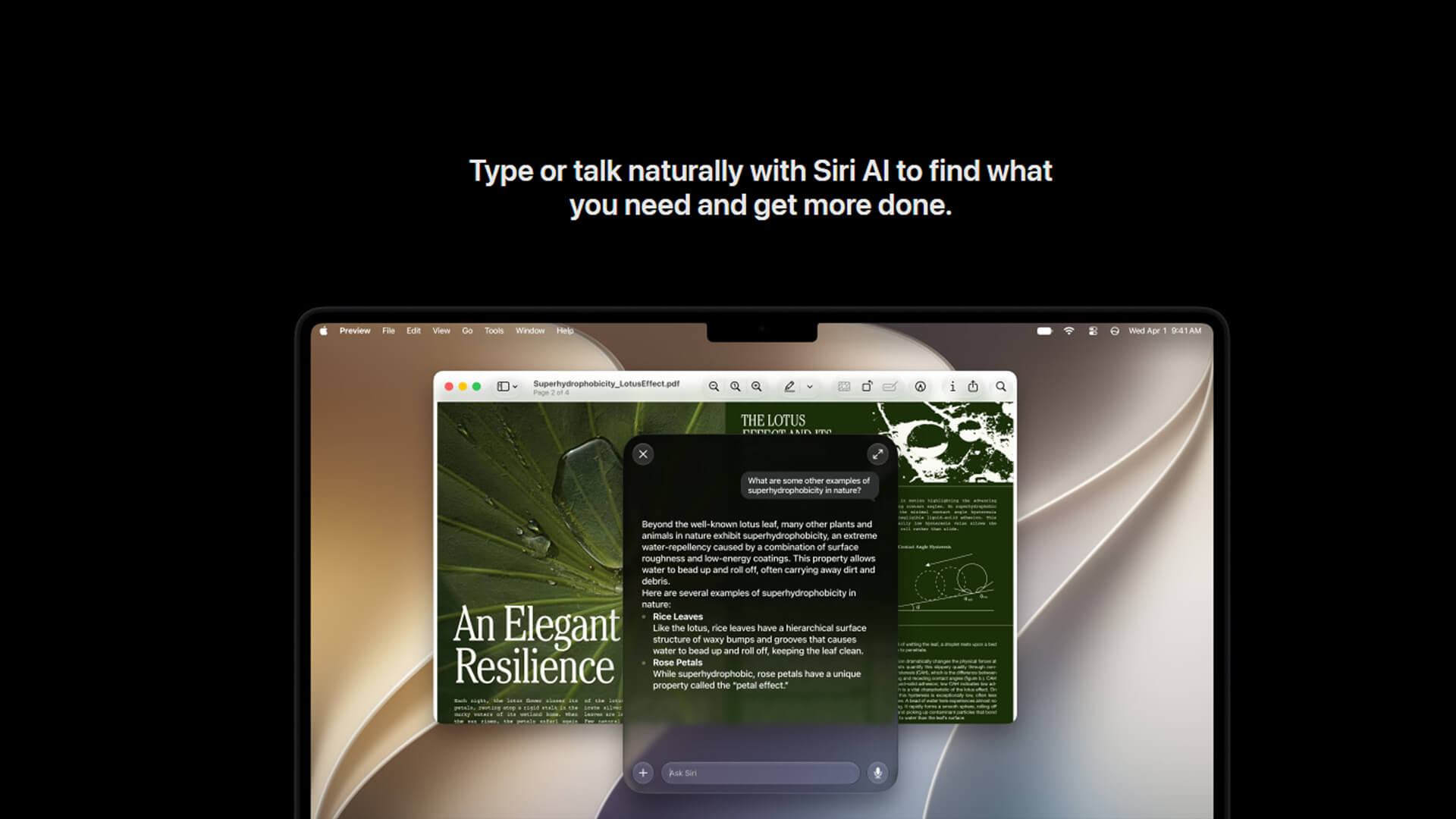
The biggest headline is macOS Golden Gate Siri AI.
Siri AI is designed to be more conversational, more useful, and more aware of what you are doing on your Mac. It can answer broader questions, understand personal context, and help with actions across apps.
On Mac, that means Siri AI can help with:
- Finding information from emails, notes, and photos
- Answering questions about on-screen content
- Drafting text
- Editing messages
- Searching through personal context
- Connecting actions across apps
- Starting or continuing conversations in the dedicated Siri app
This is a much bigger upgrade than the older Siri experience, which often felt limited compared with modern AI assistants.
Google Gemini Siri Integration Context
Apple presents the feature as Siri AI powered by Apple Intelligence. Reports around WWDC 2026 have also focused on Google Gemini involvement behind Apple’s newer AI architecture.
For users, the practical point is simple: Siri AI is meant to feel more like a modern assistant that can understand natural questions, screen context, and personal information while still fitting into Apple’s privacy-first approach.
If you use a Mac for writing, research, emails, or planning, this could be one of the most useful macOS 27 upgrades.
Visual Intelligence on Mac
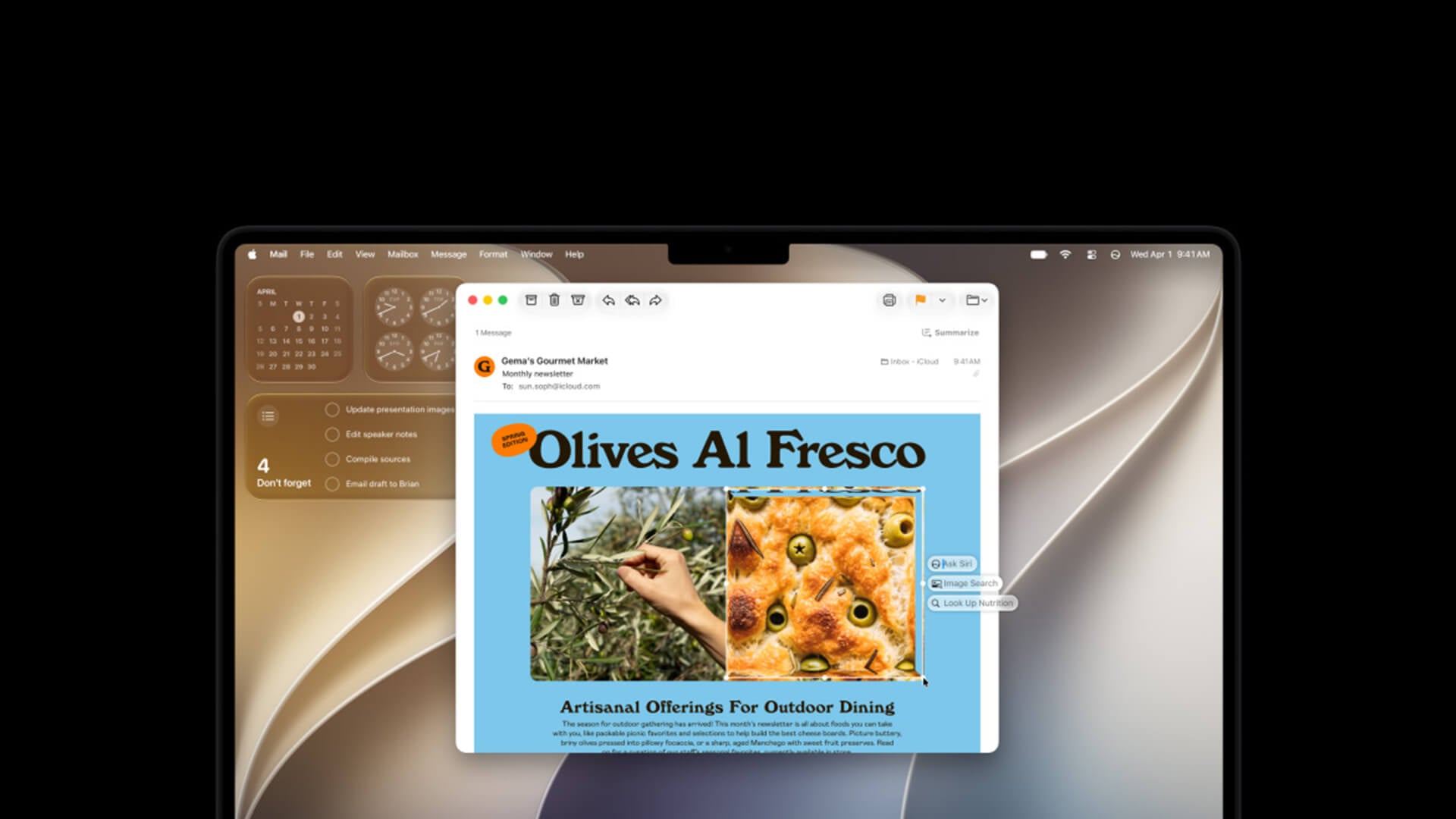
Visual Intelligence on Mac lets you ask Siri AI about what is on your screen.
You can use it with screenshots, images, documents, and PDFs to get answers, search for related information, or take action based on what is visible.
Examples include:
- Asking about an image in an email
- Getting information from a PDF
- Looking up objects or food in an image
- Searching for similar content
- Using screen context to ask a follow-up question
This makes macOS 27 more useful for students, researchers, creators, and anyone who works with visual information.
Apple Intelligence Across Apps
Apple Intelligence features macOS 27 brings into more everyday apps include writing help, smarter messages, image tools and automation support.
Expect upgrades across:
| App or Area | What macOS 27 Adds |
|---|---|
| More relevant search and AI writing support | |
| Messages | Smarter replies and tone-aware suggestions |
| Safari | Topic grouping and Notify Me |
| Photos | Clean Up, Extend, and Spatial Reframing |
| Shortcuts | Create automations from plain descriptions |
| Siri app | Saved conversations and cross-device continuity |
| Passwords | Alerts and assisted fixes for weak or compromised passwords |
If you use your Mac for work or study, these features could save time across small daily tasks rather than changing one single workflow.
macOS Golden Gate Safari Features
Safari gets a useful set of AI and productivity upgrades in macOS 27.
The main macOS Golden Gate Safari features include automatic tab topic grouping and Notify Me alerts for page changes.
What Safari Adds
| Safari Feature | Why It Helps |
|---|---|
| Tab Topics | Groups related tabs automatically |
| Notify Me | Watches pages for changes |
| Faster start page loading | Makes Safari feel more responsive |
| Ask to Browse support | Helps with parental website approval |
| Better integration with Siri AI | Makes searching and research easier |
For shoppers, Notify Me could be useful for price drops or restocks. For students and researchers, tab grouping could make large browsing sessions easier to manage.
Liquid Glass Settings in macOS 27
macOS Tahoe introduced the Liquid Glass design language. macOS 27 Golden Gate improves it rather than replacing it.
The biggest Liquid Glass settings macOS 27 brings are around readability and control. Apple has added a slider that lets users adjust Liquid Glass from ultra-clear to fully tinted.
Liquid Glass Improvements
| Area | Improvement |
|---|---|
| Readability | Better contrast and refraction |
| Controls | Slider for transparency and tint |
| Toolbars | More uniform app layout |
| Sidebars | Edge-to-edge sidebars |
| Icons | More defined menu bar and app icon style |
| Window shape | Cleaner and more consistent appearance |
This matters because some users found early Liquid Glass effects too distracting. macOS 27 makes the design easier to tune for comfort.
macOS Golden Gate vs macOS Tahoe: What’s New?
macOS Golden Gate vs macOS Tahoe is not a complete reset. It is more like a refinement release with a much bigger AI layer.
macOS Tahoe introduced the major Liquid Glass design direction and expanded Apple Intelligence on Mac. macOS 27 Golden Gate builds on that foundation with better readability, smarter Siri AI, more integrated app intelligence, and stronger Apple Silicon focus.
macOS 27 vs macOS 26 Tahoe
| Area | macOS 26 Tahoe | macOS 27 Golden Gate |
|---|---|---|
| Design | Introduced Liquid Glass | Refines Liquid Glass readability and controls |
| Siri | Older Siri with Apple Intelligence additions | New Siri AI experience and dedicated app |
| Visual Intelligence | More limited on Mac | Expanded screen-aware Visual Intelligence |
| Safari | Strong productivity browser | Adds tab topics and Notify Me |
| Photos | Apple Intelligence editing tools | Adds stronger AI photo editing tools |
| Compatibility | Included some Intel Macs | Apple Silicon-focused support |
| Performance | Major design and continuity update | Faster, more refined system behaviour |
| Parental controls | Existing Screen Time tools | Stronger controls and app/site approvals |
The key difference is that macOS 27 is more about making macOS Tahoe’s ideas work better, especially for AI and usability.
macOS 27 Performance Improvements
macOS 27 performance improvements are focused on everyday responsiveness, search, AirDrop, Safari, and system-level efficiency.
Apple is highlighting faster AirDrop transfers, quicker network file browsing, faster Safari start page loading, better Mail search ranking, and broader system refinements.
Where You May Notice Speed Gains
| Area | Expected Benefit |
|---|---|
| AirDrop | Faster file transfers |
| Safari | Faster start page loading |
| Network browsing | Quicker access to shared files |
| More relevant search results | |
| Spotlight/Search | Better suggestions and indexing |
| General system use | More responsive feel |
Will macOS 27 Golden Gate make every Mac faster? Not necessarily in a dramatic benchmark sense. Older M1 Macs may feel smoother in some places, while newer M3, M4, and M5 models should benefit more from advanced Apple Intelligence features.
Should You Upgrade to macOS Golden Gate?
For most compatible Apple Silicon users, macOS 27 should be worth upgrading once the final version is stable.
The real question is timing.
Upgrade When the Final Version Arrives If:
- You have an Apple Silicon Mac
- Your apps are compatible
- You want Siri AI and Apple Intelligence features
- You use Safari, Mail, Photos, or Messages heavily
- You want better Liquid Glass controls
- You want the latest security and platform updates
Wait Before Upgrading If:
- You rely on older work software
- You use specialist audio, video, or design plug-ins
- You have business-critical accessories
- You are unsure whether your apps support macOS 27
- You do not want early bugs
Consider a New Mac If:
- Your current Mac is Intel-based
- You want macOS 27 Apple Silicon support
- You need Apple Intelligence features
- Your Mac is slowing down with modern apps
- Your battery life or performance is poor
If you mainly need a portable everyday Mac, lightweight MacBook Air models are the natural place to look. For more help choosing one, read our guide on how to pick the right MacBook Air.
Best Macs for macOS 27 Golden Gate
The best Mac for macOS 27 depends on what you do every day.
MacBook Air for Everyday Use
MacBook Air is the sensible pick for students, home users, hybrid workers and anyone who wants a quiet, portable Mac.
It is best for:
- Browsing
- Study
- Documents
- Video calls
- Emails
- Light photo work
- Apple Intelligence features
- Everyday macOS 27 use
A MacBook Air with Apple Silicon should run macOS 27 well, but some advanced AI features may depend on newer chips and memory.
MacBook Pro for AI and Creative Work
If you work with video, code, AI tools, design apps, or large creative projects, MacBook Pro is the stronger choice.
The powerful MacBook Pro laptops for AI workflows are better suited to users who need more memory, stronger sustained performance, and faster M-series chips.
Choose MacBook Pro if you need:
- Higher sustained performance
- More memory options
- Better display quality
- Stronger creative app performance
- Better AI workflow headroom
- More ports
- Longer heavy-use performance
For a deeper buying comparison, our MacBook Air M5 vs MacBook Pro M5 comparison guide can help decide which model makes more sense.
MacBook Neo for Entry-Level Users
MacBook Neo appears in Apple’s macOS 27 compatible list, making it part of the Golden Gate story from day one.
The affordable MacBook Neo will likely appeal to students, light users, and buyers who want modern Apple Intelligence support without moving into MacBook Pro pricing.
It is best for:
- Student work
- Everyday browsing
- Notes and documents
- Streaming
- Light creative tasks
- Basic Siri AI use
- Portable macOS 27 access
Apple Mac Desktops for Fixed Setups
Not everyone needs a laptop. If you mainly work at a desk, Apple Mac desktops can offer strong performance with a cleaner fixed setup.
Mac mini, iMac, Mac Studio, and Mac Pro options make sense for:
- Home offices
- Design desks
- Studio work
- School and business setups
- Creator workstations
- Multi-monitor workflows
For anyone unsure about Apple Silicon naming, our Apple Silicon M-chips explained guide is a useful read.
macOS Golden Gate Review: Early Take
Based on Apple’s feature list, macOS 27 looks like a practical upgrade rather than a flashy one. The best improvements are not about one dramatic redesign. They are about making the Mac feel smarter, clearer, and more responsive.
Note: This is still a preview, so this macOS Golden Gate review is not final. We will provide a full review after the stable public release.
Early Strengths
- Siri AI finally feels more modern
- Visual Intelligence fits Mac workflows well
- Safari gets genuinely useful tools
- Liquid Glass becomes easier to live with
- Photos gains stronger AI editing options
- Apple Silicon focus should help performance
- Parental controls are more complete
Early Watch-Outs
- Beta versions may be unstable
- Not all AI features arrive at the same time
- Some advanced features need newer Mac hardware
- Intel Macs are no longer supported
- Some regions and languages may have delayed features
- App compatibility should be checked before upgrading
For most users, macOS 27 Golden Gate looks like a stronger upgrade than macOS Tahoe if you have a compatible Mac.
Wrapping Up
macOS 27 Golden Gate is worth watching closely, especially if you own an Apple Silicon Mac.
The update brings meaningful upgrades to Siri AI, Apple Intelligence, Safari, Photos, Liquid Glass settings, search, and system responsiveness. It also marks the end of Intel Mac support for the newest macOS releases, which makes hardware compatibility the biggest deciding factor.
If you have an M1 or later Mac, the final macOS 27 release should be a strong upgrade once your apps are ready. If you have an Intel Mac, macOS Tahoe may be the end of the road for major macOS updates.
The practical advice is simple:
- Install the beta only if you are comfortable testing
- Wait for the final release on your main Mac
- Check app compatibility before upgrading
- Consider Apple Silicon if your Mac is no longer supported
- Choose MacBook Air for everyday use
- Choose MacBook Pro for creative and AI workflows
- Choose a Mac desktop for fixed workstations
To explore newer Mac options, you can buy Apple products at Box and compare MacBook, MacBook Air, MacBook Pro, and desktop Mac models before macOS 27 arrives fully.
FAQs
-
Which Macs are compatible with macOS 27 Golden Gate?
macOS 27 Golden Gate supports MacBook Neo 2026, MacBook Air with Apple Silicon from 2020 and later, MacBook Pro with Apple Silicon from 2020 and later, iMac with Apple Silicon from 2021 and later, Mac mini with Apple Silicon from 2020 and later, Mac Studio from 2022 and later, and Mac Pro with Apple Silicon from 2023.
-
Does macOS 27 Golden Gate support Intel Macs?
No. macOS 27 Golden Gate does not support Intel Macs in the main compatibility list. Intel Mac users should remain on macOS Tahoe or earlier supported versions unless they move to Apple Silicon hardware.
-
When is macOS 27 Golden Gate available to download?
The macOS 27 developer beta is available now. The public beta is expected in July 2026, while the final version is due as a free update in fall 2026.
-
Is macOS 27 Golden Gate a free upgrade?
Yes. macOS 27 Golden Gate will be available as a free macOS update for compatible Macs.
-
What are the biggest new features in macOS 27 Golden Gate?
The biggest macOS 27 Golden Gate features include Siri AI, Visual Intelligence on Mac, Apple Intelligence improvements, Safari tab topics, and Notify Me, Liquid Glass readability settings, improved Photos editing tools, stronger parental controls, and better everyday performance.
-
How is macOS 27 Golden Gate different from macOS 26 Tahoe?
macOS 26 Tahoe introduced the Liquid Glass design and expanded Apple Intelligence. macOS 27 Golden Gate refines that design, adds stronger Siri AI, improves Visual Intelligence, enhances Safari and Photos, improves performance, and ends support for Intel Macs.
-
Should you upgrade to macOS Golden Gate?
You should upgrade to macOS Golden Gate once the final version is available if you have a compatible Apple Silicon Mac and your key apps are ready. If you rely on older software or business-critical tools, wait for compatibility confirmation before installing.
-
Does macOS 27 include Apple Intelligence?
Yes. macOS 27 includes Apple Intelligence features on supported Macs. Apple Intelligence support includes Mac models with M1 and later, plus MacBook Neo with A18 Pro. Some advanced features need newer Mac hardware.
You can pay with:
*PayPal Credit Representative Example: Assumed credit limit £1,200, Representative 23.9% APR (variable). Purchase rate 23.9% p.a (variable).Terms & Conditions apply.


PayPal Credit and PayPal Pay in 3 are trading names of PayPal UK Ltd, 5 Fleet Place, London, United Kingdom, EC4M 7RD. Terms and conditions apply. Credit subject to status, UK residents only, Five Tech LTD acts as a broker and offers finance from a restricted range of finance providers. PayPal Pay in 3 is not regulated by the Financial Conduct Authority. Pay in 3 eligibility is subject to status and approval. 18+. UK residents only. Pay in 3 is a form of credit. Check if affordable and how you will repay. May make other borrowing more difficult or expensive. See product terms for more details.
Copyright © 1996-2026 Fivetech LTD | Terms and Conditions
box.co.uk & Box are trading names of Five Tech Limited. Registered office: Box LTD, Unit 10 Woodford Trading Estate, Woodford Green IG8 8HF