


 Menu
MenuMenu


Get Sales Advice from Mon - Fri 9am - 5:00pm:
020 3337 8950LAST UPDATED: January 27, 2026
Fan Noise, Vibration and Erratic Behaviour: How to Fix a Faulty Case Fan
A quiet PC is easy to take for granted until strange sounds start cutting through the room. Fan noise can show up gradually or appear overnight after a hardware change, and it is not always obvious whether it signals a serious problem or a simple setup issue. Case fan noise can come from airflow resistance, loose mounting, unstable speed control, or early signs of wear inside the fan itself.
Some issues are harmless and easy to fix, while others point to a component problem that will only get worse over time. This guide breaks down what different noises and behaviours actually mean, how to fix them without guesswork, and how to tell when a fan is no longer worth saving.
What Your Fan Noise Is Telling You
Unusual sounds are often the first sign that something is not quite right. Paying attention to how and when the noise appears can help you narrow down the cause quickly. Case fan noise behaves very differently depending on speed, load, and how the fan is mounted, so the sound itself is usually the biggest clue.
Clicking or Ticking at Low Speeds
A light clicking or ticking noise that appears only at low speeds is commonly linked to minor play inside the hub or slightly loose mounting. This is often described as PC case fan rattling because the sound comes and goes as the fan spins up or slows down. In many cases, the fan runs quietly once it passes a certain speed. This behaviour is usually related to early wear in the fan bearings or uneven pressure from the mounting points, rather than a complete failure.
Buzzing or Humming Under Load
A steady buzzing or humming sound that shows up during gaming or heavy workloads usually means the fan is responding to higher temperatures. As fan RPM increases, vibration can transfer into the case panels and amplify the noise. This is where case fan noise can feel louder than it actually is, especially in thinner metal cases. The fan itself may be fine, but the way it interacts with the case makes the sound more noticeable.
Grinding or Scraping Sounds
Grinding or scraping noises are more serious and tend to get worse over time. These fan sounds usually indicate internal wear or damage that does not improve with speed changes. Unlike light rattling, grinding is a strong sign that the fan is reaching the end of its usable life and should not be ignored.

Why Case Fans Start Vibrating
Vibration is often mistaken for simple noise, but it has its own set of causes. While case fan noise is easy to hear, vibration is usually felt through the case panels or desk, making the system sound harsher than it should. Understanding why a fan vibrates helps you fix the root problem instead of masking it.
Loose Mounting and Panel Resonance
One of the most common reasons for case fan vibration is poor mounting. If the fan mounting screws are unevenly tightened, the fan frame can transfer movement directly into the case. Thin side panels then amplify this into audible resonance noise. In these situations, slightly adjusting the screw tension or using rubber vibration dampers can dramatically reduce the problem without changing the fan itself.
Fan Imbalance and Blade Wobble
Over time, dust buildup or minor blade damage can throw a fan off balance. Even a small fan imbalance can cause noticeable shaking at certain speeds. This often explains why vibration appears only within a narrow RPM range and disappears when the fan speeds up or slows down.
Airflow Turbulence That Feels Like Vibration
Not all vibration is mechanical. Obstructed airflow can create pressure fluctuations that feel like rattling, especially when cables or grills disrupt smooth intake and exhaust paths.
When Fan Speed Becomes Unstable
Not all problems come from physical noise or vibration. In some systems, case fan noise is caused by unstable speed control, where the fan constantly ramps up and down without a clear reason. This type of behaviour is often more annoying than a steady sound because it never settles.
PWM vs DC Control Mismatch
Modern fans rely on either a PWM signal or DC fan control to regulate speed. When the control mode in the BIOS does not match the fan type, the result is often erratic fan behaviour. You may notice sudden speed jumps, pulsing, or fans that struggle to maintain a consistent fan RPM. This mismatch is especially common after a BIOS reset or motherboard upgrade.
Fan Curves That Overreact
Overly aggressive fan curves can make a system sound far louder than necessary. If the curve reacts instantly to small temperature changes, the fan will constantly ramp up and down. This creates unnecessary fan loud noise even when temperatures are well within safe limits. Smoother curves allow the system to respond gradually, reducing noise and mechanical stress.
Header Limits, Splitters and Hubs
Motherboard fan headers have power limits, and exceeding them can cause unstable behaviour. Using splitters or hubs without proper power delivery can introduce voltage instability, leading to inconsistent speeds or random fluctuations. This often shows up as unpredictable fan sounds that seem to have no clear pattern.
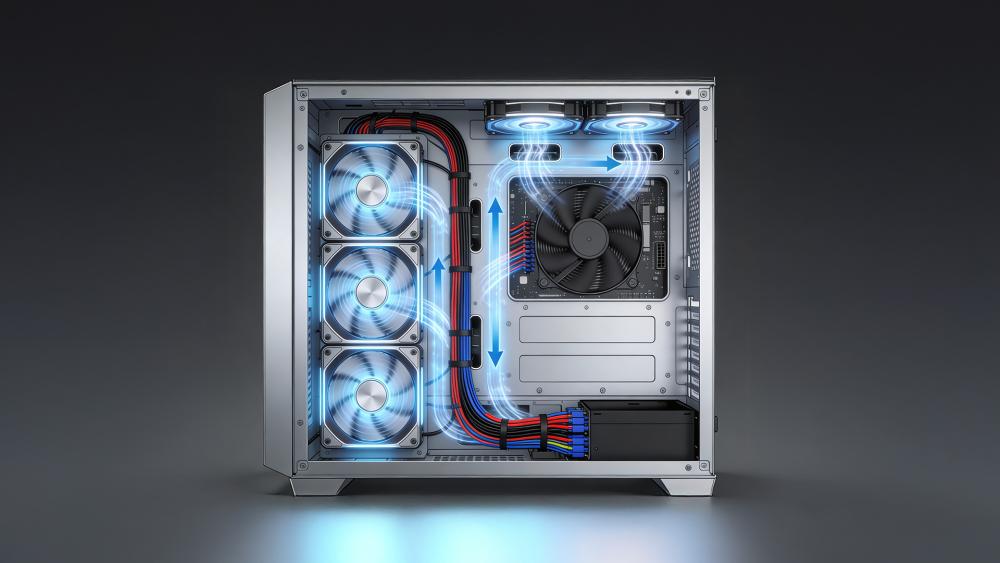
Step-by-Step Guide for Fixing Case Fan Noise
Once you have a rough idea of what is causing the issue, it is best to work through fixes in a logical order. Jumping straight to replacements often wastes time and money, especially when case fan noise is caused by simple setup problems rather than faulty hardware.
Quick Physical Checks
Start with the basics. Power down the system, reseat the fan, and check for adequate clearance around the blades. Make sure no cables are brushing against the fan frame, as even minor contact can cause a rattling noise that only appears at certain speeds. Not checking clearance and compatibility are common mistakes when buying case fans, and they often lead to vibration, noise issues, or improper mounting that could have been avoided with a quick inspection.
Reduce Noise Without Killing Cooling
If the fan itself is healthy, lowering its speed slightly can reduce noise without affecting temperatures in a meaningful way. This is particularly useful in systems where airflow is already well balanced with coolers for CPU handling most of the thermal load. The goal is to minimise sound while keeping cooling consistent.
Stabilise Speed Control
In the BIOS, confirm the fan is using the correct control mode and that speed changes are not too aggressive. Stable control prevents unnecessary ramping and helps eliminate case fan noise caused by constant adjustments rather than actual heat changes.

Signs That Show a PC Fan Is Actually Failing
Not every issue can be fixed with better mounting or tuning. In some cases, ongoing case fan noise is the result of internal wear that only gets worse with time. Knowing when a fan has crossed that line helps you avoid chasing solutions that will never fully work.
Noises That Don't Improve After Remounting
If you have adjusted mounting, cleaned the fan, and reduced vibration, but the sound remains unchanged, the problem is likely internal. Persistent fan rattling that does not respond to physical fixes usually points to worn components rather than installation issues.
Intermittent Start-Up or Random Stops
If the case fan isn't spinning normally, spins inconsistently, or randomly stops is showing clear signs of failure. This type of behaviour often appears alongside erratic fan behaviour and is commonly mistaken for a control problem.
Persistent Grinding Even at Low RPM
Grinding that continues even at very low speeds is a strong indicator of irreversible damage. At this stage, case fan noise is no longer just an annoyance but a warning that the fan may fail without notice.
Planning to buy a new PC case fan? Don't forget to read our case fan buying guide to make a well-informed purchase decision.
How to Keep Fans Quiet Long-Term
Fixing the immediate problem is only part of the solution. Preventative care and sensible setup choices go a long way in keeping case fan noise from returning, especially in quiet PC builds.
Clean Dust Before It Becomes a Problem
Dust buildup affects more than just temperatures. As it collects unevenly on the blades, it can increase vibration and strain the motor, making the noise more noticeable over time. Regular cleaning helps maintain balance and prevents small issues from turning into persistent case fan vibration later on.
Avoid Airflow Blockages That Create Turbulence
Poor airflow forces fans to work harder than necessary. Cables hanging in front of intakes, restrictive front panels, or cramped layouts all contribute to turbulent airflow and extra noise. This is why a silent PC case with good airflow often stays quieter than a tightly sealed design, even with similar fans installed.
Build a Fan Curve That Doesn't Constantly Ramp
A well-tuned fan curve prioritises stability over rapid reaction. Allowing temperatures to rise slightly before increasing speed reduces unnecessary ramping and helps maintain consistent acoustics. This is where motherboards with advanced fan control make a real difference, as they allow finer adjustments that keep fans quiet without sacrificing cooling performance.
Conclusion
Strange noises should never be ignored, but they also do not always mean something is broken. Case fan noise often starts with small issues such as uneven mounting, airflow restriction, or unstable control settings, all of which are fixable with careful setup. Left unchecked, vibration and wear can escalate into PC case fan rattling or a persistent fan rattling noise that no amount of tuning will solve. Recognising when fan loud noise is caused by configuration rather than failure helps you avoid unnecessary replacements. When a fan does reach the end of its life, upgrading to silent PC case fans and pairing them with the best PSUs for stable PC builds reduces electrical fluctuation and long-term wear.
Frequently Asked Questions
How to stop fan vibration noise?
Fan vibration is usually reduced by reseating the fan, adjusting screw tension, and improving airflow. Rubber mounts can also help isolate vibration from the case.
Why is my case fan loud?
A loud fan is often reacting to heat, airflow restriction, or aggressive fan curves. Dust buildup and poor mounting can make the noise seem worse than it is.
How to fix a fan that is noisy?
Start by cleaning the fan, checking for obstructions, and confirming the correct control mode in the BIOS. If noise persists, the fan may be wearing out.
Why is my fan speed fluctuating?
Fluctuating speed is usually caused by sensitive fan curves, control mode mismatch, or power issues from splitters or hubs.
How to tell if a PC fan is failing?
Grinding sounds, inconsistent start-up, and noise that does not improve after adjustments are strong signs that a fan is nearing failure.
You can pay with:
*PayPal Credit Representative Example: Assumed credit limit £1,200, Representative 23.9% APR (variable). Purchase rate 23.9% p.a (variable).Terms & Conditions apply.


PayPal Credit and PayPal Pay in 3 are trading names of PayPal UK Ltd, 5 Fleet Place, London, United Kingdom, EC4M 7RD. Terms and conditions apply. Credit subject to status, UK residents only, Five Tech LTD acts as a broker and offers finance from a restricted range of finance providers. PayPal Pay in 3 is not regulated by the Financial Conduct Authority. Pay in 3 eligibility is subject to status and approval. 18+. UK residents only. Pay in 3 is a form of credit. Check if affordable and how you will repay. May make other borrowing more difficult or expensive. See product terms for more details.
Copyright © 1996-2026 Fivetech LTD | Terms and Conditions
box.co.uk & Box are trading names of Five Tech Limited. Registered office: Box LTD, Unit 10 Woodford Trading Estate, Woodford Green IG8 8HF