


 Menu
MenuMenu


Get Sales Advice from Mon - Fri 9am - 5:00pm:
020 3337 8950LAST UPDATED: July 20, 2026
Monitor Colour Gamuts Explained: sRGB, DCI-P3 and Adobe RGB
The best monitor colour space depends on where your content will be viewed or produced. sRGB is sufficient for most browsing, office work, standard gaming and everyday screen use because it remains the common baseline for digital content.
DCI-P3 is more relevant to HDR gaming, films, streaming and modern video production, where a wider range of saturated colours may be supported. Adobe RGB is designed more towards photography, image editing and print-focused creative work, particularly when green and cyan reproduction matters.
Wider colour gamuts are not automatically better. The content, software and complete workflow must support the selected colour space, while calibration and colour management determine whether those colours are reproduced correctly. This guide explains how sRGB, DCI-P3 and Adobe RGB differ, what their coverage percentages mean and which option best suits your monitor use.
Quick Answer: Which Monitor Colour Gamut Do You Need?
The right choice depends on where the content will be viewed, published or printed.
| Main use | Recommended starting point | Why |
|---|---|---|
| Browsing and office work | 100% sRGB | Covers the standard colour range used by most everyday digital content |
| Web design | Accurate sRGB mode | Helps websites and graphics appear consistent across common displays |
| SDR gaming | Accurate sRGB | Suits standard desktop and non-HDR game content |
| HDR gaming and films | Strong DCI-P3 coverage | Supports the wider colours used in compatible HDR media |
| Video editing | DCI-P3 or Display P3 | Better suited to modern video and wide-colour delivery |
| Photography for online use | Accurate sRGB | Matches common web and social platforms |
| Photography for print | High Adobe RGB coverage | Provides a more useful green and cyan range for print-focused workflows |
| Mixed creative work | Accurate sRGB, P3 and Adobe RGB modes | Allows the display to match different outputs |
For most buyers, a well-calibrated sRGB monitor is enough. An Adobe RGB monitor becomes more valuable when professional print is involved, while strong P3 support is more useful for HDR entertainment and video work. The available gamut should always be paired with an accurate preset or a properly managed colour profile.
What Is a Colour Gamut on a Monitor?
A monitor’s colour gamut is the range of colours it can reproduce within a defined RGB colour space, such as sRGB, DCI-P3 or Adobe RGB. It represents only part of the visible colour range, which is why different monitors can display the same image with noticeably different greens, reds or blues.
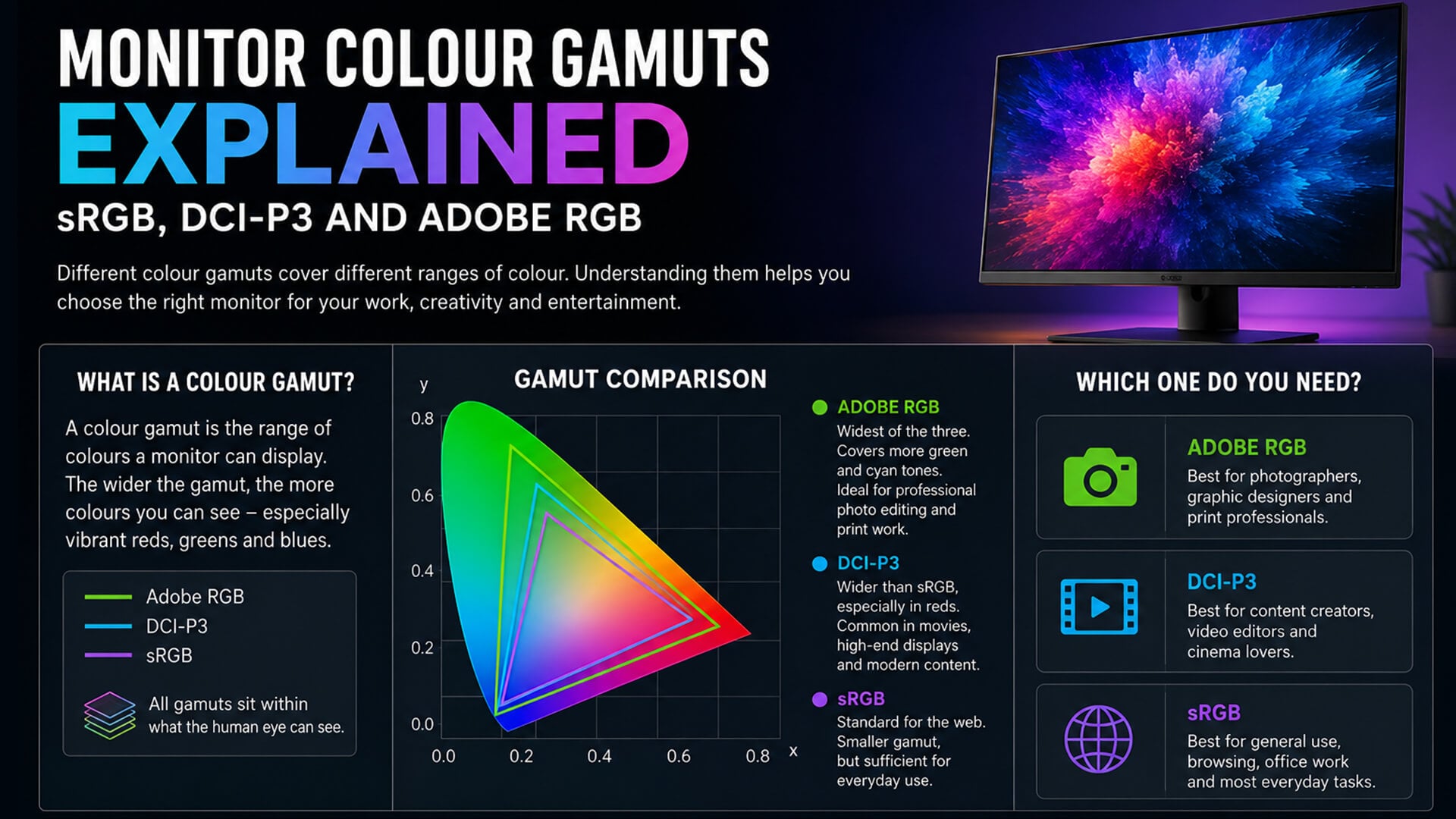
Colour spaces are commonly shown as triangles on a chromaticity diagram. The three corners represent red, green and blue, while the area inside shows the colours created by mixing them. When content contains shades outside the monitor’s available range, those shades must be replaced with the nearest reproducible colour. This can cause colour clipping, where differences between highly saturated colours are lost.
Gamut Coverage Percentage
A gamut coverage percentage shows how much of a named colour space the display can reproduce. For example, 99% DCI-P3 means the monitor reaches almost all of the DCI-P3 target.
Coverage normally stops at 100%. However, strong coverage does not confirm that the displayed colours are accurate, as calibration must be assessed separately.
Gamut Volume
Gamut volume compares the monitor’s total colour range with the size of a reference space. It can exceed 100% when the display produces colours beyond the reference boundaries.
This is why a specification such as 125% sRGB does not necessarily mean better sRGB coverage. The monitor may extend beyond sRGB in certain areas while still needing an accurate sRGB mode to display standard content correctly.
sRGB vs DCI-P3 vs Adobe RGB: What Is the Difference?
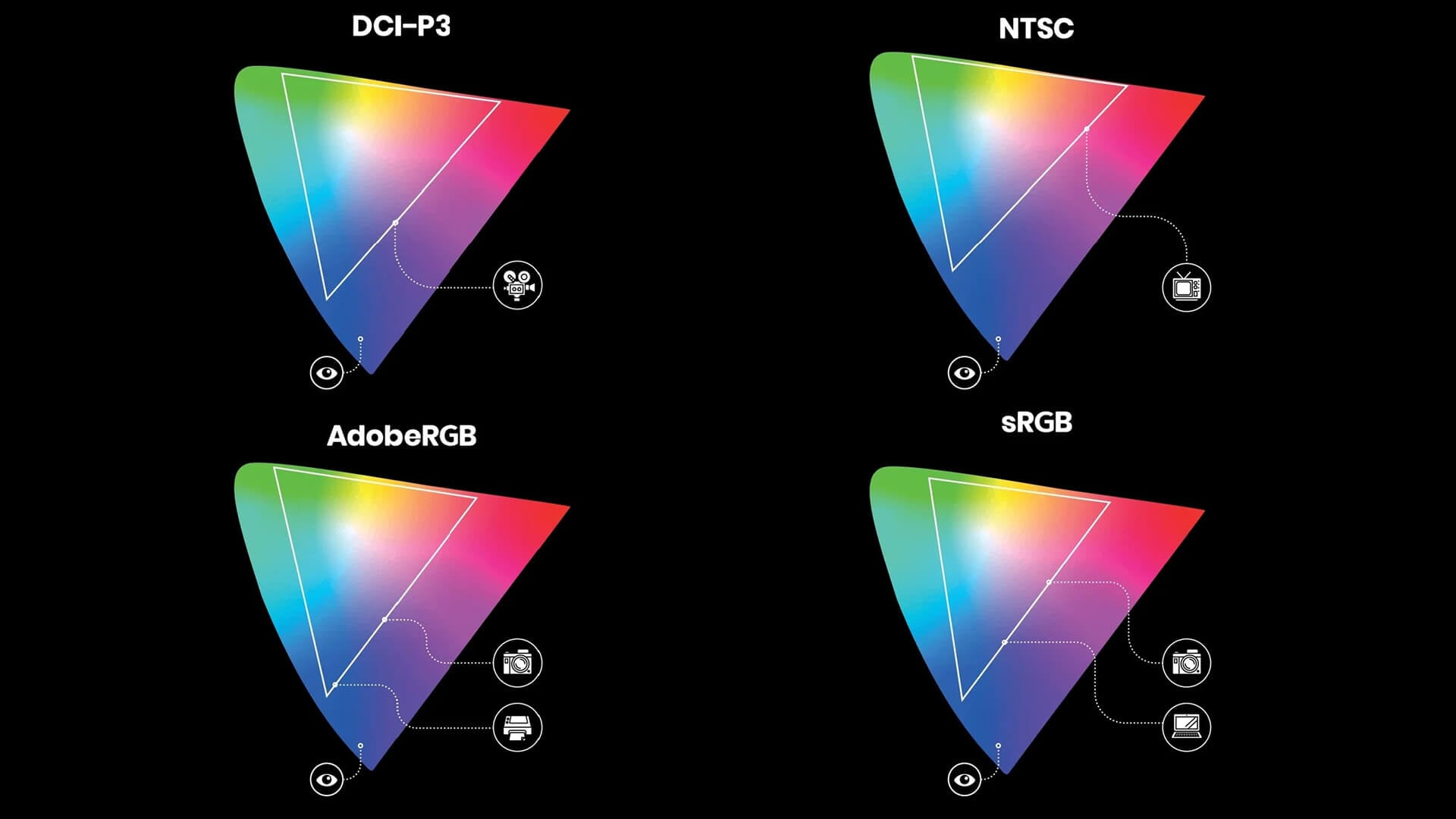
sRGB, DCI-P3 and Adobe RGB are designed for different types of content. sRGB prioritises broad compatibility, DCI-P3 supports wider colour in cinema and modern media, while Adobe RGB provides an additional range for photography and print.
| Area | sRGB | DCI-P3 / P3 | Adobe RGB |
|---|---|---|---|
| Main use | Web, office and standard digital content | Video, cinema, HDR and modern media | Photography, image editing and print |
| Relative gamut | Standard | Wider than sRGB | Wider than sRGB |
| Notable colour range | Broad compatibility | More saturated reds and greens | Greater green and cyan coverage |
| Best suited to | General users and web creators | Gamers, viewers and video editors | Photographers and print designers |
| Useful monitor feature | Accurate sRGB mode | Strong P3 coverage and HDR performance | Adobe RGB mode and calibration support |
| Risk without colour management | Usually limited | Standard content may look oversaturated | Screen and print colours may not match |
sRGB for Everyday and Web Content
sRGB remains the safest choice for browsing, office applications, websites and most standard dynamic range content. An accurate sRGB monitor can display these colours as intended without unnecessarily stretching them across a larger native range.
Wide-gamut displays should include a dependable sRGB mode. Without one, unmanaged web content may show oversaturation, making skin tones, icons and other colours look unnaturally intense.
DCI-P3 for Video, HDR and Modern Media
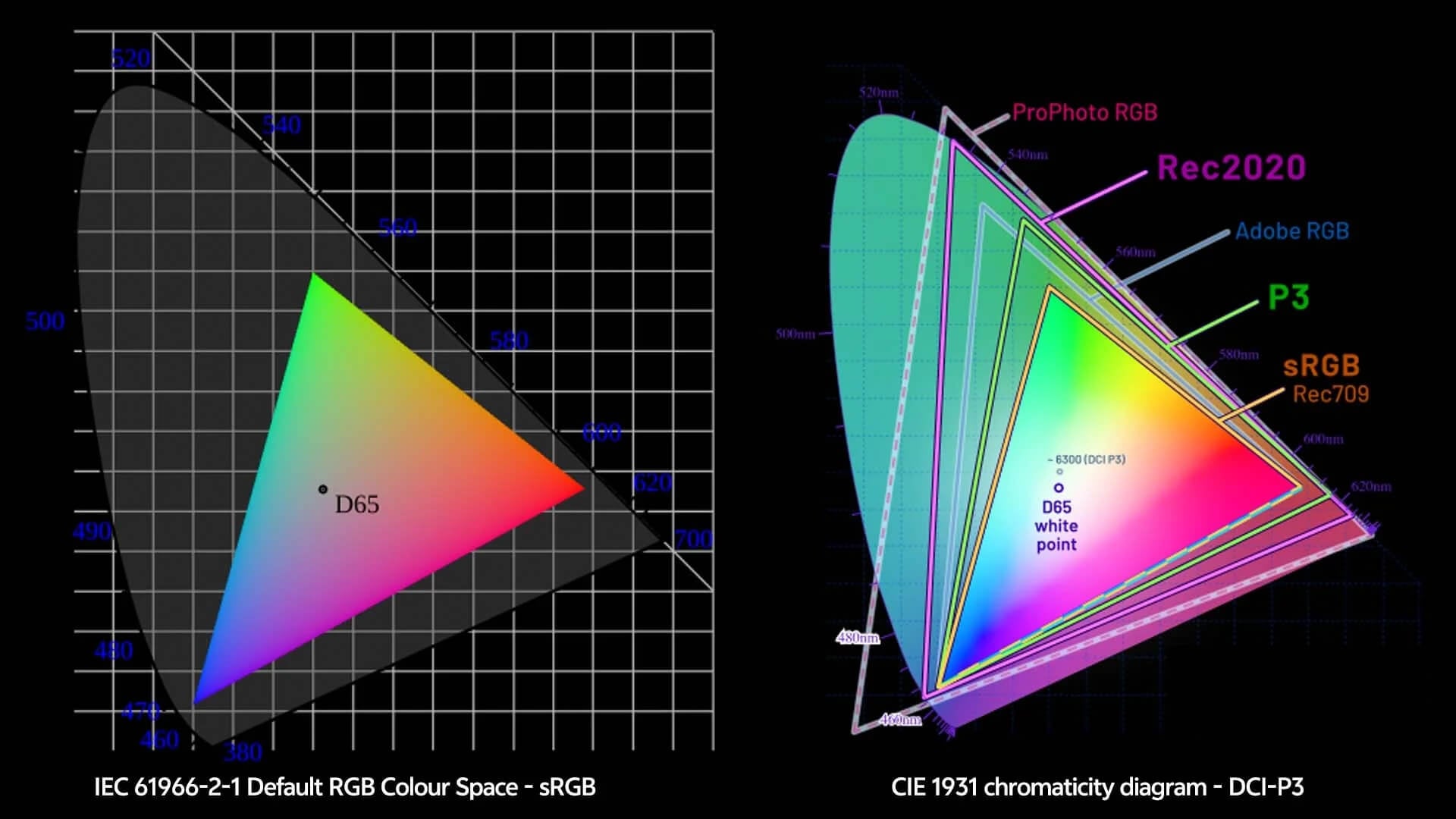
DCI-P3 was created as a cinema colour standard and covers a wider range than sRGB. Consumer monitors often advertise DCI-P3 coverage, while some devices and applications use Display P3, which adapts the P3 primaries for modern screen-based workflows.
A DCI-P3 monitor is particularly relevant to HDR gaming, streaming and video post-production. P3 wide colour can provide richer reds and greens where compatible content supports them.
High coverage alone does not guarantee a good HDR experience. When comparing HDR gaming monitors, brightness, contrast, local dimming and tone mapping also matter. Many wide-gamut OLED displays combine strong P3 coverage with deep contrast, but their accuracy and available colour modes still need to be checked.
Adobe RGB for Photography and Print
Adobe RGB also covers more colour than sRGB, but its main advantage lies in green and cyan shades used in digital photography and professional print production.
An Adobe RGB monitor is most useful when images remain in a properly colour-managed workflow from capture and editing through to printing. It offers less practical benefit for buyers who mainly browse, watch films or play games.
DCI-P3 vs Adobe RGB
The choice between DCI-P3 and Adobe RGB depends on the final output:
- Choose DCI-P3 or Display P3 for video, HDR entertainment and screen-based media.
- Choose Adobe RGB for photography and print-focused creative work.
- Choose a monitor with accurate modes for both when your projects cover digital and printed output.
Neither is universally better. The most useful wide colour gamut is the one supported by the content, software and output device used in your workflow.
Which Colour Gamut Is Best for Gaming, Design and Photography?
The most useful gamut depends on where the finished content will be viewed or produced.
| Use | Best starting point | What to prioritise |
|---|---|---|
| Everyday computing | sRGB | Accurate colour and a reliable sRGB mode |
| Web and interface design | sRGB | Consistency across common browsers and displays |
| SDR gaming | sRGB | Accuracy, contrast, refresh rate and response time |
| HDR gaming | DCI-P3 | Strong P3 coverage, suitable brightness and HDR performance |
| Video editing | DCI-P3 or Display P3 | Accurate presets and a colour-managed workflow |
| Photography for online use | sRGB | Reliable profiles and consistent export settings |
| Photography for print | Adobe RGB | High coverage, calibration and print profiling |
| Mixed creative work | Multiple accurate gamut modes | Easy switching between sRGB, P3 and Adobe RGB |
When it comes to choosing between sRGB, Adobe RGB and DCI-P3 for gaming, sRGB remains the practical choice for standard content, while DCI-P3 is more relevant to HDR titles. Adobe RGB offers little additional value for gaming because its wider green and cyan range is mainly intended for photography and print.
A monitor for designers should match the final output. Web designers normally need dependable sRGB, video creators benefit from P3, and print-focused photographers should prioritise Adobe RGB. Colour-accurate IPS monitors can suit these tasks, although calibration and gamut coverage matter more than the panel label alone.
Resolution should also be assessed separately. Crisp 4K displays provide additional workspace and finer detail, but they do not automatically offer wider or more accurate colour.
How to Read Colour Gamut Percentages
A colour percentage only makes sense when the reference space and measurement type are clear.
| Specification | What it generally means | What it does not prove |
|---|---|---|
| 100% sRGB | The monitor covers the full sRGB target | That every colour is accurate |
| 95% DCI-P3 | Most of the DCI-P3 range can be reproduced | Strong HDR brightness or contrast |
| 99% Adobe RGB | Nearly the full Adobe RGB range is available | Accurate print matching without calibration |
| 125% sRGB | The monitor’s gamut volume extends beyond sRGB | Complete or accurate sRGB coverage |
| 72% NTSC | An older approximate area comparison | An exact equivalent to 100% sRGB |
A figure above 100% normally refers to gamut volume rather than coverage. For example, 125% sRGB means the display can produce colours beyond the sRGB boundaries, but standard content may still need an accurate sRGB mode to avoid oversaturation.
Similarly, 99% DCI-P3 coverage shows that the monitor reaches almost all of the target space. It does not confirm colour accuracy, HDR quality or calibration. When comparing monitors, check whether the percentage refers to coverage or volume and avoid comparing figures from different colour spaces as though they use the same scale.
Colour Accuracy, Calibration and Profiles
Wide colour gamuts increase the range of colours a monitor can produce, but they do not guarantee accurate colour reproduction. Accuracy depends on how closely the display matches the intended targets within each mode.
Gamut Is Not the Same as Accuracy
A monitor may cover nearly all of a colour space while displaying some shades incorrectly. A smaller, accurately configured sRGB display can therefore be more dependable than a wider monitor colour gamut with poor calibration. Coverage and accuracy should always be checked separately.
Factory and Hardware Calibration
Factory calibration means the monitor has been adjusted before sale, often for a specific colour mode, brightness and white point. Where colour accuracy matters, check which modes were tested and whether a calibration report is included.
Hardware calibration adjusts the monitor’s internal colour processing using a compatible sensor and software. This can provide more precise control than corrections applied only through the computer. Periodic display calibration may also help maintain accuracy as the panel changes over time.
Colour Profiles and Managed Applications
A colour profile describes how a particular monitor reproduces colour. Compatible applications use this information to translate content correctly between cameras, displays, printers and other devices.
Profiles cannot expand the screen’s physical gamut, but they support better colour consistency across a managed workflow. An incorrect or missing profile can cause the same image to look different between applications or devices.
How to Check a Monitor’s Colour Gamut
A reliable colour gamut test should clearly state:
- Which colour space was measured, such as sRGB, DCI-P3 or Adobe RGB
- The gamut coverage percentage
- The gamut volume, where available
- The monitor mode used during testing
- Whether the result was recorded before or after calibration
- The target brightness and white point
- Colour accuracy and panel-uniformity results
- Separate measurements for SDR and HDR modes where relevant
What Else Should You Check Before Buying?
Colour coverage should be assessed alongside the wider monitor specification:
- Colour accuracy: Check calibration results rather than relying only on gamut percentages.
- Colour modes: Look for usable sRGB, DCI-P3 or Adobe RGB presets that match your workflow.
- Brightness: Compare the monitor’s brightness in nits with your room, HDR needs and working conditions.
- HDR performance: Strong P3 coverage needs suitable contrast, peak brightness and tone mapping.
- Resolution: Higher resolution improves detail and workspace, but does not widen the colour gamut.
- Panel type: IPS, OLED and other technologies differ in contrast, uniformity and response.
- Screen finish: Choosing a glossy or matte monitor affects reflections and perceived clarity, not the available colour range.
- Bit depth: Check for suitable 10-bit or 8-bit plus FRC support where smooth gradients matter.
- Uniformity: Creative work benefits from consistent brightness and colour across the panel.
- Connectivity: Make sure the selected HDMI, DisplayPort or USB-C connection supports the required resolution, refresh rate and bit depth.
The best monitor combines suitable gamut coverage with dependable accuracy and the features required for the intended workload.
Final Thoughts: Which Colour Gamut Should You Choose?
Treat colour gamuts as workflow requirements rather than quality scores. Choose a monitor that accurately supports the colour space your content uses, with suitable presets and calibration options. For mixed use, a display with reliable sRGB, DCI-P3 and Adobe RGB modes offers greater flexibility than one that only advertises a large percentage.
Frequently Asked Questions
Which colour gamut is best?
It depends on the workload. sRGB suits everyday use and web content, DCI-P3 is more relevant to HDR and video, while Adobe RGB is useful for photography and professional print.
What is 72% colour gamut?
The percentage is incomplete unless the reference gamut is named. A specification of 72% NTSC is often treated as broadly similar in size to full sRGB, but it is not an exact conversion.
Is 125% sRGB better than 100% sRGB?
Not automatically. It usually means the monitor’s gamut volume extends beyond sRGB. Standard content may still look oversaturated unless the display includes an accurate sRGB mode.
What does 99% DCI-P3 mean?
It means the monitor can reproduce approximately 99% of the target DCI-P3 colour space. It does not confirm colour accuracy, HDR performance or calibration quality.
Do I need Adobe RGB for printing?
Adobe RGB is useful for professional photography and print workflows that preserve colour profiles from editing to output. It is not necessary for ordinary documents, web images or basic home printing.
You can pay with:
*PayPal Credit Representative Example: Assumed credit limit £1,200, Representative 23.9% APR (variable). Purchase rate 23.9% p.a (variable).Terms & Conditions apply.


PayPal Credit and PayPal Pay in 3 are trading names of PayPal UK Ltd, 5 Fleet Place, London, United Kingdom, EC4M 7RD. Terms and conditions apply. Credit subject to status, UK residents only, Five Tech LTD acts as a broker and offers finance from a restricted range of finance providers. PayPal Pay in 3 is not regulated by the Financial Conduct Authority. Pay in 3 eligibility is subject to status and approval. 18+. UK residents only. Pay in 3 is a form of credit. Check if affordable and how you will repay. May make other borrowing more difficult or expensive. See product terms for more details.
Copyright © 1996-2026 Fivetech LTD | Terms and Conditions
box.co.uk & Box are trading names of Five Tech Limited. Registered office: Box LTD, Unit 10 Woodford Trading Estate, Woodford Green IG8 8HF