


 Menu
MenuMenu


Get Sales Advice from Mon - Fri 9am - 5:00pm:
020 3337 8950LAST UPDATED: July 06, 2026
How Does a Laser Printer Work? Simple Step-by-Step Guide
If you have ever wondered how does a laser printer work, the answer is simpler than it sounds. A laser printer uses static electricity, a laser beam, toner powder, a rotating drum and heat to turn a digital document into a printed page.
Unlike an inkjet printer, a laser printer does not spray liquid ink onto paper. Instead, it uses dry toner powder. The toner is attracted to a charged image on a drum, transferred onto paper, and then fused into place using heat and pressure. That is why pages from laser printers usually come out dry, sharp, and smudge-resistant.
This guide explains laser printer how it works in a simple step-by-step way. We will cover the laser printing process, the main parts inside a laser printer, how colour laser printers work, how wireless laser printers work, and when a laser printer makes sense for home or office use.
To compare current options, browse laser printer deals, explore printers for home and office at Box.co.uk.
What Is a Laser Printer and What Is Its Purpose?
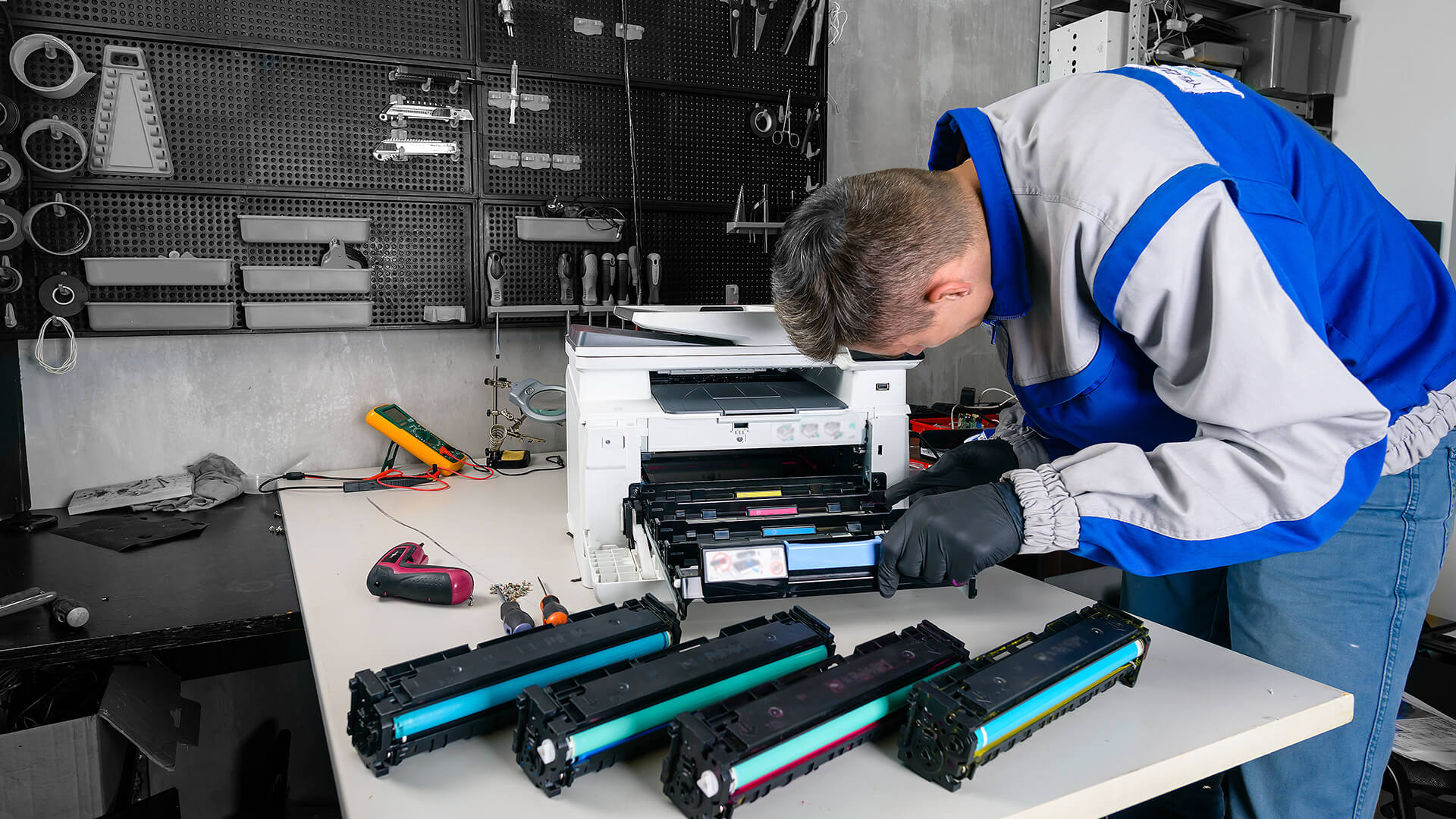
A laser printer is a printer designed to produce sharp text and clean documents using toner powder instead of liquid ink. It is commonly used in homes, schools, small businesses, and offices because it is fast, reliable, and well suited to regular document printing.
The main laser printer purpose is to print clear, professional-looking pages quickly, making it ideal for letters, invoices, reports, contracts, forms, office documents, schoolwork, shipping labels, business paperwork, and presentations or charts on colour models. Laser printers are popular because they are fast, low maintenance and produce crisp text, which makes them a strong choice for anyone who prints mostly documents rather than high-quality photos.
In simple terms, a laser printer uses a laser beam to create an invisible image on a drum, where toner powder sticks to that image, transfers onto the paper and is then melted into place by heat. To explain how a laser printer works in one sentence, it uses a laser, static electricity, toner powder, and heat to print digital text or images onto paper.
Common Laser Printer Example for Home and Office Use
A common laser printer example is a mono laser printer used for home office documents. Another example is a multifunction laser printer that can print, scan, and copy in one machine.
For home users, a simple wireless mono laser printer may be enough for letters, forms, and schoolwork. For offices, a multifunction printer can be more useful because it can handle scanning, copying, and shared printing.
Examples include a Xerox colour laser printer, a Brother multifunction laser printer, an HP colour LaserJet MFP, or a wireless HP LaserJet printer.
Why Laser Printers Use Toner Instead of Ink?
Laser printers use toner because the toner works well with the electrostatic printing process. Toner is a fine powder, usually stored in a toner cartridge. It can be charged with static electricity, attracted to the correct parts of the drum and then fused to paper.
Inkjet printers use liquid ink, while laser printers use toner powder. This is one of the main differences between laser and inkjet printers. To learn more, read our guide to ink vs toner explained.
How Does a Laser Printer Work? The Simple Explanation
If you are asking laser printer how does it work, think of the process like this:
A laser printer creates an invisible version of your document on a charged drum. Toner powder sticks to that image. The toner moves from the drum onto the paper. A fuser unit then uses heat and pressure to bond the toner permanently to the page.
That is the basic idea behind how laser printers work.
The Basic Laser Printer Working Principle
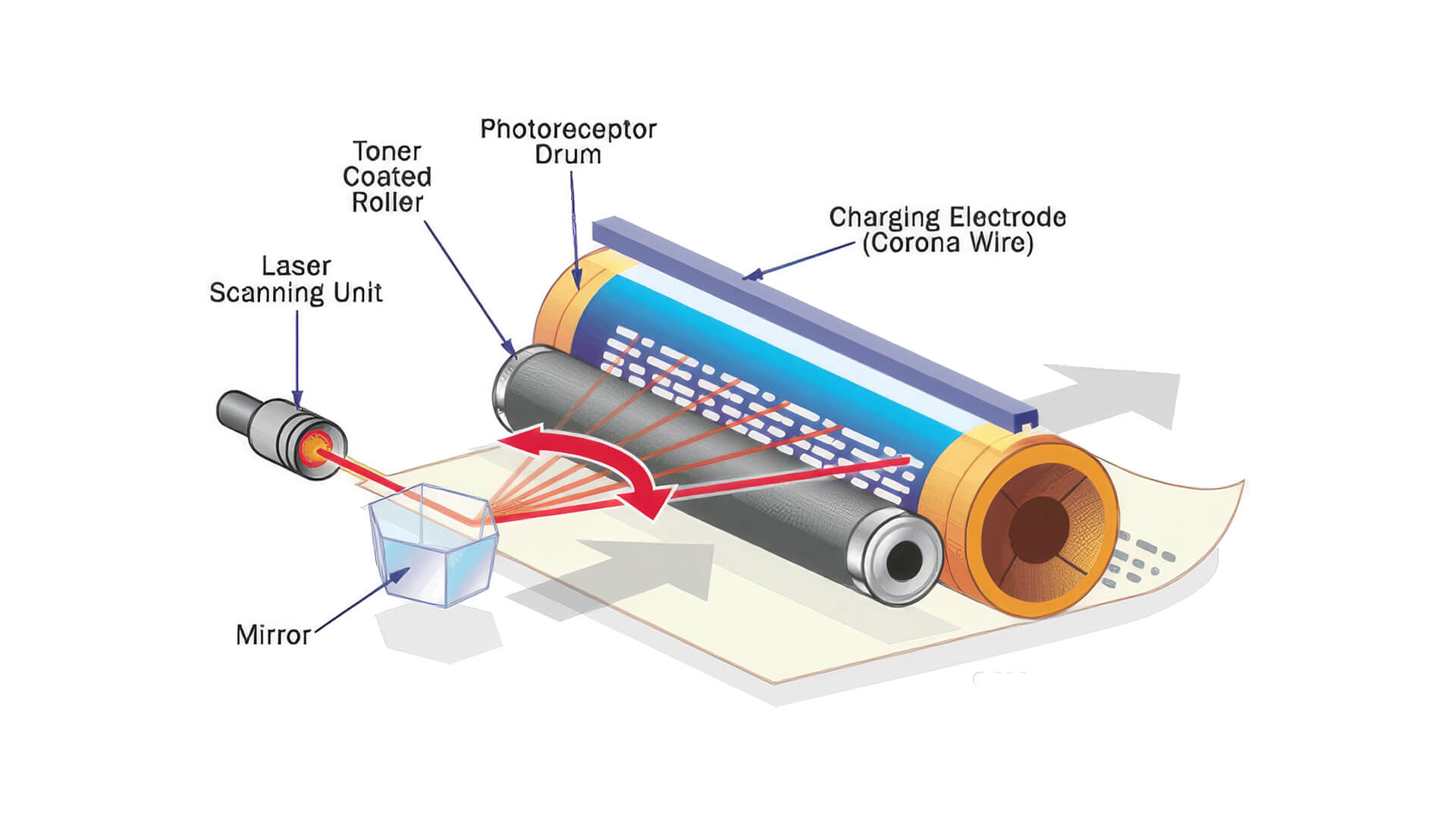
The laser printer working principle is based on electrostatic charge. Inside the printer, the photoreceptor drum, also called an OPC drum or imaging drum, is given an electrical charge. A laser beam then changes the charge in specific areas to form a hidden image, called a latent image.
Toner powder is attracted to that image. The printer then transfers the toner to the paper and uses heat to fuse it into place.
In short:
- Charge the drum
- Draw the image with a laser
- Add toner
- Transfer toner to paper
- Fuse toner with heat
How Static Electricity Helps Toner Stick to Paper
Static electricity is what makes toner move to the right places. The drum, toner, and paper are all given controlled electrical charges during the printing process.
The toner is attracted to the areas where the laser has created the image. Then the paper is charged so it pulls the toner away from the drum. This is why toner sticks to the correct parts of the page instead of spreading everywhere.
Why the Printed Page Comes Out Dry and Smudge-Free
A laser printed page comes out dry because the printer does not use wet ink. The toner starts as powder and is then melted into the paper by the fuser unit.
The fuser uses heat and pressure to bond the toner to the page. This gives laser printers their clean, sharp, and smudge-resistant finish.
The Laser Printing Process Explained Step by Step
The laser printing process may sound technical, but it follows a clear sequence. Here are the seven main steps of how laser printing works.
Step 1: The Printer Receives and Processes the Document
When you press print, the printer receives data from your computer, phone, tablet or network. The printer’s internal processor converts the document into a page layout it can print.
This includes text, images, margins, graphics and page size. Once the file is ready, the printer begins preparing the drum for printing.
Step 2: The Drum Is Cleaned for a New Print Job
Before a new page is printed, the printer removes any leftover toner from the previous print cycle. This helps avoid marks, streaks or ghost images on the next page.
Some printers use cleaning blades, rollers or internal cleaning systems to keep the drum ready for the next image.
Step 3: The Photoreceptor Drum Gets an Electrostatic Charge
The photoreceptor drum, also known as the OPC drum or imaging drum, receives an electrostatic charge. This is often done by a primary charge roller or corona wire, depending on the printer design.
This charge prepares the drum so the laser can create the image pattern.
Step 4: The Laser Draws the Image on the Drum
The laser beam shines onto the drum in very precise areas. Wherever the laser touches, it changes the electrical charge on the drum.
This creates an invisible electrostatic image of the page. This hidden image is called a latent image.
This is the part that gives the laser printer its name. The laser does not burn the image onto the page. It simply changes the electrical charge on the drum so toner knows where to stick.
Step 5: Toner Powder Sticks to the Laser-Created Image
The toner cartridge releases toner powder. Because the toner has its own electrical charge, it is attracted to the laser-created image on the drum.
The toner sticks only to the charged areas that match your document. This creates a toner version of your text or image on the drum.
Step 6: The Toner Transfers from the Drum to the Paper
Next, the paper passes through the printer. A transfer roller or transfer belt gives the paper an electrical charge that pulls the toner away from the drum and onto the paper.
At this stage, the toner is sitting on the page, but it is not fully fixed yet. If you touched it before fusing, it could smudge.
Step 7: The Fuser Uses Heat and Pressure to Bond the Toner
Finally, the paper passes through the fuser unit. The fuser uses heat and pressure to melt the toner powder into the fibres of the paper.
This is why the page often feels warm when it comes out of a laser printer. Once fused, the toner is fixed in place and the page is ready to use.
What Are the Main Parts That Make a Laser Printer Work?
If you want to understand what makes a laser printer work, it helps to know the main parts inside the machine.
Toner Cartridge
The toner cartridge holds the toner powder. Toner is the material that forms the text and images on the page. In mono laser printers, there is usually one black toner cartridge. In colour laser printers, there are usually four toner colours: cyan, magenta, yellow and black.
Photoreceptor or OPC Drum
The photoreceptor drum is a light-sensitive cylinder that carries the electrostatic image. The laser changes the charge on the drum, and toner sticks to the image created there.
Some printers have the drum built into the toner cartridge, while others use a separate drum unit.
Laser Unit and Mirrors
The laser unit produces the laser beam that draws the image onto the drum. Some printers also use mirrors or lenses to guide the beam accurately across the drum.
This part of the process is what makes laser printing precise.
Transfer Roller or Transfer Belt
The transfer roller or transfer belt helps move toner from the drum onto the paper. Colour laser printers often use a transfer belt to build up colour layers before moving the full image to the page.
Fuser Unit
The fuser unit uses heat and pressure to bond toner to the paper. This is one of the most important parts of the printer because it turns loose toner powder into a permanent print.
Paper Feed and Output Tray
The paper feed system pulls paper from the tray, guides it through the print path and sends it out to the output tray. Good paper handling helps reduce paper jams and misfeeds.
How Does a Colour Laser Printer Work?
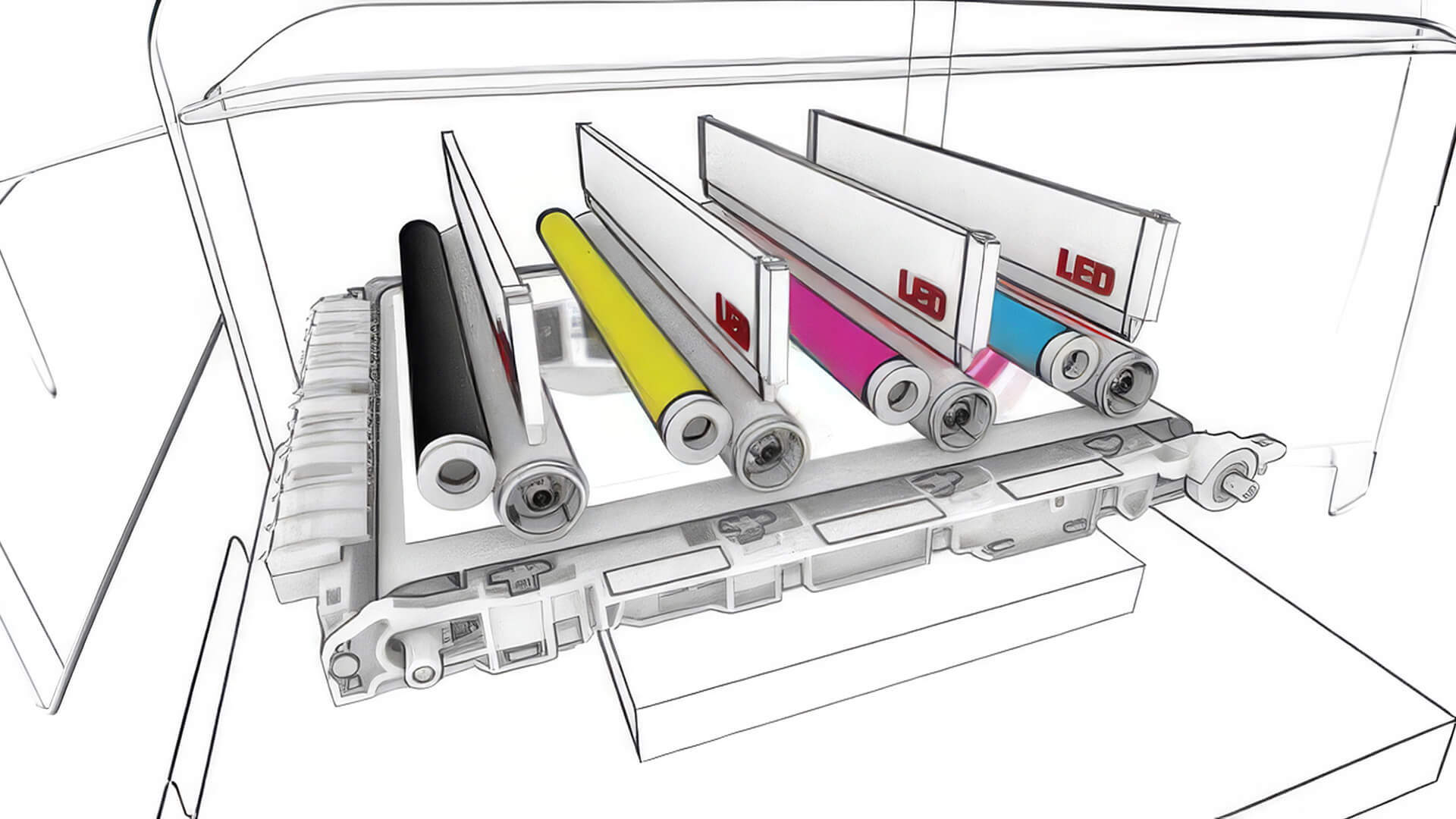
A colour laser printer works in a similar way to a mono laser printer, but it uses four toner colours instead of just black. If you are searching for color laser printer how it works or how a color laser printer works, the key difference is the CMYK toner system.
How CMYK Toner Creates Colour Prints
Colour laser printers use CMYK toner:
- Cyan
- Magenta
- Yellow
- Black
By combining these colours in different amounts, the printer can create a wide range of colours for charts, logos, graphics and images.
How Colour Laser Printers Layer Cyan, Magenta, Yellow and Black
If you are wondering how do laser printers print color, the printer builds the image using separate colour toner layers. Each colour is applied in the correct position, then the final image is transferred and fused onto the page.
Some printers do this in several passes, while others use a transfer belt to collect the colours before applying them to paper.
Colour Laser Printer vs Mono Laser Printer
A mono laser printer only prints in black and white. It is usually simpler, cheaper to run and ideal for text documents.
A colour laser printer can print graphics, reports, charts, presentations and branded documents. It is better if you need colour output, but colour toner can cost more than black toner.
| Feature | Mono Laser Printer | Colour Laser Printer |
|---|---|---|
| Best for | Letters, forms, invoices, reports | Presentations, charts, graphics, branded documents |
| Toner colours | Black only | Cyan, magenta, yellow and black |
| Running costs | Usually lower | Usually higher |
| Best user | Home offices and document-heavy teams | Offices that need colour documents |
| Photo quality | Not suitable | Good for documents, not specialist photo printing |
LaserJet Printer: How Does It Work?
If you are asking LaserJet printer how does it work, the answer is the same basic laser printing process. LaserJet is commonly used to describe HP laser printers, but the core process still uses toner, a drum, static electricity, and a fuser.
How a Laser Jet Printer Works
A laser jet printer receives your document, uses a laser to create an image on a drum, applies toner to that image, transfers the toner to paper and then fuses it using heat.
The main difference between models is not the basic process, but the features they offer. Some LaserJet printers are mono, some are colour, some are wireless and some include scan, copy and fax functions.
To compare HP models, browse HP printer options.
How Does a Wireless Laser Printer Work?
A wireless laser printer works like a normal laser printer once the print job reaches the printer. The difference is how the file is sent.
Instead of connecting with a USB cable, the document is sent over Wi-Fi or a network connection.
A wireless laser printer can receive print jobs from laptops, phones and tablets. This is useful in homes and offices because the printer does not need to sit next to one computer.
Wireless Laser Printer vs USB Laser Printer
A USB laser printer connects directly to one computer. This can be simple and reliable, but it is less flexible for shared use.
A wireless laser printer connects through Wi-Fi or a network, making it easier for multiple users to print.
| Feature | Wireless Laser Printer | USB Laser Printer |
|---|---|---|
| Connection | Wi-Fi or network | Direct cable |
| Best for | Multiple users and flexible placement | One computer setup |
| Device support | Laptops, phones, tablets, desktops | Usually one connected computer |
| Setup | May need Wi-Fi setup | Usually plug-and-print |
| Office use | More flexible | Less flexible |
When Wireless Printing Is Useful for Home and Office Setups
Wireless printing is useful when more than one person needs access to the printer. It also helps if your desk space is limited, because the printer can be placed elsewhere in the room. For home offices and small teams, wireless printing makes the setup cleaner and easier to share.
Laser Printer vs Inkjet Printer: Which Is Better?
The choice between laser and inkjet depends on what you print. A laser printer is usually better for fast document printing. An inkjet printer is often better for photo printing and flexible colour media.
For more detail, read our inkjet vs laser comparison.
Print Speed and Text Quality
Laser printers are usually strong for print speed and text quality. They are built for sharp, clear pages, making them ideal for reports, invoices, contracts and office documents.
Inkjet printers can also produce good text, but they are often chosen for photo and image quality instead.
Ink vs Toner Costs
Laser printers use toner cartridges. Inkjet printers use ink cartridges or ink tanks.
Toner cartridges can cost more upfront, but they often have a higher page yield. This can make laser printers cost-effective for regular document printing.
Ink costs vary widely depending on the printer type, cartridge size and how often you print.
Photo Printing and Colour Documents
Inkjet printers are usually better for high-quality photo printing. Colour laser printers are better for business colour documents such as charts, graphics, reports and presentations.
If you need colour photos, consider inkjet. If you need sharp colour documents, consider colour laser.
Best Choice for Home, Office and Occasional Printing
For home document printing, a mono laser printer can be a strong choice. For offices, a multifunction laser printer is often practical because it can print, scan and copy. For occasional printing, laser can be useful because toner does not dry out like ink.
Advantages and Disadvantages of Laser Printers
Key Advantages of Laser Printers
The main advantages of laser printer models are speed, sharp text and low maintenance.
Laser printers are useful because they offer:
- Fast document printing
- Sharp text quality
- Smudge-resistant output
- Good page yield
- Lower maintenance than inkjet for occasional use
- Strong performance for office documents
- Reliable mono printing
- Wireless and duplex options on many models
- Multifunction options for print, scan and copy
Laser printers are especially useful if you print a lot of text documents.
Common Disadvantages of Laser Printers
Laser printers also have some downsides.
Common disadvantages include:
- Higher upfront cost on some models
- Toner cartridges can be expensive
- Colour laser printers can be larger
- Not ideal for specialist photo printing
- Fuser units use heat
- Some models are heavier than inkjets
- Replacement drums may be needed on some printers
The best choice depends on your print habits. If you mainly print documents, the benefits often outweigh the downsides.
Are Laser Printers Being Phased Out?
Laser printers are still widely used for home office and business document printing. They remain popular because they are fast, reliable and well suited to high-volume text output.
Inkjet printers have improved, especially ink tank models, but laser printers are still a strong choice for document-heavy users.
How to Use a Laser Printer Properly
If you want to know how to use laser printer models properly, focus on paper, toner, maintenance, and setup.
Choosing the Right Paper
Use paper that is suitable for laser printers. Laser printers use heat, so the paper must be able to handle the fuser process.
Avoid paper that is damp, curled or unsuitable for laser printing, as this can cause jams or print quality problems.
Replacing Toner Cartridges Safely
When replacing a toner cartridge, follow the printer instructions. Avoid touching the drum surface if it is exposed, and gently shake some toner cartridges as instructed to distribute the toner evenly.
Always use compatible toner for your printer model.
Avoiding Paper Jams and Print Quality Issues
To reduce paper jams:
- Use the correct paper size
- Do not overfill the tray
- Store paper flat and dry
- Keep the paper path clean
- Replace worn consumables when needed
- Remove jammed paper carefully
If print quality drops, check the toner cartridge, drum unit, and paper type.
Basic Laser Printer Maintenance Tips
Laser printers do not usually need heavy maintenance, but simple care helps them last longer.
Basic tips include:
- Keep the printer clean and dust-free
- Use suitable paper
- Replace toner when needed
- Check the drum or imaging unit
- Avoid forcing jammed paper
- Keep firmware updated where available
- Use the printer regularly enough to detect problems early
For buying guidance, see our printer buying guide or home office printer guide.
Should You Buy a Laser Printer?
A laser printer is worth considering if you want fast, sharp and reliable document printing. It is especially useful for home office documents, business reports, invoices, contracts, schoolwork, admin paperwork, shipping labels and regular black-and-white printing. If you also need scanning and copying, browse multifunction printers for all-in-one options.
When a Colour Laser Printer Makes Sense
A colour laser printer makes sense if you often print business colour documents such as charts, reports, client presentations, training packs, branded documents, marketing handouts and office graphics. You can compare models from brands such as Xerox laser printers, Brother printer range and HP.
When an Inkjet Printer May Be the Better Choice
An inkjet printer may be better if you print photos, creative materials or specialist colour media. Inkjet models can also be a good option for low-volume users who want a lower upfront cost. The best choice depends on whether your priority is document speed or image quality.
Final Thoughts!
A laser printer works by using a laser, toner powder, static charge and heat to turn a digital file into a sharp printed page. For most homes and offices, it is a practical choice for fast, clean and reliable document printing.
If you need everyday text printing, choose a mono laser printer. If you print reports, charts or business graphics, a colour laser printer may be better. For printing, scanning and copying in one device, choose a multifunction laser printer.
To find the right model for your setup, browse laser printer deals, compare printers for home and office, or explore the office printer range at Box.co.uk.
FAQs About How Laser Printers Work
How does a laser printer work step by step?
A laser printer works by receiving the document, cleaning the drum, charging the drum, using a laser to draw an invisible image, applying toner powder, transferring the toner to paper and fusing the toner with heat and pressure.
Do laser printers ever need ink?
No, laser printers do not use ink. They use toner powder stored in toner cartridges. Ink is used by inkjet printers, while toner is used by laser printers.
What makes a laser printer work?
A laser printer works using a laser beam, photoreceptor drum, toner cartridge, static electricity, transfer roller or transfer belt, and fuser unit. These parts work together to move toner from the cartridge onto the paper.
What are the 7 steps of laser printing?
The seven main steps are processing, cleaning, charging, exposing, developing, transferring and fusing. In simple terms, the printer prepares the page, creates the image with a laser, adds toner, transfers it to paper and fixes it with heat.
What is a disadvantage of a laser printer?
One disadvantage of a laser printer is that it can cost more upfront than some inkjet models. Colour laser toner can also be expensive, and laser printers are not usually the best option for high-quality photo printing.
Which is better, laser or inkjet?
Laser is usually better for fast text documents, office printing and regular paperwork. Inkjet is usually better for photos, creative printing and flexible media. The better choice depends on what you print most often.
Are laser printers cheaper to refill?
Laser toner cartridges can cost more to replace than ink cartridges, but they often print more pages. This can make the cost per page lower for regular document printing, depending on the printer and toner yield.
How long do laser printers last?
A laser printer can last several years with proper use and maintenance. Lifespan depends on print volume, paper quality, toner use, maintenance, duty cycle and whether parts such as the drum or fuser need replacing over time.
You can pay with:
*PayPal Credit Representative Example: Assumed credit limit £1,200, Representative 23.9% APR (variable). Purchase rate 23.9% p.a (variable).Terms & Conditions apply.


PayPal Credit and PayPal Pay in 3 are trading names of PayPal UK Ltd, 5 Fleet Place, London, United Kingdom, EC4M 7RD. Terms and conditions apply. Credit subject to status, UK residents only, Five Tech LTD acts as a broker and offers finance from a restricted range of finance providers. PayPal Pay in 3 is not regulated by the Financial Conduct Authority. Pay in 3 eligibility is subject to status and approval. 18+. UK residents only. Pay in 3 is a form of credit. Check if affordable and how you will repay. May make other borrowing more difficult or expensive. See product terms for more details.
Copyright © 1996-2026 Fivetech LTD | Terms and Conditions
box.co.uk & Box are trading names of Five Tech Limited. Registered office: Box LTD, Unit 10 Woodford Trading Estate, Woodford Green IG8 8HF