


 Menu
MenuMenu


Get Sales Advice from Mon - Fri 9am - 5:00pm:
020 3337 8950LAST UPDATED: February 24, 2026
Norton Email & Text Scam Alert: How to Recognise and Avoid It
The rise of the Norton email scam is becoming a growing issue across the UK, with criminals sending fake renewal notices, misleading invoices, and convincing scam text messages to trick people. These threats often appear genuine because scammers copy Norton's branding, turning the attack into a dangerous branded impersonation scam that many users fall for.
These scams can lead to financial loss, malware infections, and even identity theft. Many victims report phishing email scams that look almost identical to a real security alert. Understanding how this email and text message scam works is the first step in staying safe. This guide will help you recognise red flags, avoid risky links, and learn how to avoid phishing attempts that target everyday users across the UK.
Before we get into the details of email and text scams, here are some tips to help you fight an email or text scam attack.
Suffering from a Norton Email or Text Scam? What to Do Next
Realising you may have interacted with a suspicious message or email can feel stressful, but quick action helps reduce the impact. Follow these steps:
- Stay calm and avoid reopening the message, especially if it looked like a click link scam email or a fake renewal alert.
- Run a full security scan on your device using trusted security tools such as Norton Antivirus.
- Update all programs and apps, including security software that appears out of date, to close possible vulnerabilities.
- Change your key passwords, starting with email and banking accounts.
- Enable two-factor authentication on your important services to add extra protection and stay safe from upcoming scams and fraud.
- Check your bank accounts and online statements for any unusual or unexpected activity.
- Contact your bank or card provider immediately if you notice anything suspicious.
- Review whether you shared any personal or financial information and take steps to secure those details in the aftermath of a Norton email scam.
- Add account monitoring if available, particularly when financial details may have been exposed.
- Report the scam to Norton through their official channels if it resembles a Norton renewal warning scam or any other impersonation attempt.
Taking these steps promptly helps limit potential damage and gives you the best chance of securing your accounts and devices again.
How the Norton Email Scam Works
The Norton email scam comes in several forms that appear genuine at first glance. Some people receive a Norton phishing SMS, while others are targeted through misleading alerts or spam text messages that claim their subscription has renewed. These tricks often support a renewal invoice scam or a subscription renewal email scam designed to create pressure and confusion.
Types of Scam Messages
Common tactics include:
- A Norton text scam that claims your device has a security problem or needs urgent attention
- An antivirus scam email suggesting your computer is infected and urging you to check immediately
- A scam phone call pretending to be Norton, often pressuring you to take quick action or provide information
- A fake antivirus renewal notice that asks you to pay for a subscription you do not have
- A scam refund phone call claiming Norton owes you money, usually to trick you into sharing bank details
- Harmful files or links sent as attachments in a scam email impersonating Norton
- Messages designed to look like a genuine Norton support email or Norton customer service email, but with misleading instructions
Why These Scams Are Effective
These scams are effective because criminals copy Norton's branding and tone, making their messages appear genuine. This type of brand impersonation phishing is designed to lower your guard and push you into reacting quickly. Most scam messages rely on the following tactics:
- Creating fear or urgency to pressure you into acting without thinking
- Using polished layouts that look similar to real security notifications
- Sending urgent action phishing emails that try to convince you to click unsafe links
- Using email invoice fraud techniques, often including a fake invoice from Norton
By using these methods, scammers make it difficult for people to recognise Norton phishing attempts or a misleading phishing text message warning, especially when the message closely resembles a trusted alert.
Who Scammers Target and How They Get Your Information
The Norton email scam does not focus on specific individuals because criminals prefer to target as many people as possible. Even if you have never used Norton products, you can still receive a Norton scam email or a misleading message designed to look genuine. Many victims assume they were chosen for a reason, but in most cases, scammers simply send bulk emails and scam text messages to large lists of stolen or purchased contact details.
Your information can be gathered through data breaches, leaked mailing lists, public websites or automated scraping tools. Your email or password might already be on the dark web without you knowing about it. Some attackers also use malware to harvest email addresses and phone numbers, which can later feed into attempts such as an identity theft protection scam or a fake refund offer.
How to Spot a Norton Scam (Red Flags)
Spotting the Norton email scam becomes easier once you know the subtle signs that criminals often rely on. Many scams look polished at first glance, but small details can help you decide whether a message is safe or suspicious.
Look out for:
- A sender address that looks unusual or slightly altered
- Greetings that do not use your name or appear too generic
- Odd spacing, strange formatting or spelling mistakes
- Messages that try to frighten you into quick decisions
- Links that do not match official Norton websites
- Attachments you did not expect or files asking for permissions
- Sudden invoices or alerts that seem unrelated to your account
- Messages that mimic security warnings but feel overly dramatic
If anything seems off, pause before responding. Most scams try to create pressure, which is why taking a moment to review the content can protect you from risk. Staying calm and checking carefully is one of the simplest ways to stay ahead of threats and improve your cyber-scam email recognition skills that help you keep your laptop, PC, or phone safe online. Whenever you are unsure, delete the message or visit Norton's official site directly through your browser rather than following any link inside the email or text.
What Legitimate Norton Messages Look Like
Genuine messages from Norton follow a consistent and trustworthy format, which makes them much easier to recognise compared to anything linked to the Norton email scam. Real emails are clear, calmly written and never try to frighten you into quick decisions.
Authentic communication usually includes:
- A subject line that reflects the purpose of the message
- A polite greeting that uses your details correctly
- Straightforward information about your product or account
- Links that direct you to official Norton pages only
- No unexpected attachments or requests for urgent payment
- Clean formatting that looks professional and familiar
A proper Norton support email also guides you to verified help resources and does not request sensitive information. If you use Norton software, you will notice that legitimate notifications match the branding and tone you expect, which makes it easier to tell them apart from a scam email impersonating Norton.
When in doubt, compare the message with past communications you know are genuine or visit the official site directly. This simple check helps you stay safe from misleading content pretending to be official.
What Norton Is Doing to Protect You from Email and Text Scams
Norton continues to strengthen its security tools to help users stay ahead of modern scams. These improvements focus on detecting deceptive messages early, guiding users clearly and blocking threats before they reach your inbox or phone.
1. AI-Powered Scam Detection in Norton's Security Suite
Norton uses advanced AI systems within its security tools to identify threats connected to the Norton Email Scam. These systems scan behaviour patterns, suspicious links and risky wording in real time, helping users stay protected across email, text and web activity.
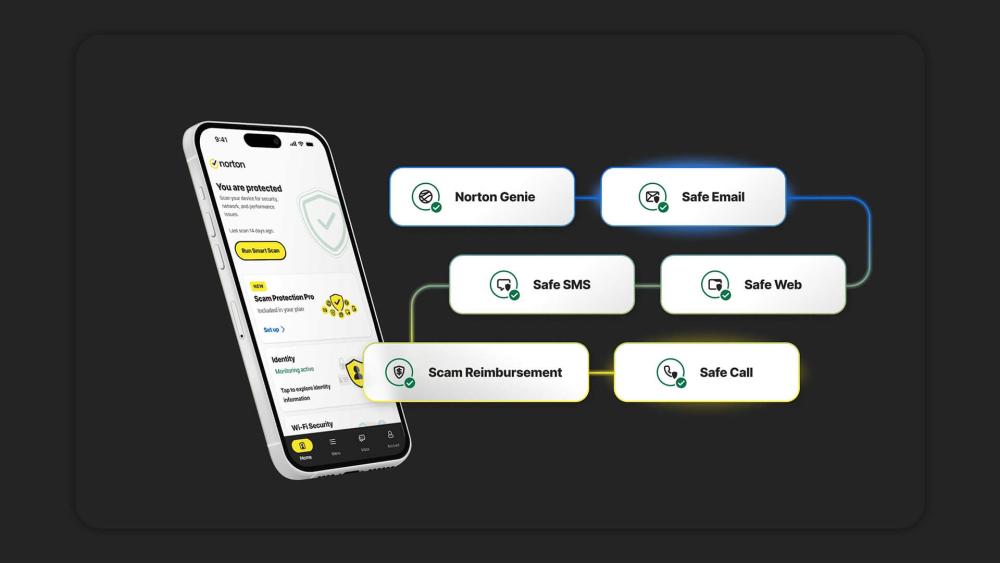
2. Norton Genie for Reviewing Suspicious Content
Norton Genie provides a quick analysis of anything that looks questionable. You can upload an email, text or screenshot, and the tool will assess it for signs of fraud or impersonation. It offers clear guidance when you are unsure whether a message is genuine.
3. Safe SMS and Safe Email Features in Norton 360
Nortn 360 includes extra protection for both text messages and emails. Safe SMS and Safe Email scan incoming content, filter dangerous links and highlight messages that resemble known scams. This adds another layer of protection against cyber threats, imitation alerts or fake renewal notices.
Deepfake and Scam Call Defence
Norton has also expanded its protections to cover emerging threats such as AI-generated deepfake audio and video, which are increasingly used in phone-based scams. New tools within the Norton mobile apps can identify manipulated media, help block fraudulent calls and warn you when a caller shows signs of impersonation. This added layer of defence strengthens overall protection, especially as criminals shift from written scams to more advanced voice and video deception techniques.
Official Reporting Channels for Scam Investigation
Norton encourages users to report suspicious emails or texts through its verified reporting routes. Forwarding questionable content helps Norton's teams investigate new threats and strengthen future protections for all users.
Conclusion
Keeping yourself up to date with the latest online threats, including the Norton Email Scam, can make a real difference to your digital safety. Taking a moment to review unexpected messages, avoiding unfamiliar links and relying on trusted tools helps you decide whether something is genuine. With steady digital habits and a bit of caution, you can protect your information and reduce the chances of falling for misleading alerts. Sharing this guidance with friends and family also helps others stay safe from similar scams. If you are buying a new device, opt for PCs or laptops with a free Norton 360 subscription, as it provides you with a solid edge against scammers and hackers.
Frequently Asked Questions
What is the Norton email scam, and how does it work?
The Norton email scam is a form of phishing where criminals send fake renewal notices, invoices or alerts that appear to come from Norton. These messages are designed to trick you into clicking harmful links, sharing personal information or making payments. Many versions also appear as texts or imitation support messages that copy Norton's branding.
Can I receive a Norton scam message even if I am not a Norton customer?
Yes. These scams target a wide audience, not just Norton users. Criminals often send bulk emails and texts to large lists of stolen or purchased contact details, which means anyone can receive them.
How do I know if a text message claiming to be from Norton is fake?
Look for mistakes, suspicious links or urgent wording. A genuine message will not pressure you into quick action or ask you to confirm sensitive details. If the link looks unusual or the message feels unexpected, delete it and check your account directly through the official website.
What should I do if I clicked a link in a Norton scam email?
Run a full security scan, update all programs and apps, and change any passwords that may be at risk. Keep an eye on your financial accounts and consider contacting your bank if you notice anything unusual. It also helps to report the incident using Norton's official channels.
Is a high-priced Norton renewal invoice always a scam?
Most unexpected or unusually expensive renewal invoices are fraudulent. Scammers frequently use this tactic to pressure victims into paying quickly. Always verify renewal details by signing in to your official Norton account rather than trusting the message you received.
Will Norton ever call me about a refund?
No. Norton does not make unsolicited phone calls about refunds or overpayments. If you receive a call claiming that Norton owes you money or needs remote access to process a refund, it is almost certainly a scam. Always verify directly through your official Norton account.
Why am I getting Norton renewal emails if I do not use Norton?
Scammers often send bulk phishing emails to large lists of stolen or purchased contact details. You do not need to be a Norton customer to receive a Norton email scam. These messages are sent widely in the hope that someone will panic and respond.
Can someone hack me just by sending a scam email?
No. Simply receiving a Norton email scam cannot hack your device. The risk begins if you click a malicious link, download an attachment, share personal information, or install remote access software. Deleting suspicious messages without interacting with them keeps you safe.
You can pay with:
*PayPal Credit Representative Example: Assumed credit limit £1,200, Representative 23.9% APR (variable). Purchase rate 23.9% p.a (variable).Terms & Conditions apply.


PayPal Credit and PayPal Pay in 3 are trading names of PayPal UK Ltd, 5 Fleet Place, London, United Kingdom, EC4M 7RD. Terms and conditions apply. Credit subject to status, UK residents only, Five Tech LTD acts as a broker and offers finance from a restricted range of finance providers. PayPal Pay in 3 is not regulated by the Financial Conduct Authority. Pay in 3 eligibility is subject to status and approval. 18+. UK residents only. Pay in 3 is a form of credit. Check if affordable and how you will repay. May make other borrowing more difficult or expensive. See product terms for more details.
Copyright © 1996-2026 Fivetech LTD | Terms and Conditions
box.co.uk & Box are trading names of Five Tech Limited. Registered office: Box LTD, Unit 10 Woodford Trading Estate, Woodford Green IG8 8HF