


 Menu
MenuMenu


Get Sales Advice from Mon - Fri 9am - 5:00pm:
020 3337 8950LAST UPDATED: November 05, 2025
Your Password Might Already Be on the Dark Web - Here’s How You Can Find Out
Imagine waking up one morning to find that your email is a part of a data breach. Frightening, isn’t it? That’s exactly what millions of people are facing after the recent Gmail data breach, where hackers reportedly exposed user credentials that are now believed to be circulating across dark web marketplaces.
You may think you’re safe because you haven’t seen any alerts or suspicious activity, but that’s a dangerous illusion. Cybercriminals rarely announce their moves. In this post, we’ll walk you through how to check whether you are a victim of a password leak, how to verify their exposure, and what proactive steps to take before the damage becomes irreversible.
But before we dive into these details, let’s have a look at what actually happened in the Gmail data breach saga.
The Recent Gmail Data Breach: What Happened
The latest concern around Gmail centres on a reported password leak of some 183 million Gmail credentials. But a deeper look clears out the situation.
The Incident Breakdown
- A data compilation dubbed “Synthient Stealer Log Threat Data” revealed over 183 million email/password combinations and some 23 billion rows of related credentials.
- The credentials came from multiple sources: malware-infested machines, “stealer” logs, and credential stuffing lists (re-used passwords across accounts). Only about 16.4 million were reportedly never seen before.
- Google clarified that there was no breach of Gmail’s systems. The company said the leaked credentials stem from older, unrelated breaches rather than a fresh internal incident. In such situations, digital security suites like Norton 360 keep you safe from evolving cyber threats.
What Google Says
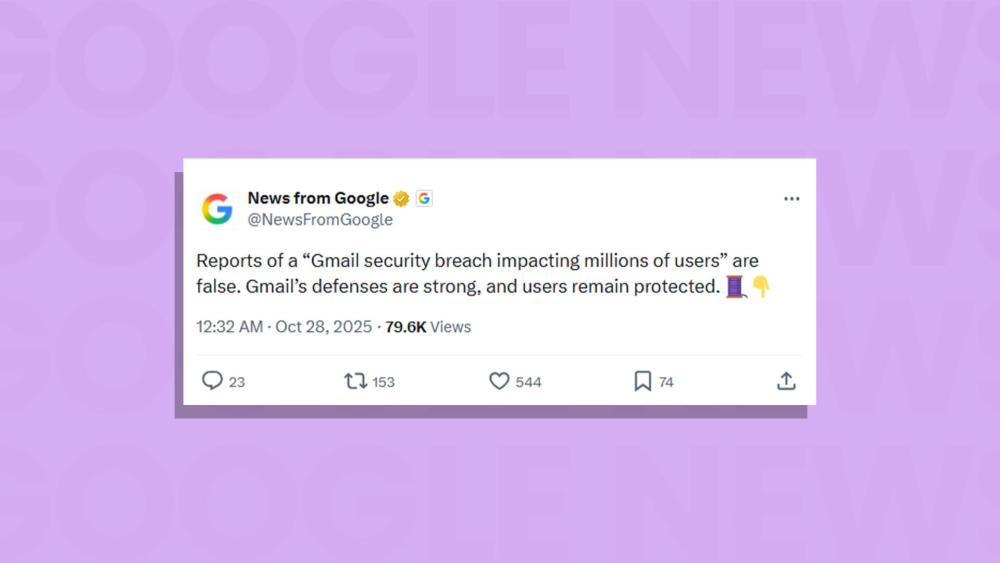
- Google labelled the alarm around the incident as “entirely false” when described as a broad Gmail hack.
- The company emphasised that Gmail’s defences remain “strong and effective”, blocking more than 99.9% of phishing and malware attempts.
- It noted that the real threat lies in phishing, malware-based credential harvesting, and the reuse of stolen passwords.
- Even though Gmail as a platform wasn’t breached, Google admitted that its users (approximately 2.5 billion) could be at risk of phishing attacks following the incident.
What It Means for Your Passwords
A Google password leak in this context doesn’t necessarily mean your email password was taken from the company’s servers. It may have been harvested via malware on your device, or you may have reused that password on another site which was breached. If your Gmail address and password show up in one of these datasets, it’s a strong indicator that your credentials are already circulating on the dark web, making you vulnerable to account takeovers and credential-stuffing attacks elsewhere.
How to Verify If Your Password Has Been Leaked
Verifying exposure of your credentials is a vital step once you suspect a password leak. Here’s how you can safely and effectively check whether your information is on the dark web.
Use Trusted Checking Tools
There are several reliable tools available that allow you to check if your email address or passwords have appeared in a known breach:
- Have I Been Pwned website lets you enter your email address to see if it appears in its database of breached records.
- Dark-web scan services like Norton dark web monitoring let you check whether your credentials or personal data are circulating on the dark web or not.
- Some browsers or account ecosystems include built-in password checks that alert you if a saved password appears in a breach dataset.
How to Use These Tools Safely
- Only enter your email address or the first part of a password hash if required. Do not enter full actual passwords into untrusted sites. These tools generally match against hashed or partially hashed records.
- Ensure the website is legitimate: check for HTTPS, correct domain name, and good reputation.
- Use a tool from a known provider or one that references large breach databases.
- After checking, do not ignore a “negative” result. Moreover, absence from a known list does not guarantee safety. New attacks and leaks can happen all the time. Always stay up-to-date on tips to keep your laptop and PC safe online.
Interpreting the Results
- If the service returns a match for your email or password, it means your credentials are likely included in a breach or leaking dataset, and you should treat them as compromised.
- If nothing shows up, you still should assume some risk until you’ve followed best-practice protection steps.
- Remember: even if only one account is flagged, any other accounts where you use the same password or similar credentials could also be at risk due to reuse.
Steps to Take If Your Password Is Found on the Dark Web
Finding out your credentials are exposed is concerning. However, acting swiftly can significantly minimise the damage. Here is a structured action plan to follow if you discover a compromised password, following the best practices around a serious password leak.
Change the Compromised Password Immediately
As soon as you learn that a login has been exposed, change the password for that account without delay. Choose a strong, unique password that you haven’t used before (nor on other sites). This is especially important because, once breached, the credentials can be used for further attacks.
Also, ensure that any other account where you used the same or a very similar password is changed. Because of credential-stuffing attacks (where stolen credentials are tried across multiple services), this is a real risk.
Enable Two-Factor Authentication (2FA) and Stronger Login Methods
Having a locked-down password is good, but any single method can still be bypassed. Activating 2FA adds a second verification layer, making it far harder for an attacker to gain access even if they have your password.
Where available, consider using passkeys or security keys. These are more resistant to phishing than traditional passwords.
Review and Secure Your Recovery Options
Often, when one account is compromised, attackers attempt to exploit secondary access via recovery email, backup phone number, or security questions.
- Check which email addresses or phone numbers are listed as recovery options and remove or update any that are outdated or unfamiliar.
- Review connected apps or third-party access permissions and revoke anything suspicious.
- Log out of all devices and sessions for the affected account where possible, to prevent ongoing access.
Use a Password Manager and Adopt Unique Passwords
A core reason leaks happen is password reuse or weak passwords. A reputable tool like Norton Password Manager helps generate strong, unique passwords for every service and store them securely.
This step is all the more important when dealing with a risk of further password leak incidents, because you’ll be bolstering your overall resilience rather than only reacting. Additionally, a password manager can help audit your existing passwords for reuse or exposure.

Monitor Your Accounts & Use Dark Web Monitoring Services
Once you’ve secured the immediate account, you should remain vigilant:
- Set up alerts for unusual login activity, password reset requests you didn’t initiate, unfamiliar devices signing in, etc.
- Consider using a service that provides ongoing dark-web monitoring. The best option here is to buy Norton Antivirus as it is one of the best protection tools when it comes to hacking attempts, and its capabilities in the area of dark‐web surveillance are well documented.
Secure Your Devices & Stay Alert to Phishing
Even after changing passwords, the environment where the breach occurred may still harbour risks:
- Ensure your operating system, browser and security software are up to date.
- Run antivirus and anti-malware scans to detect any possible infection that might have enabled the password data breach.
- Be cautious of unexpected emails, text messages or calls claiming to be from your bank, service providers or support agent. Such social-engineering attempts often follow a leak.
- Adopt safe practices when making new purchases, such as always preferring buying gaming laptops with antivirus software or going for Windows 11 laptops for professional and business use.
- Also educate your kids about staying safe online so they don’t end up giving crucial details to hackers.
Why It Is Important to Check If Your Passwords Are on the Dark Web
Many people assume that if their accounts seem fine, their details are safe, but that’s often far from true. Once your credentials appear on the dark web, they can circulate for years, giving cyber-criminals repeated opportunities to exploit them.
How Leaked Credentials Circulate
Hackers treat stolen credentials like currency. A 2025 study revealed that more than 1.7 billion passwords were traded on dark-web marketplaces in 2024. Even minor or outdated leaks can have lasting consequences because data from multiple incidents is often bundled together and sold in bulk.
The Danger of Password Reuse
Reusing the same login details across different websites is one of the most common mistakes people make. When a single service suffers a breach, attackers use those same details to attempt logins elsewhere, a method known as credential stuffing. This simple tactic succeeds because users often keep identical passwords for email, banking, and social media accounts.
Why Old Data Still Matters
Even information that seems harmless, such as usernames or recovery emails, can make targeted attacks easier. Cyber-criminals often combine fragments from older breaches to impersonate users or bypass verification questions. That’s why checking for exposure regularly is crucial.
The Value of Your Data
On the dark web, login information is traded openly for surprisingly small sums. Yet the cost to victims can be significant, including phishing scams, identity theft and financial loss. Detecting and addressing a password leak early drastically reduces that risk.
Why Regular Monitoring Is Worth It
Tools that perform dark-web scans or alert you when your email appears in a leaked database provide a vital layer of awareness. They allow you to change passwords, enable two-factor authentication, and secure your accounts before criminals can act. Taking a proactive approach now saves time, money, and stress later.
Final Words
Online security is a continuous habit, not a one-off task. The recent Gmail incident proves how quickly a password leak can spark risk, even without a direct breach. Strong, unique passwords and two-factor authentication remain essential. Consider using Norton password manager and Norton dark web monitoring for extra protection and early alerts. Stay alert, review your security settings regularly, as protecting your credentials today keeps your digital life safe tomorrow. In addition to this, when you buy a new laptop from a trusted retailer like Box.co.uk, you can claim your free Norton 360 digital security suite on selected purchases.
Frequently Asked Questions
What happens when my password is found in a data breach?
When your credentials are exposed, they can be used by cyber-criminals for account takeover, identity theft, or credential-stuffing attacks.
How do I know if my login details are circulating on the dark web?
You can check using trusted services or dark-web monitoring tools, which scan breach databases and underground forums for your email or credentials.
Can I rely on my account being safe if the service hasn’t announced a breach?
No. Just because a company hasn’t declared a breach doesn’t mean your login wasn’t exposed via another channel (e.g., malware, infostealer logs), so it’s wise to assume risk.
What’s the difference between a data leak, a data breach and a dark-web exposure?
A data breach is when a system is directly compromised; a data leak might be the unintentional release of data; dark-web exposure refers to stolen credentials being circulated or sold after a leak or breach.
Should I change my passwords even for accounts I don’t actively use?
Yes. Old or inactive accounts are often overlooked, yet reused credentials from them can still be exploited after a password leak. Regular review and change are best practices.
You can pay with:
*PayPal Credit Representative Example: Assumed credit limit £1,200, Representative 23.9% APR (variable). Purchase rate 23.9% p.a (variable).Terms & Conditions apply.


PayPal Credit and PayPal Pay in 3 are trading names of PayPal UK Ltd, 5 Fleet Place, London, United Kingdom, EC4M 7RD. Terms and conditions apply. Credit subject to status, UK residents only, Five Tech LTD acts as a broker and offers finance from a restricted range of finance providers. PayPal Pay in 3 is not regulated by the Financial Conduct Authority. Pay in 3 eligibility is subject to status and approval. 18+. UK residents only. Pay in 3 is a form of credit. Check if affordable and how you will repay. May make other borrowing more difficult or expensive. See product terms for more details.
Copyright © 1996-2026 Fivetech LTD | Terms and Conditions
box.co.uk & Box are trading names of Five Tech Limited. Registered office: Box LTD, Unit 10 Woodford Trading Estate, Woodford Green IG8 8HF