


 Menu
MenuMenu


Get Sales Advice from Mon - Fri 9am - 5:00pm:
020 3337 8950LAST UPDATED: December 04, 2025
M4 Vs M5 MacBook Pro Compared: Is It Worth Upgrading?
Powerful laptops aren't just for filmmakers and 3D artists anymore. Students, developers, business users and hybrid workers all rely on machines that can handle demanding tasks without slowing down. That's why Apple's latest MacBook Pro laptops attract so much attention.
If you're comparing the M4 MacBook Pro with the new M5 MacBook Pro, the big question is simple: is the newer chip genuinely worth the upgrade? This M5 Mac vs M4 Mac guide breaks down the key differences in performance, battery life, display quality and long-term value, helping you choose the model that fits your workflow. Whether you're editing 4K timelines, building apps, training ML models or just want a fast, reliable laptop for daily use, you'll know exactly which generation makes the most sense for 2025.
Generation Identity: What Defines M4 vs M5
Understanding the differences between the M4 and M5 generations is essential when comparing M5 Mac vs M4 Mac for real-world use. Both machines fall under the category of latest laptops, but each focuses on slightly different strengths that matter depending on your workload.
M4 Overview
The M4 generation delivered a notable single-core uplift over M3, improved GPU features and impressive efficiency gains. For many users, this made the MacBook Pro M4 a stable, reliable option for creative tasks, software development and day-to-day productivity.
Because it's a well-established platform, the M4 Mac is ideal for buyers who want proven performance, solid thermals and broad compatibility without stepping up to the newest architecture. Just like the latest MacBook Air models, it remains a smart, dependable choice for students, business users and creators who want powerful performance at a better price point.
M5 Overview
The MacBook Pro M5 represents the next wave of Apple Silicon, prioritising faster CPU response, stronger GPU throughput and significantly upgraded on-device AI performance. With improved Neural Engine capability and enhanced media processing, the Mac M5 generation stands tall among the new Mac laptops and is aimed at users pushing into heavier video workloads, ML models or 3D rendering.
For long-term buyers, the MacBook Pro M5 offers better futureproofing, stronger performance per watt and a longer macOS update window. Apple introduced the first M5-powered 14-inch MacBook Pro in October 2025, with units shipping later that month. However, recent industry reports suggest that the higher-end M5 Pro and M5 Max MacBook Pro models are now expected to arrive in spring 2026, giving power users a clearer idea of when the full lineup will land.

Performance Comparison: CPU, GPU & Workloads
Performance is often the deciding factor for most buyers when it comes to comparing M5 Mac vs M4 Mac. Both chips are fast, but the M5 family brings architectural refinements that matter for real workloads, whether you're editing 4K timelines, compiling code or running ML models.
CPU Performance
The M4 already delivered excellent single-core results, but the MacBook Pro M5 builds on this with higher clock efficiency and improved pipeline performance. This leads to noticeably faster responsiveness in everyday tasks, Xcode builds and productivity apps. Multi-core scaling also benefits depending on the configuration, especially in workloads like video transcoding and large codebases. For developers comparing chips, the M5 provides better headroom for long-term performance.
GPU Performance
Apple's next-generation GPU in the Mac M5 line offers stronger compute throughput, improved ray tracing support and better performance in real-time rendering tasks. Creative users working in Final Cut Pro, DaVinci Resolve or Blender will see smoother playback, faster renders and more stable performance under heavy loads. The M4 remains capable, but the MacBook Pro M5 brings a clear graphics uplift.
Unified Memory and Bandwidth
Unified memory plays a major role in handling large timelines, ML datasets and multi-app workflows. The M5 generation extends memory bandwidth and supports higher configurations, giving creators and developers more room for demanding projects. This is especially useful when training machine learning models or editing high-resolution footage where memory constraints can slow an M4 setup.
Workload-Based Breakdown
- Video Editing: Faster renders, smoother scrubbing and better export times on the M5, especially in ProRes-heavy projects.
- Machine Learning: Stronger Neural Engine performance elevates ML inference and model training on the M5.
- Developer Workloads: Xcode builds and container-based workflows run more efficiently due to stronger single-core and memory performance.
- Daily Productivity: Both chips handle everyday tasks with ease, but the M5 offers snappier performance and more longevity.
If you're choosing between the MacBook Pro M4 and MacBook Pro M5 for professional workloads, the newer generation provides a tangible boost across CPU, GPU and AI-powered tasks without sacrificing efficiency.

Display & Design
When comparing M5 Mac with M4 Mac, display quality and design consistency are key factors for creatives, students and mobile professionals. Both generations deliver premium hardware, but there are subtle differences worth noting depending on your workflow.
Display Options and Quality
Both the MacBook Pro M4 and MacBook Pro M5 offer Apple's Liquid Retina XDR display, giving you exceptional brightness, HDR performance and accurate colour reproduction. ProMotion also remains a standout feature, delivering smooth 120Hz refresh rates that benefit everything from scrolling and multitasking to timeline scrubbing in Final Cut Pro. Optional nano-texture glass is still available for users who work in bright environments or need reduced glare.
Chassis, Thermals and Cooling
Apple maintains its aluminium design across both generations, so build quality feels identical. Thermally, the Mac M5 generation benefits from improved chip efficiency, helping it stay cooler under sustained workloads. While both models use active cooling, the M5's thermal behaviour is generally more stable when running long video renders or heavy ML workloads, thanks to the updated architecture.
Ports and I/O
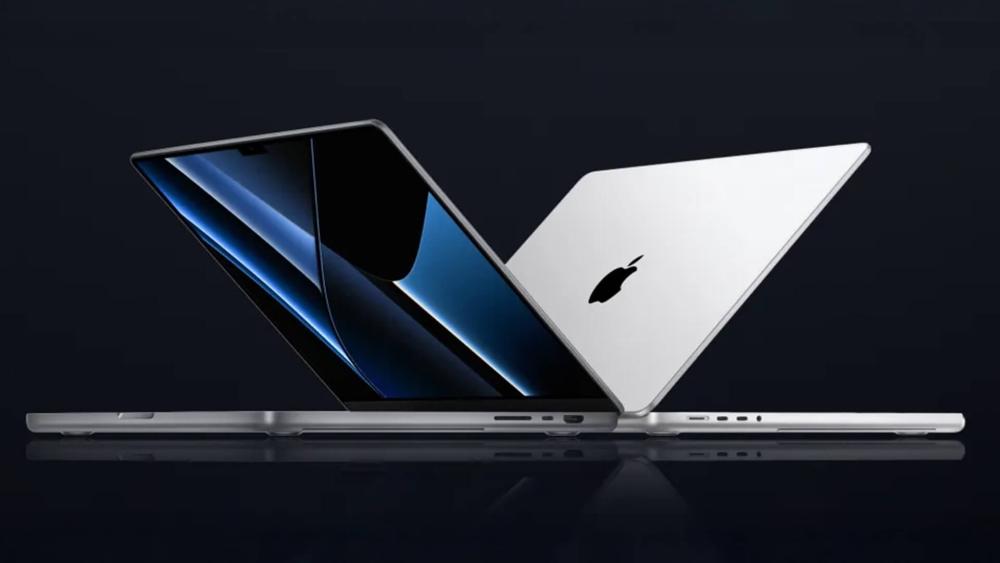
Port selection remains a strong point for both models, with MagSafe charging, HDMI, SDXC and multiple Thunderbolt ports. The key difference lies in connectivity: some configurations of the MacBook Pro M5 support Thunderbolt 5, offering higher bandwidth for advanced external workflows. This benefits users running multiple high-resolution displays, fast external storage or complex docking setups. Importantly, external display behaviour remains smooth across both generations, with the M5 offering increased headroom for future peripherals.
Battery Life & Portability
Battery performance is always a major part of every M5 Mac vs M4 Mac debate, especially for students, developers and creatives who work away from a charger. Both generations are known for excellent efficiency, but the M5 architecture introduces refinements that make a noticeable difference in real-world use.
Battery Life in Real Use
In video playback and mixed productivity benchmarks, the MacBook Pro M4 already delivers some of the longest runtimes of any laptop in its class. The MacBook Pro M5 builds on this with improved power management, allowing it to sustain high performance for longer without draining the battery quickly. Long coding sessions, multi-window research, Zoom calls and timeline editing all feel a bit more efficient on the M5, particularly under heavier loads. Noticed a dip in battery life of your current MacBook Pro? Read our guide on how to fix MacBook Pro battery not charging or draining quickly.
Chip Efficiency Improvements
Apple's updated architecture in the Mac M5 generation brings stronger performance per watt, meaning you get faster processing with less overall energy use. This efficiency gain is most noticeable during demanding tasks like ML model training, 4K editing and app builds. While the M4 remains efficient, the M5 offers better thermal consistency and battery endurance for modern workloads.
Portability Considerations
If portability matters, both generations maintain the same lightweight, travel-friendly design. The 14-inch size remains the most balanced option for commuting or campus use, while the 16-inch appeals to users who prefer a larger canvas for creative work. MagSafe fast charging and USB-C charging support remain consistent across both.
Software & User Experience
A major element of every M5 Mac vs M4 Mac argument is about everyday use. Both run macOS exceptionally well, but the M5 architecture enables newer features, better long-term support and smoother performance across demanding apps.
macOS Optimisation and New Features
macOS continues to be tightly optimised for Apple Silicon, and both the MacBook Pro M4 and MacBook Pro M5 benefit from efficient scheduling, low-latency memory access and smooth app performance. However, the M5 generation unlocks enhanced on-device AI features, faster media engine handling and improved AV1 decoding, which matter for video professionals and ML-heavy workflows.
AI and Media Processing
The Mac M5 introduces a more capable Neural Engine that handles machine learning tasks faster and with lower power draw. Users working with photo segmentation, text generation, motion tracking or ML model inference will see noticeably quicker results. Video editors benefit from strengthened encoding/decoding paths, especially for ProRes and AV1-heavy projects. The M4 remains reliable, but the M5 clearly leads in advanced media and AI pipelines.
App Compatibility and Update Longevity
Both chips support a wide range of pro apps, but the MacBook Pro M5 will naturally benefit from a longer macOS update cycle. This makes it a better choice for users who want a machine that stays compatible for five to six years without feeling outdated. The M4 is still very modern and far from outdated in 2025, but the M5 offers the broader long-term safety net.
Everyday Experience: Thermals, Smoothness and Connectivity
ProMotion performance on both models delivers smooth scrolling and responsive animations, which helps with productivity and creative work. Thermal behaviour is slightly improved on the M5, resulting in quieter fan operation during sustained workloads. External display performance is reliable across both, though Thunderbolt 5 support on some M5 models provides additional bandwidth for future high-resolution setups.
For users who value long-term updates, the newest AI features and the smoothest ProMotion experience, the MacBook Pro M5 stands out. The M4 remains excellent for stability and compatibility, but the M5 brings clear quality-of-life improvements across software and user experience.
M5 Mac vs M4 Mac: Pricing and Value for Money
Although the M5 is the newer chip, several high-end MacBook Pro M4 configurations, especially M4 Pro and M4 Max models, remain more expensive than the base M5. The two generations now overlap across multiple price bands, so it's essential to compare configurations rather than assuming the newest model costs more.
the entry MacBook Pro M5 sits alongside mid-range M4 options, while refurbished M4 units offer strong value for anyone prioritising performance on a budget. The M5 still leads for long-term support, battery efficiency and on-device AI features, making it the better futureproof pick. But a well-priced MacBook Pro M4, particularly a Pro or Max variant, can deliver excellent performance per pound and sometimes outmuscle the base M5 in GPU-heavy workloads.
Overall, the best value depends on the deal you find. The M5 is the stronger long-term choice, while the M4 remains a smart buy when discounted or has better specs than the entry M5. If you have decided to buy a new MacBook, don't forget to read our guide on 8 things to know before buying a New MacBook.
Conclusion
The decision between M5 Mac and M4 Mac depends on how much performance, efficiency and futureproofing you need. If value is your priority, the MacBook Pro M4 remains a powerful and reliable option, especially when discounted or found in refurbished form. It handles creative work, development tasks and everyday productivity with ease, making it a smart choice for many users in 2025.
The MacBook Pro M5, however, brings meaningful gains in CPU, GPU and on-device AI performance. It offers better battery efficiency, longer macOS support and improved media handling, making it ideal for buyers who want the latest architecture and a longer runway before upgrading again. If you're already on an M4 model, it may be worth waiting for the higher-end M5 Pro and M5 Max variants expected next year before making the jump. Along with the MacBook Pro, MacBook Air M5 will also be launched next year. So, holding on to that big leap for a little while is a wise move.
But if you're upgrading from an M2 or M3 system, moving to the M5 generation is an excellent step up in both performance and longevity. Box.co.uk is a great place to buy a New Apple Mac Pro. We offer exclusive offers and the best laptop deals in the town for Apple users.
Frequently Asked Questions
Is the M5 MacBook Pro worth upgrading from the M4?
It depends on your workflow. The M5 offers stronger CPU, GPU and on-device AI performance, but if you're already using an M4, it may be better to wait for the M5 Pro or M5 Max models arriving next year. For users on M2 or M3, the M5 is a clear upgrade.
Is the M4 MacBook Pro still a smart buy in 2025?
Absolutely. With overlapping pricing and strong performance, the M4 remains a great choice, especially when discounted or purchased refurbished. It's still fast enough for most creative and professional workflows.
Which chip is better for developers working in Xcode, Docker or ML frameworks?
The M5 leads thanks to higher single-core performance and improved unified memory bandwidth. ML workflows also benefit from a stronger Neural Engine, making the M5 more futureproof for development.
Are there any design or port changes between M4 and M5?
The overall design remains the same. The main differences appear in connectivity, where some M5 configurations include newer Thunderbolt standards.
Which chip is better for developers working in Xcode, Docker or ML frameworks?
The M5 leads thanks to higher single-core performance and improved unified memory bandwidth. ML workflows also benefit from a stronger Neural Engine, making the M5 more futureproof for development.
You can pay with:
*PayPal Credit Representative Example: Assumed credit limit £1,200, Representative 23.9% APR (variable). Purchase rate 23.9% p.a (variable).Terms & Conditions apply.


PayPal Credit and PayPal Pay in 3 are trading names of PayPal UK Ltd, 5 Fleet Place, London, United Kingdom, EC4M 7RD. Terms and conditions apply. Credit subject to status, UK residents only, Five Tech LTD acts as a broker and offers finance from a restricted range of finance providers. PayPal Pay in 3 is not regulated by the Financial Conduct Authority. Pay in 3 eligibility is subject to status and approval. 18+. UK residents only. Pay in 3 is a form of credit. Check if affordable and how you will repay. May make other borrowing more difficult or expensive. See product terms for more details.
Copyright © 1996-2026 Fivetech LTD | Terms and Conditions
box.co.uk & Box are trading names of Five Tech Limited. Registered office: Box LTD, Unit 10 Woodford Trading Estate, Woodford Green IG8 8HF