


 Menu
MenuMenu


Get Sales Advice from Mon - Fri 9am - 5:00pm:
020 3337 8950LAST UPDATED: December 05, 2025
Curved vs Flat Monitors: Which One Should You Buy in 2025?
Choosing between curved vs flat monitors has become one of the biggest questions for anyone upgrading their setup in 2025, whether you’re building a gaming rig, sorting out a home office, or looking for a more immersive screen for everyday use. Both shapes bring clear strengths. Curved monitors offer a wrap-around feel that’s brilliant for gaming and ultrawide multitasking, while flat monitors remain the go-to choice for precise work, accurate colour, and simple mounting. With screen sizes getting larger, refresh rates climbing, and more gamers shifting to ultrawide curved monitor formats, understanding the differences has never mattered more. This guide breaks down everything you need to know so you can pick the screen shape that genuinely fits how you play, work, and create.
Understanding Monitor Shapes and Why They Matter

Not all monitors are the same when it comes to functionality and use-cases. When comparing curved vs flat monitors, it helps to understand what actually sets their shapes apart and why that design makes a real difference to your gaming, work or study setup. Shape affects how you see the screen, how far you turn your head, how immersive games feel, and even how well you can work across multiple windows. Before looking at performance or features, it’s worth breaking down what defines each monitor type.
What Defines a Curved Monitor?
Curved monitors bend the panel slightly inwards to match the natural shape of your peripheral vision. The curvature radius (for example, 1000R or 1500R) determines how tight that curve feels, with lower numbers offering a more pronounced wrap-around effect. This shape helps pull the edges of the screen into your field of view, reducing distortion and creating a more immersive feel, especially on larger or ultrawide displays.
What Defines a Flat Monitor?
Flat monitors use the traditional straight-edged panel most people are used to. They offer consistent viewing angles, predictable geometry, and easy placement on any desk. Because they don’t curve towards the user, flat screens are often better suited to wall mounting, multi-screen setups and shared viewing where everyone needs an undistorted view of the same content.
Benefits of Curved Monitors
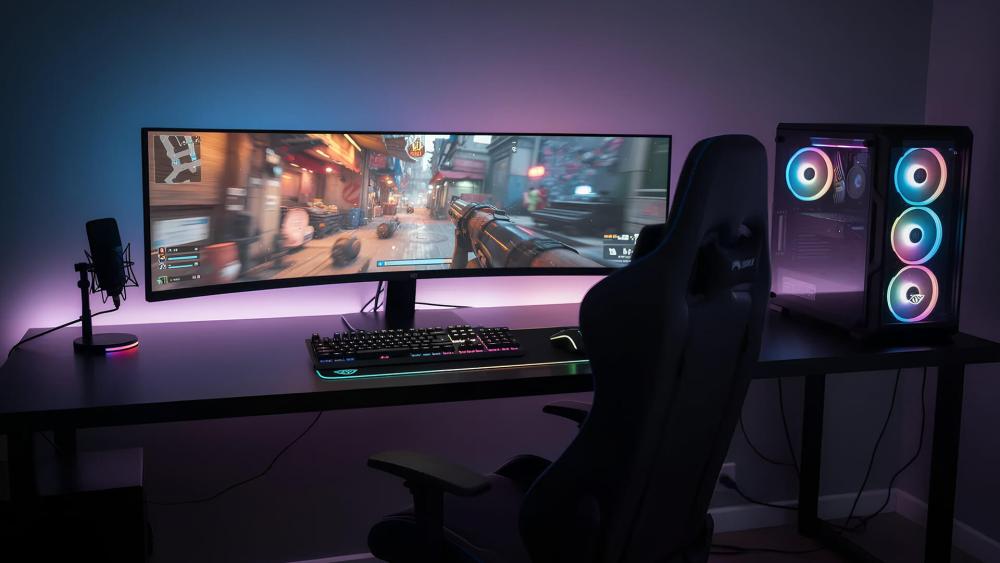
For many gamers and multitaskers comparing curved vs flat monitors, curved screens instantly stand out because of how different they feel to use. The gentle bend in the panel isn’t just for style. It changes the way you see the entire display, making larger screens easier to take in at once and giving games a more cinematic edge. Here’s where curved panels really shine.
Immersion and Gaming Experience
A curved monitor pulls the edges of the screen closer to your natural field of view, which helps create a more immersive display experience. In fast-paced games, especially racers, flight sims, and open-world titles, that wrap-around effect makes your games feel bigger and more connected. It’s also one of the biggest reasons curved monitor gaming has become a favourite among players who want deeper immersion without jumping to VR. So, using them as your go-to gaming monitors might be the best idea.
Comfort and Multitasking for Ultrawide Setups
If you’re running an ultrawide curved monitor, the curve helps reduce the amount of head movement needed when working across multiple windows. Everything sits at a more consistent distance from your eyes, which can feel more natural during long sessions. This is ideal for gamers who also need space for Discord, Spotify, browsers, or streaming software on the same display.
Visual Appeal and Workstation Setups
Curved monitors tend to give any setup a premium look, especially when paired with RGB lighting or clean cable-managed desks. They offer a modern, wrap-around aesthetic that suits high-end gaming builds and productivity workstations alike.
Benefits of Flat Monitors

Flat screens remain the standard for most setups, and are best for work and productivity. When comparing curved vs flat monitors, it’s easy to see why many users still prefer a flat panel for everyday work, competitive play and colour-sensitive tasks. Their traditional shape offers reliability, flexibility, and predictable performance across a wide range of use cases.
Precision and Professional Work (Design, Editing)
Flat monitors provide a straight, accurate viewing surface, which is key for design, editing and colour-critical jobs. Lines look true, geometry stays consistent, and IPS monitors in particular deliver strong colour accuracy across the entire panel. This makes flat monitors the safer choice for creatives who can’t risk distortion or uneven colour and want work monitors for everyday use.
Space Efficiency, Mounting and Viewing Angles
Flat panels are easier to mount on arms or walls, which can free up desk space and make positioning simpler. Because they don’t curve towards the viewer, flat screens also work better in shared environments where multiple people need a clear view of the same content. Whether it’s a home office, uni project session or small meeting space, flat screens keep things straightforward.
Budget and Mainstream Availability
If you’re choosing between curved vs flat monitors on a tighter budget, flat panels offer loads of choice at lower prices. They’re available in every size and resolution, and because the tech is more mature, you’ll often get better value at entry-level and mid-range price points. Great if you’re building your first PC setup or upgrading without going all-in on premium gear.
What to Consider Before Choosing - Key Decision Factors
When deciding between curved vs flat monitors, it’s not just about the shape. Your desk space, viewing distance, games you play and the type of work you do all influence which panel will actually feel better day to day. Before you commit, it’s worth weighing up the practical details that can make one style far more suitable than the other.
Desk Space, Viewing Distance and Setup
Curved screens tend to shine when you’re sitting close enough for the arc to match your natural field of view. If your desk is shallow or you’re right in front of your display, the curve helps keep everything comfortably in sight. On deeper desks, the benefits reduce because you’re sitting too far back to feel the wrap-around effect properly.
Primary Use Case: Gaming vs Productivity
Gamers usually benefit more from curves thanks to the boosted immersion, especially on ultrawide setups. For productivity, flat monitors often win because they keep documents, spreadsheets, and browser windows lined up cleanly without visual distortion. Thinking about how you use your PC most of the time makes the curved vs flat monitors decision much easier.
Monitor Size, Aspect Ratio and Resolution
The bigger the display, the more noticeable the curve. A large computer screen at 32 inches or wider starts to feel more natural with a bend, while smaller screens don’t gain much. Aspect ratio matters too: ultrawide curved monitor models take full advantage of the arc, but standard 16:9 flat screens remain the most versatile choice for general use.
Mounting, Shared Rooms and Number of Viewers
If you need to wall-mount your screen, share it with others or regularly move it around, flat monitors are usually more practical. They’re simpler to install, easier to align and give everyone the same viewing angle. Curved panels are more user-focused, designed for the person sitting directly in front.
Budget, Brand and Future Upgrade Path
Flat screens usually offer better value for tight budgets, while curved monitors often sit at the premium end. It’s also worth thinking about future changes, such as upgrading your graphics card or switching to a higher refresh rate later. For help, check out our guide to match your monitor to your graphics card when planning long-term.
Curved vs Flat Monitors by Use-Case
Even with all the technical details covered, the easiest way to choose between curved vs flat monitors is to think about how you actually use your setup. Different tasks benefit from different shapes, and the right choice for a gamer won’t always match what a designer, student, or office worker needs. Here’s how each type performs in the real world.
Gaming & Immersive Entertainment
Curved screens usually have the edge here. The wrap-around effect adds depth to open-world games, racers, and cinematic titles, helping your peripheral vision stay engaged. It doesn’t replace a VR headset, but it does make single-screen gaming feel more absorbing and natural. Many players say this is the main reason they prefer curved monitors over flat ones for long gaming sessions.
Office Work, Spreadsheets & Study
For productivity, flat monitors tend to make life simpler. They keep text, grids and browser windows perfectly aligned, which means fewer visual distractions and easier tracking across columns or long documents. Students and office users who spend most of the day reading or typing usually find flat panels more comfortable.
Creative/Design and Professional Editing
Accuracy matters here, and flat monitors usually win. Designers, photographers, and video editors rely on consistent geometry and colour accuracy, especially on IPS monitors. A curved screen can introduce subtle distortion, which is fine for games but not ideal for precise editing or layout work where straight lines must stay straight.
Multi-Monitor Setups / Shared Screens
If you’re running two or three displays, or you share your screen often with others, flat panels offer more flexibility. They line up cleanly in multi-monitor layouts and make positioning easier. Curved monitors work brilliantly as a single ultrawide centrepiece, but combining multiple curved screens can be trickier depending on the radius and size.
Which Monitor Shape Should You Choose in 2025?
By this point, choosing between curved vs flat monitors comes down to the kind of user you are and what you expect from your setup. Both shapes deliver strong performance, but each shines in different situations. It’s less about which one is "better" overall and more about which one fits your gaming habits, your workspace and the type of content you deal with every day.
Recommendation Matrix by User Type
To make things simpler:
- Gamers who want immersion should lean towards curved monitors, especially in ultrawide formats.
- Students and office users will usually get more clarity and practicality from flat monitors.
- Designers and creative pros benefit most from flat IPS panels with strong accuracy.
- Multitaskers using a large computer screen may prefer a curved ultrawide for comfort.
- Multi-monitor users often find flat screens easier to arrange and align.
Quick Checklist: Key Decision Criteria
Before you buy, run through this quick list:
- How close do you sit to your screen?
- Do you mainly play immersive games, or do you handle detailed work?
- Does your desk have enough depth for a curve to feel natural?
- Are you planning a multi-monitor layout?
- Does your graphics card comfortably support your chosen resolution and refresh rate?
This checklist keeps the curved vs flat monitors comparison grounded in your real everyday use. If you’re planning a full upgrade, it’s worth checking our quick guide on monitor ports explained so you know whether your PC or console can actually support the resolution and refresh rate you’re aiming for.
FAQs
Which is better, a curved or a flat monitor?
There’s no universal winner between curved vs flat monitors. Curved screens are better for immersion, especially in gaming and ultrawide setups, while flat monitors offer more accuracy and flexibility for work, design and multi-monitor layouts. The best choice depends entirely on how you use your PC.
Can you wall-mount a curved monitor?
Yes, most curved monitors can be wall-mounted as long as they support a standard VESA mount. Just keep in mind that the curve may affect how natural the viewing angles feel when mounted flat against a wall, especially if you sit off-centre.
Do curved monitors actually make a difference?
For gaming and ultrawide productivity setups, curved monitors can make a noticeable difference by bringing the edges of the display into your natural field of view. This helps with immersion and reduces head movement across a large panel. On smaller screens, the effect is less dramatic.
Will a curved monitor distort straight lines or colour?
Straight lines remain straight, but curvature can subtly alter perspective, which is why flat screens are preferred for design, CAD and precise editing work. Colour accuracy depends more on panel type (such as IPS) than the shape itself.
Does size matter more than curvature when choosing a monitor?
Yes. Curvature is most effective on larger screens, usually 32 inches and above or on ultrawide formats. A small curved display won’t deliver the same immersive feel, so size, viewing distance and how you use the screen all play a bigger role than curvature alone.
You can pay with:
*PayPal Credit Representative Example: Assumed credit limit £1,200, Representative 23.9% APR (variable). Purchase rate 23.9% p.a (variable).Terms & Conditions apply.


PayPal Credit and PayPal Pay in 3 are trading names of PayPal UK Ltd, 5 Fleet Place, London, United Kingdom, EC4M 7RD. Terms and conditions apply. Credit subject to status, UK residents only, Five Tech LTD acts as a broker and offers finance from a restricted range of finance providers. PayPal Pay in 3 is not regulated by the Financial Conduct Authority. Pay in 3 eligibility is subject to status and approval. 18+. UK residents only. Pay in 3 is a form of credit. Check if affordable and how you will repay. May make other borrowing more difficult or expensive. See product terms for more details.
Copyright © 1996-2026 Fivetech LTD | Terms and Conditions
box.co.uk & Box are trading names of Five Tech Limited. Registered office: Box LTD, Unit 10 Woodford Trading Estate, Woodford Green IG8 8HF