


 Menu
MenuMenu


Get Sales Advice from Mon - Fri 9am - 5:00pm:
020 3337 8950LAST UPDATED: February 23, 2026
How to Fix AIO Pump and Fan Failure in CPU Water Coolers
A modern CPU water cooler, also known as an AIO liquid cooler, is designed to maintain stable temperatures under heavy workloads. However, when an AIO pump or fan begins to fail, cooling issues can arise suddenly. From sudden temperature spikes to unexpected shutdowns, these faults often go unnoticed until performance is noticeably impacted. This is especially common in water-cooled gaming PCs, where sustained loads push cooling hardware under higher-than-normal stress.
This guide explains how AIO pump and fan failures occur, what warning signs to identify, and how to diagnose and fix them safely. Whether you’re using a high-end liquid setup or choosing between an air or liquid CPU cooler, understanding how your cooling system functions can help prevent long-term damage and keep your system running reliably.
How AIO CPU Water Coolers Work
An AIO setup is a sealed cooling solution designed to move heat away from the processor efficiently without the complexity of a custom loop. In a typical CPU water cooler, the pump, cold plate, tubing, radiator, and fans work together as a closed system, making installation simpler while still offering strong thermal performance compared to many traditional PC CPU coolers.
Pump and Fan Cooling Roles
The pump sits on top of the CPU and is responsible for pushing the CPU cooler’s liquid through the loop. Heat is absorbed at the cold plate, carried through the tubes, and released at the radiator. Radiator fans then pull or push air through the fins to disperse that heat out of the case. If either the CPU water cooler pump or fan is not working correctly, temperatures can rise rapidly, even in systems built around AIO CPU coolers. This division of labour is what makes a closed-loop cooler effective in compact builds and high-performance setups alike, including many water-cooled gaming PCs.
Common Causes of AIO Failure
Despite being marketed as low-maintenance, an all-in-one CPU cooler can still fail over time. Electrical issues, pump motor wear, or air entering the loop can all lead to reduced coolant flow. In some cases, fans degrade before the pump does, while in others, a failing AIO pump becomes the main issue. Even users running the best water-cooling CPU coolers can encounter these problems after extended use, particularly if they have been operating under constant load.
Wondering which cooling solution is right for modern processors? Read our guide on Air vs AIO vs Custom Loops for Modern Processors to understand the differences and choose the best option for your build.
Warning Signs of AIO Pump and Fan Failure
Early warning signs are often subtle, but recognising them quickly can prevent excessive CPU strain. When a CPU water cooler begins to fail, cooling performance usually degrades before a complete breakdown occurs, making it important to spot changes in temperature, noise, or fan behaviour.
CPU Overheating with an AIO
A common indicator is rising CPU temperatures during tasks that previously ran smoothly. You may notice the system reaching thermal limits more quickly, followed by reduced clock speeds as CPU thermal protection activates. This can occur even if a CPU with an AIO water cooler is installed correctly. It is especially likely if coolant circulation slows or airflow through the radiator becomes restricted.
Unusual Pump or Fan Noise
Audible changes often indicate mechanical issues. AIO cooler pump noise may present as a constant buzzing, while rattling or gurgling noises from the cooler can suggest air trapped in the loop. Fans can also develop problems over time, leading to grinding or irregular fan noises. These sounds usually indicate wear rather than normal operation and should not be ignored.
Pump or Fans Not Spinning
A more obvious symptom occurs when the pump or radiator fans stop spinning. A radiator fan that stops spinning can quickly cause heat buildup, while a failing AIO pump often leads to immediate temperature spikes. In some cases, the system may boot, but a malfunctioning CPU cooler fan can trigger warnings or shutdowns once the processor heats up.

How to Diagnose AIO Pump and Fan Problems
Proper diagnosis helps determine whether the issue lies with the pump, fans, or system configuration once warning signs appear. A methodical check can save time and prevent replacing a CPU water cooler that is still functional.
Check Pump and Fan RPM
Start by checking pump and fan speeds in the BIOS or through monitoring software. A healthy CPU water cooler pump should report a steady RPM, while radiator fans should scale smoothly with temperature changes. Sudden drops, erratic readings, or zero RPM values often point to a failing AIO pump or an AIO fan failure. Some CPU liquid coolers come with a screen that shows live pump data, making it easier to spot issues without relying solely on software.
Inspect Power and Connections
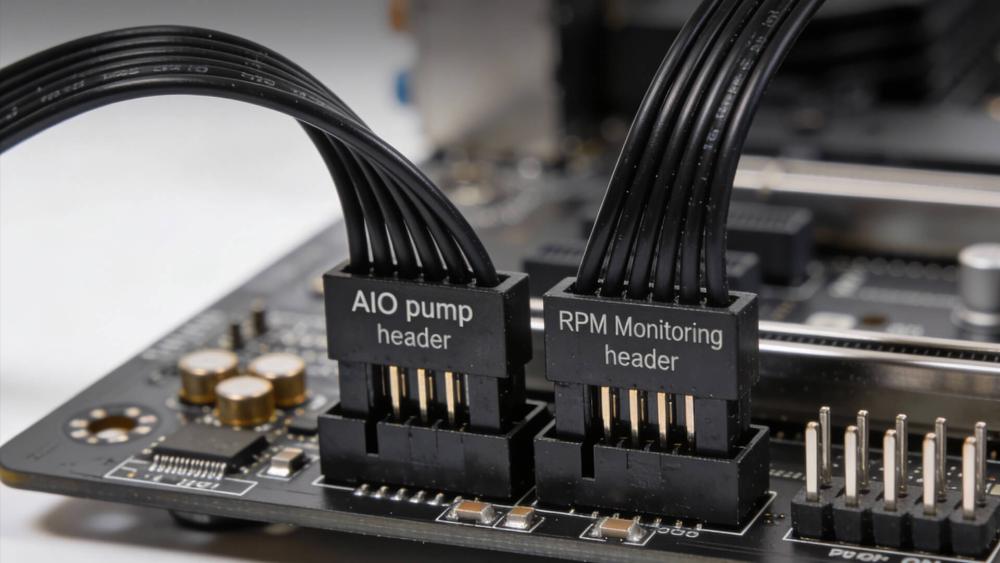
Next, inspect all power and data connections. The pump should be connected to the correct header and supplied with consistent power, while fans must be seated firmly in their designated ports. Loose connectors, incorrect header assignments, or missing SATA power can all cause a CPU water cooler pump to behave unpredictably. These checks apply across most AIO cooler designs and are a common source of problems even in otherwise stable PC CPU cooler setups.
How to Fix AIO Pump and Fan Failure
Once the cause has been identified, many AIO pump and fan failure issues can be resolved without replacing the entire unit. Applying the correct fix can restore normal operation and extend the lifespan of a CPU water cooler, particularly when the problem is configuration or airflow-related rather than mechanical.
Reconfigure Pump and Fan Headers
Incorrect header configuration is a common cause of pump and fan instability. The pump should be connected to a dedicated pump or CPU_OPT header and set to run at a constant speed, while radiator fans should use PWM control. Misconfigured settings can make the CPU water cooler pump appear faulty when it is not. This step is especially important when upgrading or swapping between different AIO CPU coolers, as header behaviour can vary between motherboards.
Remove Air from the AIO Loop
If air has entered the loop, repositioning the system can help move bubbles away from the pump. Tilting the case gently while the system is running may reduce gurgling and AIO pump noise. Although this does not repair damaged components, it can restore proper coolant flow in an AIO liquid cooler affected by trapped air. Correct radiator placement also plays a role here, particularly in taller cases where tube orientation matters.
Replace Faulty Radiator Fans
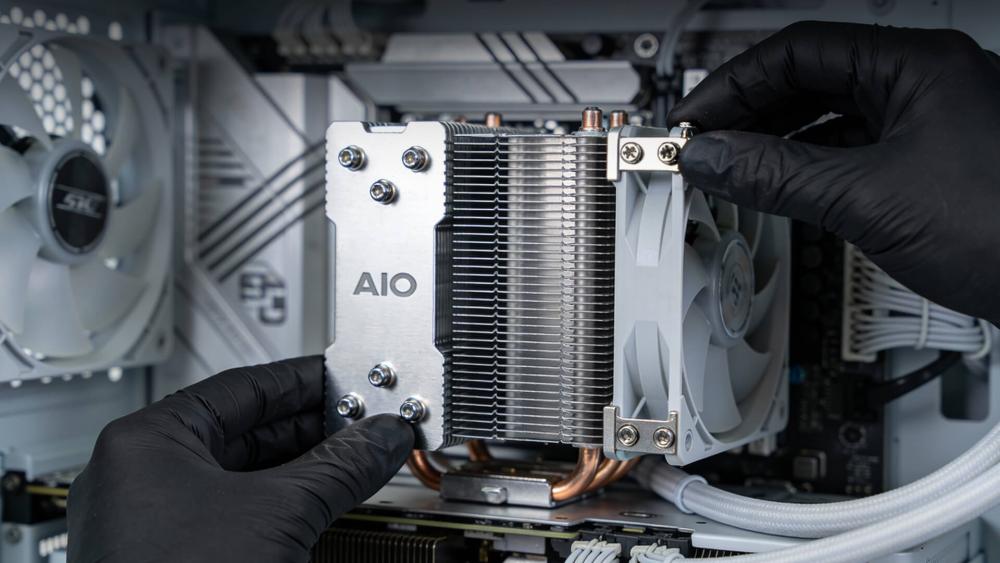
Fans are often easier and cheaper to replace than the pump itself. If a CPU water cooler fan shows inconsistent speeds or has stopped spinning, replacing it can immediately improve cooling performance. This approach is common in the best budget water cooler CPU setups, where the pump remains reliable, but fans wear out first.
When AIO Pump Replacement Is Necessary
Not all AIO problems can be fixed through configuration or maintenance. In some cases, replacing the pump or the entire unit is the only reliable option to protect the CPU and maintain stable performance from your CPU water cooler.
Signs of Permanent Pump Failure
A pump that no longer reports RPM, fails to move coolant, or causes instant temperature spikes is usually beyond repair. A dead AIO pump often leads to rapid overheating even at idle, making the system unsafe to run. Persistent noise, such as grinding or constant buzzing, can also indicate internal motor damage rather than a temporary issue. When these symptoms appear consistently, continuing to troubleshoot rarely improves the situation and may risk CPU damage.
Repair vs Replacement Decision
Because most AIOs are sealed, pump repairs are not practical for end users. At this stage, replacement becomes the sensible choice. Depending on budget and system requirements, users may opt for a direct replacement or upgrade to a newer AIO cooler with improved reliability. This is also a good time to reassess cooling needs, especially if the system has been upgraded or workloads have increased since the original cooler was installed.
How to Prevent Future AIO Failures
Preventative care plays a major role in extending the lifespan of any CPU water cooler. While AIOs are designed to be low maintenance, correct installation and regular monitoring can significantly reduce the risk of pump or fan failure over time.
Correct AIO Installation
Proper installation starts with radiator placement and tube orientation. To prevent air from getting trapped in the pump, mount the radiator so the pump is lower than the highest point in the loop. Secure mounting pressure on the CPU block is equally important, as poor contact can reduce heat transfer efficiency and strain the cooling system. These best practices apply across most liquid cooling setups, from entry-level options to premium closed-loop designs.
Monitor Pump Health Regularly
Regularly checking temperatures and pump performance allows early detection of issues before they escalate. Sudden changes in noise, RPM readings, or cooling performance often indicate potential issues. Some AIO coolers include monitoring tools that track long-term performance trends. This makes it easier to identify a failing component before it affects system stability.
Conclusion
A failing AIO pump can quickly reduce the effectiveness and reliability of a CPU water cooler. However, many issues can be identified and fixed with the right approach. By spotting early warning signs, performing proper diagnostics, and applying targeted fixes, you can often restore effective cooling without replacing the cooler immediately. If the pump has failed, knowing when to upgrade ensures your system stays protected and performs reliably.
Frequently Asked Questions
How to tell if an AIO pump has failed?
A failed pump is usually indicated by rapidly rising CPU temperatures, little to no coolant movement, and missing or zero RPM readings. Loud or unusual noises can also signal internal failure.
How to bypass CPU fan error with AIO?
CPU fan errors often appear when the motherboard does not detect a fan signal. This can usually be resolved by adjusting BIOS settings to ignore fan warnings or ensuring the correct header is used.
How do AIO coolers fail?
AIO coolers typically fail due to pump wear, electrical issues, air buildup in the loop, or fan degradation. Over time, internal components can wear out even under normal use.
Can I replace the fan on an AIO pump?
Yes, radiator fans can usually be replaced if they fail. However, the pump itself is sealed and cannot be repaired or swapped independently in most AIO designs.
How long should an AIO CPU cooler last?
Most AIO coolers last several years under normal use, but their lifespan depends on operating conditions, installation quality, and how heavily the system is used.
You can pay with:
*PayPal Credit Representative Example: Assumed credit limit £1,200, Representative 23.9% APR (variable). Purchase rate 23.9% p.a (variable).Terms & Conditions apply.


PayPal Credit and PayPal Pay in 3 are trading names of PayPal UK Ltd, 5 Fleet Place, London, United Kingdom, EC4M 7RD. Terms and conditions apply. Credit subject to status, UK residents only, Five Tech LTD acts as a broker and offers finance from a restricted range of finance providers. PayPal Pay in 3 is not regulated by the Financial Conduct Authority. Pay in 3 eligibility is subject to status and approval. 18+. UK residents only. Pay in 3 is a form of credit. Check if affordable and how you will repay. May make other borrowing more difficult or expensive. See product terms for more details.
Copyright © 1996-2026 Fivetech LTD | Terms and Conditions
box.co.uk & Box are trading names of Five Tech Limited. Registered office: Box LTD, Unit 10 Woodford Trading Estate, Woodford Green IG8 8HF