


 Menu
MenuMenu


Get Sales Advice from Mon - Fri 9am - 5:00pm:
020 3337 8950LAST UPDATED: April 08, 2026
How to Choose the Right Lenovo Laptop for Students, Professionals, & Gamers – Complete Guide
Choosing the right laptop can feel overwhelming, especially when so many options promise speed, portability, and long battery life. Whether you are preparing for a new academic term in the spirit of back to school shopping, upgrading your work setup as a busy professional, or hunting for a gaming machine that can keep up with the latest releases, the decision matters.
A laptop today is more than just a device. It is a study partner, a travel companion, and in many cases, the heart of your entertainment and creativity. Lenovo has become a trusted name worldwide because it caters to every type of user. From affordable models that students can rely on to powerful machines designed for coding, video editing, and gaming, Lenovo offers a wide portfolio. The brand is known for striking the right balance between durability, performance, and design. This makes it one of the most dependable choices for people who want a laptop that lasts and adapts to different lifestyles.
In this blog, we will look closely at how to choose the right Lenovo laptop for your needs. We will explore what makes each series unique, which features matter most, and how you can pick a device that matches your day-to-day life - whether that means slim portability, touchscreen flexibility, or raw GPU performance. With so many categories available, from IdeaPad to ThinkPad, Yoga to Legion, there is a Lenovo laptop built for you. So let's look into it!
Lenovo Laptop Range Explained – Understanding the Series
When researching the Lenovo laptop range, it helps to understand how Lenovo structures its lineup. Each series is built for a specific type of user:
- IdeaPad: Affordable, everyday performance
- ThinkPad: Business durability and security
- Yoga: Premium 2-in-1 flexibility
- Legion & LOQ: Gaming and creative power
- V Series: Budget-friendly office machines
This structure highlights Lenovo's product range and flexibility, ensuring there is a model suited to students, professionals, gamers, and creators alike. If you want to understand the difference between these ranges, our Lenovo IdeaPad vs ThinkPad vs Yoga vs LOQ comparison might be a good starting point.
How to Choose the Right Lenovo Laptop

Buying a laptop is no longer just about picking the fastest processor or the largest storage drive. It is about balancing performance, portability, design, and budget in a way that matches your lifestyle. Lenovo's wide range means there is a laptop for almost every scenario, but making the right choice requires careful consideration of your needs. Below is a step-by-step guide that will help you identify the perfect Lenovo laptop for you.
Step 1: Define Your Primary Purpose
The first and most important step is to decide what you will use the laptop for.
- For students: Look at affordable Lenovo laptops in the IdeaPad series. These provide reliable performance for essays, research, online learning, and entertainment.
- For professionals: Choose Lenovo laptops for office productivity, such as ThinkPads. They offer durability, strong battery life, and security features.
- For creatives: A touchscreen Lenovo laptop for designers and editors from the Yoga series will give you flexibility and pen support.
- For gamers: Go for the Lenovo Legion series, which offers laptops with powerful GPUs and high refresh rate displays for competitive play.
Knowing your main purpose helps you avoid paying for features you will not need while ensuring you do not under-buy and face limitations later.
Step 2: Choose the Right Processor
The processor is the heart of your laptop. Here is a breakdown of what to choose:
- Intel Core i3 or AMD Ryzen 3: Entry-level chips, suitable for very light tasks.
- Intel Core i5 or AMD Ryzen 5: A sweet spot for students and office users.
- Intel Core i7 or AMD Ryzen 7: Perfect for heavy multitasking, coding, and creative projects.
- Intel Core i9 or AMD Ryzen 9: High-end chips for advanced gaming, 3D rendering, and video editing.
If you are looking for the best Lenovo laptop for coding, aim for at least an Intel Core i7 or AMD Ryzen 7 to handle compilers, virtual machines, and multitasking smoothly.
Step 3: Consider RAM and Storage
For the RAM, consider:
- 8GB RAM: Minimum recommended for students and casual users.
- 16GB RAM: Ideal for professionals, coders, and designers who multitask heavily.
- 32GB RAM or more: Needed for advanced gaming, video editing, and animation.
For storage:
- Always prioritise Lenovo laptops with fast SSD storage. They boot quickly, load apps in seconds, and improve overall responsiveness.
- 256GB SSD is enough for students.
- 512GB or 1TB SSD is better for professionals and gamers who handle larger files.
Step 4: Look at Battery Life
Battery life is one of Lenovo's strongest points, but you should still check the specifications.
- Students should consider Lenovo laptops with long battery life, as they may go from class to class without access to a charger.
- Travelling professionals will benefit from ThinkPads that often exceed 10 hours of battery life.
- Gamers and video editors may need to compromise slightly on endurance since high-performance components drain batteries faster.
Step 5: Decide on Display Type
Your screen impacts your daily experience more than you might realise.
- Full HD (1920x1080): Standard for most Lenovo laptops, ideal for students and professionals.
- 2K or 4K Displays: Found in higher-end Yogas and ThinkPads, perfect for creative design and media editing.
- High Refresh Rate Displays (120Hz, 144Hz, 240Hz): Essential if you are choosing Lenovo laptops with high refresh rate displays for gaming. Smooth visuals make a big difference in fast-paced titles.
- Touchscreens: Yoga laptops shine here, great for note-taking, sketching, or creative projects.
Step 6: Pay Attention to Design and Portability
Design matters, especially if you carry your laptop daily.
- Slim Lenovo laptops are ideal for students and travellers. Many IdeaPads and Yogas weigh less than 1.5kg.
- Durable Lenovo laptops for business travel in the ThinkPad series are slightly heavier but offer rugged designs that survive tough environments.
- Backlit keyboards are invaluable if you work at night or travel often. Look for Lenovo laptops with a backlit keyboard in both IdeaPad and ThinkPad ranges.
Step 7: Security and Extra Features
For professionals and students dealing with sensitive information, Lenovo laptops with a fingerprint sensor provide quick and secure logins. Other features to look for:
- Webcam privacy shutters for added protection.
- Thunderbolt or USB-C ports for fast charging and data transfers.
- Stylus support in Yoga models for creative tasks.
Step 8: Check for Eco-Friendly Choices
More buyers today are interested in sustainability. Lenovo is increasingly offering eco-friendly laptop options, such as models built with recycled materials and lower energy consumption. Choosing these laptops helps reduce your carbon footprint while still getting excellent performance.
Step 9: Match Your Budget to the Right Series
Budget-friendly: IdeaPad Slim and Flex.
Mid-range professional: ThinkPad T-series or X-series.
Creative professionals: Yoga Slim or Yoga 9i.
Gaming: Legion 5 Pro, Legion Slim 7, or LOQ 15 for entry-level gaming.
When you align your budget with your purpose, Lenovo ensures there is a perfect match without unnecessary overspending.
Best Lenovo Laptop Series Available at Box

Lenovo offers several laptop series; each designed with a different audience in mind. Here is a quick guide to help you understand the differences. For a quick round-up of the most popular models right now, take a look at our list of the best Lenovo laptops to consider in the UK.
Lenovo IdeaPad – Affordable and Reliable
The IdeaPad series is aimed at students and everyday users. These are affordable Lenovo laptops that balance portability, SSD storage, and decent battery life. Perfect for back to school, streaming, and light work.
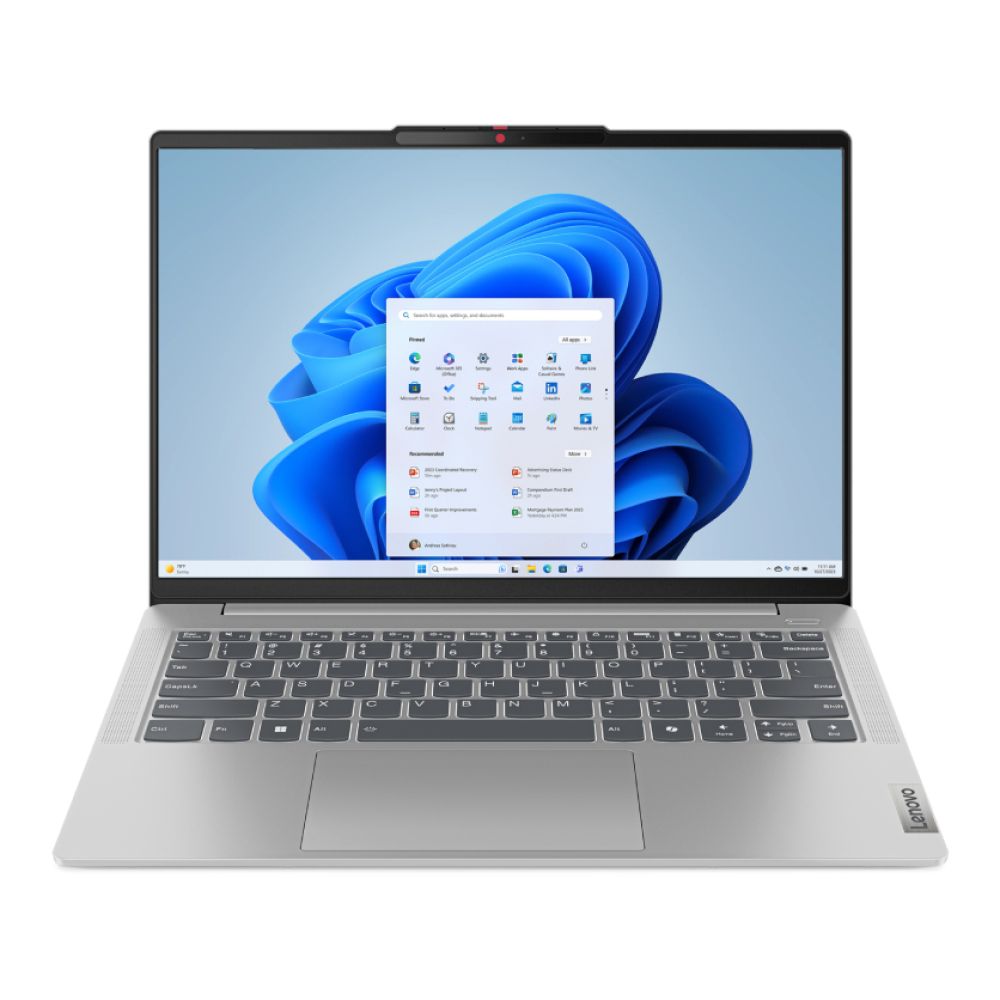
1. Lenovo IdeaPad Slim 5 14IMH9 – Business Power in a Slim Design
The Lenovo IdeaPad Slim 5 14IMH9 is designed for professionals who want both portability and performance. With the latest Intel Core Ultra 7 155H processor, 16GB LPDDR5x RAM, and a spacious 1TB SSD, it delivers smooth multitasking, fast responsiveness, and ample storage for business files. The 14-inch WUXGA OLED display provides sharp visuals and vibrant colours, making it ideal for presentations and long working sessions.
Built with Intel Arc Graphics and running on Windows 11 Home, it is well-suited for productivity, light creative work, and business applications. Slim yet powerful, with modern connectivity through HDMI and USB-C, this laptop is perfect for professionals seeking a reliable, future-ready device.
Shop Lenovo IdeaPad Slim 5 Ultra 7
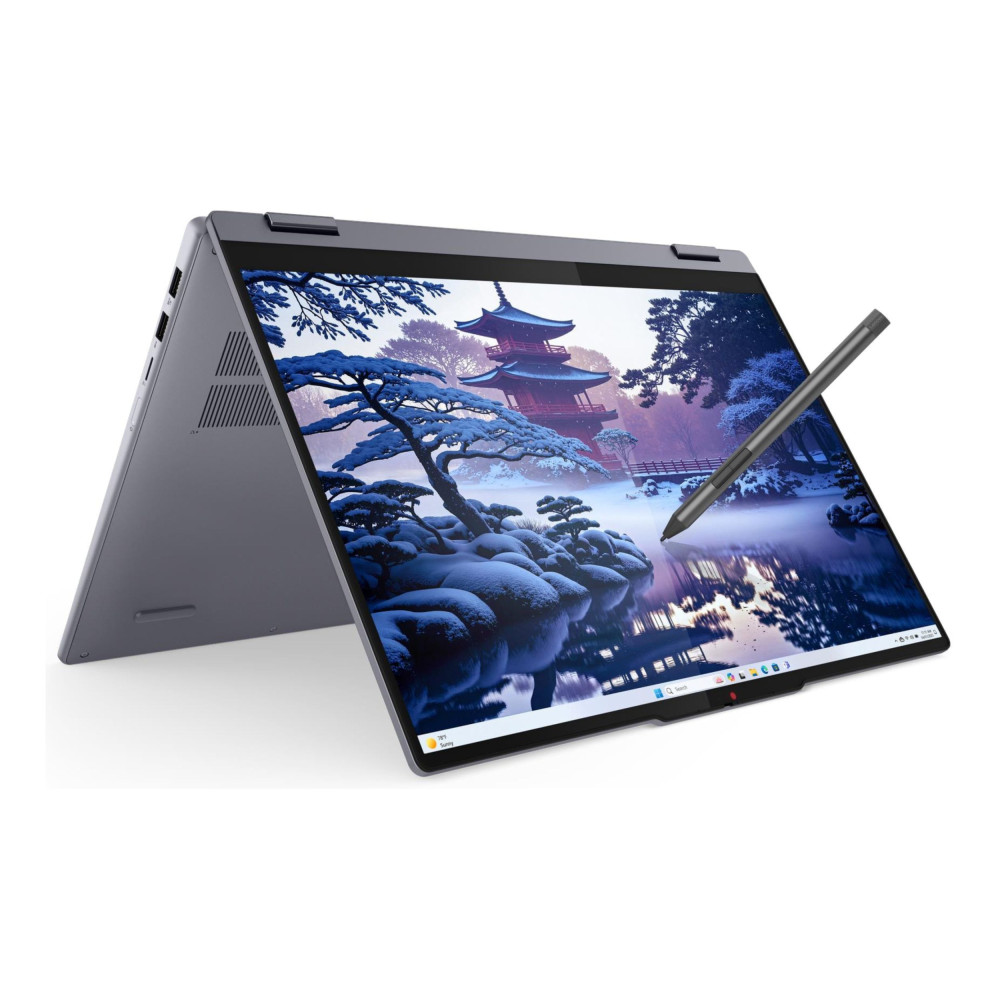
2- Lenovo IdeaPad 5 2-in-1 16IAL10 – AI-Ready Flexibility with Bigger Screen Power
The Lenovo IdeaPad 5 2-in-1 16IAL10 (83KS001UUK) takes everyday versatility to the next level, combining intelligent AI-ready performance with a larger 16-inch display for enhanced productivity. Powered by the Intel® Core™ Ultra 5 225U 12-core processor, this laptop delivers smart, efficient power for daily workloads, multitasking, content creation, and professional applications. With 16GB LPDDR5x RAM and a spacious 1TB SSD, it ensures seamless app switching, fast boot times, and plenty of storage for large files, projects, and media libraries.
The 16-inch WUXGA (1920 x 1200) IPS touchscreen provides bright, crisp visuals with extra vertical workspace, making it ideal for multitasking, spreadsheets, creative design, and streaming. Thanks to its flexible 2-in-1 design, you can switch effortlessly between laptop and tablet modes for note-taking, presentations, or collaborative work sessions.
As part of Lenovo's next-generation lineup, this AI-ready laptop includes Wi-Fi 7 and Bluetooth 5.4, delivering lightning-fast, future-ready connectivity. The inclusion of HDMI, dual USB-C, USB-A ports, and a MicroSD card reader ensures maximum versatility for modern workflows. A backlit UK keyboard enhances productivity in low-light environments, while Windows 11 Home provides a clean, secure, and intuitive operating system experience.
Finished in sleek Luna Grey, this slim yet powerful 2kg device is ideal for students, hybrid professionals, and creators who want performance, flexibility, and future-proof connectivity in one adaptable machine.
Shop Lenovo IdeaPad 5 2-in-1 16IAL10 (83KS001UUK)
Lenovo ThinkBook – Durable and Professional
ThinkBooks are legendary for their durability and reliability, making them durable Lenovo laptops for business travel. They are popular among professionals who value long battery life, strong build quality, and security features like fingerprint sensors.
1. Lenovo ThinkBook 16 – AMD Ryzen 5, 8GB RAM, 256GB SSD, Windows 11 Pro
The Lenovo ThinkBook 16 is a fantastic choice for professionals and small business users who want a balance of performance and value. Powered by an AMD Ryzen 5 7535HS Hexa-Core processor, this laptop can handle demanding productivity tasks such as office applications, light coding, and multitasking with ease. The 16-inch WUXGA IPS display (1920 x 1200 resolution) gives you more vertical screen space, which is a real advantage for spreadsheets, documents, and presentations.
With 8GB RAM and a 256GB SSD, the ThinkBook provides quick boot times and smooth day-to-day performance. The AMD Radeon 660M integrated graphics also support streaming and light creative tasks. Running on Windows 11 Pro, it is business-ready out of the box, complete with advanced security features.
Connectivity is also strong, with HDMI, USB 3.2, and USB-C (USB4 40Gbps) ports, giving flexibility for displays, peripherals, and fast data transfers.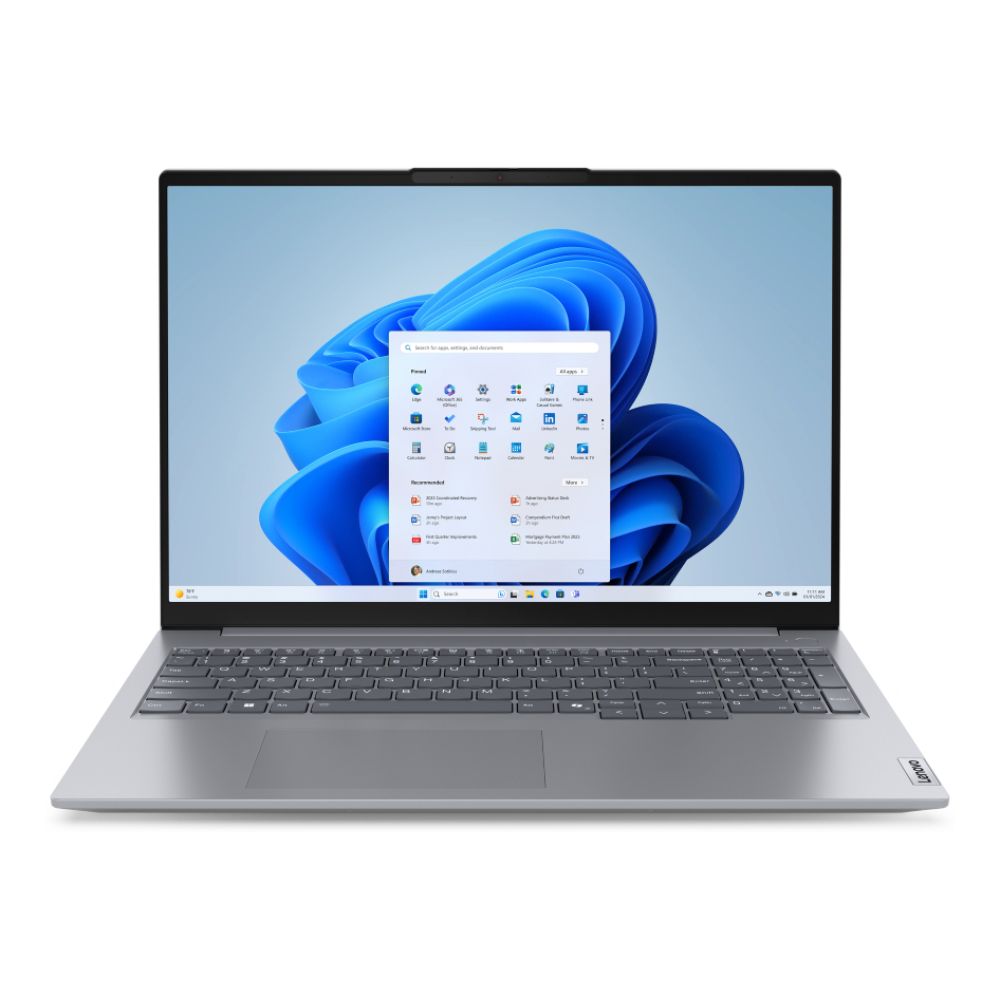
Shop Lenovo ThinkBook 16 AMD Ryzen 5
Lenovo Legion – Gaming and Performance
The Legion series is designed for gamers and creators. The Legion series is designed for gamers and creators. You can view the full Lenovo Legion gaming laptop range if you are searching for the best Lenovo laptop for gaming. With powerful GPUs and high refresh rate displays, these laptops deliver smooth performance for gaming, video editing, and animation.
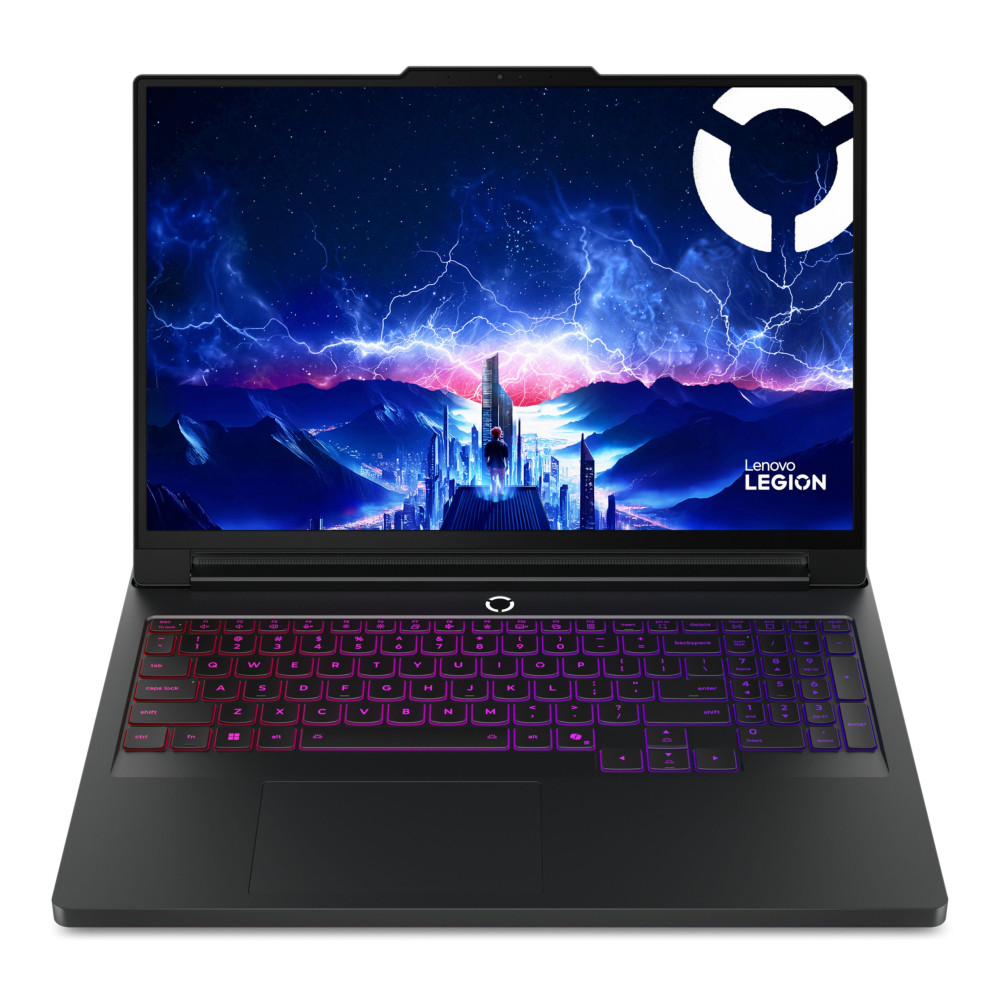
1. Lenovo Legion Pro 7 16IAX10H – The Ultimate Gaming Beast
For gamers and creators who demand the best, the Lenovo Legion Pro 7 16IAX10H sets a new standard. Powered by the Intel Core Ultra 9 275HX 24-core processor, paired with 32GB DDR5 RAM and a lightning-fast 1TB SSD, it is built to handle the most demanding modern games and creative workloads. The dedicated NVIDIA GeForce RTX 5080 GPU ensures cutting-edge performance with ray tracing, AI-enhanced graphics, and seamless 4K gaming.
The 16-inch WQXGA OLED display with high resolution and rich colour depth provides an immersive experience for both gaming and video editing. Connectivity is top-notch with Thunderbolt 4, Wi-Fi 7, HDMI 2.1, and RJ-45, making it a powerhouse for eSports players, streamers, and professionals who need uncompromising performance in one machine.
Shop Lenovo Legion Pro 7 Ultra 9
Lenovo V Series – Business Ready and Affordable
The V Series offers affordable Lenovo laptops for office productivity. Browse the Lenovo V Series laptops for reliable business machines at competitive prices. They are straightforward, powerful, and ideal for professionals who need reliable machines at a lower cost.
1. Lenovo V15 G4 AMN – Reliable Business Performance at Exceptional Value
The Lenovo V15 G4 AMN (82YU00JYUK-V15) is a dependable business laptop built for professionals who need reliable performance without stretching their budget. Powered by the AMD Ryzen 5 7520U Quad-Core processor (up to 4.3GHz Turbo Boost), this model handles everyday office tasks, multi-tab browsing, spreadsheets, video calls, and productivity software with confidence.
Equipped with 16GB LPDDR5 RAM and a fast 512GB SSD, it delivers smooth multitasking and quick load times, ensuring responsive performance throughout the workday. The 15.6-inch Full HD (1920 x 1080) LCD display provides clear visuals and ample screen space for documents, reports, and presentations, making it ideal for business environments.
Integrated AMD Radeon 610M graphics support light creative tasks, streaming, and presentation work comfortably. Connectivity is practical and modern, with USB Type-C, USB-A, HDMI, Wi-Fi, Bluetooth 5.1, and Ethernet, ensuring flexibility whether you are working from the office or remotely.
Running on Windows 11 Pro, this laptop includes enhanced security features and business-ready tools straight out of the box. Weighing just 1.65kg and finished in a sleek black design, the Lenovo V15 G4 AMN is a smart choice for professionals looking for a durable, cost-effective business machine backed by a 1-year warranty.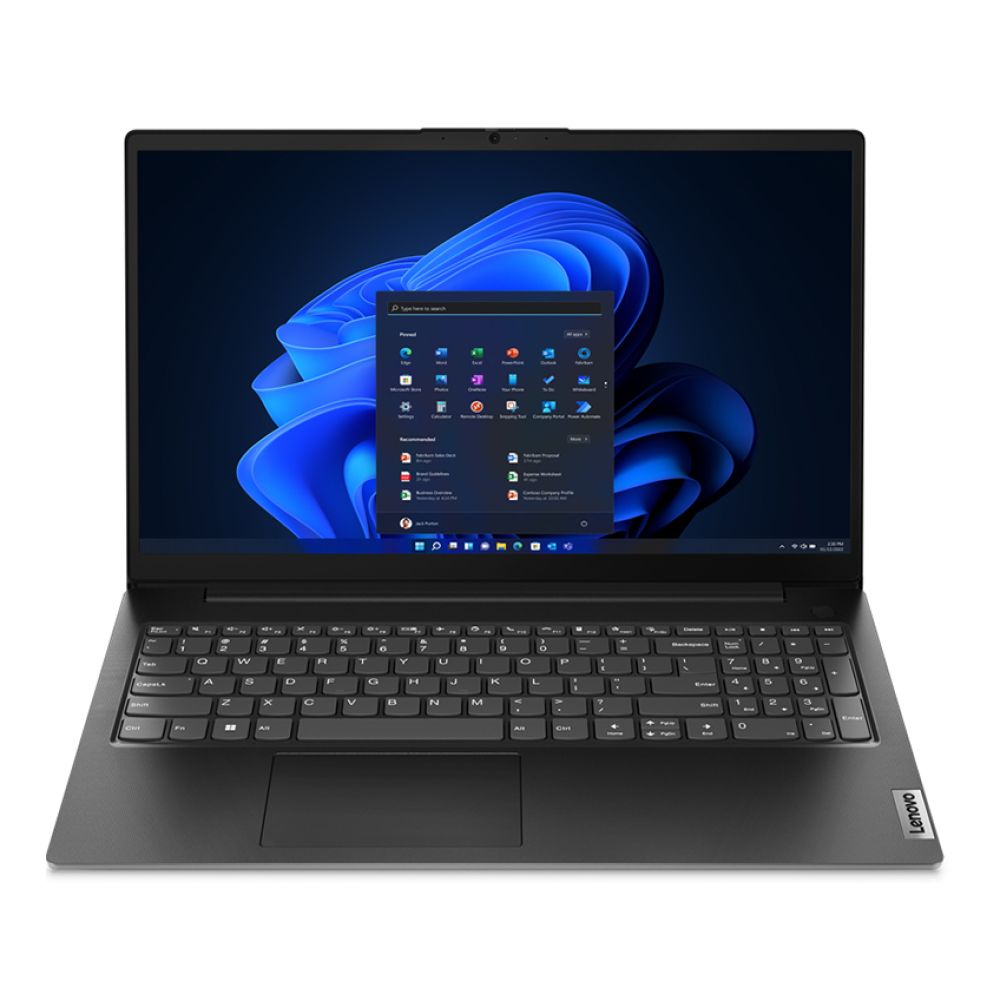
Shop Lenovo V15 G4 AMN AMD Ryzen 5
2. Lenovo V14 – Intel Core i5, 16GB RAM, 512GB SSD, Windows 11 Pro
If you are looking for a slim Lenovo laptop that delivers strong multitasking performance, the Lenovo V14 is an excellent contender. It comes with the Intel Core i5-13420H Octa-Core processor, giving it enough power for everyday office work, browsing, streaming, and even heavier workloads like coding and multitasking between applications.
This model shines with its 16GB RAM and 512GB SSD storage, ensuring lightning-fast performance, smooth file handling, and ample space for documents, videos, and applications. The 14-inch Full HD display makes it compact and portable, ideal for professionals and students who are often on the go.
It runs Windows 11 Pro, meaning it is tailored for office productivity, with enterprise-level features such as remote desktop, BitLocker encryption, and enhanced multitasking support. Combined with its sleek black design and free delivery, the Lenovo V14 is a strong option for buyers who want a Lenovo laptop with backlit keyboard-level productivity (though this model specifically comes with a TN panel for efficiency).

There are many other Lenovo Series you can find on box.co.uk. If you are still deciding between ranges, our in-depth article helps you compare Lenovo IdeaPad and ThinkPad, as well as Yoga and LOQ models, to see which series best fits your workflow.
Why Choose Lenovo?

Lenovo has become one of the world's leading laptop makers by offering consistent quality across a wide price range. From budget-friendly models to premium business machines and gaming powerhouses, Lenovo ensures that every user can find a device suited to their needs.
1. Reliability and Durability:
Lenovo is known for building laptops that last. The ThinkPad series is often tested to military standards, making them excellent durable Lenovo laptops for business travel. Even budget ranges like IdeaPad feature sturdy hinges and solid chassis designs, giving students and professionals confidence that their laptops can handle everyday use.
2. Affordable Options:
Lenovo's affordable laptops in the IdeaPad and V series are popular for back to school and everyday tasks. Even at lower price points, they often include SSD storage, good displays, and reliable performance, ensuring buyers do not compromise on essentials.
3. Long Battery Life:
Many Lenovo laptops, especially ThinkPads and Yogas, deliver a long battery life of 8 to 12 hours. This makes them ideal for professionals working long days without charging and students who need a dependable laptop through classes and study sessions.
4. Innovation and Flexibility:
Lenovo pushes innovation with designs like the Yoga 2-in-1, which converts into tablet or tent mode. Features such as backlit keyboards, fingerprint sensors, and AI-based performance adjustments make Lenovo laptops more modern and user-friendly, especially for creatives who prefer touchscreen Lenovo laptops.
5. Strong Performance:
Lenovo caters to all users, from light web browsing to professional video editing. ThinkPads are perfect for coding and productivity, while the Legion series offers laptops with powerful GPUs and high refresh rate displays, making them favourites among gamers and content creators. If you're unsure how gaming laptops compare more broadly, our guide on how to choose the right gaming laptop explains refresh rates, GPUs, and performance tiers in detail.
6. Portability and Design:
Slim Lenovo laptops like IdeaPad Slim and Yoga weigh under 1.5kg, ideal for students and travellers. Despite their compact form, Lenovo ensures useful ports like HDMI and USB-C are available, avoiding the hassle of carrying adapters.
7. Security Features:
Data protection is a priority for Lenovo. Many models come with biometric authentication and fingerprint sensors, ensuring fast and secure access. This appeals particularly to professionals dealing with sensitive business data.
8. Sustainability:
With eco-friendly Lenovo laptop options built using recycled materials and energy-efficient components, Lenovo shows a commitment to reducing its carbon footprint. This makes them attractive to buyers who value sustainability as much as performance.
9. After-Sales Support:
Lenovo offers reliable after-sales service, extended warranties, and widespread support centres. This reassures users that their investment is backed by strong customer care. Even the most reliable laptops may face hiccups, so we created a dedicated guide on how to troubleshoot Lenovo performance issues quickly and effectively that can help me fix most issues.
Are Lenovo Laptops Good in 2026?
If you're still asking are Lenovo laptops good, the short answer is yes — but the right model depends on your usage.
- Students benefit most from IdeaPad models.
- Business users rely on ThinkPad durability and security.
- Creatives prefer Yoga flexibility.
- Gamers choose Legion for performance.
Lenovo consistently delivers reliability across entry-level, mid-range, and premium tiers, which is why it remains one of the most trusted laptop brands globally.
Conclusion
Choosing the right laptop is never a one-size-fits-all decision. Lenovo stands out because it offers something for every user, whether you are a student searching for affordable Lenovo laptops, a professional needing a durable Lenovo laptop for business travel, or a gamer looking for Lenovo laptops with a powerful GPU and high refresh rate display. The variety across IdeaPad, ThinkPad, Yoga, Legion, and LOQ means you can always find a device that matches your lifestyle.
As you weigh your options, remember that the top Lenovo laptops to consider are those that align with your specific needs. If long battery life is a priority, ThinkPads and Yogas excel. For creative work, touchscreen Lenovo laptops for graphic design and animation, like the Yoga 9i, are ideal. And if gaming or video editing is your focus, the Legion Pro series delivers unmatched performance.
Ultimately, Lenovo's balance of reliability, innovation, and value makes it a trusted choice across the globe. With the guidance in the Lenovo laptop buying guide, you can confidently choose a laptop that will support your studies, career, creativity, or gaming journey for years to come.
Frequently Asked Questions
What are the different Lenovo laptop models?
Lenovo offers several main series: IdeaPad, ThinkPad, Yoga, Legion, LOQ, and V Series. Each caters to different users, from students to gamers.
Which Lenovo laptop is best for me?
The best Lenovo laptop depends on your needs. Students should consider IdeaPad, professionals should choose ThinkPad, creatives may prefer Yoga, and gamers should look at Legion.
Lenovo IdeaPad vs ThinkPad vs Yoga vs Legion – what's the difference?
IdeaPad focuses on affordability, ThinkPad on business durability, Yoga on 2-in-1 flexibility, and Legion on gaming performance.
Are Lenovo laptops good for long-term use?
Yes. ThinkPads are especially known for durability, while IdeaPad and Legion models offer strong value and reliable performance.
What is the best Lenovo laptop for students?
The IdeaPad Slim and Flex models are often considered the best Lenovo laptops for students due to affordability, battery life, and portability.
You can pay with:
*PayPal Credit Representative Example: Assumed credit limit £1,200, Representative 23.9% APR (variable). Purchase rate 23.9% p.a (variable).Terms & Conditions apply.


PayPal Credit and PayPal Pay in 3 are trading names of PayPal UK Ltd, 5 Fleet Place, London, United Kingdom, EC4M 7RD. Terms and conditions apply. Credit subject to status, UK residents only, Five Tech LTD acts as a broker and offers finance from a restricted range of finance providers. PayPal Pay in 3 is not regulated by the Financial Conduct Authority. Pay in 3 eligibility is subject to status and approval. 18+. UK residents only. Pay in 3 is a form of credit. Check if affordable and how you will repay. May make other borrowing more difficult or expensive. See product terms for more details.
Copyright © 1996-2026 Fivetech LTD | Terms and Conditions
box.co.uk & Box are trading names of Five Tech Limited. Registered office: Box LTD, Unit 10 Woodford Trading Estate, Woodford Green IG8 8HF