


 Menu
MenuMenu


Get Sales Advice from Mon - Fri 9am - 5:00pm:
020 3337 8950LAST UPDATED: January 02, 2026
CAMM2 RAM in Laptops: Everything You Need to Know
Laptop memory design is changing fast. As modern devices become thinner, lighter, and more powerful, traditional RAM layouts are beginning to reveal their limitations. Manufacturers are under pressure to deliver higher bandwidth, better efficiency, and longer usable lifespans without sacrificing portability. This is where a CAMM2 RAM in laptops comes into the conversation as a new approach to designing, installing, and upgrading memory.
CAMM2 introduces a different laptop RAM form factor that prioritises space efficiency and bandwidth without permanently fixing memory to the motherboard. Although CAMM2 laptops are currently limited to a small number of premium and enterprise-focused models, the technology is well-suited to work with modern workloads, including intensive multitasking, professional applications, and on-device AI processing. As part of the latest memory technology for laptops, CAMM2 reflects a longer-term shift towards more flexible and future-ready memory designs, even if adoption is still in its early stages.
In this guide, we’ll break down what CAMM2 memory is, how it evolved, how it compares to traditional laptop RAM, and which users are most likely to encounter it first. If you’re planning a future laptop purchase or want to understand where memory design is heading, understanding the basics of CAMM2 RAMs will give you valuable context without the hype.
What Is CAMM2 Memory?
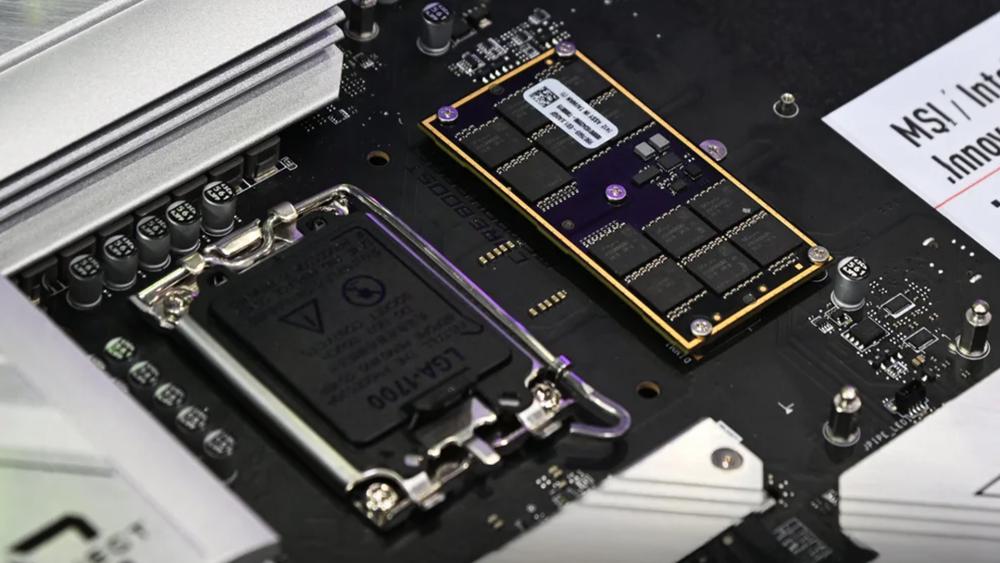
CAMM2 is a newer laptop memory format designed to address the physical and performance limitations of traditional RAM layouts. Short for Compression Attached Memory Module, CAMM2 uses a flat, board-style design that mounts directly onto the laptop motherboard using a compression mechanism rather than sliding into a vertical RAM slot. This approach allows manufacturers to support higher memory bandwidth in a much slimmer footprint, which is increasingly important as laptop designs continue to prioritise thinness.
At a technical level, a CAMM2 RAM is intended to function as a modular alternative to both SO-DIMM memory and fully soldered RAM. Instead of using multiple small DIMM modules, CAMM2 consolidates memory into a single module that can support wider memory interfaces and more consistent performance. This makes CAMM2 RAM in laptops a great fit for systems that need high memory throughput without stacking components or sacrificing internal space.
One of the most important aspects of CAMM2 is standardisation. CAMM2 has been formally defined under the JEDEC CAMM2 Standard, which means its physical layout, electrical design, and compatibility guidelines are no longer tied to a single manufacturer. This is a major step forward compared to earlier CAMM implementations, which were proprietary. JEDEC standardisation helps establish CAMM2 as a recognised memory standard, improving the chances of broader industry adoption over time.
It’s also important to understand what CAMM2 is not. CAMM2 does not replace DDR5 or define a new memory generation on its own. Instead, it acts as a modern delivery method for existing and future RAM types, including DDR5-based designs. In practical terms, this means CAMM2 RAM in laptops focuses on how memory is packaged and connected, rather than changing how the memory itself fundamentally works.
How CAMM2 Evolved From CAMM
The original CAMM (Compression Attached Memory Module) was introduced by Dell as a proprietary memory form factor and first appeared in Dell Precision mobile workstations in 2022. Dell developed CAMM to address the space and bandwidth limitations of SO-DIMM RAM in high-performance, thin laptops.
Its flat, compression-mounted design allowed memory to sit closer to the processor, improving signal integrity and reducing motherboard height requirements. Despite these advantages, adoption was limited because the design was exclusive to Dell systems.
Why CAMM2 Replaced the Original CAMM RAM Design
The main barrier to wider CAMM adoption was its proprietary nature. To move beyond a single-manufacturer solution, Dell submitted the CAMM design to the JEDEC Solid State Technology Association in 2022, enabling industry-wide development and standardisation. This step shifted compression-attached memory from a Dell-specific innovation to a shared platform, laying the groundwork for broader use of CAMM2 RAMs in laptops.
Key Improvements Introduced with CAMM2
JEDEC took over refinement of the technology and published the JESD318 CAMM2 standard in December 2023. CAMM2 formalises the mechanical and electrical specifications needed for consistent implementation across manufacturers.
While retaining the core advantages demonstrated by early designs such as the Dell CAMM memory module, CAMM2 removes vendor lock-in and aligns with modern DDR5-based memory technologies. This makes CAMM2 a more scalable, open, and future-ready memory standard for upcoming laptop designs.
Why Traditional SO-DIMM RAM Is Reaching Its Limits
For many years, SO-DIMM memory has been the default choice for laptop RAM thanks to its modular design and wide compatibility. However, as laptop designs have evolved, the limitations of this form factor have become harder to ignore. Thinner chassis, higher performance targets, and increasing power efficiency demands are all pushing traditional SO-DIMM layouts closer to their practical limits.
One of the biggest challenges is physical space. SO-DIMM modules rely on a vertical RAM slot, which adds height to the laptop motherboard and often requires stacked configurations to reach higher capacities. This makes it difficult for manufacturers to design ultra-thin laptops without compromising internal layout or cooling. In many cases, this has led to a shift towards soldered memory, reducing flexibility for users who want to upgrade later.
Bandwidth is another growing concern. As memory speeds increase, maintaining clean signal paths becomes more difficult with crowded DIMM layouts. This is especially noticeable when comparing older DDR4 RAM designs to newer standards, where faster data rates demand tighter control over trace length and layout. While SO-DIMM solutions can still perform well, they are increasingly constrained in thin and high-performance systems.
Upgradability also presents challenges. Although SO-DIMM memory is modular, access is not always straightforward, and many modern laptops limit or remove upgrade options altogether. As a result, users are often forced to choose between portability and long-term usability. These trade-offs have helped drive interest in alternative memory approaches, setting the stage for CAMM2 RAMs in laptops that aim to balance performance, space efficiency, and modular design more effectively.
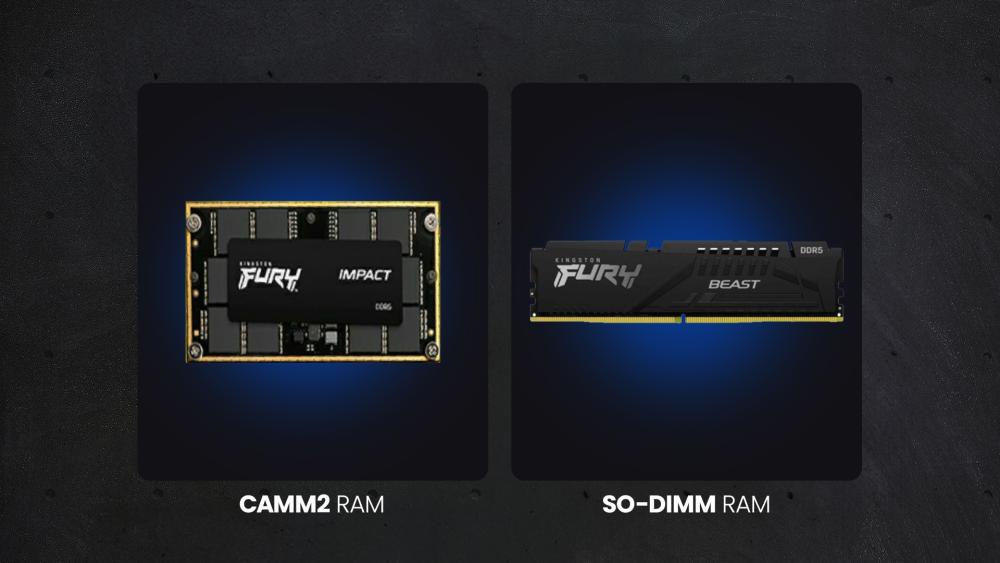
CAMM2 vs SO-DIMM – What’s the Real Difference?
As CAMM2 begins to appear in select laptops, it’s natural to compare it with the long-established SO-DIMM format. While both serve the same purpose, they approach laptop memory design in very different ways, especially when it comes to performance, space usage, and long-term usability.
Performance and Memory Bandwidth
One of the most notable differences lies in how memory bandwidth is delivered. CAMM2 is designed to support a wider memory interface within a single module, allowing systems to achieve dual-channel RAM performance without relying on multiple DIMMs. This can help deliver more consistent throughput and lower latency, particularly in workloads that rely heavily on memory access.
By contrast, SO-DIMM performance depends heavily on motherboard layout and slot configuration. In thinner laptops, compromises in routing can limit achievable bandwidth, especially as memory speeds continue to increase. This is where a CAMM2 RAM in a laptop shows clear potential advantages for modern, performance-focused designs.
Physical Design and Space Efficiency
SO-DIMM modules require a vertical insertion into a RAM slot, which adds height and constrains internal layouts. To reach higher capacities, manufacturers often stack DIMMs, further increasing space requirements. CAMM2 takes a different approach by using a flat, board-style module that mounts directly onto the motherboard.
This lower-profile design frees up valuable internal space, enabling slimmer laptops or allowing room for larger batteries and improved cooling. From a design perspective, CAMM2 supports a more flexible laptop RAM form factor, particularly in premium and ultra-thin systems.
Upgradability and Repairability
Both formats are modular, but they differ in how upgrades are handled. SO-DIMM upgrades are familiar and widely supported, making them the current standard for most laptop RAM upgrades. CAMM2, however, uses a compression-mounted installation method that avoids soldering while still maintaining a compact footprint.
In theory, this improves repairability and long-term usability compared to soldered memory. In practice, upgrade options will still depend on manufacturer policies and part availability. Even so, a CAMM2 RAM in laptops offers a promising middle ground between traditional SO-DIMM modules and fully soldered memory designs.
CAMM2 and DDR5 – Why They’re Designed to Work Together
CAMM2 has been developed alongside modern memory generations, making it a natural fit for DDR5-based laptop platforms. While CAMM2 itself defines how memory is packaged and mounted, DDR5 defines how that memory performs. Together, they address many of the challenges facing high-performance laptop memory design today.
DDR5 introduces higher data rates, improved power efficiency, and better scalability compared to previous generations. These benefits are particularly important in compact laptops, where power consumption and thermal limits play a major role in sustained performance. By pairing CAMM2 with DDR5, manufacturers can design systems that support higher memory throughput without relying on stacked modules or complex DIMM layouts.
Another advantage of this combination is more efficient power management. DDR5 includes on-module voltage regulation, reducing strain on the motherboard and improving stability at higher speeds. This works well with the flat, compression-mounted design of CAMM2, helping systems maintain consistent DDR5 speed while keeping energy use in check. As a result, the modern CAMM2 RAMs in laptops can support demanding workloads without significantly impacting battery life.
CAMM2 also provides a scalable platform for future memory capacities. A DDR5 CAMM module can deliver high bandwidth through a single module, which simplifies memory routing and makes it easier for manufacturers to design laptops that balance performance, efficiency, and upgradability. This alignment with DDR5 memory standards positions CAMM2 as a practical solution for next-generation laptop designs rather than a short-term experiment.
Which Laptops Are Most Likely to Use CAMM2 Memory?
Because CAMM2 is still an emerging standard, its adoption is currently focused on laptop categories where memory performance, efficiency, and longevity are more important than price. In the near term, CAMM2 RAMs are most likely to appear in the following segments:
- Business and Enterprise Laptops: These systems prioritise reliability, serviceability, and higher memory capacities. CAMM2 supports modular memory without increasing chassis thickness, making it well-suited to long deployment cycles and professional workloads.
- AI-focused Laptops: Modern AI laptops benefit from high-bandwidth memory to handle on-device AI tasks efficiently. CAMM2 helps deliver faster data access while maintaining power efficiency, which is critical for sustained performance.
- Premium Ultrabooks: Ultra-thin laptops often rely on soldered RAM to save space. CAMM2 offers a way to maintain slim designs while still supporting modular memory, appealing to users who want portability without sacrificing future upgrade potential.

Can Users Upgrade CAMM2 Memory Themselves?
CAMM2 is designed as a modular memory format, meaning it avoids permanently soldered RAM. However, upgrading a CAMM2 RAM in your laptop is not as straightforward as swapping a traditional SO-DIMM. CAMM2 modules are mounted flat against the motherboard using a compression-based mechanism, typically secured with screws. This allows for thinner internal designs but usually requires more disassembly, making upgrades less accessible for casual users.
In practice, upgradability will depend heavily on the manufacturer. Some laptops may allow user-accessible upgrades, while others may restrict replacements to authorised service centres or require approved modules for compatibility. Firmware support and warranty policies can also limit what users can realistically upgrade. Even with these minor constraints, CAMM2 still represents a step forward compared to fully soldered memory, offering better repairability and longer usable lifespans.
For users weighing their current options, understanding these trade-offs alongside existing standards is key. Our guide on how to choose the right laptop RAM provides helpful context when planning future upgrades. If you are looking for a general RAM buying guide for your setup, refer to our guide on how to choose memory for any device.
Final Words: Should You Wait for CAMM2 or Upgrade Your Laptop RAM Now?
At the moment, the use of CAMM2 RAMs in laptops is still limited to a small number of high-end models, which is an important factor when deciding whether to wait or upgrade now. CAMM-based memory first appeared in Dell Precision 7680 and 7780 mobile workstations, using Dell’s original proprietary CAMM design. More recently, standardised CAMM2-family memory, particularly LPCAMM2, has begun appearing in select professional laptops such as certain Lenovo ThinkPad P1 Gen 7 configurations. Despite this progress, availability remains limited to premium and workstation-class devices.
If you’re buying a laptop today and rely on proven compatibility, upgrading your existing system is often the more practical choice. Traditional RAM options are widely available, easier to install, and offer excellent value for performance improvements, especially for multitasking, creative work, and gaming. This is particularly true for users considering upgrades in current high-performance gaming laptops, where memory bottlenecks can still be resolved effectively with existing standards.
Waiting for CAMM2 makes sense if you’re planning a future purchase in the premium or workstation category and care about long-term repairability and emerging memory designs. For everyone else, upgrading now remains the smarter and more cost-effective option.
Frequently Asked Questions
What is the difference between CAMM2 and CAMM?
CAMM was the original, proprietary memory form factor introduced by Dell in 2022 for its Precision laptops. CAMM2 is the JEDEC-standardised version of that concept, finalised in December 2023, making it an open and industry-backed standard suitable for wider adoption.
Is CAMM2 better than SO-DIMM laptop RAM?
CAMM2 isn’t universally better, but it addresses specific limitations of SO-DIMM RAM. In supported systems, CAMM2 RAMs can offer better space efficiency, cleaner signal routing, and improved bandwidth potential, especially in thinner or high-performance designs.
Does CAMM2 replace DDR5 memory?
No. CAMM2 is a memory form factor, not a memory generation. It works alongside existing standards like DDR5, defining how the memory is packaged and installed rather than how the memory itself operates.
Will DDR6 use CAMM2?
It’s too early to say for certain. CAMM2 has been designed with future scalability in mind, so it could support future memory generations such as DDR6, but this will ultimately depend on JEDEC standards and manufacturer adoption.
What is the maximum capacity of CAMM2?
The JEDEC CAMM2 standard supports high-capacity configurations, with early specifications allowing for modules up to 128GB. Actual supported capacities will vary depending on the laptop model, processor, and manufacturer implementation.
You can pay with:
*PayPal Credit Representative Example: Assumed credit limit £1,200, Representative 23.9% APR (variable). Purchase rate 23.9% p.a (variable).Terms & Conditions apply.


PayPal Credit and PayPal Pay in 3 are trading names of PayPal UK Ltd, 5 Fleet Place, London, United Kingdom, EC4M 7RD. Terms and conditions apply. Credit subject to status, UK residents only, Five Tech LTD acts as a broker and offers finance from a restricted range of finance providers. PayPal Pay in 3 is not regulated by the Financial Conduct Authority. Pay in 3 eligibility is subject to status and approval. 18+. UK residents only. Pay in 3 is a form of credit. Check if affordable and how you will repay. May make other borrowing more difficult or expensive. See product terms for more details.
Copyright © 1996-2026 Fivetech LTD | Terms and Conditions
box.co.uk & Box are trading names of Five Tech Limited. Registered office: Box LTD, Unit 10 Woodford Trading Estate, Woodford Green IG8 8HF