


 Menu
MenuMenu


Get Sales Advice from Mon - Fri 9am - 5:00pm:
020 3337 8950LAST UPDATED: December 09, 2025
Desktop vs All‑in‑One vs Mini PC vs Tower: Which Type of Acer PC Fits Your Needs?
Choosing between the different Acer desktop types can feel like a mission, especially when every setup has its own strengths. Whether you’re building a clean home workspace, replacing ageing office machines, need something tiny for a cramped student desk, or want a proper tower for gaming and creative workloads, Acer has a form factor for every kind of user. This guide breaks down All-in-One PCs, Mini PCs, traditional desktops and full-size towers so you can pick the Acer computer that actually fits your day-to-day tasks, budget and space. Let’s dive in and make the choice easier.
Understanding the Acer PC Ecosystem

Acer’s lineup is built around giving users proper choice, which is why the brand supports multiple Acer desktop types across different sizes, shapes and workloads. From compact workspace PCs to upgrade-friendly towers, each form factor solves a different problem for home users, students, businesses and gamers alike. Understanding the basics makes it much easier to know where your needs fit.
What Defines Each Type of Acer Computer?
Acer splits its computers into clear categories to suit different desk setups and performance needs:
- Acer All-in-One (AIO): An all in one desktop with the PC built directly into the display. Ideal for minimal setups and everyday computing.
- Acer Mini PC: Ultra-compact machines designed for small desks, digital signage, business counters and point-of-sale use.
- Acer Desktop (traditional form factor): Balanced performance in a small tower, perfect for home office work, admin and general tasks.
- Acer Tower PC: Larger, more powerful and far more upgradeable, designed for gaming, editing, rendering and creative workloads.
Why Acer Offers Multiple Form Factors
Not everyone uses a PC the same way. Students want something tidy that fits on a crowded desk, businesses want compact workstation setups with easy deployment, and gamers need airflow and thermal design that can handle high-end GPUs. By offering several form factors, Acer covers everything from simple web browsing to creator-class performance, ensuring you can pick the exact Acer computer that suits your space and workload.
Key Specs That Matter Across All Acer PCs (CPU, RAM, GPU, Storage)
Regardless of which Acer PC you choose, a few core specs determine how smooth your day-to-day experience will be:
- CPU: The processor controls overall speed. Intel Core and AMD Ryzen options appear across all Acer lines, from Aspire to Predator.
- RAM: More memory means better multitasking, especially for students, office workflows and creators working with large files.
- GPU: Essential for gaming, design, editing and 3D workloads. Tower PCs have the best compatibility for full-size graphics cards.
- Storage: SSDs load Windows and apps significantly faster than HDDs. Many Acer desktops support multi-drive setups for flexible storage.
- Ports & Displays: Multi-display support is important for productivity and gaming. Look for HDMI, DisplayPort or USB-C depending on your setup.
Acer designs its systems around CPU/GPU workload balance, ensuring each form factor feels responsive without wasting power or space.
Acer Desktop Types at a Glance
Before diving into each model in detail, here’s a fast breakdown of the main Acer desktop types so you can quickly match their strengths to your setup. This helps you instantly see which design best fits your workspace, performance needs and future upgrade plans.
| Acer PC Type | Size & Footprint | Upgradeability | Performance Level | Best For | Graphics Options |
| All-in-One (AIO) | Monitor + PC combined, minimal desk space | Very limited | Everyday tasks, admin, light creative work | Home offices, students, reception desks | Integrated or entry-level GPUs |
| Mini PC | Ultra-compact, can mount behind a monitor | Limited | Light office work, browsing, POS systems | Tiny desks, small businesses, shared spaces | Integrated graphics |
| Traditional Desktop (Small Tower) | Mid-size case, modest footprint | Moderate | Balanced performance for home/office | Students, light creative work, multitasking | Integrated or mid-range GPUs |
| Tower PC | Full tower, highest airflow | Excellent | Gaming, editing, 3D work, rendering | Gamers, creators, upgraders | Full-size dedicated GPUs |
Acer All-in-One PCs - Best for Minimalist Workspaces & Everyday Productivity
Acer All-in-One systems are ideal for users who want clean desks without sacrificing everyday usability. Among all Acer desktop types, these deliver the simplest, most streamlined setup by combining the display and PC hardware into a single unit. No bulky tower, fewer cables and far less desk clutter make them spot-on for home offices, students and light creative use.
Display Integration & Space Savings
The main appeal of an all in one desktop is how tidy it keeps your workspace. The entire system sits behind the screen, which means:
- fewer cables to manage
- no need for a separate tower
- easier placement on small desks
- a more modern aesthetic
Most Acer AIO models also offer wide viewing angles, solid colour accuracy and Full HD or higher resolutions, making them comfortable for browsing, admin tasks, video calls and everyday computing.
Ideal Use Cases
Acer AIO systems shine when the priority is simplicity rather than raw power:
- Home office setups: Perfect for remote working, email, spreadsheets and web-based workflows.
- Reception & front-of-house: A clean, professional look that doesn’t overwhelm a counter or welcome desk.
- Students: Great for coursework, research and streaming without needing extra desk space.
They suit users who want a desktop that "just works", without worrying about cases, airflow or future upgrades. If you need something efficient and tidy, the Acer Aspire AIO lineup fits well alongside the wider Aspire family.
Acer Mini PCs - Compact Power for Business, POS & Tiny Desks

If desk space is tight or you need a machine that fits into specific business environments, Acer Mini PCs are one of the most versatile Acer desktop types available. They’re designed to deliver dependable everyday performance in an ultra-small form factor, making them ideal for offices, reception areas, meeting rooms, point-of-sale systems and compact home setups.
Portability & Mounting Flexibility
Acer mini PC units are built for flexibility. Their compact size allows them to be:
- mounted behind a monitor using VESA brackets
- tucked under a desk
- placed on shelves or counters
- transported between meeting rooms or work locations
Businesses appreciate how simple they are to deploy, especially when fitting out multiple desks or retail points where space is at a premium.
Efficiency & Everyday Multitasking
Despite their size, Acer mini systems deliver smooth performance for general office tasks:
- web browsing, email and admin workloads
- Light productivity software
- POS software and business dashboards
- Multi-display support for improved workflow
- Low noise and low power draw
They offer the right balance of reliability and efficiency, especially for environments where you don’t need a large tower but still want a proper Windows workstation. For larger business setups and administrative use, the Acer Veriton line often pairs well with mini PC deployments thanks to similar stability and efficiency.
Acer Tower PCs - For Gamers, Creators & Upgraders
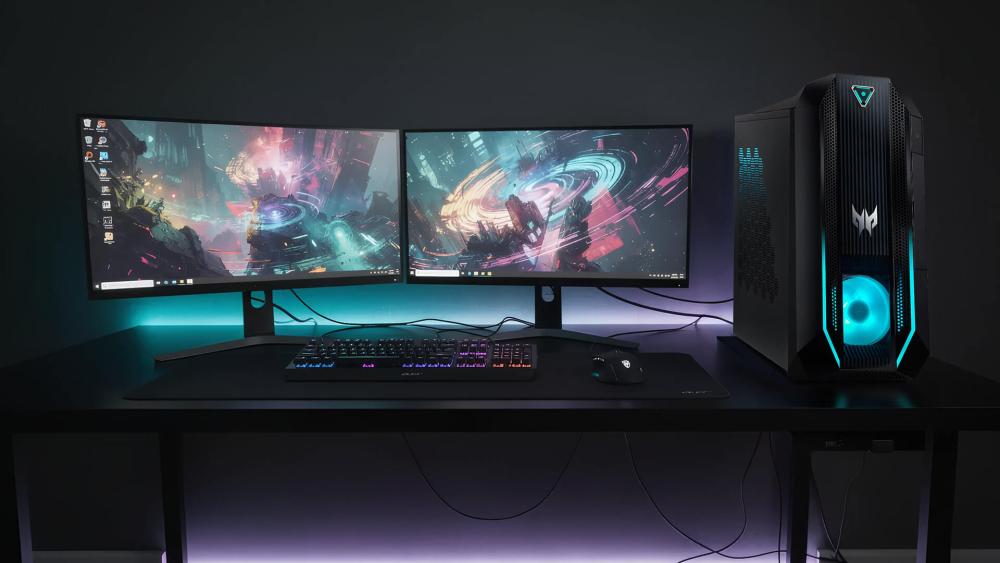
Of all the Acer desktop types, tower PCs offer the highest performance ceiling and the most freedom to upgrade. These machines are built with airflow, cooling headroom and internal space in mind, which is exactly what gamers, content creators and power users need when running heavy workloads or high-end GPUs. If you want raw performance or a system you can customise over time, a tower is the go-to choice.
Why Towers Offer the Best Expansion & Cooling
Acer tower PCs are designed with upgrade-friendly architecture, giving you far more flexibility than AIOs, mini PCs or traditional desktops. Key benefits include:
- Superior airflow and thermal design for sustained performance
- Space for full-size GPUs, ideal for AAA gaming and rendering
- Multiple storage bays for SSDs and HDDs
- RAM upgrade options for future-proofing
- Better cable management thanks to larger internal layouts
This makes towers the best long-term investment for users who don’t want to replace their whole system in a couple of years.
Ideal for Gaming, Design, Editing & 3D Workloads
If your workload is heavy or graphics-focused, tower PCs simply perform better:
- Gaming: Easily handles modern titles at high settings, especially when paired with RTX-equipped Nitro desktops or Predator towers.
- Content creation: Smooth editing and rendering in Adobe, Blender, DaVinci Resolve and similar apps.
- 3D modelling & CAD: More room for powerful GPUs and high-end CPUs makes towers ideal for engineering and technical workloads.
- Multi-display setups: Great for streamers, creators and anyone using two or three monitors.
Towers deliver the creator-class performance and hardware scalability that advanced users expect when pushing their PCs to the limit.
Acer Traditional Desktops - Balanced Power for Home & Office
If you want a dependable everyday machine without the large footprint of a full tower, Acer’s traditional desktops hit the sweet spot. Among all the Acer desktop types, these offer the best balance between performance, size and practicality. They’re built for users who need a stable workstation for admin, multitasking and general computing, but don’t need the heavy power draw of high-performance gaming towers.
Reliable Performance for General Use
Acer desktops are built for straightforward, no-fuss productivity. They’re ideal for:
- office software
- browsing and communication
- video calls
- multitasking workloads
- school research and coursework
Models in the Acer Aspire family are especially popular thanks to their smooth performance, reliability and excellent value. You can browse the full Aspire collection at Box.
Best for Administration, Students and Light Creative Work
Traditional desktops shine in roles where consistency matters more than raw power:
- Administrative use: Perfect for offices, call centres and reception environments.
- Students: Good for homework, research, streaming, and light creative tasks.
- Light creative work: Suitable for photo editing, design concepts and software learning.
They’re also easier to maintain and upgrade than an all-in-one system, making them a smart long-term pick if you need a reliable workstation that still has room for modest hardware improvements.
Which Acer PC Should You Choose?
With so many Acer desktop types available, the best choice depends on what you actually do day to day. Here’s a quick guide to match common user profiles with the Acer systems that fit them best, making it easier to narrow things down without second-guessing.
For Home Office → Acer Aspire Desktop / AIO
If your daily routine includes emails, spreadsheets, video calls and browser-based work, an Acer Aspire desktop or Acer AIO is the perfect fit.
- Clean, quiet and reliable
- Great for multitasking
- Works well with small or shared spaces
For Business → Acer Veriton Desktop / Mini PC
Businesses need consistency, low maintenance, and compact designs that deploy easily across multiple desks. The Acer Veriton desktop or Acer Mini PC range suits:
- admin teams
- reception counters
- POS setups
- meeting room installs
Mini PCs are especially useful where space is tight or systems need to be mounted behind displays.
For Students → Acer AIO / Aspire
Students need something affordable, tidy and capable of handling research, coursework and streaming. The best fits are:
- Acer AIO: zero clutter and simple setup
- Acer Aspire desktop: dependable performance for homework and light creative tasks
Both keep the desk clean while offering more power than a basic laptop at the same price.
For Gaming → Acer Nitro / Predator Towers
If you’re playing modern titles or using performance-heavy software, you want a proper tower with space for cooling and dedicated GPUs. The Acer Nitro and Predator towers deliver:
- high-end CPU/GPU combinations
- creator-class performance
- strong airflow for long gaming sessions
For Content Creators → Predator Orion / RTX Towers
Creators working with video editing, 3D renders or large design files need more power than an average desktop. Predator Orion and RTX-equipped Acer towers offer:
- fast multicore processors
- powerful graphics cards
- high memory capacity
- better thermal performance for long renders
Perfect for editors, streamers, 3D artists and designers.
For Space-Saving → Mini PC or AIO
If your desk is small, shared or used in a retail environment, the best choices are:
- Acer Mini PC: mounts behind a monitor, tiny footprint, low noise
- Acer AIO: all-in-one simplicity with no extra cables or external towers
Both prioritise space without compromising the basics.
Conclusion
Acer offers a wide range of Acer desktop types because no two users work the same way. Whether you prefer the clean look of an AIO, the tiny footprint of a mini PC, the balanced performance of a traditional desktop or the raw power and upgrade freedom of a tower, there’s an Acer system built for your setup. By matching your workload, space and performance needs to the right form factor, you can invest in a PC that feels fast today and stays useful for years. Acer’s ecosystem makes it easy to choose confidently. Also, if you run into any problems with your Acer PC, our Acer startup and no-display guide might be worth a check.
FAQs
Which is better, all in one desktop or tower?
It depends on your needs. An all in one desktop offers a clean, minimal setup with fewer cables and a smaller footprint, making it great for home offices and students. A tower PC delivers better cooling, stronger performance and far more upgrade options, so it’s the better choice for gaming, editing and future-proofing.
Does Acer make a mini PC?
Yes. Acer produces compact mini PCs designed for tight workspaces, business counters, POS systems and office environments. They’re small, efficient and can often be mounted behind a monitor for a clutter-free setup.
Is an Acer Mini PC good for small workspaces?
Absolutely. Acer Mini PCs are built specifically for small desks, shared spaces and commercial setups. Their compact design allows them to fit behind monitors or under counters without reducing everyday performance for tasks like browsing, admin work or business applications.
Are Acer All-in-One PCs practical for productivity?
Yes, an Acer AIO is great for everyday productivity. They combine the PC and display into a single unit, giving you a tidy workspace while still offering enough power for office tasks, video calls, research, streaming and general workflows. They’re especially handy for home offices and students who need simplicity.
Which Acer desktop type is best for gaming performance?
Tower PCs such as Acer Nitro and Predator models are the strongest option for gaming. They offer superior airflow, space for full-size GPUs and higher-end CPUs. Among all Acer desktop types, towers provide the best performance for modern games, multitasking and creator workloads.
You can pay with:
*PayPal Credit Representative Example: Assumed credit limit £1,200, Representative 23.9% APR (variable). Purchase rate 23.9% p.a (variable).Terms & Conditions apply.


PayPal Credit and PayPal Pay in 3 are trading names of PayPal UK Ltd, 5 Fleet Place, London, United Kingdom, EC4M 7RD. Terms and conditions apply. Credit subject to status, UK residents only, Five Tech LTD acts as a broker and offers finance from a restricted range of finance providers. PayPal Pay in 3 is not regulated by the Financial Conduct Authority. Pay in 3 eligibility is subject to status and approval. 18+. UK residents only. Pay in 3 is a form of credit. Check if affordable and how you will repay. May make other borrowing more difficult or expensive. See product terms for more details.
Copyright © 1996-2026 Fivetech LTD | Terms and Conditions
box.co.uk & Box are trading names of Five Tech Limited. Registered office: Box LTD, Unit 10 Woodford Trading Estate, Woodford Green IG8 8HF