


 Menu
MenuMenu


Get Sales Advice from Mon - Fri 9am - 5:00pm:
020 3337 8950LAST UPDATED: July 06, 2026
What Makes NVIDIA 50 Series Laptops Different? DLSS, Max-Q, and AI Performance
When new GPU generations launch, most people assume the difference is simple, more power, more FPS, and better performance. But with NVIDIA 50 Series laptops, the story is very different.
These laptops are not just faster versions of previous models. Instead, NVIDIA has shifted focus toward AI-assisted performance, smarter rendering and better efficiency, making this generation feel like a platform upgrade rather than a standard spec bump.
If you’re comparing RTX 50 laptop GPUs with older models, the real question is not just how fast they are, but how differently they work. Technologies like DLSS 4, Max-Q and AI-powered performance are changing how gaming, content creation and everyday workloads are handled.
Why NVIDIA RTX 50 Series Laptops Feel Different from Previous Generations
When comparing NVIDIA 50 Series laptops to earlier RTX generations, the difference goes beyond just higher specifications or improved frame rates. This generation introduces a shift in how laptop GPUs deliver performance, focusing more on intelligent processing, efficiency and real-world user experience rather than just raw power.
It Is Not Just a Spec Bump, It Is a Platform Shift
In previous generations, GPU upgrades were mainly about increasing core counts, clock speeds or memory bandwidth. While those improvements still exist, RTX 50 Series laptops take a different approach by integrating AI-driven technologies directly into how performance is delivered.
This means the GPU is no longer just rendering frames in the traditional way. Instead, it actively uses AI to optimise performance in real time, enhancing visuals, improving responsiveness, and delivering smoother gameplay without relying purely on hardware brute force.
For users, this translates into a more refined experience. You are not just getting higher numbers on a spec sheet, but a system that feels faster, smoother, and more responsive in everyday use.
The Role of Blackwell in Gaming, Creation, and AI Workloads
At the centre of this shift is NVIDIA’s Blackwell architecture, which is designed to support modern workloads that go beyond traditional gaming.
This architecture introduces:
- Advanced Tensor Cores, specifically built to accelerate AI-driven tasks
- Faster memory technologies like GDDR7, improving data handling and performance
- Greater overall efficiency, making high performance possible even in laptop form
These improvements allow AI-powered laptop graphics to play a much bigger role across different use cases. In gaming, this means smarter rendering and smoother visuals. In creative work, it enables faster processing and AI-assisted tools. For productivity, it allows laptops to handle more complex tasks efficiently.
What Users Actually Notice First in Real Laptop Use
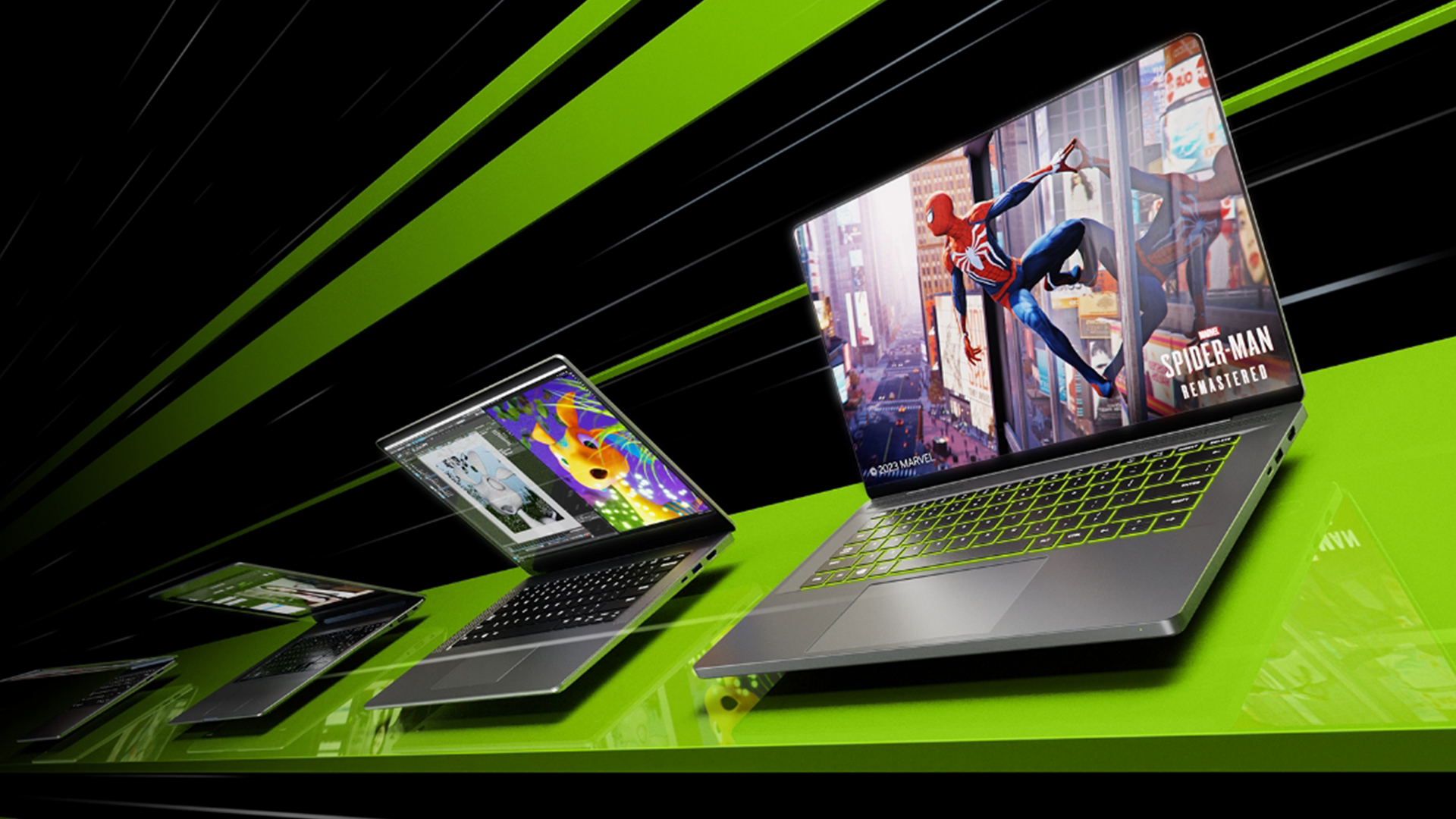
While the technical upgrades are important, what truly defines RTX 50 Series laptops is how they feel in everyday use.
Instead of simply noticing higher frame rates, users experience:
- Smoother and more consistent gameplay, especially in demanding titles
- Improved image quality, with sharper details and better visual clarity
- Quieter and cooler operation, thanks to better efficiency
- Faster workflows, particularly in creative and AI-assisted applications
These improvements are immediately noticeable, even without understanding the underlying technology. The overall experience feels more polished, responsive, and efficient, which is what sets this generation apart.
DLSS 4 Is the Biggest Gaming-Led Difference
When it comes to understanding what truly sets NVIDIA 50 Series laptops apart, DLSS 4 is one of the most important technologies to focus on. While traditional GPU upgrades improve raw performance, DLSS 4 changes how performance is delivered, making games feel smoother and more responsive without relying solely on hardware power.
What DLSS 4 Changes Compared with Earlier Versions
In simple terms, DLSS (Deep Learning Super Sampling) uses AI to improve performance and image quality at the same time. With DLSS 4 laptops, this technology has evolved significantly.
Instead of rendering every frame traditionally, the GPU uses AI to intelligently generate and enhance frames, reducing the workload while maintaining high visual quality. This means your laptop can achieve better performance without needing significantly more raw power.
Compared to earlier versions, DLSS 4 brings:
- More advanced AI frame generation, making gameplay smoother
- Improved image reconstruction, enhancing visual clarity
- Better handling of motion, reducing blur and visual inconsistencies
For you, this means games look sharper and run more smoothly, even at higher settings.
How Multi Frame Generation Affects Perceived Performance
One of the standout features of DLSS 4 is Multi Frame Generation, which takes performance improvements even further.
Instead of generating a single additional frame, the GPU can now create multiple AI-generated frames between rendered ones. This dramatically increases perceived performance, even if the hardware itself hasn’t changed significantly.
In real-world gaming, this results in:
- Higher frame rates without increasing GPU workload
- Smoother gameplay, especially in graphically demanding titles
- Better performance at higher resolutions like 1440p and 4K
The key here is “perceived performance.” Even if the raw frame rate is lower, the experience feels much smoother and more fluid.
Why Image Quality and Smoothness Matter as Much as Frame Rate
Gaming is no longer just about chasing the highest FPS numbers. What really matters is how smooth and visually consistent the experience feels.
DLSS 4 improves:
- Clarity and sharpness, making visuals more detailed
- Motion smoothness, reducing stutter and lag
- Consistency in fast-paced scenes, improving overall gameplay experience
This creates a more immersive environment where gameplay feels natural and responsive, rather than just technically fast.
Max-Q Is What Makes RTX 50 Performance Work in Laptop Form
One of the biggest challenges with high-performance GPUs is fitting that power into a laptop without creating excessive heat, noise or battery drain. This is exactly where Max-Q technology plays a crucial role in NVIDIA 50 Series laptops.
Rather than simply focusing on raw performance, Max-Q is designed to optimise how that performance is delivered, ensuring that powerful RTX 50 laptop GPUs can run efficiently within a compact laptop design.
How Max-Q Balances Power, Thermals, and Acoustics
At its core, Max-Q is about balance. It intelligently manages how the GPU uses power, helping to control heat output and reduce unnecessary strain on the system.
This optimisation affects three key areas:
- Power usage, ensuring the GPU only uses what it needs
- Thermal performance, keeping temperatures under control
- Fan noise, reducing how loud the system becomes under load
For users, this means that RTX 50 Series gaming laptops can deliver strong, consistent performance without becoming overly hot or noisy. Instead of experiencing loud fans or performance drops, you get a smoother and more stable experience.
Why Thin-and-Light Laptops Benefit More from Max-Q Improvements
Max-Q improvements are especially important in thin and light laptops, where space for cooling systems is limited. In these designs, efficiency matters just as much as performance.
With better optimisation, these laptops can:
- Maintain performance for longer periods without throttling
- Stay cooler, even during demanding tasks
- Operate more quietly, improving overall comfort
This allows manufacturers to build slimmer, more portable laptops without sacrificing the power needed for gaming or creative work.
What Better Efficiency Means for Battery Life and Portability
Efficiency doesn’t just improve thermals; it also impacts battery life. While gaming laptops are not typically known for long battery performance, Max-Q helps extend usage during lighter tasks like browsing, streaming, or working.
AI Performance Goes Beyond Gaming
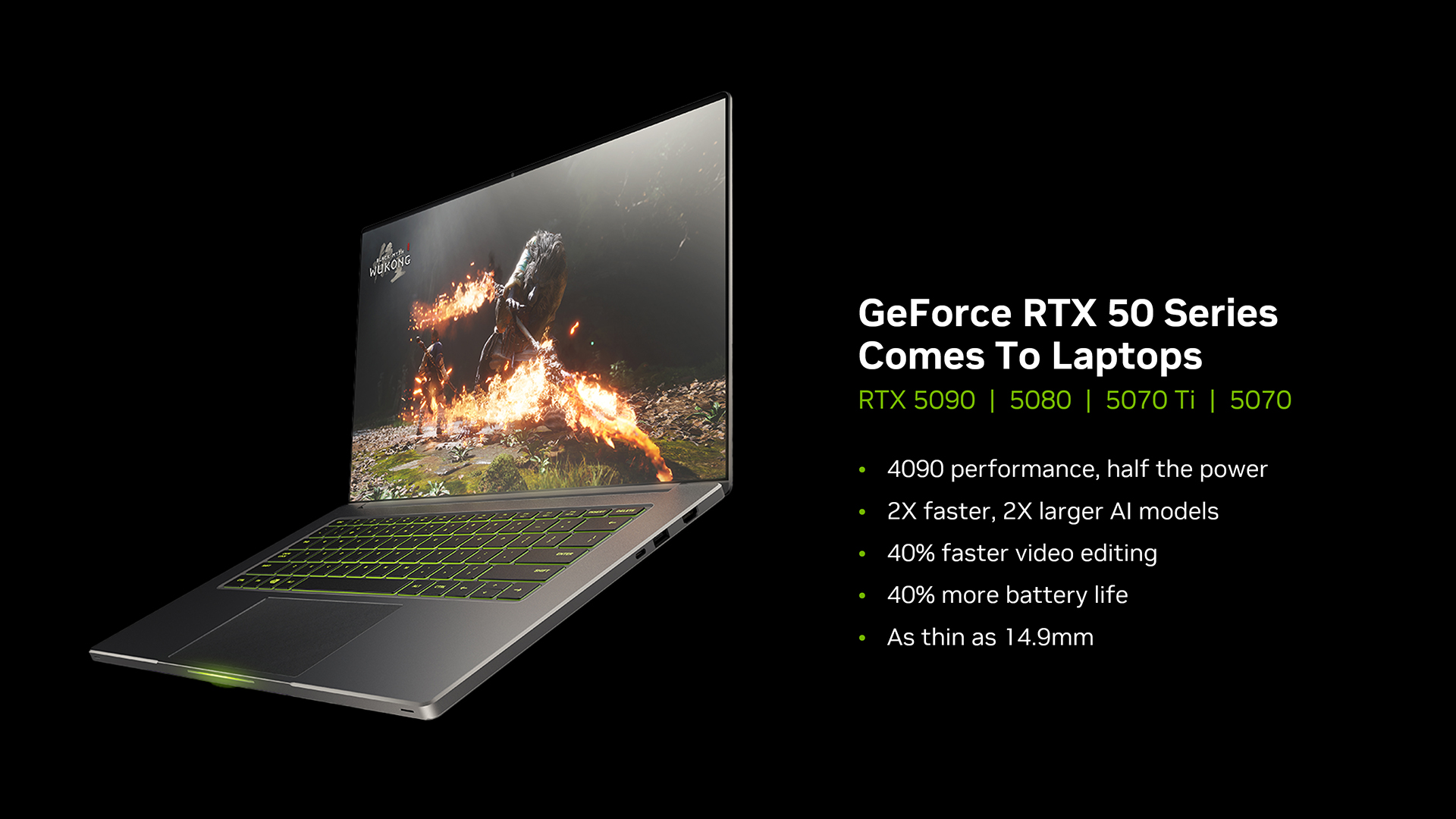
While gaming is often the focus when discussing NVIDIA 50 Series laptops, one of the biggest advancements in this generation is how well these GPUs handle AI-powered tasks beyond gaming. This shift is particularly important for creators, professionals, and users who rely on modern software tools that increasingly use AI to improve speed and efficiency.
How RTX 50 Series Laptops Accelerate AI-Assisted Creative Work
AI is now deeply integrated into many creative applications, and RTX 50 laptop GPUs are designed to take full advantage of this. With more advanced Tensor Cores and improved architecture, these laptops can accelerate a wide range of creative tasks.
For example, in video editing, AI can help with tasks like scene detection, background removal and faster rendering. In image processing, it can enhance details, upscale resolution or apply complex effects instantly. Many modern tools also include AI-assisted features, such as automatic adjustments or real-time previews, which rely heavily on GPU acceleration.
This is where NVIDIA Studio laptops stand out. They are specifically optimised to work with creative software, ensuring that these AI-powered features run smoothly and efficiently. For users, this means less waiting time and a more seamless creative workflow.
What AI Performance Means for Local Workflows and Productivity
One of the biggest advantages of improved AI performance is the ability to run tasks locally on your laptop, rather than relying on cloud-based processing.
This brings several practical benefits:
- Faster results, as tasks are processed directly on your device
- Improved privacy, since sensitive files don’t need to be uploaded online
- Greater reliability, as you are not dependent on internet speed or connectivity
For professionals and creators, this can significantly improve productivity. Tasks that once required online tools or external processing can now be handled instantly on your laptop, making your workflow more efficient and flexible.
Where NVIDIA Studio Fits into the Value of These Laptops
NVIDIA Studio laptops play an important role in unlocking the full potential of RTX 50 Series GPUs. These devices are not just about hardware; they combine powerful GPUs with software optimisation, drivers and tools specifically designed for creative applications.
This means you get:
- Better compatibility with creative software
- More stable performance during demanding tasks
- Access to features that are optimised for AI workflows
For creators, designers and professionals, this combination of hardware and software ensures a more reliable and consistent experience. It allows you to focus on your work without worrying about performance limitations.
What RTX 50 Series Laptops Mean for Different Types of Buyers
One of the most important things to understand about NVIDIA 50 Series laptops is that their value is not the same for everyone. While the technology behind DLSS 4, Max-Q and AI performance is impressive, the real benefit depends on how you actually use your laptop.
Instead of thinking about these laptops as simply “better,” it’s more helpful to understand who benefits the most from the improvements and why.
Why Gamers May Care Most About DLSS and Latency Gains
For gamers, the biggest difference with RTX 50 Series gaming laptops comes from how the experience feels during gameplay.
Technologies like DLSS 4 improve performance by using AI to generate additional frames, which leads to smoother visuals without requiring significantly more raw power. At the same time, improvements in latency help ensure that your inputs such as keyboard or mouse actions are reflected on screen more quickly.
In real-world use, this results in:
- Smoother and more consistent gameplay, even in demanding titles
- Higher perceived frame rates without pushing hardware to its limits
- Better responsiveness, which is especially important in competitive gaming
For gamers, this means the upgrade is less about chasing higher numbers and more about achieving a more fluid and immersive experience.
Why Creators May Care More About AI Tools and Export Speed
For creators, the benefits of RTX 50 Series laptops are more focused on productivity and workflow efficiency.
With improved AI performance, these laptops can accelerate tasks like video editing, rendering and image processing. Many modern creative applications now include AI-powered features, which rely on GPU acceleration to function effectively.
As a result, creators can expect:
- Faster rendering and export times, reducing waiting periods
- More efficient workflows through AI-assisted tools
- Improved performance when working with large files or complex projects
For professionals and content creators, these improvements can significantly reduce the time spent on repetitive or processing-heavy tasks, making their overall workflow smoother and more efficient.
Why Some Buyers May Still Be Fine with RTX 40 Series Laptops
While RTX 50 Series laptops introduce meaningful improvements, it’s important to recognise that not every user needs to upgrade immediately.
If you already own an RTX 40 Series laptop and it performs well for your current needs whether that’s gaming, work or casual use, you may not notice a major difference in everyday scenarios.
Upgrading becomes more relevant if:
- You want access to DLSS 4 and newer AI-driven features
- You need better efficiency, cooling or battery performance
- Your current system struggles with newer or more demanding applications
For many users, the decision comes down to whether the new features will genuinely improve their experience, rather than simply owning the latest hardware.
What to Compare Before Buying an RTX 50 Series Laptop
Once you understand how these laptops differ, the next step is knowing what to look for before making a purchase. Not all RTX 50 Series laptops perform the same, and choosing the right configuration is essential.
GPU Tier, Power Limits, and Cooling Design
The GPU you choose whether it’s an RTX 5090, RTX 5080, RTX 5070 or RTX 5060; has a direct impact on performance. Higher-tier GPUs deliver better results, but they also require more power and stronger cooling systems.
In laptops, performance is also affected by power limits and thermal design. A well-cooled system can maintain higher performance for longer, while a poorly cooled one may throttle under load.
For you, this means looking beyond the GPU name and considering how the laptop is built to support it.
Display Quality, Memory, and Storage
A powerful GPU is only part of the experience. The display and system configuration also play a major role.
A high-quality display enhances gaming and creative work by providing:
- Better colour accuracy
- Higher refresh rates
- Improved visual clarity
At the same time, having enough RAM and storage ensures smooth multitasking and efficient handling of large files or applications.
This combination is essential for getting the most out of your laptop’s performance.
Portability Versus Sustained Performance
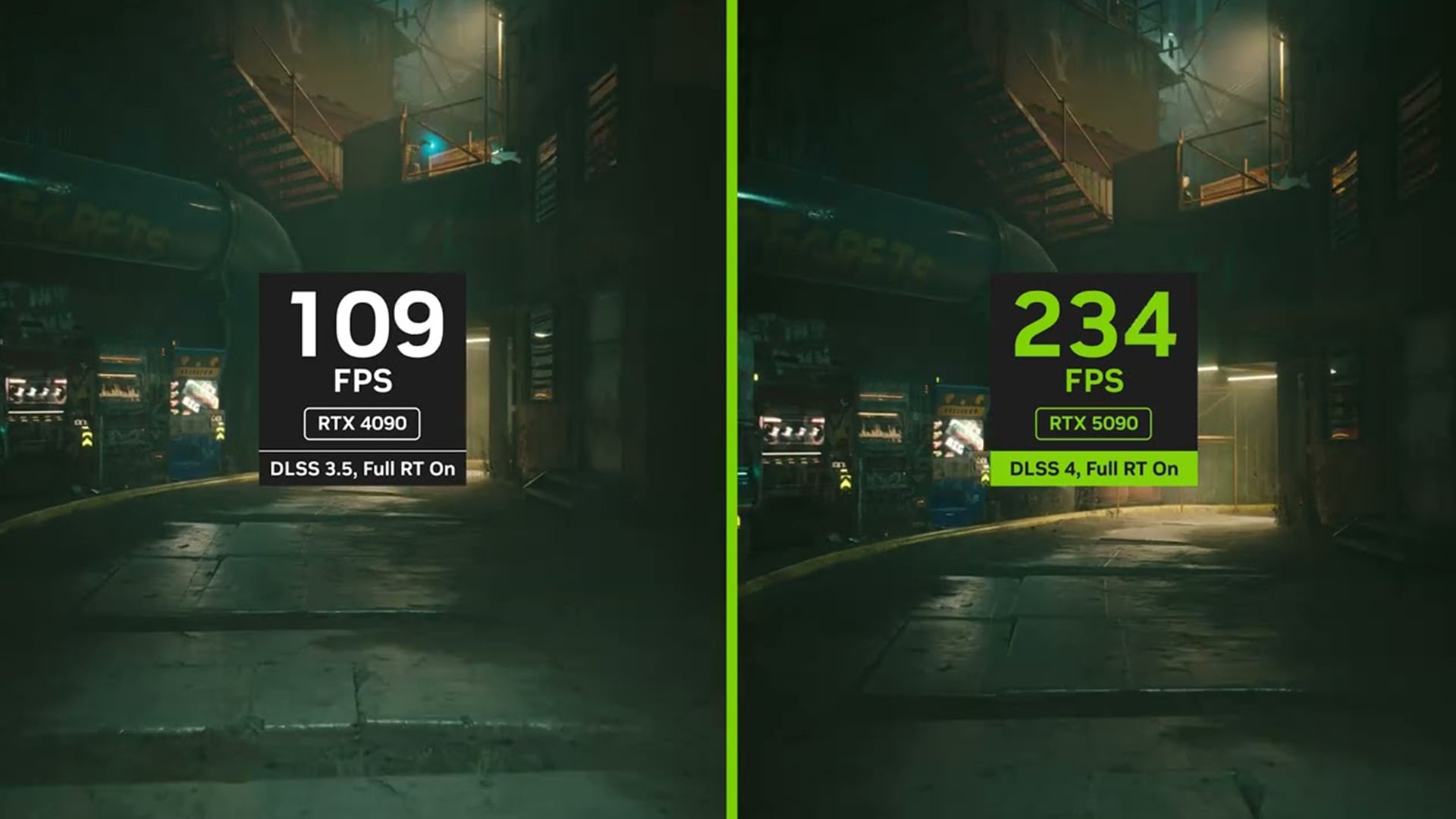
Another important factor to consider is whether you prioritise portability or sustained performance.
- Thin and light laptops are easier to carry and better suited for everyday use
- Larger laptops offer better cooling and more consistent performance during long gaming or creative sessions
Neither option is better overall; it simply depends on how you plan to use your device.
Final Verdict: What Really Makes NVIDIA RTX 50 Series Laptops Different?
When looking at NVIDIA 50 Series laptops, the biggest difference is not just raw performance, but how that performance is delivered through technologies like DLSS 4, Max-Q and AI acceleration. For gaming users, the most noticeable upgrade comes from DLSS 4 and AI-driven rendering, which significantly improve smoothness, responsiveness and overall visual quality, making gameplay feel more fluid rather than just increasing frame rate numbers. For creators and AI-focused users, the real advantage lies in faster workflows, with AI acceleration helping to reduce rendering times, improve efficiency, and handle complex creative tasks more effectively.
Ultimately, the decision to upgrade depends on your needs. If you’re looking for better gaming performance, improved efficiency and access to AI-powered workflows, RTX 50 Series laptops offer a meaningful step forward. However, if your current laptop already handles your tasks comfortably, especially if you’re using an RTX 40 Series system, upgrading may not be essential right now.
To explore your options, you can browse a wide range of 50 series laptops, including RTX 5080 laptops, RTX 5090 laptops, RTX 5070 Ti laptops and RTX 5050 laptops, or discover the best laptops available at Box.co.uk to find the right fit for your setup.
Frequently Asked Questions
Are NVIDIA RTX 50 Series laptops only better for gaming?
No, they also improve AI performance and creative workflows.
Is DLSS 4 available on all RTX laptops?
No, DLSS 4 is designed for newer RTX generations.
Does Max-Q reduce performance?
No, it improves efficiency while maintaining strong performance.
Is it worth upgrading from RTX 40 Series?
It depends on your needs; upgrade for AI and DLSS improvements.
Which RTX 50 laptop GPU is best for creators?
Higher-tier GPUs like RTX 5080 or 5090 are best for demanding creative tasks.
You can pay with:
*PayPal Credit Representative Example: Assumed credit limit £1,200, Representative 23.9% APR (variable). Purchase rate 23.9% p.a (variable).Terms & Conditions apply.


PayPal Credit and PayPal Pay in 3 are trading names of PayPal UK Ltd, 5 Fleet Place, London, United Kingdom, EC4M 7RD. Terms and conditions apply. Credit subject to status, UK residents only, Five Tech LTD acts as a broker and offers finance from a restricted range of finance providers. PayPal Pay in 3 is not regulated by the Financial Conduct Authority. Pay in 3 eligibility is subject to status and approval. 18+. UK residents only. Pay in 3 is a form of credit. Check if affordable and how you will repay. May make other borrowing more difficult or expensive. See product terms for more details.
Copyright © 1996-2026 Fivetech LTD | Terms and Conditions
box.co.uk & Box are trading names of Five Tech Limited. Registered office: Box LTD, Unit 10 Woodford Trading Estate, Woodford Green IG8 8HF