


 Menu
MenuMenu


Get Sales Advice from Mon - Fri 9am - 5:00pm:
020 3337 8950LAST UPDATED: July 06, 2026
What Is FPS in Gaming? And Why Low FPS Ruins Your Experience
FPS is one of the most important gaming performance metrics, but it is also one of the easiest to misunderstand. If a game feels smooth, responsive,and easy to control, FPS is usually a bigreason why. If a game feels choppy,delayed,or awkward, low FPS could be the problem.
In gaming, FPS stands for frames per second. It tells you how many individual frames your PC, laptop,or console can display every second while you play. More frames usually mean smoother motion, bettercontrol,and a more responsive gaming experience.
This guide explains what FPS means in gaming, why FPS low performance feels so bad, how 1% low FPS and 0.1% low FPS affect frame consistency, and how FPS vs refresh rate works. We will also cover how to run an FPS test, what counts as good FPS, and which upgrades can help if your gaming PC FPS is not where it should be.
Quick answer: FPS means frames per second. Higher FPS makes games look smoother and feel more responsive, while low FPS can cause stuttering, input lag, choppymovementand poor control.
What Is FPS in Gaming?
FPS stands forframes per second. It measures how many frames your system produces every second during gameplay.
A “frame” is a single still image. When many frames appear quickly,one after another, your brain sees motion. That is how video games FPS works.
Some people search for “frame rate per second” or “frame per second”,but the correct term isframes per second.
FPS in Simple Terms
| FPS Level | What It Feels Like |
|---|---|
| 30 FPS | Playable, but not very smooth |
| 60 FPS | Smooth for most games |
| 90 FPS | Very smooth, especially on PC |
| 120 FPS | Great for fast action and competitive games |
| 144 FPS+ | Ideal for high refresh rate gaming |
| 240 FPS+ | Competitive-level smoothness for esports |
FPS is not just about visuals. It also affects how quickly the game responds to your input.
That matters in:
- Shooters
- Racing games
- Fighting games
- Battle royale games
- Competitive multiplayer
- Fast action games
- Open-world games with lots happening on screen
If FPS drops hard, the game may still run, but it will not feel good.
How FPS Affects Your Gaming Experience
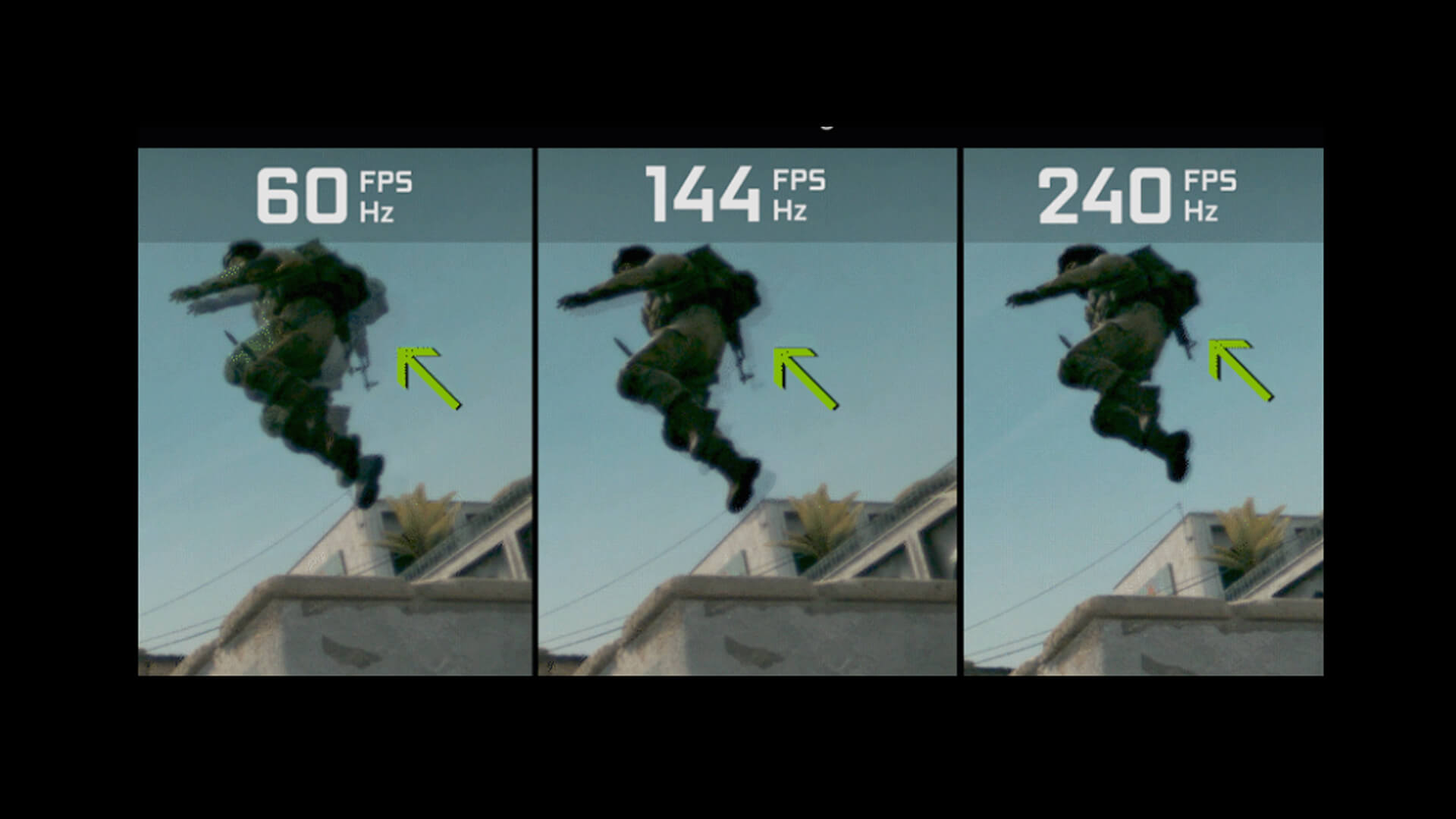
FPS affects three main parts of gaming:
- Smoothness
- Visual clarity
- Input response
A high FPS PC can make the same game feel completely different compared with a weak system running at low FPS. The graphics settings might look similar, but the way the game moves and responds can change massively.
Smooth vs Laggy Gameplay
Smooth gameplay happens when frames are delivered consistently. The camera moves cleanly, enemies are easier to track, and the game feels stable.
Low FPS creates the opposite effect.
You may notice:
- Choppy camera movement
- Stuttering issues
- Delayed actions
- Jerky animations
- Sudden frame drops
- Uneven movement during fights
- Poor aiming control
This is why FPS low performance can ruin a game,even if the graphics look good in screenshots.
A game running at 60 FPS with stable frame pacing will usually feel much better than a game jumping between 90 FPS and 35 FPS.
Visual Fluidity and Motion
FPS affects how fluid motion looks on screen. This is especially obvious when you move the camera quickly.
At low FPS, fast motion can look broken or blurry. In shooters, this can make it harder to track enemies. In racing games, corners can feel less predictable. In action games, attacks and dodges can feel harder to time.
Higher FPS improves visual smoothness because more frames are shown every second.
Here is the basic idea:
| Scenario | Low FPS | Higher FPS |
|---|---|---|
| Turning the camera | Choppy and uneven | Smooth and clear |
| Tracking enemies | Harder to follow | Easier to follow |
| Racing at speed | Less precise | More controlled |
| Fast combat | Messy timing | Cleaner response |
| Open-world travel | More stutter | Better flow |
This is why players care so much about FPS in game performance. It changes how the game feels, not just how it looks.
Input Response and Control
FPS also affects input response. This is how quickly your game reacts after you press a key, move yourmouse,or use a controller.
Low FPS can make controls feel heavy. You press a button, but the result feels slightly delayed. In casual games, that is annoying. In competitive games, it can cost you the round.
Higher FPS can reduce perceived input lag because new frames are being generated more often.
That means:
- Aiming feels sharper
- Movement feels more direct
- Timing feels easier
- Camera control feels cleaner
- Competitive play feels more responsive
This is a majorreason whyesports players chase high FPS, even when a game is already playable at 60 FPS.
What Is Considered Good FPS?
Good FPS depends on the type of game, your hardware,and your monitor. Not every gameneeds240 FPS, but every gamebenefitsfromastable frame rate.
For most players, 60 FPS is still the key target. It feels smooth, works well across many displays,and is easier to achieve than extreme frame rates.
30 FPS vs 60 FPS vs 120 FPS
| FPS Target | Best For | Experience |
|---|---|---|
| 30 FPS | Cinematic single-player games, older consoles | Playable, but less responsive |
| 60 FPS | Most PC and console games | Smooth and comfortable |
| 90 FPS | Fast PC gaming | Very smooth |
| 120 FPS | Shooters, racing, action games | Excellent response |
| 144 FPS+ | Competitive PC gaming | Very smooth and precise |
| 240 FPS+ | Esports and high-end setups | Maximum responsiveness |
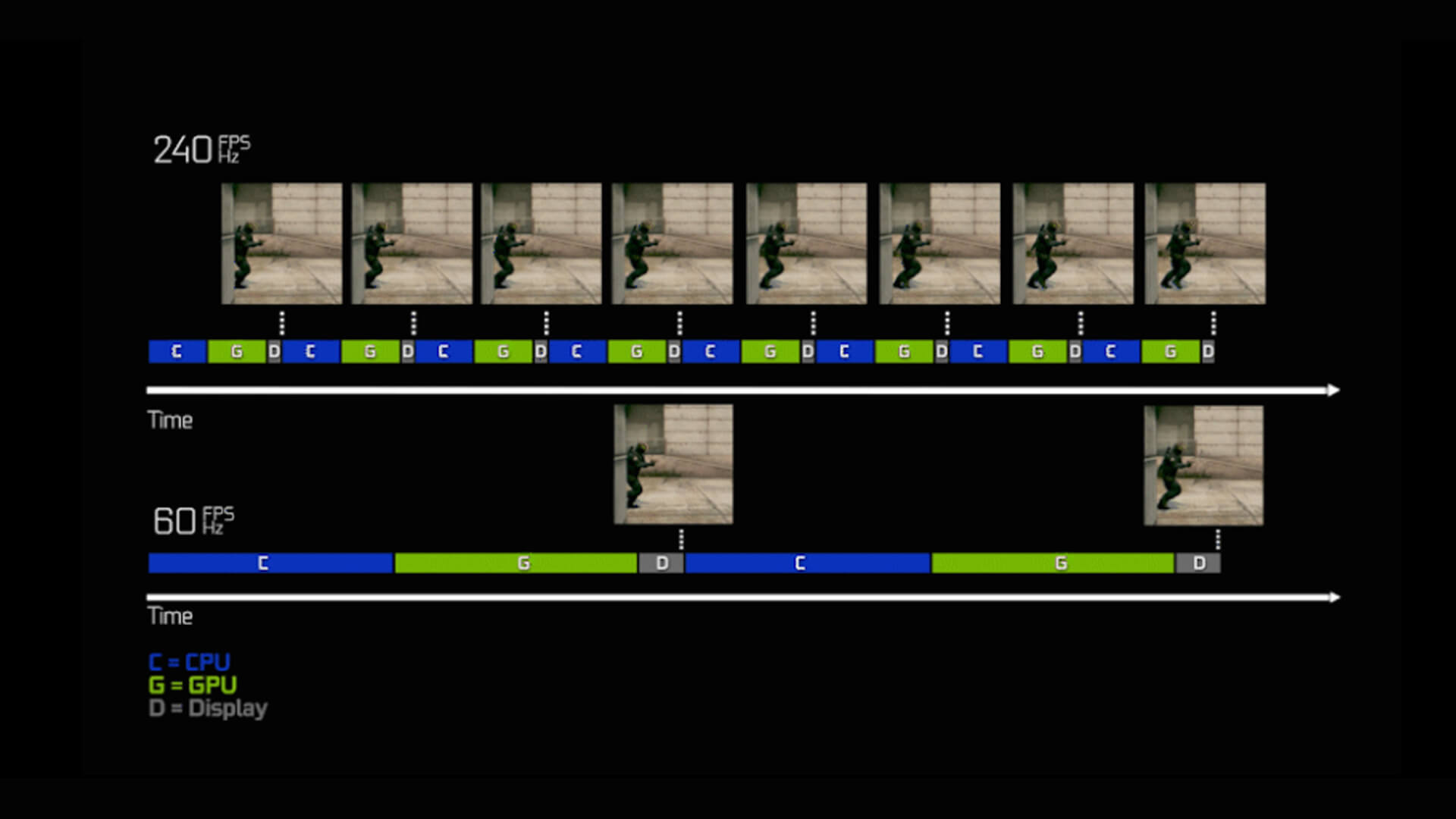
30 FPS can still be playable in slower games. Story-led games, strategygames,and casual titles can feel fine at 30 FPS if the frame pacing is stable.
For shooters, racinggamesand competitive multiplayer, 60 FPS should be theminimumtarget. For serious competitive play, 120 FPS or higher is much better.
Competitive vs Casual Gaming Needs
A casual player may be happy with stable 60 FPS. A competitive player usually wants more.
Here is a simple breakdown:
| Player Type | Recommended FPS |
|---|---|
| Casual story player | 30 to 60 FPS |
| General PC gamer | 60 to 100 FPS |
| Shooter player | 100 to 144 FPS |
| Competitive esports player | 144 to 240 FPS+ |
| High-end enthusiast | 240 FPS+ where possible |
For competitive games, FPS is not just a comfort feature. It can affect your reaction time, tracking and accuracy.
That is why a highFPSPC matters most in:
- Counter-Strike-style shooters
- Valorant
- Call of Duty
- Fortnite
- Apex Legends
- Rocket League
- Fighting games
- Racing sims
FPS for Different Game Types
Different genres have different FPS needs.
| Game Type | Ideal FPS Target | Why It Matters |
|---|---|---|
| Story games | 60 FPS | Smooth cinematic gameplay |
| Open-world games | 60 to 90 FPS | Better travel and combat |
| Shooters | 120 FPS+ | Faster aiming and reactions |
| Racing games | 120 FPS+ | Clearer motion at speed |
| Fighting games | Stable 60 FPS | Timing and consistency |
| Strategy games | 60 FPS | Comfort and clarity |
| Esports titles | 144 FPS+ | Competitive responsiveness |
For most gamers, the best target is not “maximum FPS at all costs”.It isstable FPS that matches your screen and game type.
What Are 1% Low FPS and 0.1% Low FPS?
Average FPS does not tell the whole story.
A game might average 100 FPS but still feel rough if it drops hard every few seconds. That is where1% low FPSand0.1% low FPSmatter.
What 1% Low FPS Means
1% low FPS shows the average of the slowest 1% of frames.
It helps show how stable the game feels during heavier moments.
For example:
| Average FPS | 1% Low FPS | What It Means |
|---|---|---|
| 120 FPS | 100 FPS | Very smooth |
| 120 FPS | 65 FPS | Noticeable dips |
| 120 FPS | 35 FPS | Stutter likely |
| 90 FPS | 80 FPS | Consistent |
| 90 FPS | 40 FPS | Uneven gameplay |
A strong 1% low FPS means fewer dips and better frame consistency.
What 0.1% Low FPS Means
0.1% low FPS shows even more extreme drops. It highlights rare stutters, freezes,or sudden hitches.
This matters because one bad frame drop during a boss fight, corner, penaltyshootout,or final circle can ruin the moment.
Watch 0.1% low FPS if you notice:
- Sudden hitches
- Micro-stutter
- Random freezes
- Uneven mouse movement
- Drops when new areas load
- Stutter during explosions or busy scenes
Average FPS tells you speed. 1% low FPS and 0.1% low FPS tell you stability.
What Causes Low FPS in Games?
Low FPS can come from hardware, software,settings,or background tasks. Sometimes it is one clear bottleneck. Other times, several smaller issues stack up.
The most common causes are:
- Weak graphics card
- Older CPU
- Not enough RAM
- Slow storage
- High resolution
- Heavy graphics settings
- Poor cooling
- Outdated drivers
- Too many background apps
- Bad game optimisation
Hardware Limitations: GPU, CPU and RAM
The GPU usually has the biggest impact on FPS, especially at higher resolutions and graphics settings.
Your graphics card handles:
- Shadows
- Lighting
- Textures
- Ray tracing
- Anti-aliasing
- Upscaling
- Frame generation
- High-resolution output
If your GPU is weak, FPS will drop when graphics settings are too high.
For smoother performance,anRTX GPU for better FPScan makea big difference, especially if you want higher settings, ray tracing support, DLSS,or stronger 1440p and 4K gaming.
The CPU also matters. It handles game logic, physics, AI, backgroundsystems,and feeding data to the GPU. If the CPU cannot keep up, your graphics card may sit underused.
RAM can also cause problems. If you do not have enough memory, games may stutter when loading assets or switching areas.
Graphics Settings and Resolution
Graphics settings can crush FPS quickly.
The biggest FPS killers are usually:
| Setting | FPS Impact |
|---|---|
| Ray tracing | Very high |
| Native 4K resolution | Very high |
| Ultra shadows | High |
| Volumetric effects | High |
| Reflections | High |
| Draw distance | Medium to high |
| Texture quality | Depends on VRAM |
| Anti-aliasing | Medium |
| Motion blur | Usually low |
| V-Sync | Can affect responsiveness |
Resolution is also a major factor.
A game at 4K is much harder to run than 1080p because the GPUhas torenderfar more pixels. If FPS is low, dropping from 4K to 1440p or 1080p can give a large performance boost.
Background Processes and Optimisation
Sometimes FPS low problems are not caused by the game itself.
Background apps can steal CPU, RAM,storageor network resources.
Check for:
- Browser tabs
- Game launchers
- RGB software
- Recording apps
- Downloads
- Windows updates
- Antivirus scans
- Overlay tools
- Streaming software
- Cloud sync apps
Poor cooling can also reduce gaming performance. If your CPU or GPU gets too hot, it may lower its speed to protect itself. This is called thermal throttling.
That can cause FPS drops even if your PC looks powerful on paper.
How to Improve FPS in Gaming
The best way to improve FPS is to start with settings before spending money. Many games can gain a lot of performance with a few smart changes.
After that, check drivers,thermals,and background apps. If FPS is still poor, then look at upgrades.
Adjusting Graphics Settings
Start with the settings that have the biggest FPS impact.
Try this order:
- Turn off or reduce ray tracing
- Lower shadows from Ultra to High or Medium
- Use DLSS, FSR,orXeSSif available
- Lower resolution or use upscaling
- Reduce reflections and volumetric effects
- Lower draw distance slightly
- Keep textures high only if you have enough VRAM
- Disable unnecessary motion blur
- Test V-Sync on and off
- Usefullscreenmode where possible
Do not just use the Low preset straight away. Many games look much better with a custom mix of settings.
A good target is:
- Keep textures as high as VRAM allows
- Reduce expensive lighting effects
- Use upscaling for 1440p or 4K
- Prioritise stable 1% low FPS over maximum average FPS
Run an FPS Test
An FPS test helps you see what isactually happeninginstead of guessing.
You can use:
- Built-in game benchmarks
- In-game FPS counters
- GPU software overlays
- Windows Game Bar
- Steam overlay
- MSI Afterburner-style monitoring tools
Track more than average FPS.
Watch:
| Metric | Why It Matters |
|---|---|
| Average FPS | General performance level |
| 1% low FPS | Smoothness during heavier moments |
| 0.1% low FPS | Worst stutters and hitches |
| GPU usage | Shows if GPU is fully loaded |
| CPU usage | Helps spot CPU bottlenecks |
| VRAM usage | Shows if texture settings are too high |
| RAM usage | Helps catch memory limits |
| Temperatures | Shows possible thermal throttling |
If average FPS looks good but the game feels rough, check 1% low FPS and frame times.
Upgrading Hardware
If settings are already optimised and FPS is still poor, hardware may be the issue.
Useful upgrades include:
| Upgrade | Helps With |
|---|---|
| New GPU | Higher FPS, better visuals, higher resolution |
| Better CPU | CPU-heavy games, simulation, esports |
| More RAM | Stutter reduction and smoother multitasking |
| NVMe SSD | Faster loading and fewer streaming hitches |
| Better cooling | More stable sustained performance |
| Higher refresh monitor | Lets you see higher FPS properly |
For bigger gains, look athardware upgrades for better FPS, especially if your current PC is several years old.
If you would rather buy a complete system,our range of high-endPCs for smooth gameplaycan be a simpler route than upgrading part by part.
Optimising System Performance
Before buying new hardware, clean up the system.
Quick wins:
- Update GPU drivers
- Restart before gaming
- Close browser tabs
- Disable heavy startup apps
- Check Windows power mode
- Keep games on an SSD
- Update the game
- Check background downloads
- Clean dust from fans
- Make sure RAM is running at the right speed
These steps will not turn a weak system into a monster, but they can reduce stutter and improve FPS stability.
FPS vs Refresh Rate:What’sthe Difference?
FPS and refresh rate are connected, but they are not the same thing.
FPSis how many frames your PC or console generates every second.
Refresh rateis how many times your monitor can refresh the image every second. It is measured in Hz.
So, is 120 FPS the same as 120Hz?
No. 120 FPS is the game performance. 120Hz is the monitor refresh rate. They work best together, but they are not identical.
Why Matching FPS and Refresh Rate Matters
If your PC produces 144 FPS but your monitor is only 60Hz, you will not see all those frames properly. The game may feel more responsive, but the display cannot show the full benefit.
If your monitor is 144Hz but your game only runs at 45 FPS, the screen has the capacity for smooth motion, but your system is not producing enough frames.
For the best result, pair strong hardware withthe rightmonitors for smooth gameplay, and you will enjoy your games more.
This helps with:
- Smoother motion
- Lower perceived input lag
- Better competitive response
- Cleaner camera movement
- Less blur during fast action
What About Screen Tearing?
Screen tearing happens when the monitor shows parts of different frames at the same time. It can look like a horizontal split across the image.
This usually happens when FPS and refresh rate are notsyncingproperly.
Common fixes include:
- V-Sync
- G-Sync
- FreeSync
- FPS caps
- Variable refresh rate monitors
The best fix depends on your hardware and game.
FPS on Gaming Laptops
Gaming laptops can deliver excellent FPS, but they have extra limits compared with desktop PCs.
The main factors are:
- GPU wattage
- Cooling design
- CPU power limits
- Screen refresh rate
- RAM configuration
- Laptop thickness
- Power mode
- Whether it is plugged in
A laptop with a strong GPU can still perform badly if it is running on battery or stuck in a quiet power profile.
For serious portable performance,high performance gaming laptopsare a better fit than general-purpose laptops because they are built with stronger cooling, dedicatedGPUs,and faster displays.
Laptop FPS Tips
To improve gaming laptop FPS:
- Keep the laptop plugged in
- Use performance mode
- Raise the back of the laptop for airflow
- Clean vents regularly
- Update GPU drivers
- Use DLSS, FSR,orXeSSwhere available
- Avoid gaming on battery
- Use an external monitor if the laptop supports it well
Gaming laptops are great when you need power and portability, but thermals matter. If the laptop gets too hot, FPS can drop.
FPS Monitor Tools: Should You Use One?
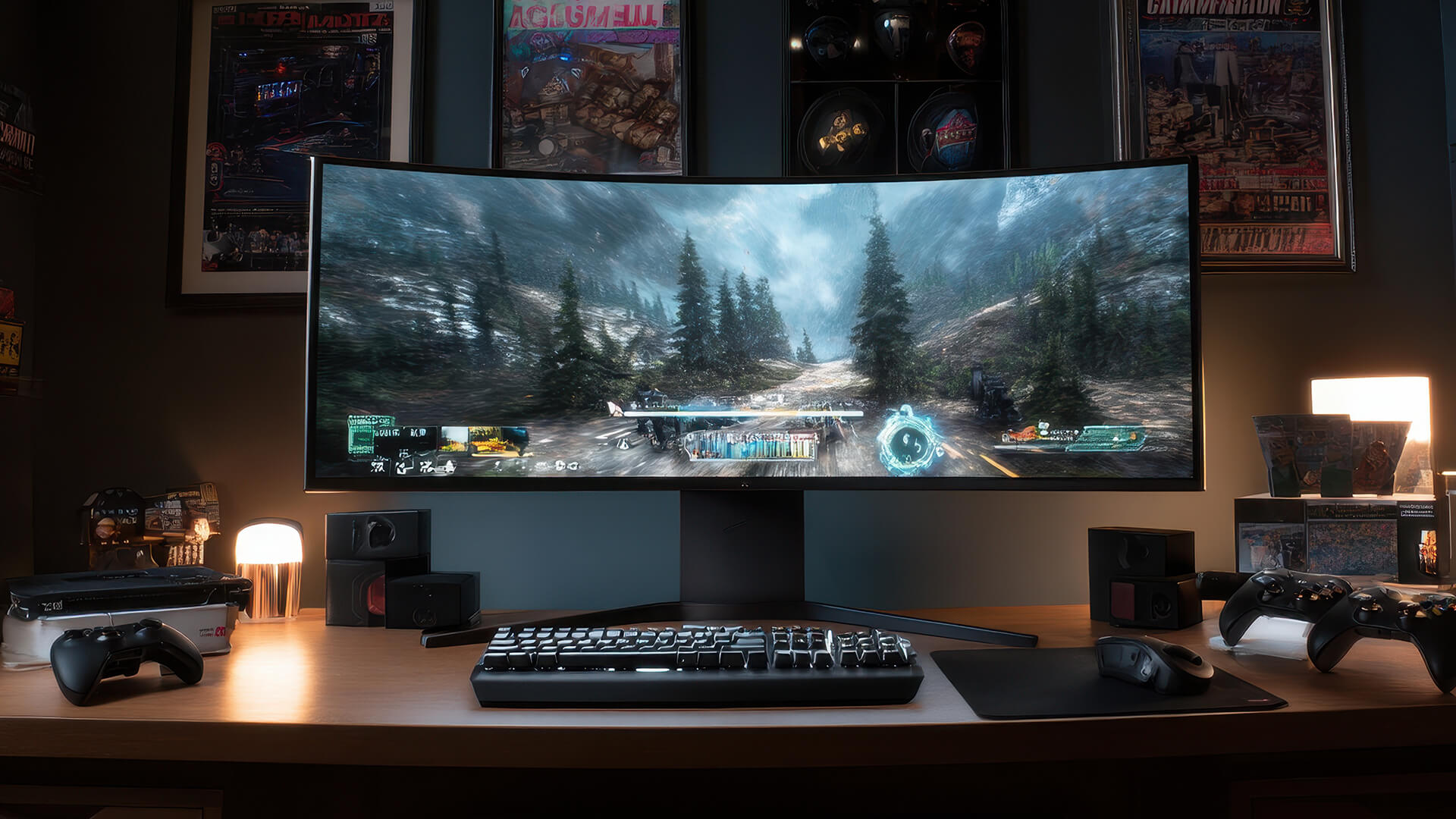
An FPS monitor shows your frame rate while you play. It helps you understand whether the game is running smoothly or struggling.
This is useful when:
- Testing new settings
- Checking a new GPU
- Comparing performance modes
- Diagnosing stutter
- Benchmarking a gaming laptop
- Testing ray tracing
- Checking 1% low FPS
- Finding CPU or GPU bottlenecks
Do not stare at the number all the time, though. The best setting is the one that feels good and stays stable.
A simple FPS monitor is useful for testing. During normal gaming, you can turn it off once you are happy with performance.
Wrapping Up
FPS matters because it affects how a game feels in your hands. Higher FPS can make games smoother, clearer,and more responsive, while low FPS can make even a great game feel sluggish.
For casual players, stable 60 FPS is a great target. For competitive players, 120 FPS, 144 FPS,or higher can make a real difference. For esports, frame consistency, 1% low FPS,and refresh rate matter just as much as average FPS.
The best gaming experience is not just about chasing the biggest number. It is about balance.
Focus on:
- Stable frame rate
- Good 1% lows
- Sensible graphics settings
- A monitor that matches your FPS
- Hardware that suits the games youactually play
If your game feels laggy, do an FPS test first. Check your settings, background apps, temperatures,and driver updates. If the system is still struggling, then it may be time to upgrade your GPU, monitor, RAM,storage,or full gaming PC.
FAQs
-
What does FPS mean in gaming?
FPS means frames per second. It measures how many frames your system produces every second while running a game. Higher FPS usually means smoother motion and better responsiveness.
-
Is higher FPS better for gaming?
Yes, higher FPS isgenerally betterfor gaming because it improves visual smoothness and input response. However, stable FPS is more important than a high average FPS with big drops.
-
Is 120 FPS the same as 120Hz?
No. 120 FPS means the game is producing 120 frames per second. 120Hz means the monitor refreshes 120 times per second. They work best together, but they are not the same thing.
-
Why does low FPS cause lag?
Low FPS causes lag because frames are being produced too slowly or unevenly. This makes movement look choppy and can make controls feel delayed, especially in fast games.
-
Does FPS depend on GPU or CPU?
FPS depends on both GPU and CPU. The GPU usually matters most for graphics-heavy games, high resolutions,and visual settings. The CPU matters more in simulation games, esports titles, open-worldgames,and situations with lots of AI or physics.
-
What is 1% low FPS?
1% low FPS shows the average of the slowest 1% of frames. It helps measure frame consistency and shows how smooth the game feels during demanding moments.
-
What is 0.1% low FPS?
0.1% low FPS shows the most extreme frame drops. It is useful for spotting rare stutters, freezes,or hitches that may not show up in average FPS.
-
How can I improve FPS quickly?
Lower heavy graphics settings, turn off ray tracing, use upscaling, update drivers, close background apps, check temperatures,and run the game from an SSD. If that is not enough, a GPU or CPU upgrade may be needed.
You can pay with:
*PayPal Credit Representative Example: Assumed credit limit £1,200, Representative 23.9% APR (variable). Purchase rate 23.9% p.a (variable).Terms & Conditions apply.


PayPal Credit and PayPal Pay in 3 are trading names of PayPal UK Ltd, 5 Fleet Place, London, United Kingdom, EC4M 7RD. Terms and conditions apply. Credit subject to status, UK residents only, Five Tech LTD acts as a broker and offers finance from a restricted range of finance providers. PayPal Pay in 3 is not regulated by the Financial Conduct Authority. Pay in 3 eligibility is subject to status and approval. 18+. UK residents only. Pay in 3 is a form of credit. Check if affordable and how you will repay. May make other borrowing more difficult or expensive. See product terms for more details.
Copyright © 1996-2026 Fivetech LTD | Terms and Conditions
box.co.uk & Box are trading names of Five Tech Limited. Registered office: Box LTD, Unit 10 Woodford Trading Estate, Woodford Green IG8 8HF