


 Menu
MenuMenu


Get Sales Advice from Mon - Fri 9am - 5:00pm:
020 3337 8950LAST UPDATED: March 16, 2026
Samsung Galaxy S25 AI Features: How Smart Is Samsung’s Latest Flagship?
Artificial intelligence is no longer a background feature in modern smartphones. With the Samsung Galaxy S25, it becomes a central part of how the device operates day to day. Rather than adding isolated smart tools, Samsung has focused on building a more connected experience where tasks, searches, editing, and organisation work together through Galaxy AI.
The conversation around Samsung S25 AI features centres on how seamlessly they fit into everyday use. From voice-driven multi-app commands to intelligent photo processing and contextual daily updates, the emphasis is on reducing friction. Instead of opening several apps to complete one task, the phone is designed to interpret intent and act on it.
If you are considering the Samsung S25 and wondering whether its AI tools will genuinely make daily life easier, this guide breaks down the different AI features.
Cross-App Action – One Command, Multiple Tasks
One of the most practical Samsung S25 AI features is Cross-App Action. Instead of handling apps one by one, the Samsung Galaxy S25 allows you to complete multiple steps with a single voice command. Holding the power button activates the assistant, and from there, the phone interprets what you want to do across supported apps.
In real use, this means you could spot a recipe in a video, ask how to make it, and have the steps saved to Notes. You can check sports fixtures and add them straight to your calendar, summarise a YouTube video into text, or pull information from messages and share it instantly. The system works across Google apps, Samsung native apps and selected third-party platforms like WhatsApp and Spotify, making the Samsung S25 AI assistant feel more capable than earlier versions.
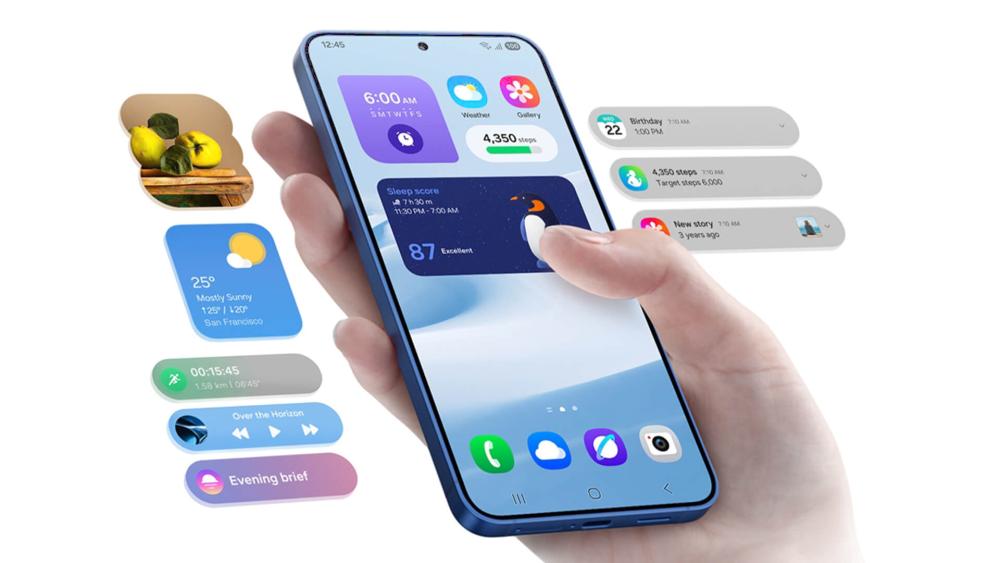
Now Brief & Now Bar – AI That Keeps You Updated
Not every improvement needs to be dramatic to be useful. Some of the most practical Samsung S25 AI features work quietly in the background, and that is where Now Brief and Now Bar fit in on the Samsung Galaxy S25.
Now Brief provides a personalised overview of your day. It can surface weather updates, calendar events, reminders, and even notify you when new podcast episodes are available. Instead of checking multiple apps in the morning, key information is presented in one place, shaped around your usage habits.
The Now Bar builds on this by offering live updates directly on the lock screen. Sports scores, currently playing music, navigation details and other timely information appear without needing to unlock your AI-powered Samsung Phone. For users who rely on their S25 5G throughout the day, this small change can reduce unnecessary screen time and interruptions.
While less flashy than camera tools or voice automation, these background enhancements show how Samsung AI is being used to improve everyday convenience rather than simply showcase technical capability.
Circle to Search with Google – Visual Search Made Instant
Searching no longer has to start with typing. On the Samsung Galaxy S25, Circle to Search allows you to draw around text, objects or images on your screen and receive contextual results within seconds. It works with a finger or S Pen, making it accessible whether you are browsing social media, watching videos or shopping online.
In practical terms, this means you can circle a pair of trainers in a photo and check prices, identify a landmark in a travel clip, translate foreign text, or find similar products without switching apps. The tool builds on existing Galaxy AI features, but feels more integrated here thanks to smoother performance and improved recognition accuracy.
AI for Creators – Audio Eraser and Auto Trim
Content creation is clearly a focus area within the Samsung S25 AI features, particularly for users who regularly record and share video. Tools like Audio Eraser and Auto Trim aim to reduce editing time without requiring third-party software.
Audio Eraser allows you to isolate and adjust specific sound types within a video. The system can detect voices, music, wind, crowd noise and general background interference, giving you the option to reduce or remove unwanted elements. For anyone filming in busy environments, this makes everyday videos cleaner without needing advanced editing skills. It also complements the wider Samsung S25 AI camera features, which focus on making content look and sound polished straight from the device.
Auto Trim takes a different approach by analysing footage and extracting key scenes automatically. Instead of manually cutting clips, the phone generates a shortened version ready for sharing. There are length limits and project restrictions, but for quick uploads, it simplifies the workflow considerably.
Together, these tools show how Samsung AI extends beyond photography, supporting practical, time-saving edits directly on the S25 Galaxy range.
AI Camera Intelligence – From ProVisual Processing to Ultra Zoom
When it comes to the latest phone models, much of the intelligence in the camera system works before you even tap edit. On the Samsung Galaxy S25, upgraded AI models analyse lighting, detail and colour in real time, ensuring photos look balanced straight from capture.
ProScaler enhances how images and video appear on the display by intelligently improving clarity. This is particularly noticeable when viewing older media or lower-resolution content, helping visuals appear sharper without artificial over-processing. Alongside this, the Next Gen ProVisual Engine focuses on capture quality. It refines textures, balances skin tones and preserves natural colour depth, especially in mixed lighting. These refinements form a core part of the Samsung S25 AI camera features, delivering consistent results without requiring manual adjustments.
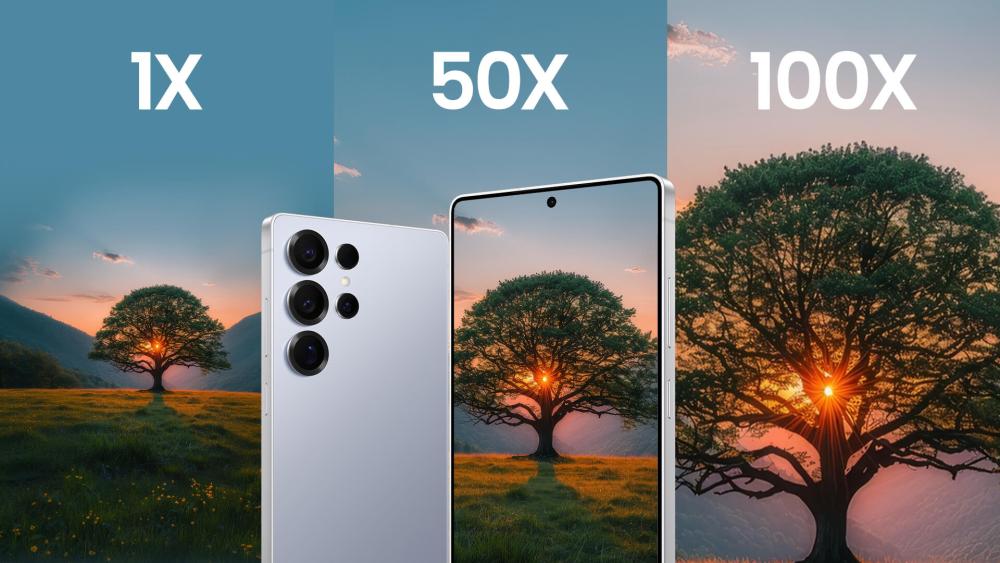
On the Ultra model, the Samsung S25 Ultra AI features extend this further with additional photographic tools. Scene Optimisation analyses subjects and environments in real time, automatically adjusting brightness, contrast and saturation for more balanced shots. AI Super Resolution Zoom reduces noise and improves clarity when zooming in on distant objects, supporting sharper detail beyond standard optical limits.
Portrait photography also benefits from improved edge detection, producing cleaner background blur and more accurate subject separation. In low-light conditions, Nightography AI adapts exposure dynamically, enhancing detail while controlling noise for clearer night-time images.
Across the range, the processing system remains consistent. Hardware is a major difference between Samsung S25 and S25 Ultra, but the core AI imaging approach stays aligned. That consistency matters more in daily use than spec-sheet differences.
AI Performance, Processor and Privacy
All of these intelligent tools rely on hardware that can handle them smoothly. The Samsung S25 processor and performance upgrades play a major role in how responsive the phone feels, particularly when running AI tasks in the background. Rather than pausing to process commands, the system handles voice requests, image analysis and contextual suggestions with minimal delay.
A stronger neural processing unit allows more features to run directly on the device. This matters for both speed and privacy. Tasks such as image optimisation and certain assistant functions can be completed locally, reducing reliance on cloud servers. More complex queries still draw on online services, but the balance between on-device and cloud processing feels more refined than in previous generations.
For buyers comparing S25 or the top tablets in the UK, performance consistency is important. When comparing the Samsung S25 vs S25 Plus vs S25 Ultra, AI responsiveness remains aligned across the range. Hardware differences influence areas such as battery capacity and camera configuration, yet the overall AI experience is designed to feel uniform.
AI-Powered Battery Management
The Samsung Galaxy S25 uses AI-powered battery optimisation that learns your usage habits and adjusts power allocation accordingly. Over time, the system identifies apps you use frequently and those you don’t, limiting background activity for less-used apps to conserve power. This can help extend battery life without increasing battery size or radically changing charging behaviour.
While battery capacity and charging speeds remain similar to past models, this sort of smart power management represents an example of Samsung AI being applied beyond cameras and voice features, making the device more efficient based on how you personally use it.
Writing Assist and Live Translation – Smarter Communication
Communication is another area where the Samsung Galaxy S25 applies AI in practical ways. Instead of acting as a separate app, Writing Assist works directly within supported messaging and note-taking environments.
The system can suggest tone adjustments, refine grammar and restructure sentences depending on the context. Whether drafting a quick reply or writing something more formal, the phone helps shape the message without making it feel automated. These Samsung S25 AI features improve clarity rather than changing how you communicate.
Live Translation adds another layer. Calls and messages can be translated in real time, reducing language barriers without needing a separate translation app. For travel, international work or multilingual households, this makes the device more functional in everyday scenarios.

AI Note Summarisation – Turning Long Text into Clear Insights
Long notes and documents can be difficult to revisit later. On the Samsung S25, AI-powered summarisation within Samsung Notes helps condense larger blocks of text into structured highlights.
The feature can extract key points, organise information into bullet form and make lengthy content easier to scan. This is particularly useful for meetings, lectures or research notes, where speed and clarity matter more than formatting.
Rather than replacing manual note-taking, this tool supports it. As part of the evolving Galaxy AI features, summarisation improves productivity without introducing complexity. It is subtle, but over time, it reduces friction in information management.
Generative Photo Editing – Smarter Post-Capture Adjustments
Beyond automatic image optimisation, the Samsung S25 AI camera features also include generative editing tools. These allow users to reposition objects, extend backgrounds or remove unwanted elements with minimal effort.
When an object is moved or erased, the system intelligently fills in surrounding areas to maintain visual consistency. Reflections and shadows can also be adjusted to create a more natural finish. The aim is not to dramatically alter images, but to correct small imperfections without requiring specialist editing skills.
For those exploring Samsung S25 Ultra features, the larger sensor hardware may provide more detail to work with, yet the underlying AI editing approach remains consistent across models. This reinforces that many of the improvements are software-driven rather than hardware-exclusive.
AI-Enhanced Security – Smarter Protection Behind the Scenes
Security is another area where AI plays a supporting role. On the Samsung Galaxy S25, more tasks are processed directly on the device, which reduces exposure when handling sensitive information.
On-device AI processing means certain image analysis and assistant functions do not always rely on cloud servers. This approach strengthens privacy while maintaining responsiveness. The device also monitors app behaviour more intelligently, helping identify unusual activity patterns.
Final Thoughts
The Samsung Galaxy S25 shows how AI in Android phones can move beyond novelty and become part of everyday use. Instead of focusing on one headline feature, the improvements span photography, communication, productivity and performance.
What makes the Samsung S25 AI features stand out is how naturally they fit into daily tasks. From smarter camera processing to cross-app voice actions and background updates, the tools aim to save time rather than demand attention.
Across the Samsung Galaxy S range, the core AI experience remains consistent. Hardware differences matter, particularly for photography, but the intelligence driving the system is shared.
Wondering which Samsung S25 model is right for you? Read our in-depth Samsung S25 Buying Guide and make a well-informed purchase decision.
Frequently Asked Questions
What AI features does the Samsung Galaxy S25 have?
The Samsung Galaxy S25 includes AI tools such as Cross-App Action, Now Brief, Circle to Search, Writing Assist, AI note summarisation, generative photo editing and advanced camera processing. These Samsung S25 AI features are designed to improve productivity, photography and everyday convenience.
Does the Samsung Galaxy S25 use Google Gemini?
Yes, the device integrates Google Gemini alongside Samsung’s own AI systems. This allows the Samsung S25 AI assistant to handle more complex queries while combining on-device and cloud-based processing.
What are the Samsung S25 AI camera features?
The Samsung S25 AI camera features include Scene Optimisation, improved Portrait Mode edge detection, Nightography AI for low-light shots, generative editing tools and AI-powered zoom enhancements on the Ultra model.
What is the difference between Samsung S25 and S25 Ultra in AI features?
The core AI system remains the same across both models. However, the Ultra benefits from enhanced camera hardware, which works alongside AI processing to improve zoom and overall image detail.
Does the Samsung S25 process AI on-device?
Yes, many AI features run directly on the device, particularly image processing and certain assistant functions. More complex requests may rely on cloud connectivity, depending on the feature.
You can pay with:
*PayPal Credit Representative Example: Assumed credit limit £1,200, Representative 23.9% APR (variable). Purchase rate 23.9% p.a (variable).Terms & Conditions apply.


PayPal Credit and PayPal Pay in 3 are trading names of PayPal UK Ltd, 5 Fleet Place, London, United Kingdom, EC4M 7RD. Terms and conditions apply. Credit subject to status, UK residents only, Five Tech LTD acts as a broker and offers finance from a restricted range of finance providers. PayPal Pay in 3 is not regulated by the Financial Conduct Authority. Pay in 3 eligibility is subject to status and approval. 18+. UK residents only. Pay in 3 is a form of credit. Check if affordable and how you will repay. May make other borrowing more difficult or expensive. See product terms for more details.
Copyright © 1996-2026 Fivetech LTD | Terms and Conditions
box.co.uk & Box are trading names of Five Tech Limited. Registered office: Box LTD, Unit 10 Woodford Trading Estate, Woodford Green IG8 8HF