


 Menu
MenuMenu


Get Sales Advice from Mon - Fri 9am - 5:00pm:
020 3337 8950LAST UPDATED: February 04, 2026
Best Motherboards for the Ryzen 7 9850X3D Processor (AM5 Buyer's Guide)
Choosing the right motherboard is one of the most important decisions when building or upgrading a system around the Ryzen 7 9850X3D Processor. As part of AMD's latest Ryzen 9000 lineup, this CPU is designed for the AM5 platform and targets gamers who want strong, consistent performance without unnecessary complexity. That makes motherboard compatibility, power delivery, and platform features far more important than headline specs alone.
The AMD Ryzen 7 9850X3D uses the AM5 CPU socket and supports DDR5 memory exclusively, which means not every motherboard will be a good fit, even if it technically works. Chipset choice, VRM quality, memory support, and expansion options all play a role in how well your system performs and how future-proof your build will be. This is especially relevant if you're upgrading from an older platform or planning to pair the CPU with a high-end GPU and fast storage.
In this buyer's guide, we'll break down the best AM5 motherboards for the AMD Ryzen 7 9850X3D, explain which chipsets make the most sense for different budgets, and help you choose a board that matches your gaming needs without overspending. Whether you're browsing the wider range of Ryzen 9000 series CPUs or finalising parts for a new build, this guide focuses on stability, compatibility, and real-world value.
What Is the Ryzen 7 9850X3D and Why the Right Motherboard Matters

The AMD Ryzen 7 9850X3D is a modern AM5 CPU Socket processor designed for users building on AMD's current desktop platform. It sits within the wider AMD Ryzen 9000 Series and is based on AMD's latest Zen 5 architecture, which means it relies entirely on AM5 motherboards and DDR5 memory support. If you're upgrading from an older Ryzen system, this alone makes motherboard choice a critical first step.
As an X3D chip, the Ryzen 7 9850X3D is positioned with gaming workloads in mind, focusing on delivering consistent performance rather than raw clock speeds. That makes the motherboard's power delivery and stability especially important. A well-built board helps ensure steady power under load, reliable memory compatibility with DDR5 EXPO kits, and access to modern expansion features like fast NVMe storage and next-generation GPUs.
Choosing the right motherboard also affects how future-proof your build will be. Chipset features, PCIe support, and connectivity options can determine whether your system feels balanced today or restrictive in a year or two. If you want a broader overview of where this CPU fits in AMD's current lineup, our Ryzen 7 9850X3D Release guide is a useful place to start.
Ryzen 7 9850X3D Motherboard Requirements Explained
Before choosing a specific board, it's important to understand what the Ryzen 7 9850X3D Processor actually requires at a platform level. While many AM5 motherboards are technically compatible, not all of them are equally suited to an X3D-focused build.
AM5 Socket and Chipset Compatibility
The AMD Ryzen 7 9850X3D uses the AM5 CPU socket, which means it will only work with modern AM5 motherboards. Older platforms are not supported, as the AM5 socket introduces DDR5 memory and newer connectivity standards that are essential for Ryzen 9000 series CPUs. You can view the full range of compatible options in our selection of AM5 socket processors.
Within the AM5 ecosystem, several chipsets are commonly paired with the Ryzen 7 9850X3D:
- X670E: Full-featured flagship chipset with extensive PCIe 5.0 support
- X670: High-end chipset with strong connectivity but fewer PCIe 5.0 lanes
- B650E: Mid-range option offering PCIe 5.0 support on key slots
- B650: Value-focused chipset suitable for simpler AM5 builds
PCIe 5.0 support is provided by the platform itself rather than the processor alone. While it enables compatibility with next-generation GPUs and storage, it's a matter of expandability and longevity rather than an immediate performance requirement.
Power Delivery and VRM Requirements for X3D CPUs
X3D processors like the Ryzen 7 9850X3D prioritise consistent, efficient power delivery rather than aggressive overclocking headroom. This makes motherboard quality especially important. A well-designed board with robust VRMs helps maintain stability during extended gaming sessions and reduces the risk of power-related throttling.
When comparing boards, it's worth paying attention to:
- The quality of the VRM components
- Proper heatsinks over the power stages
- A clean, well-spaced board layout that supports airflow
These factors contribute more to a reliable X3D system than headline overclocking features.
DDR5 Memory Support and EXPO Profiles
All AM5 systems, including those built around the AMD Ryzen 7 9850X3D, support DDR5 memory only. This makes memory compatibility an important consideration when selecting a motherboard. Boards that properly support EXPO profiles allow DDR5 kits to run at their rated speeds with minimal manual tuning.
For most users, a dual-channel memory configuration offers the best balance of stability and performance. Choosing a motherboard with solid DDR5 support and clear BIOS options helps ensure your memory runs as intended without unnecessary troubleshooting.
Best 10 Motherboards for Ryzen 7 9850X3D
Choosing the right motherboard for the Ryzen 7 9850X3D Processor comes down to matching the AM5 platform features with your budget and how you actually plan to use your system. While all of the boards listed below are compatible with AMD's latest Zen 5 CPUs, they are not interchangeable in terms of power delivery quality, expansion options, or long-term upgrade potential. This selection focuses on commercially sensible choices that balance reliability, modern connectivity, and value, rather than chasing unnecessary features.
To make comparisons easier, these motherboards are grouped by use case. High-end X870E and X870 boards are aimed at enthusiasts who want maximum platform features and future-proofing. B850 and B850E models sit in the sweet spot for gaming-focused builds, offering strong VRMs and modern connectivity without premium pricing. Finally, the value-focused options prioritise stability and essential features, making them ideal for long-term AM5 builds that don't overspend.
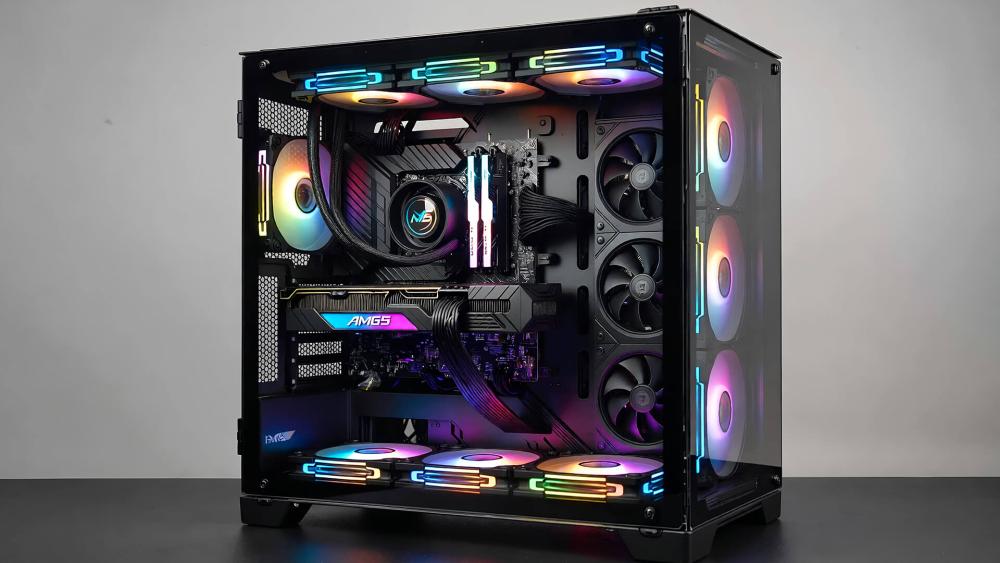
High-End / Enthusiast (X870E & X870)
ASUS ROG Crosshair X870E Hero
MPN: ROG CROSSHAIR X870E HERO
Best for: Enthusiasts building a high-end AM5 gaming system with the Ryzen 7 9850X3D.
The ASUS ROG Crosshair X870E Hero is a flagship X870E motherboard aimed at users who want maximum platform features and long-term upgrade flexibility. It's well suited to the Ryzen 7 9850X3D thanks to its focus on stable power delivery, strong connectivity, and extensive storage support.
Why it's a good match for Ryzen 7 9850X3D:
- AM5 socket with full AMD X870E chipset support
- Designed for gaming-focused builds rather than extreme overclocking
- Strong VRM cooling for consistent power delivery
- Excellent expansion for GPUs and fast storage
Key features at a glance:
- ATX form factor
- 4× DDR5 memory slots (up to 192 GB)
- 5× M.2 slots and 4× SATA ports
- Multiple USB 3.2 Gen 2 Type-A and Type-C ports
- Dual LAN with 2.5Gb and 5Gb Ethernet
- ROG SupremeFX 7.1 HD Audio
Things to keep in mind:
- Premium pricing compared to B850 options
- Best suited to high-end builds where expansion and connectivity matter
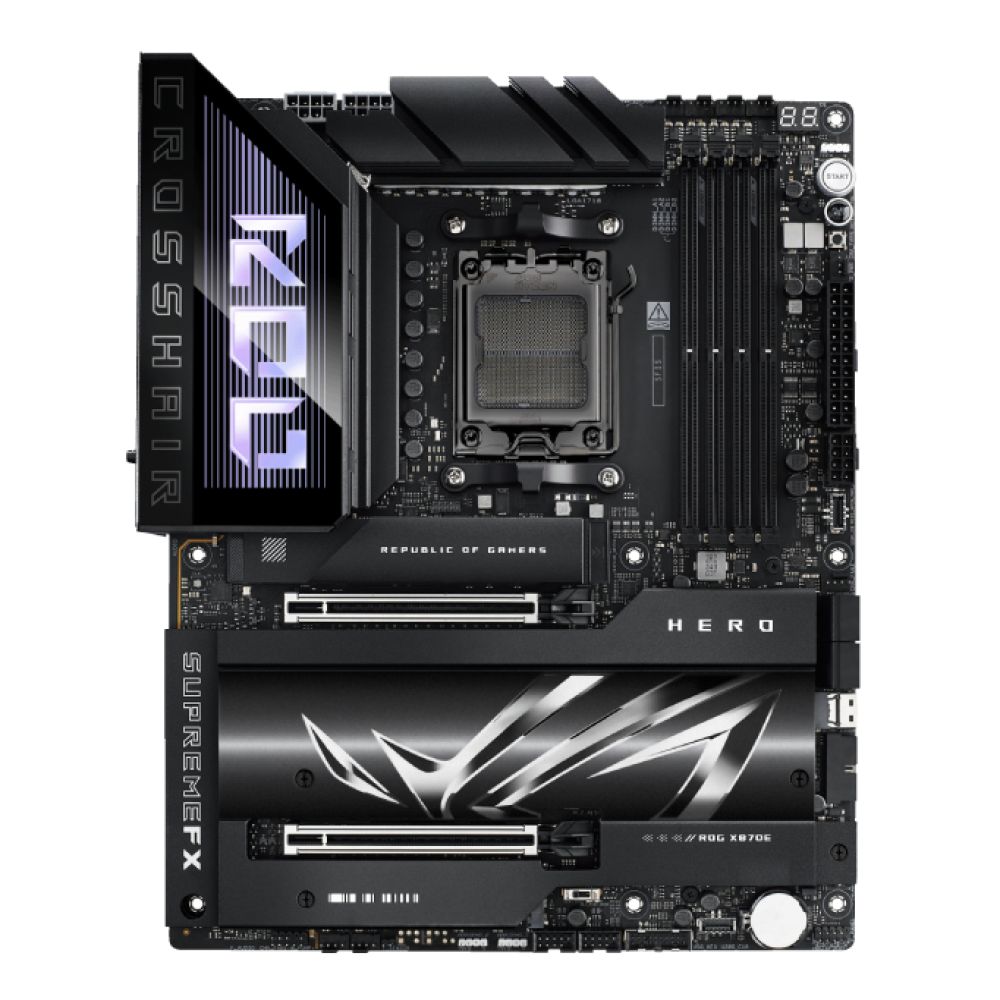
MSI MAG X870E Tomahawk WiFi
MPN: MAG X870E TOMAHAWK WIFI
Best for: High-end Ryzen 7 9850X3D builds that want X870E features without paying flagship prices.
The MSI MAG X870E Tomahawk WiFi sits firmly in the sweet spot for users who want the benefits of the X870E chipset but don't need the premium extras found on enthusiast-tier boards. It's a strong pairing for the Ryzen 7 9850X3D Processor, offering a balanced mix of power stability, modern connectivity, and expansion options that suit gaming-focused builds.
Why it's a good match for Ryzen 7 9850X3D:
- AM5 socket with AMD X870E chipset support
- Designed for stable, long-term gaming performance
- Plenty of high-speed storage and expansion support
- Cleaner, more affordable alternative to flagship boards
Key features at a glance:
- ATX form factor
- 4× DDR5 memory slots (up to 256 GB)
- 4× M.2 slots and 4× SATA ports
- Multiple USB 3.2 Type-A and Type-C ports, plus USB4 Gen 2x2
- 5Gb Ethernet for fast wired networking
- 7.1 channel HD audio
Things to keep in mind:
- Fewer PCIe slots than top-end enthusiast boards
- Focuses on practical features rather than premium extras
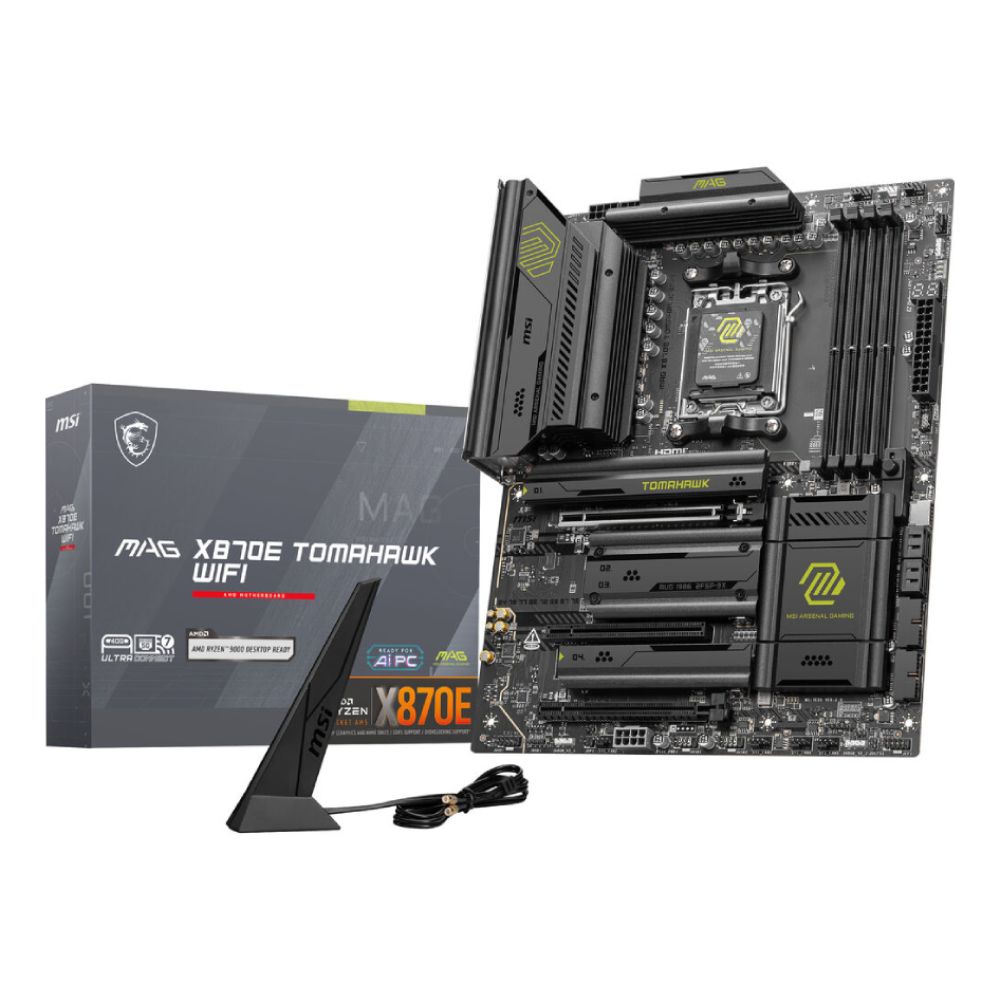
Gigabyte X870E AORUS Elite WiFi7
MPN: X870E AORUS ELITE WIFI7
Best for: High-end gaming builds that want X870E features with a more streamlined, no-nonsense design.
The Gigabyte X870E AORUS Elite WiFi7 is a well-balanced X870E motherboard aimed at gamers who want modern AM5 features without stepping into full enthusiast pricing. Paired with the Ryzen 7 9850X3D Processor, it offers a solid foundation for stable gaming performance and future expansion.
Why it's a good match for Ryzen 7 9850X3D:
- AM5 socket with AMD X870E chipset support
- Focused on gaming stability rather than overclocking extras
- Good balance of expansion and connectivity
- Clean layout that suits high-end GPUs and NVMe storage
Key features at a glance:
- ATX form factor
- 4× DDR5 memory slots (up to 256 GB)
- 4× M.2 slots and 4× SATA ports
- Multiple PCIe x16 slots for graphics and expansion cards
- USB 3.2 Gen 1 and Gen 2 Type-A connectivity
- 2.5Gb Ethernet and 7.1 channel HD audio
Things to keep in mind:
- Fewer premium connectivity options than top-tier X870E boards
- Best suited to gaming-first builds rather than workstation use
ASUS TUF Gaming X870-PLUS WiFi
MPN: TUF GAMING X870-PLUS WIFI
Best for: Gamers who want a reliable AM5 motherboard for the Ryzen 7 9850X3D without paying for X870E extras.
The ASUS TUF Gaming X870-PLUS WiFi is built around the AMD X870 chipset and focuses on durability, stability, and core features rather than maximum expansion. It's a sensible choice for Ryzen 7 9850X3D Processor builds where long-term reliability and a clean gaming setup matter more than having every high-end feature available.
Why it's a good match for Ryzen 7 9850X3D:
- AM5 socket with AMD X870 chipset support
- Designed for stable gaming performance on the AM5 platform
- Passive VRM heatsinks for consistent power delivery
- Straightforward layout suited to single-GPU builds
Key features at a glance:
- ATX form factor
- 4× DDR5 memory slots (up to 192 GB)
- 4× M.2 slots and 2× SATA 6Gb/s ports
- USB 3.2 Gen 1 and Gen 2 Type-A connectivity
- 2.5Gb Ethernet with TUF LANGuard
- Realtek ALC1220 7.1 HD audio
Things to keep in mind:
- Fewer expansion slots than X870E alternatives
- Best suited to simpler, gaming-focused AM5 builds

Shop ASUS TUF GAMING X870-PLUS
Best for Gaming (B850 & B850E Sweet Spot)
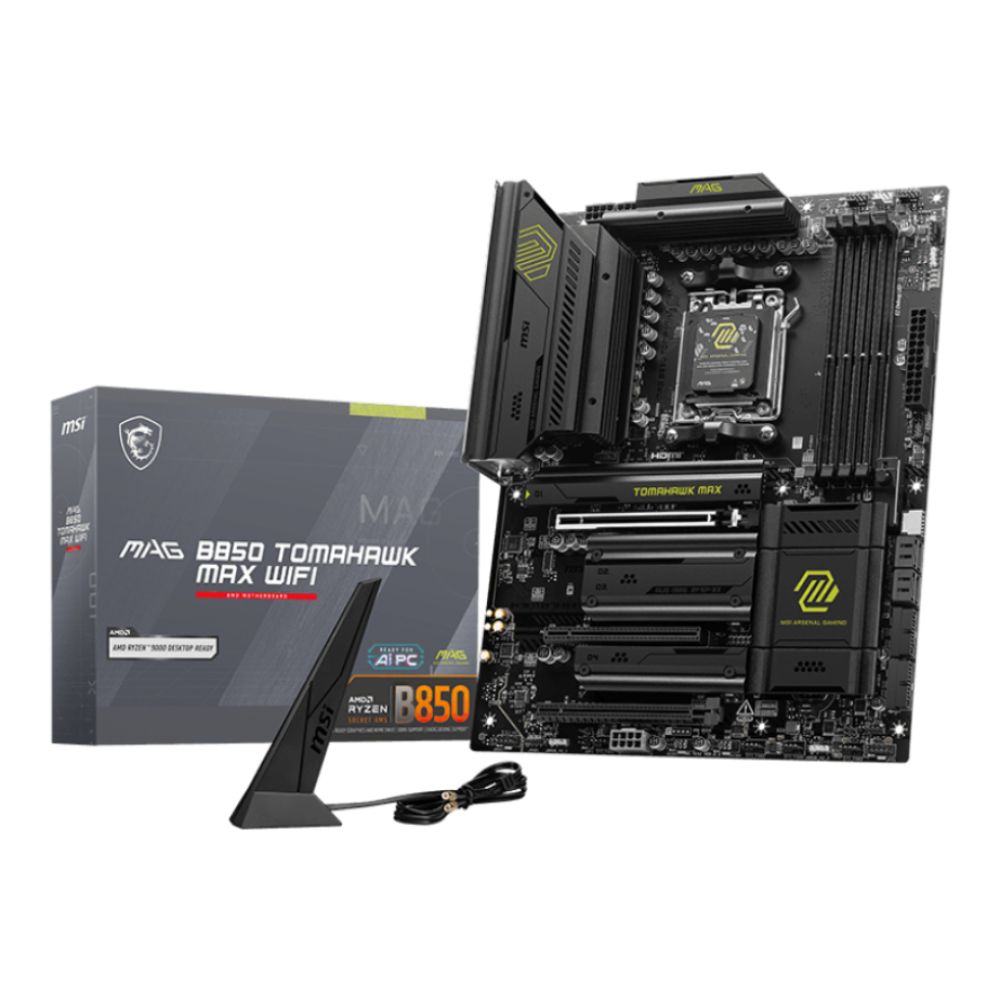
MSI MAG B850 Tomahawk MAX WiFi
MPN: MAG B850 TOMAHAWK MAX WIFI
Best for: Gamers who want a well-balanced AM5 motherboard for the Ryzen 7 9850X3D without stepping up to X870 pricing.
The MSI MAG B850 Tomahawk MAX WiFi sits firmly in the sweet spot for gaming-focused AM5 builds. Using the AMD B850 chipset, it delivers the core features the Ryzen 7 9850X3D Processor needs, while avoiding the cost of higher-end chipsets that many gamers won't fully use.
Why it's a good match for Ryzen 7 9850X3D:
- AM5 socket with AMD B850 chipset support
- Designed for stable, long-term gaming performance
- Strong connectivity for modern gaming setups
- Sensible expansion for single-GPU builds
Key features at a glance:
- ATX form factor
- 4× DDR5 memory slots (up to 256 GB)
- 4× M.2 slots and 4× SATA 6Gb/s ports
- Multiple USB 3.2 Type-A and Type-C ports, including high-speed Type-C
- 5Gb Ethernet for fast wired networking
- 7.1 channel HD audio
Things to keep in mind:
- Fewer chipset lanes than X870E boards
- Focuses on gaming essentials rather than premium extras
ASUS ROG STRIX B850-E Gaming WiFi
MPN: ROG STRIX B850-E GAMING WIFI
Best for: Gaming-first Ryzen 7 9850X3D builds that want premium features without moving to an X870 chipset.
The ASUS ROG STRIX B850-E Gaming WiFi is a higher-end B850 motherboard aimed at gamers who want strong connectivity and storage flexibility on the AM5 platform. It pairs well with the Ryzen 7 9850X3D Processor, offering a feature set that focuses on gaming performance and everyday usability rather than workstation extras.
Why it's a good match for Ryzen 7 9850X3D:
- AM5 socket with AMD B850 chipset support
- Designed specifically for gaming-focused builds
- Plenty of high-speed NVMe storage support
- Premium audio and networking features
Key features at a glance:
- ATX form factor
- 4× DDR5 memory slots (up to 192 GB)
- 5× M.2 slots for fast storage expansion
- HDMI 2.1 and DisplayPort 1.4a outputs
- 5Gb Ethernet for fast, low-latency networking
- ROG SupremeFX 7.1 HD audio (ALC4080)
Things to keep in mind:
- Fewer expansion lanes than X870-class boards
- Best suited to gaming builds rather than heavy multitasking systems

MSI B850 GAMING PLUS WIFI6E
MPN: B850 GAMING PLUS WIFI6E
Best for: Budget-conscious Ryzen 7 9850X3D builds that still want modern AM5 features and reliable stability.
The MSI B850 GAMING PLUS WIFI6E is a straightforward B850 motherboard aimed at gamers who want a dependable AM5 platform without paying for premium extras. It pairs well with the Ryzen 7 9850X3D Processor in builds where stability, DDR5 support, and essential connectivity matter more than maximum expansion.
Why it's a good match for Ryzen 7 9850X3D:
- AM5 socket with AMD B850 chipset support
- Designed for stable gaming-focused builds
- Simple, no-nonsense layout that's easy to build with
- Suitable for single-GPU systems
Key features at a glance:
- ATX form factor
- 4× DDR5 memory slots (up to 256 GB)
- 2× M.2 slots and 4× SATA ports
- USB 5Gbps and 10Gbps Type-A and Type-C connectivity
- 2.5Gb Ethernet for reliable wired networking
- 7.1 channel HD audio
Things to keep in mind:
- Fewer M.2 slots than higher-tier B850 boards
- Focuses on essential features rather than future expansion

Best Value / Smart Picks
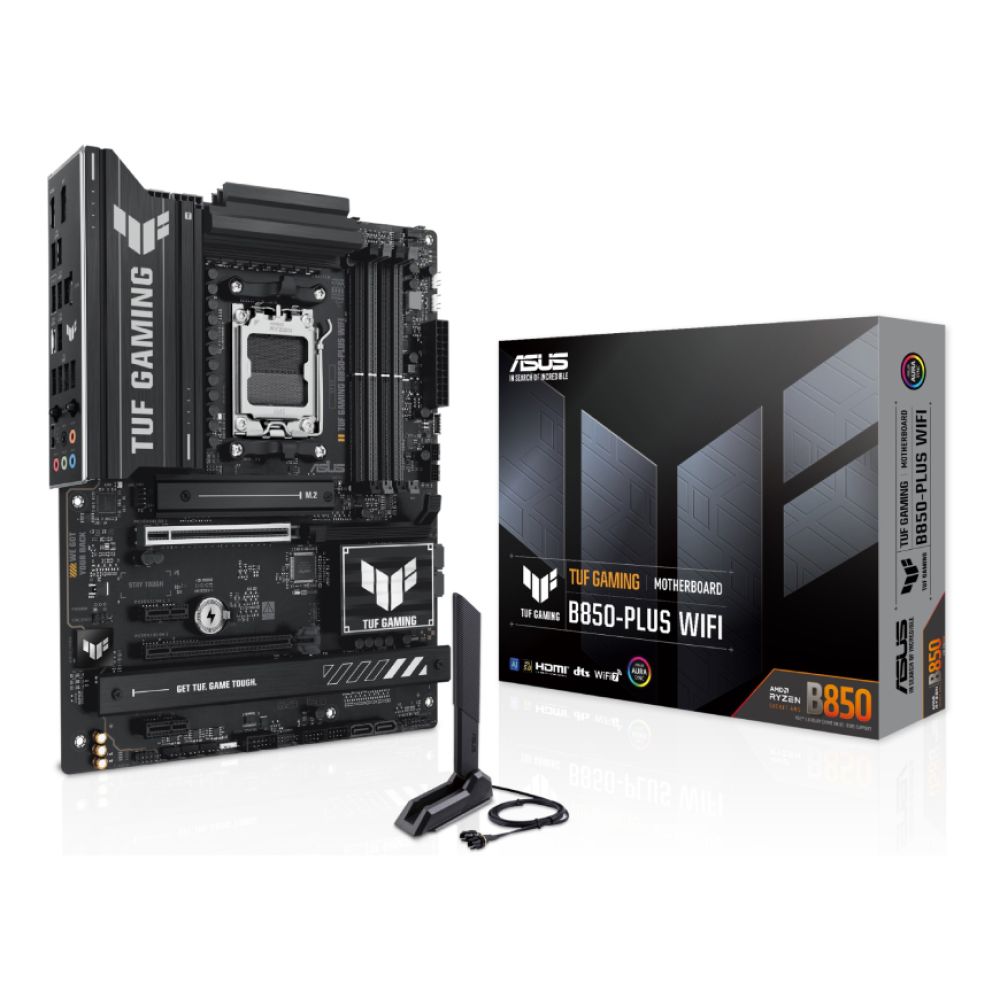
ASUS TUF Gaming B850-PLUS WiFi
MPN: TUF GAMING B850-PLUS WIFI
Best for: Reliable, long-term AM5 gaming builds using the Ryzen 7 9850X3D.
The ASUS TUF Gaming B850-PLUS WiFi is a sensible B850 motherboard aimed at gamers who want a dependable platform without paying for premium extras. It's a good fit for the Ryzen 7 9850X3D Processor, especially in builds focused on stability, longevity, and straightforward expansion.
Why it's a good match for Ryzen 7 9850X3D:
- AM5 socket with AMD B850 chipset support
- Designed for consistent gaming performance on AM5
- Practical expansion options for single-GPU builds
- Focus on durability rather than flashy features
Key features at a glance:
- ATX form factor
- 4× DDR5 memory slots (up to 192 GB)
- 3× M.2 slots and 4× SATA 6Gb/s ports
- USB 3.2 Gen 1 and Gen 2 Type-A connectivity
- 2.5 Gigabit Ethernet for stable wired networking
- 7.1-channel audio support
Things to keep in mind:
- Fewer high-speed storage options than premium B850 boards
- Best suited to clean, gaming-focused builds rather than heavy multitasking
Shop ASUS TUF GAMING B850-PLUS
MSI B850 Gaming Plus WiFi
MPN: B850 GAMING PLUS WIFI
Best for: Gamers who want a strong-value AM5 motherboard for the Ryzen 7 9850X3D without sacrificing stability.
The MSI B850 Gaming Plus WiFi is a well-rounded B850 motherboard that focuses on delivering the essentials needed for a reliable gaming system. It pairs comfortably with the Ryzen 7 9850X3D Processor, offering solid connectivity and expansion while keeping costs under control.
Why it's a good match for Ryzen 7 9850X3D:
- AM5 socket with AMD B850 chipset support
- Designed for stable, everyday gaming performance
- Good balance of storage and expansion options
- Ideal for clean, single-GPU AM5 builds
Key features at a glance:
- ATX form factor
- 4× DDR5 memory slots (up to 256 GB)
- 3× M.2 slots and 4× SATA 6Gb/s ports
- USB 3.2 Type-A and Type-C connectivity
- 5Gb Ethernet for fast, low-latency networking
- 7.1 channel HD audio
Things to keep in mind:
- Fewer premium features than higher-tier B850 boards
- Best suited to value-focused gaming systems
ASRock B850 Steel Legend WiFi
MPN: B850 STEEL LEGEND WIFI
Best for: Gamers who want a visually clean AM5 build with solid features and strong value.
The ASRock B850 Steel Legend WiFi is a B850 motherboard that focuses on practicality and long-term reliability, while also standing out with its lighter, white-themed design. It's a good match for the Ryzen 7 9850X3D Processor in gaming builds that need modern AM5 support without stepping up to higher-priced chipsets.
Why it's a good match for Ryzen 7 9850X3D:
- AM5 socket with AMD B850 chipset support
- Designed for stable gaming performance on the AM5 platform
- Good balance of storage and connectivity features
- Clean styling for white or neutral-themed builds
Key features at a glance:
- ATX form factor
- 4× DDR5 memory slots (up to 256 GB)
- 4× M.2 slots and 4× SATA III ports
- USB 3.2 Gen 1 and Gen 2 Type-A and Type-C ports
- HDMI output for basic display support
- 7.1 channel HD audio
Things to keep in mind:
- Fewer premium extras than higher-end B850 boards
- Best suited to gaming-focused systems rather than heavy workstation use

How to Choose the Best AM5 Motherboard for Your Build
With so many AM5 motherboards available, it's easy to overthink the decision when building around the Ryzen 7 9850X3D Processor. Focusing on how you actually use your PC helps narrow the options and avoids paying for features you'll never need.
Gaming vs Productivity Use Cases
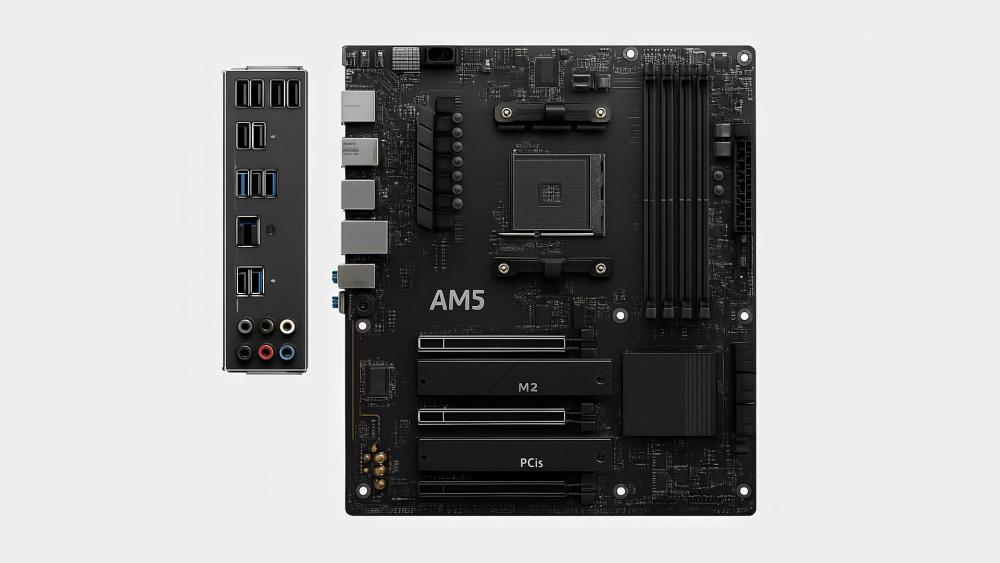
For most gamers, a gaming-focused AM5 motherboard is more than enough. Features aimed at workstation or creator systems, such as excessive expansion slots or specialist add-in support, rarely improve gaming performance. What matters more is stable power delivery, good memory support, and reliable connectivity. If your build is primarily for gaming, a well-equipped B850 or X870 board will cover everything without unnecessary extras.
Future Upgrade Considerations
One of the advantages of the AM5 platform is its long-term support. Choosing a motherboard with a modern chipset gives you more flexibility for future CPU upgrades within the same socket. It's also worth thinking about expansion headroom. Having spare M.2 slots for additional storage or PCIe support for future graphics cards can extend the life of your system without needing a full rebuild.
Connectivity, Storage, and Expansion Needs
Every build has different connectivity requirements. Check that your motherboard offers enough USB ports for your peripherals, including a mix of USB Type-A and Type-C where needed. Storage is another key factor, with M.2 slots providing the fastest and most convenient option for modern SSDs. Networking should also match your setup, whether that means reliable 2.5Gb Ethernet for wired gaming or onboard Wi-Fi for flexible placement.
Common Mistakes to Avoid When Buying a Ryzen 7 9850X3D Motherboard
When building around the Ryzen 7 9850X3D, most problems come from choosing a motherboard that doesn't match how the system will actually be used. Avoiding these common mistakes helps keep your build balanced, reliable, and cost-effective.
Paying for Features You'll Never Use
It's easy to assume higher-end chipsets automatically mean better gaming performance, but many of their extra features go unused in typical gaming builds. Multiple PCIe slots, niche connectivity, or workstation-focused expansion rarely improve the experience. Choosing a board that fits your needs often delivers better value than buying the most expensive option available.
Overlooking VRM Quality on Mid-Range Boards
Not all AM5 motherboards are built the same, even within the same chipset. X3D CPUs benefit from consistent power delivery, so boards with minimal VRM cooling or weak power designs can be a poor long-term choice. Prioritising solid VRM heatsinks and sensible board layouts helps maintain stability during extended gaming sessions.
Forgetting About BIOS Support
While AM5 is designed to support Ryzen 9000 series CPUs, some motherboards may require a BIOS update before full compatibility is guaranteed. Checking update support in advance, or choosing a board with BIOS Flashback, makes first-time setup far smoother.
Choosing Too Few M.2 Slots
Modern gaming builds often grow over time. Opting for a motherboard with limited M.2 storage can lead to early upgrades or workarounds later. Having spare M.2 slots gives flexibility for adding fast NVMe storage without replacing your board.
Ignoring Rear I/O and Connectivity Needs
USB ports, networking speed, and display outputs are easy to overlook until everything is plugged in. Making sure your motherboard has enough rear USB ports and suitable networking avoids reliance on hubs or add-in cards later on.
By keeping these points in mind, it's much easier to choose an AM5 motherboard that complements the Ryzen 7 9850X3D without overspending or limiting future upgrades.
BIOS and Compatibility Tips for Ryzen 7 9850X3D
Getting the most out of the Ryzen 7 9850X3D Processor isn't just about choosing the right hardware. Proper BIOS setup and system configuration play a big role in ensuring a smooth and stable AM5 build.
One of the first things to check is BIOS support for Ryzen 9000 Series CPUs. Even though AM5 motherboards are designed for this platform, some boards may ship with an older BIOS version. Updating to the latest BIOS ensures full compatibility, improved stability, and access to newer platform optimisations.
BIOS Flashback is a particularly useful feature, especially if you're building from scratch. It allows you to update the BIOS without installing a CPU or memory first, which can save time and avoid setup issues if the board doesn't initially recognise the processor.
For memory performance, make sure to enable EXPO profiles in the BIOS after your system is up and running. DDR5 memory will otherwise run at default speeds, and enabling EXPO helps your RAM operate at its rated settings with minimal manual tuning.
Finally, don't overlook case airflow and motherboard thermals. Good airflow across the VRMs and M.2 slots helps maintain stable temperatures during long gaming sessions. Pairing a well-ventilated case with a motherboard that has proper heatsinks ensures consistent performance and long-term reliability on the AM5 platform.
Wrapping Up
Choosing the right motherboard for the Ryzen 7 9850X3D Processor comes down to finding the best balance between features, stability, and long-term value. With the AM5 platform, gamers have a wide range of options, from high-end X870E boards built for maximum expansion to more affordable B850 models that still deliver everything needed for a strong gaming experience.
The key is focusing on what actually benefits your build. Reliable power delivery, solid DDR5 support, enough M.2 storage, and the right connectivity will have a far bigger impact than paying extra for features you may never use. By matching your motherboard choice to how you game and upgrade over time, you can build a system that stays capable and relevant for years.
Whether you're finalising parts for a new PC or upgrading an existing AM5 setup, pairing the Ryzen 7 9850X3D with the right motherboard ensures you get the most out of AMD's latest platform without unnecessary compromises. And if you are still confused about the processor, you can compare the best processors for gaming on Box.co.uk and finalize an option that fits your needs.
Frequently Asked Questions
What is the best chipset for Ryzen 7 9850X3D?
The best chipset depends on how you plan to use your system. X870E and X870 chipsets offer the most features and expansion, while B850 provides excellent value for gaming builds. All support the Ryzen 7 9850X3D on the AM5 platform when paired with a compatible motherboard.
Do I need an X670E motherboard for gaming?
No, an X670E motherboard is not required for gaming. While it offers more connectivity and expansion, most gamers will see no practical benefit over a well-built B850 or X870 board when using the Ryzen 7 9850X3D in a typical gaming setup.
Is B650 enough for Ryzen 7 9850X3D?
B650 motherboards can support the Ryzen 7 9850X3D, but feature sets vary by model. For gaming builds that don't need extensive expansion, a quality B650 board can be sufficient, though newer B850 options often provide better long-term value and connectivity.
Does Ryzen 7 9850X3D support DDR5 only?
Yes, the Ryzen 7 9850X3D supports DDR5 memory only. All AM5 motherboards use DDR5, and older DDR4 memory is not compatible. Using DDR5 with EXPO profiles enabled helps ensure memory runs at its intended speed and settings.
Will older AM5 motherboards need a BIOS update?
Some AM5 motherboards may require a BIOS update to fully support Ryzen 9000 series CPUs like the Ryzen 7 9850X3D. Checking BIOS compatibility before building is recommended, and boards with BIOS Flashback make updates easier if needed.
Is PCIe 5.0 necessary for GPUs?
PCIe 5.0 is not essential for current GPUs. Most modern graphics cards do not fully use PCIe 4.0 bandwidth, let alone PCIe 5.0. PCIe 5.0 support is mainly about future-proofing rather than immediate gaming performance.
You can pay with:
*PayPal Credit Representative Example: Assumed credit limit £1,200, Representative 23.9% APR (variable). Purchase rate 23.9% p.a (variable).Terms & Conditions apply.


PayPal Credit and PayPal Pay in 3 are trading names of PayPal UK Ltd, 5 Fleet Place, London, United Kingdom, EC4M 7RD. Terms and conditions apply. Credit subject to status, UK residents only, Five Tech LTD acts as a broker and offers finance from a restricted range of finance providers. PayPal Pay in 3 is not regulated by the Financial Conduct Authority. Pay in 3 eligibility is subject to status and approval. 18+. UK residents only. Pay in 3 is a form of credit. Check if affordable and how you will repay. May make other borrowing more difficult or expensive. See product terms for more details.
Copyright © 1996-2026 Fivetech LTD | Terms and Conditions
box.co.uk & Box are trading names of Five Tech Limited. Registered office: Box LTD, Unit 10 Woodford Trading Estate, Woodford Green IG8 8HF