


 Menu
MenuMenu


Get Sales Advice from Mon - Fri 9am - 5:00pm:
020 3337 8950LAST UPDATED: July 06, 2026
Prime Tech Deals 2026: The Discounts Everyone’s Talking About
Box Prime Tech Deals 2026 bring limited-time savings across gaming, computing, displays, PC components, and accessories. Whether you are upgrading a gaming setup, refreshing your home office, or building a new PC, this sale period is a good time to compare categories and focus on upgrades that genuinely improve your setup.
The best deals are not always the loudest ones. A strong discount only matters if the product fits your needs, works with your current hardware, and offers long-term value after the sale ends.
This guide covers what to expect from Box’s tech sale, which categories are worth watching, how to spot a proper deal, and how to avoid wasting money on upgrades that look better on the discount badge than they do in real use.
Quick answer: Prime Tech Deals 2026 are best for shoppers who plan ahead. The strongest categories to watch are monitors, gaming peripherals, PC components, power supplies, cooling upgrades, gaming laptops, and full gaming PCs. Check the specs, compare the savings, and buy based on what your setup actually needs.
Prime Tech Deals 2026: What to Expect
Prime tech deals 2026 focus on practical technology upgrades across gaming, displays, computing, and PC hardware. The sale window gives shoppers time to compare options, but some offers may change or sell out during the event.
The best approach is simple: start with the products you already need, then check whether the discount makes them worth buying now.
What’s Going on Offer?
Expect savings across categories such as:
- Gaming headsets
- Keyboards and mice
- Monitors
- Portable displays
- PC cases
- Power supplies
- CPU coolers
- PC components
- Gaming laptops
- Gaming PCs
- Console accessories
- Storage and peripherals
If your main goal is improving your gaming setup, start with gaming deals at Box. This keeps the search focused on products built around performance, comfort, and smoother gameplay.
Best Categories to Watch
| Category | Best For |
|---|---|
| Gaming peripherals | Better control, comfort, and audio |
| Monitors and displays | Sharper visuals, smoother gaming, and better workspace |
| PC components | Upgrades for cooling, power, and performance |
| Gaming PCs | Full system upgrades |
| Gaming laptops | Portable high-performance gaming |
| Home office tech | Better productivity and desk comfort |
| Accessories | Smaller upgrades that improve daily use |
A good sale is not about buying the most products. It is about buying the right ones.
Gaming Peripherals: Headsets, Keyboards and Mice
Gaming peripherals are some of the easiest tech deals to justify because they can improve your setup without a full PC rebuild.
A better headset, keyboard, or mouse can change how your setup feels every day, especially if you play competitive games, stream, work from the same desk, or spend long sessions online with friends.
What to Look For
| Peripheral | What Matters Most |
|---|---|
| Gaming headset | Comfort, mic quality, positional audio, wireless support |
| Keyboard | Switch type, layout, build quality, latency |
| Mouse | Shape, weight, sensor, battery life |
| Mouse mat | Size, surface texture, desk coverage |
| Controller accessories | Compatibility, grip, charging, and comfort |
If you play shooters, racing games, or competitive titles, headset quality matters. Better positional audio can make footsteps, team comms, and in-game cues easier to follow.
For keyboards, focus on layout and switch feel rather than only chasing the biggest percentage saving. A compact layout might be great for gaming space, while a full-size layout may be better if you also work from the same desk.
For mice, shape matters more than hype. Do not buy an ultra-light mouse if you prefer a larger palm grip. Do not buy a heavy MMO-style mouse if you mainly play fast FPS games.
Monitor and Display Deals
Monitor deals are often some of the strongest tech offers because a better screen can improve gaming, work, and entertainment at the same time.
The right display can make your setup feel faster, sharper, and more comfortable. The wrong one can leave you with a screen that looks good on paper but does not suit your PC, console, or desk.
If you are looking for discounted displays, match the screen to your setup instead of only chasing the biggest saving.
What to Check Before Buying a Monitor
| Feature | Why It Matters |
|---|---|
| Resolution | Affects sharpness and GPU demand |
| Refresh rate | Important for smooth gaming |
| Panel type | Affects colour, contrast, and viewing angles |
| Screen size | Needs to suit your desk and distance |
| Response time | Important for fast games |
| HDMI and DisplayPort | Needed for PC and console compatibility |
| Adaptive sync | Helps reduce tearing |
| Stand adjustment | Improves comfort |
| Colour accuracy | Important for creators and photo work |
Which Monitor Deal Makes Sense?
| User Type | Best Display Focus |
|---|---|
| Competitive gamer | High refresh rate, low response time |
| Console gamer | HDMI support, 4K or high-refresh options |
| Creator | Colour accuracy and panel quality |
| Home office user | Size, clarity, and stand adjustment |
| Hybrid gaming/work setup | Balance of refresh rate, resolution and comfort |
For gaming, refresh rate and response time are key. For creative work, colour and resolution matter more. For home office use, comfort and screen space often matter most.
PC Components on Sale

PC component deals can be excellent if you are upgrading a system rather than replacing it completely.
The strongest component offers are usually on practical parts that improve reliability, cooling, airflow and upgrade headroom.
You may see deals on:
- Power supplies
- CPU coolers
- PC cases
- Case fans
- GPU supports
- Storage
- Memory
- Build accessories
If your PC already has a capable CPU and GPU, PC components on sale can help you improve the parts that support performance rather than replacing everything.
Power Supplies
A PSU deal is worth considering if you are planning a GPU upgrade or building a more powerful gaming PC.
Check:
- Wattage
- Efficiency rating
- Brand quality
- PCIe power connectors
- ATX standard
- Warranty
- Future upgrade headroom
Do not buy a power supply only because it has a high wattage number. Quality, stability and the right connectors matter just as much.
CPU Coolers
Cooler deals are worth watching if your CPU runs hot, your fans are loud, or you are planning to upgrade to a more powerful processor.
A better cooler can help with:
- Lower temperatures
- Quieter operation
- Better sustained performance
- More stable boost clocks
- Cleaner builds
Check socket compatibility and case clearance before buying.
PC Cases and Airflow
A case deal is not just about looks. A good case can make a gaming PC easier to build, easier to cool, and easier to upgrade later.
Look for:
- Strong airflow
- Enough GPU clearance
- Cable management space
- Radiator support
- Dust filters
- Front I/O ports
- Good fan support
If your current case traps heat, a better airflow-focused model can make a bigger difference than expected.
Gaming PC and Laptop Deals
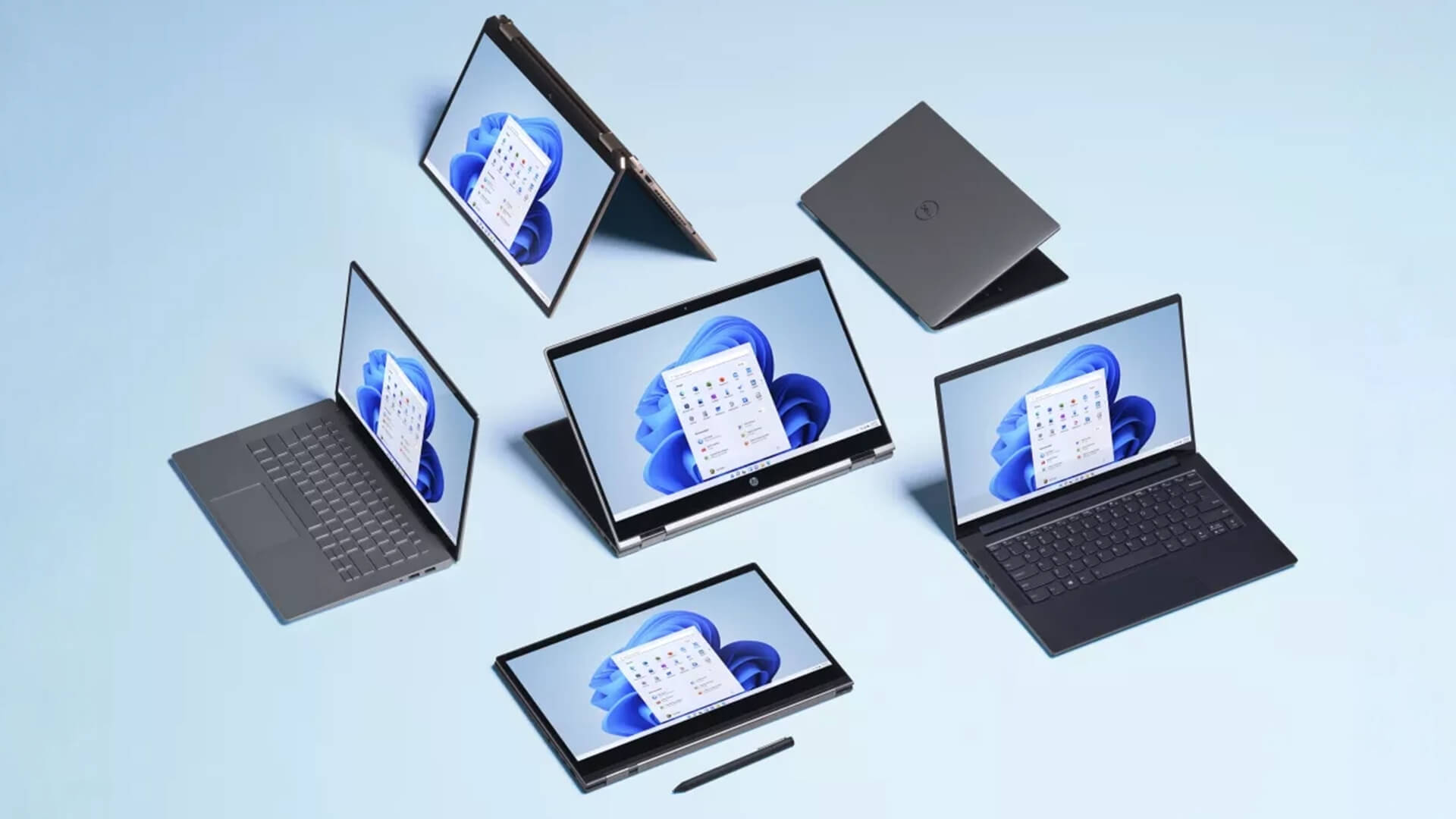
Not every upgrade needs to be part-by-part. Sometimes a full gaming PC or gaming laptop makes more sense, especially if your current system is too old to upgrade efficiently.
A gaming PC is usually the better choice if you want stronger cooling, easier upgrades, and more performance for a fixed setup.
A gaming laptop is better if you need portability, a built-in display, and easy desk-to-sofa flexibility.
Gaming PC vs Gaming Laptop
| Choose a Gaming PC If You Want | Choose a Gaming Laptop If You Want |
|---|---|
| Easier future upgrades | Portability |
| Stronger cooling | Built-in screen |
| Better high-end performance | Easy setup |
| More monitor choice | One-device convenience |
| Better long-term flexibility | Gaming away from a desk |
What to Check Before Buying a Gaming System
| Spec | What to Look For |
|---|---|
| GPU | Main driver of gaming performance |
| CPU | Important for esports, simulation and multitasking |
| RAM | 16GB minimum, 32GB better for heavier use |
| Storage | NVMe SSD preferred |
| Cooling | Important for sustained performance |
| PSU | Matters for stability and upgrades |
| Laptop display | Refresh rate, resolution, and panel quality |
| Warranty | Important for higher-value systems |
A good system deal should make the full spec clear. Avoid offers that focus only on the discount without giving enough detail on GPU, CPU, memory, storage, and cooling.
Top Categories to Shop During the Sale
The best category depends on what your current setup is missing. Do not shop for everything at once. Pick the weak point first.
Laptops and Computing
Laptop deals can be strong, but only if the specs match your workload.
Check:
- Processor generation
- RAM capacity
- SSD size
- Screen quality
- Battery life
- Weight
- Ports
- Warranty
For gaming laptops, pay close attention to GPU wattage and cooling. Two laptops with the same GPU name can perform differently if one has a lower power limit or weaker cooling.
Gaming and Performance
Gaming deals are strongest when they improve the experience directly.
Good targets include:
- Gaming headsets
- Mechanical keyboards
- Lightweight mice
- OLED monitors
- High-refresh monitors
- Power supplies
- CPU coolers
- Gaming cases
- Full gaming PCs
Avoid buying accessories just because they match your setup colour. Comfort, latency, build quality, and compatibility matter more.
Home Office and Accessories
A sale period is also useful for improving a work setup.
Look for:
- Monitors
- Portable displays
- Keyboard and mouse upgrades
- Desk audio
- Webcam accessories
- USB-C hubs
- Mouse mats
- Storage
- Cable management
A better home office setup can make everyday work more comfortable, even if it is not as exciting as a gaming upgrade.
How to Spot a Good Tech Deal
A good tech deal is not just a lower price. It is a product you actually need at a price that is genuinely better than usual.
Good Deal Checklist
| Question | Why It Matters |
|---|---|
| Is this the exact model I want? | Similar names can hide different specs |
| Does it fit my setup? | Avoids compatibility issues |
| Will I still use it after the sale? | Stops impulse buying |
| Is the warranty clear? | Important for monitors and PC parts |
| Could it sell out? | Some offers may be limited |
| Are reviews consistent? | Helps avoid poor products |
Compare Prices Properly
Before buying, compare:
- Standard price
- Promo price
- Saving in pounds
- Saving percentage
- Similar models
- Previous sale prices where available
- Reviews
- Warranty and returns
A big saving on a monitor is only useful if the monitor suits your gaming PC, console, or workstation.
Check the Specs
Do not skip the spec sheet.
For monitors, check:
- Resolution
- Refresh rate
- Panel type
- Ports
- Adaptive sync
- Brightness
- HDR support
- Stand adjustment
For PC parts, check:
- Compatibility
- Power requirements
- Case clearance
- Cooling needs
- Connector type
- Warranty
For peripherals, check:
- Wired or wireless
- Battery life
- Switch type
- Weight
- Microphone quality
- Software support
Common Sale Mistakes to Avoid
Tech deals can create pressure. That is how people end up buying products they do not need.
Avoid These Mistakes
| Mistake | Better Approach |
|---|---|
| Buying only because it is discounted | Buy because it solves a need |
| Ignoring model numbers | Check the exact product code |
| Choosing the cheapest monitor | Match resolution, panel, and refresh rate |
| Forgetting compatibility | Check size, ports, and power |
| Waiting too long on a strong limited offer | Decide quickly if it matches your plan |
| Buying too many accessories | Prioritise meaningful upgrades |
| Overlooking warranty | Check before paying |
| Ignoring delivery timing | Important if buying for a build |
The best shoppers are not the fastest. They are the best prepared.
Tips to Maximise Your Savings
The easiest way to save money is to decide what you need before the sale begins.
Before You Shop
Make a shortlist:
- Must-buy items
- Nice-to-have items
- Maximum budget
- Current prices
- Required specs
- Backup options
This stops you from being pulled into random deals.
During the Sale
Use this simple process:
- Check your shortlist first
- Compare the saving
- Confirm the exact model
- Check compatibility
- Check return options
- Buy only if it fits the plan
Budget by Upgrade Type
| Upgrade Type | Sensible Budget Focus |
|---|---|
| Headset | Comfort, mic quality, wireless needs |
| Keyboard | Switch type, layout, build quality |
| Mouse | Weight, shape, sensor, battery |
| Monitor | Resolution, refresh rate, panel |
| PSU | Wattage, quality, connectors |
| Cooler | CPU compatibility and case fit |
| Case | Airflow and GPU clearance |
If you are upgrading multiple parts, start with the one that solves the biggest problem.
Final Thoughts
Prime Tech Deals 2026 are worth watching if you are shopping with a clear plan. The strongest discounts are the ones that improve your setup in a meaningful way, such as a better monitor, a more comfortable headset, a reliable power supply, stronger cooling, or a complete gaming system.
The key is to avoid deal fatigue. Not every discount is worth your money. Focus on products that match your current setup, your future upgrade plans, and your actual day-to-day use.
For gamers, displays, peripherals, and PC components are the main categories to watch. For creators and hybrid workers, monitor and desk upgrades may deliver the most everyday value. For anyone with an ageing system, a full gaming PC or laptop could make more sense than small upgrades.
Use the sale window wisely:
- Compare before buying
- Check exact model numbers
- Prioritise real upgrades
- Watch deal end dates
- Move quickly on genuinely strong offers
- Avoid buying tech just because it is cheap
Prime Tech Deals can be a great chance to upgrade, but the best bargain is still the one you will actually use. So check out our Prime tech deals now and enjoy maximum savings on tech you love.
FAQs
-
When do Prime Tech Deals 2026 at Box start?
Prime Tech Deals 2026 run during a limited sale window, with offers available across selected categories while stock lasts. Check the relevant category pages for live pricing, deal dates, and availability.
-
What kind of tech deals can you expect?
You can expect tech deals across monitors, gaming peripherals, PC components, power supplies, coolers, cases, laptops, gaming PCs, accessories, and home office upgrades.
-
Are Prime Tech Deals worth it?
Prime Tech Deals are worth it when the product is genuinely useful, the saving is real, and the specs still make sense. They are not worth it if you are buying only because something has a discount badge.
-
How do I find the best tech deals?
Start with a shortlist, check the normal price, compare the discount, confirm the exact model number, and make sure the product fits your setup. Focus on upgrades you already need.
-
Do tech deals sell out quickly?
Some tech deals can sell out quickly, especially limited gaming accessories, popular monitors, and strong PC component discounts. If a deal matches your plan and the saving is genuinely good, it is usually better to act quickly.
-
What should I buy first during a tech sale?
Prioritise the upgrade that fixes your biggest setup problem. For gamers, that may be a monitor, headset, mouse, keyboard, or GPU-related component. For PC builders, power supplies, coolers, and cases can be strong buys.
-
Are monitor deals worth it?
Monitor deals can be very strong, especially on OLED, high-refresh, ultrawide, and 4K displays. Always match the monitor to your GPU, console, or workstation before buying.
You can pay with:
*PayPal Credit Representative Example: Assumed credit limit £1,200, Representative 23.9% APR (variable). Purchase rate 23.9% p.a (variable).Terms & Conditions apply.


PayPal Credit and PayPal Pay in 3 are trading names of PayPal UK Ltd, 5 Fleet Place, London, United Kingdom, EC4M 7RD. Terms and conditions apply. Credit subject to status, UK residents only, Five Tech LTD acts as a broker and offers finance from a restricted range of finance providers. PayPal Pay in 3 is not regulated by the Financial Conduct Authority. Pay in 3 eligibility is subject to status and approval. 18+. UK residents only. Pay in 3 is a form of credit. Check if affordable and how you will repay. May make other borrowing more difficult or expensive. See product terms for more details.
Copyright © 1996-2026 Fivetech LTD | Terms and Conditions
box.co.uk & Box are trading names of Five Tech Limited. Registered office: Box LTD, Unit 10 Woodford Trading Estate, Woodford Green IG8 8HF