


 Menu
MenuMenu


Get Sales Advice from Mon - Fri 9am - 5:00pm:
020 3337 8950LAST UPDATED: January 16, 2026
Microsoft Surface vs MacBook: Which Is Best for Professionals in 2026?
Microsoft Surface vs MacBook: Which Is Best for Professionals in 2026?
Professional laptops have evolved far beyond simple work machines. In 2026, they are expected to handle demanding multitasking, long video-heavy workdays, AI-assisted workflows, and flexible working environments without compromise. That’s exactly why the Microsoft Surface vs MacBook comparison continues to dominate conversations among professionals who need a reliable device they can depend on every day.
These two line-ups represent very different approaches to productivity. Microsoft Surface devices are built around flexibility, offering touchscreens, detachable designs, and deep integration with Windows-based business tools. Apple MacBook laptops, on the other hand, focus on performance efficiency, refined hardware, and a tightly optimised macOS experience that many professionals rely on for consistency and long-term stability. For anyone choosing between Surface vs MacBook, the decision is less about raw specifications and more about how each platform supports real working habits.
As hybrid work becomes the norm, professionals are no longer tied to a single desk or setup. Portability, battery life, and software compatibility now matter just as much as processing power. This is where the MacBook vs Microsoft surface debate becomes genuinely meaningful. Whether you’re presenting in meetings, working remotely, or switching between creative and office tasks, the differences between these devices can directly affect productivity.
In this guide, we break down Microsoft Surface vs MacBook specifically for professional use in 2026. From design and performance to operating systems, value, and profession-specific recommendations, this comparison will help you decide whether a Surface or a MacBook is the better fit for how you actually work.
Quick Comparison: Surface vs MacBook at a Glance
Before diving into detailed performance benchmarks and design choices, it helps to understand how Surface and MacBook devices differ at a high level. For many professionals, this initial Surface vs MacBook overview is often enough to narrow down which platform makes the most sense for their daily workload.
Devices in the Microsoft Surface range are designed to cover a wider range of form factors, from traditional laptops to detachable and convertible 2-in-1 models. MacBooks take a more focused approach, offering a refined clamshell design built around macOS and Apple’s custom Silicon. When looking at MacBook vs Microsoft Surface, the contrast is immediately clear in how each platform prioritises flexibility versus consistency. To help you get an idea of the differences, here’s a quick comparison table to look at:
| Feature | Microsoft Surface | Apple MacBook |
| Operating system | Windows 11 | macOS |
| Form factor | Laptop and 2-in-1 options (Surface Laptop, Surface Pro) | Traditional clamshell (MacBook Air, MacBook Pro) |
| Processor options | Intel, AMD, and ARM-based chips | Apple Silicon (M-series) |
| Touchscreen support | Yes (most models) | No |
| Pen input | Supported on compatible models | Not supported |
| Battery life | Strong, varies by model and usage | Consistently excellent across the range |
| Display quality | High-resolution PixelSense displays | Retina displays with excellent colour accuracy |
| Software ecosystem | Broad compatibility with Windows business tools | Optimised macOS ecosystem and Apple apps |
| Best suited for | Flexible workflows, Windows-based offices, 2-in-1 users |
Long workdays, creatives, macOS-first users |
Key specs and use cases
From a hardware perspective, the Microsoft Surface vs MacBook comparison starts with the processors and configurations available. Apple’s MacBooks rely on Apple Silicon, delivering impressive performance efficiency and battery life across the MacBook Air and MacBook Pro ranges. Surface devices, meanwhile, offer a mix of Intel, AMD, and ARM-based options depending on the model, giving professionals more choice based on software requirements and budget.
Display quality, input methods, and connectivity also highlight the difference between Mac vs Surface. Surface devices typically feature touchscreens and optional pen support, making them ideal for note-taking, presentations, and creative workflows. MacBooks focus on high-resolution Retina displays, large trackpads, and gesture-based navigation, appealing to users who prefer a more traditional laptop experience.
Who each device is best suited for
Choosing between MacBook vs Surface often comes down to how you work. Surface devices are well suited to professionals who value flexibility, especially those who switch between laptop and tablet-style use throughout the day. They also integrate seamlessly into Windows-based business environments, making them a strong choice among Windows-based laptops used in corporate settings.
MacBooks remain a popular option for professionals who prioritise stability, battery efficiency, and long-term performance consistency. They are commonly favoured by users already invested in Apple Mac devices and those looking for a polished, distraction-free workflow. For many buyers exploring the best laptops for professionals, this high-level comparison helps clarify which platform aligns better with their working style before diving deeper into the details.
Design & Portability for Professionals on the Go

For many professionals, a laptop is no longer tied to a single desk. Meetings, commuting, remote work, and travel all place a premium on build quality and portability. This is where the Microsoft Surface vs MacBook comparison becomes particularly important, as both ranges approach design with different priorities in mind.
Microsoft has positioned Surface devices as adaptable tools for modern work, while Apple continues to refine a consistent, premium laptop experience. When weighing up Surface vs MacBook, design choices can influence everything from how comfortable a device is to carry, to how practical it feels in fast-moving work environments.
Build quality and form factor
Both Surface and MacBook models are built to a high standard, using aluminium chassis designs that feel solid and professional. The difference lies in how that build quality is applied. The Microsoft surface laptop range focuses on slim profiles with a lighter feel, making them easy to slip into a bag without adding bulk. Surface devices are often designed with portability first, especially for professionals who are frequently on the move.
MacBooks, by contrast, are known for their uniform, rigid construction and minimalist design. Whether you’re looking at a MacBook Air or a MacBook Pro, the overall feel is consistent across the lineup. This appeals to professionals who value durability and a familiar working experience, particularly when comparing MacBook vs Microsoft Surface from a long-term reliability standpoint.
2-in-1 flexibility (Surface) vs traditional clamshell (MacBook)
One of the biggest design differences in the Mac vs Surface debate is flexibility. Surface Pro models can function as both a laptop and a tablet, with detachable keyboards and full touchscreen support. This makes them especially useful for note-taking, sketching, presentations, and touch-driven workflows. For professionals who regularly move between meetings and desk work, Surface Pro vs MacBook highlights a clear advantage for Microsoft’s 2-in-1 approach.
MacBooks remain committed to the traditional clamshell design, focusing on keyboard, trackpad, and gesture-based navigation. While they lack touchscreen input, many professionals prefer this consistency, particularly for typing-heavy tasks and long work sessions. In the MacBook vs Surface comparison, this comes down to whether you value adaptability or a more conventional, distraction-free laptop experience.
Performance & Multitasking
Performance is one of the most decisive factors for professionals choosing between a Surface and a MacBook. In 2026, laptops are expected to handle far more than basic office work, from constant video calls and large spreadsheets to creative software and development tools. This makes performance a key part of the Microsoft Surface vs MacBook comparison, especially for users who rely on smooth multitasking throughout the day.
While both platforms deliver strong everyday performance, they take different approaches under the hood. Understanding these differences helps clarify which option is better suited to your workload when weighing up MacBook vs Microsoft surface.
Processors, RAM and storage options
Apple’s MacBook range is built around Apple Silicon, which has become known for balancing power and efficiency. These chips are designed to work seamlessly with macOS, resulting in responsive performance even on thinner models like the MacBook Air. For professionals comparing Mac vs Intel, Apple’s move away from traditional Intel processors has led to improved thermals and quieter operation, particularly under sustained workloads.
Microsoft Surface devices offer more variety in processor choices. Depending on the model, professionals can choose between Intel, AMD, or ARM-based chips, giving greater flexibility when specific software compatibility is required. This variety appeals to users comparing Microsoft vs Apple laptops, especially those who need Windows-based applications that perform best on x86 hardware. RAM and storage configurations across the Surface lineup are also competitive, allowing professionals to tailor performance to their needs.
Real-world performance for office apps, video calls, multitasking
In everyday use, both platforms perform well across common professional tasks. Email, document editing, web-based tools, and video conferencing all run smoothly, making Surface vs MacBook for office work a close comparison. MacBooks often stand out for their consistent performance under load, even when running multiple apps simultaneously for long periods.
Surface devices shine in mixed-use environments where flexibility matters. Switching between keyboard, touch, and pen input while multitasking can feel more natural on a Surface, particularly for users who rely on Windows productivity tools. When looking at Surface vs MacBook for productivity, the choice often comes down to whether you value the efficiency of Apple’s ecosystem or the adaptability and broader compatibility offered by Windows.
Display Quality for Creative & Visual Work
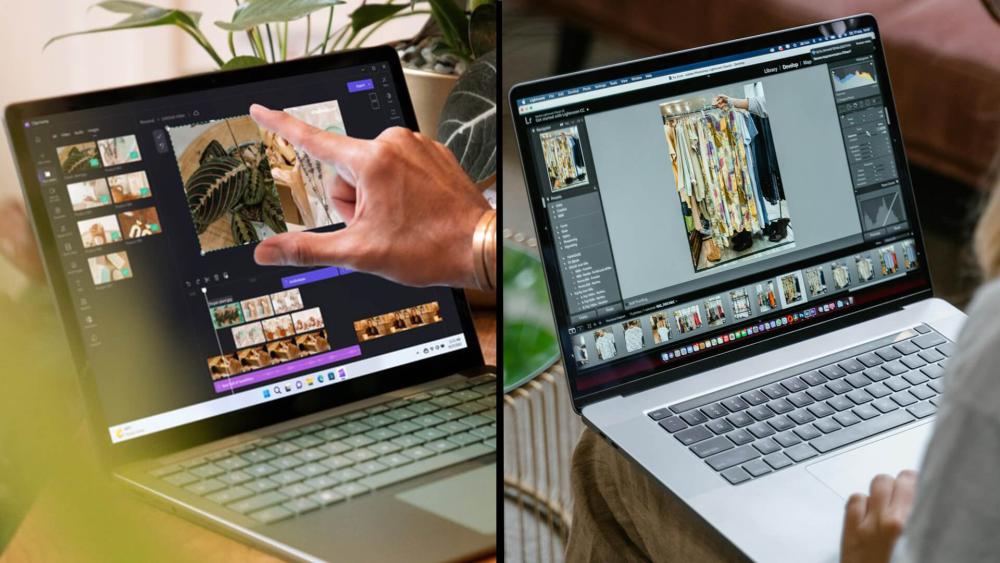
For professionals who spend long hours looking at their screen, display quality can be just as important as raw performance. Whether you’re editing visuals, reviewing presentations, or working across multiple windows, screen clarity and accuracy play a big role in daily productivity. This makes display technology a key factor in the Microsoft Surface vs MacBook comparison, particularly for creative and visually driven roles.
Both Surface and MacBook devices are known for high-quality displays, but they prioritise different features. Understanding these differences helps clarify the MacBook vs Surface decision for professionals who rely on colour accuracy, screen brightness, and input precision.
Colour accuracy and brightness
Apple’s MacBooks feature Retina displays that are widely recognised for their colour accuracy and consistency. This makes them a strong choice for designers, photographers, and video editors who need dependable colour reproduction. Across the range, brightness levels remain high enough for comfortable use in most environments, contributing to the appeal of the MacBook Air and MacBook Pro when comparing MacBook Air vs Windows Surface models.
Microsoft Surface devices use PixelSense displays, which also offer sharp resolution and vibrant colours. While colour accuracy is strong, Surface screens stand out for their aspect ratios, often providing more vertical space for documents and creative tools. For professionals deciding between Mac vs Surface, this extra screen real estate can improve productivity, especially for multitasking and content-heavy workflows.
Touchscreen and pen support (Surface) vs trackpad and gestures (MacBook)
One of the clearest differences in the Surface Pro vs MacBook discussion is input. Surface devices support touch and pen input, making them well suited to sketching, annotating documents, and hands-on creative tasks. This flexibility gives Surface an edge for professionals who value direct interaction with their work.
MacBooks, while lacking touchscreen support, are renowned for their large trackpads and refined gesture controls. For many users, this creates a smooth and efficient workflow, particularly for precision tasks and extended typing sessions. When comparing MacBook Pro vs Surface Pro, the choice comes down to whether touch and pen input are essential, or if you prefer a traditional laptop experience built around keyboard and trackpad use.
Battery Life & Reliability for Long Workdays
For professionals who spend hours away from a power socket, battery life can make or break a laptop choice. Long meetings, travel days, and remote working setups demand a device that can be relied on from morning to evening. This is where the Microsoft Surface vs MacBook comparison becomes especially relevant, as both ranges promise all-day performance but deliver it in slightly different ways.
MacBooks have built a strong reputation for battery efficiency, largely thanks to Apple Silicon. Even under sustained workloads, many professionals find that MacBooks comfortably last a full workday without needing to recharge. This reliability is one of the reasons people continue to ask are MacBooks worth it, particularly for roles that involve constant multitasking and video calls.
Surface devices also offer solid battery performance, though results can vary more depending on the model and how it’s used. Touchscreens, detachable designs, and higher refresh rates can impact battery life, especially on 2-in-1 models. That said, for professionals who value flexibility and don’t mind charging during breaks, Surface devices remain competitive in the MacBook vs Microsoft surface discussion.
Reliability goes beyond battery life alone. Both platforms are well built and designed for long-term professional use, but macOS devices are often praised for consistent performance over time. Surface devices, meanwhile, integrate seamlessly into Windows-based business environments, which can improve reliability from a software and IT management perspective. In the broader Surface vs MacBook for professionals debate, battery life and day-to-day dependability often tip the balance for users who prioritise uninterrupted workflows.
Operating System & Software Ecosystem
Beyond hardware, the operating system plays a huge role in shaping the day-to-day professional experience. For many users, the decision between Surface and MacBook is really a choice between Windows and macOS. This makes the software environment a central part of the Microsoft Surface vs MacBook comparison, particularly for professionals who rely on specific tools, workflows, or IT policies.
Both platforms are mature and capable, but they cater to slightly different working styles. Understanding how each ecosystem supports productivity helps clarify the MacBook vs Microsoft surface decision far more than specs alone.
Windows 11 productivity vs macOS
Windows 11 is built around flexibility and compatibility. It integrates seamlessly with Microsoft 365, enterprise tools, and a wide range of third-party business software with newer Copilot+ laptops pushing productivity further through on-device AI features designed for modern professional workflows. Features like window snapping, multi-monitor support, and native compatibility with corporate systems make Surface devices a strong option for professionals working in structured business environments. For many organisations, Windows vs macOS for professionals still leans heavily in favour of Windows due to familiarity and IT control.
macOS takes a more streamlined approach, focusing on stability, efficiency, and tight integration with Apple hardware. Many professionals appreciate the consistency of macOS updates and the way the operating system is optimised specifically for MacBooks. In the Mac vs Windows for business discussion, macOS often appeals to users who value a clean interface and minimal system maintenance over deep customisation.
App availability for design, dev, business tools
When it comes to software availability, both ecosystems are well covered. Popular business applications, creative tools, and development platforms are widely supported across Windows and macOS. Surface devices benefit from the sheer breadth of Windows software compatibility, making them a natural fit among Windows-based laptops used in corporate and technical roles.
MacBooks, meanwhile, are particularly popular with creative professionals and developers who rely on macOS-specific tools or prefer Apple’s development environment. Integration with other Apple Mac devices also adds value for professionals already invested in the Apple ecosystem. In the wider MacBook vs Surface debate, software choice often becomes the deciding factor for users whose work depends on platform-specific applications.
Value for Money for Professionals
Value for money is about more than just the upfront price. For professionals, it includes long-term performance, reliability, resale value, and how well a device supports daily work over several years. This makes value an important part of the Microsoft Surface vs MacBook comparison, especially for buyers thinking beyond a single upgrade cycle.
Both platforms sit firmly in the premium laptop category, but they approach pricing and long-term ownership differently. Understanding these differences helps professionals decide whether a Surface or MacBook offers better overall value.
Entry-level vs high-end configurations
At the entry level, Surface devices often provide more flexibility. Models like the Surface Laptop offer a lower starting price while still delivering solid performance for office work and productivity tasks. This makes Surface appealing for professionals who want premium build quality without immediately moving into high-end pricing. When comparing MacBook vs Surface laptop, this flexibility can be a deciding factor.
MacBooks, particularly the MacBook Air, sit at a higher starting price but justify it with strong performance efficiency and excellent battery life. Many professionals see this as good value over time, especially when considering how long MacBooks typically remain usable. For those looking at lightweight MacBook options, the balance between portability and performance remains a strong selling point.
At the higher end, the comparison becomes more nuanced. The MacBook Pro for professionals is often favoured for demanding workloads, while top-tier Surface models appeal to users who want powerful hardware combined with touch and pen input. In the MacBook Pro vs Surface Pro debate, value depends heavily on whether those extra features are genuinely useful for your work.
Long-term reliability, resale value, and total cost of ownership
Long-term reliability is where MacBooks often stand out. They tend to retain performance over time and hold their resale value well, which can reduce the total cost of ownership. This is one of the reasons professionals continue to question are MacBooks worth it and often conclude that they are, particularly for long-term use.
Surface devices offer good longevity as well, especially within managed business environments. They integrate smoothly with enterprise systems and benefit from Windows compatibility across multiple generations of software. Professionals looking to reduce costs may also consider refurbished Windows laptops, which can make high-end Surface devices more accessible without sacrificing quality.
When assessing overall value in the Surface vs MacBook for professionals discussion, the best choice depends on budget, expected lifespan, and how critical platform-specific features are to your work.
Surface vs MacBook: Best Choice by Profession

While specs and features are important, the best way to decide between these devices is to look at how they fit specific professional roles. Different jobs place very different demands on a laptop, which is why the Microsoft Surface vs MacBook comparison can lead to different conclusions depending on how you work.
Rather than declaring one platform universally better, this breakdown focuses on where each option excels. For professionals comparing MacBook vs Microsoft Surface, matching the device to your role often delivers the best results.
For business professionals & managers
For business users, reliability, portability, and compatibility with workplace software are key priorities. Surface devices integrate seamlessly with Microsoft 365, Teams, and other enterprise tools, making them a natural fit for corporate environments. Features like touchscreens and 2-in-1 designs can also be useful for presentations and meetings, particularly for professionals who value flexibility. This makes Surface a strong contender among laptops for office work and broader productivity laptops.
MacBooks also perform well in business roles, especially for professionals who prioritise battery life and a distraction-free working experience. Their strong build quality and consistent performance make them appealing for managers and executives who need a dependable device throughout long workdays. In the Surface vs MacBook for professionals debate, business users often lean towards the platform already supported by their organisation.
For designers & creatives
Creative professionals often focus on display quality, performance stability, and input options. MacBooks are widely used in creative industries due to their colour-accurate displays and smooth performance with design software. This makes them a popular choice for those comparing MacBook Air vs Windows Surface for creative work.
Surface devices, however, offer a unique advantage with touch and pen input. For illustrators, designers, and professionals who sketch or annotate directly on screen, Surface models can feel far more natural. When weighing up Surface Pro vs MacBook, creatives who value hands-on interaction may find Surface better suited to their workflow.
For developers & technical users
Developers and technical professionals often base their decision on operating system preferences and tooling. MacBooks are commonly favoured for development work thanks to macOS compatibility with a wide range of development environments and tools. This is especially relevant when considering Mac or surface for programming and technical tasks.
Surface devices appeal to developers who rely on Windows-specific tools or need broad hardware compatibility. The ability to run a wide range of software natively gives Surface an edge for certain technical roles. In this professional laptop comparison, developers should prioritise the platform that best supports their preferred tools rather than raw hardware specs alone.
Should You Choose a Microsoft Surface or a MacBook?
There’s no single winner in the Microsoft Surface vs MacBook debate, and that’s exactly what makes this comparison worth discussing in 2026. Both platforms deliver premium build quality, strong performance, and features designed specifically for professional use. The right choice ultimately depends on how you work, which tools you rely on, and what you expect from your laptop over the long term.
If flexibility is a priority, Surface devices stand out. Touchscreens, 2-in-1 designs, and broad compatibility with Windows software make them a strong option for professionals who move between meetings, presentations, and desk-based work. For users embedded in Windows environments or looking for adaptable hardware, the MacBook vs Microsoft Surface decision often leans in favour of Surface.
MacBooks, on the other hand, excel in efficiency, battery life, and long-term reliability. Their tightly optimised hardware and macOS ecosystem appeal to professionals who value consistency and minimal friction throughout the workday. For those already invested in Apple’s ecosystem, or who prioritise stability over flexibility, Mac vs Surface often points towards a MacBook as the better fit.
When deciding between Microsoft Surface vs MacBook, focus less on brand names and more on your real working habits. Consider where you work, how often you travel, which software you depend on, and how long you expect your laptop to last. By aligning your choice with your workflow, you’ll end up with a professional laptop that supports your productivity well beyond 2026.
FAQs:
Is Microsoft Surface or MacBook better for professionals in 2026?
The better option depends on how you work. In the Microsoft Surface vs MacBook comparison, Surface devices suit professionals who need flexibility, touch input, and Windows compatibility, while MacBooks are ideal for those who prioritise battery life, performance efficiency, and macOS stability.
Are MacBooks worth it for professional work?
For many users, yes. When asking are MacBooks worth it, professionals often point to long battery life, consistent performance, and strong resale value. MacBooks tend to perform reliably over several years, which can justify the higher upfront cost.
Is Surface better than MacBook for office work?
For office-based roles, Surface vs MacBook for office work is a close comparison. Surface devices integrate seamlessly with Microsoft 365 and Windows business tools, while MacBooks offer a smooth, distraction-free experience. The better choice depends on your organisation’s software and IT setup.
Which is better for productivity, Surface or MacBook?
In terms of Surface vs MacBook for productivity, both perform well. Surface devices offer multitasking flexibility with touch and pen support, while MacBooks excel at sustained performance and keyboard-driven workflows. Productivity comes down to personal preference and working style.
Should I choose a Microsoft or Apple laptop for business use?
When deciding between a microsoft or apple laptop, business users should consider software compatibility, device management, and long-term support. Windows-based businesses often prefer Surface devices, while MacBooks suit professionals already invested in the Apple ecosystem.
Is Surface Pro better than MacBook Air for professionals?
In the Surface Pro vs MacBook Air comparison, Surface Pro offers versatility with its detachable design and touchscreen, while MacBook Air focuses on lightweight portability and battery efficiency. The better option depends on whether flexibility or simplicity matters more to your role.
You can pay with:
*PayPal Credit Representative Example: Assumed credit limit £1,200, Representative 23.9% APR (variable). Purchase rate 23.9% p.a (variable).Terms & Conditions apply.


PayPal Credit and PayPal Pay in 3 are trading names of PayPal UK Ltd, 5 Fleet Place, London, United Kingdom, EC4M 7RD. Terms and conditions apply. Credit subject to status, UK residents only, Five Tech LTD acts as a broker and offers finance from a restricted range of finance providers. PayPal Pay in 3 is not regulated by the Financial Conduct Authority. Pay in 3 eligibility is subject to status and approval. 18+. UK residents only. Pay in 3 is a form of credit. Check if affordable and how you will repay. May make other borrowing more difficult or expensive. See product terms for more details.
Copyright © 1996-2026 Fivetech LTD | Terms and Conditions
box.co.uk & Box are trading names of Five Tech Limited. Registered office: Box LTD, Unit 10 Woodford Trading Estate, Woodford Green IG8 8HF