


 Menu
MenuMenu


Get Sales Advice from Mon - Fri 9am - 5:00pm:
020 3337 8950POSTED: January 28, 2026
Love 2-in-1s? The New Tricks Lenovo Yoga and Slim Laptops Have Learned Might Surprise You
If you've ever liked the idea of a laptop that adapts to how you work rather than forcing you into one setup, 2-in-1 laptops probably already caught your attention. What's changed recently is just how capable these devices have become. The latest Lenovo Yoga and Slim laptops aren't just flexible in shape anymore; they're smarter, faster, and far more practical for everyday use than earlier generations.
From students switching between notes and essays, to professionals juggling presentations, calls and creative work, Lenovo's Yoga 2-in-1 and Lenovo Slim series now feel less like compromises and more like genuinely well-rounded laptops.
Here's what they've learned to do differently and why that matters in real use.
Why 2-in-1 Laptops Are More Popular Than Ever
Work, study, and entertainment no longer happen in a single place or a fixed posture. Many people now move between a desk, the sofa, meetings, classrooms, and travel throughout the day, and they want one device that adapts to all of those situations. This shift in how laptops are used is a big reason 2-in-1 laptops and convertible laptops have become so popular.
Unlike traditional laptops, a 2-in-1 uses a reinforced hinge that allows the screen to rotate or fold fully, switching between laptop, tent, stand, and tablet modes. In practical terms, that means typing emails at a desk, watching videos hands-free, taking handwritten notes, or presenting slides without carrying separate devices. For hybrid workers, students, and frequent travellers, this flexibility reduces clutter and makes setups simpler.
Touchscreen technology and operating systems have also matured. Modern apps are far better optimised for touch, stylus input, and gesture controls than they were a few years ago, making tablet mode genuinely useful rather than a novelty. Combined with lighter designs, better battery life, and stronger internal hardware, today's laptop-tablet hybrids feel like complete machines instead of compromises.
Lenovo recognised this early on.
The Lenovo Yoga range helped shape what people now expect from a modern 2-in-1 by focusing on hinge reliability, premium materials, and everyday usability. That early investment is one reason Lenovo Yoga and Slim laptops still feel ahead of many competitors in this space today.
What Modern Users Expect From a 2-in-1 Laptop Today
Early 2-in-1s were clever, but often underpowered. Today's buyers expect much more.
Performance is no longer optional. People want AI laptops and thin devices that still feel responsive when multitasking, running creative apps, or managing multiple browser tabs. Seamless switching between modes also matters; hinges should feel solid, not fragile, and touch input needs to be accurate rather than frustrating.
How Lenovo Yoga and Slim Laptops Have Evolved Beyond Basic 2-in-1s
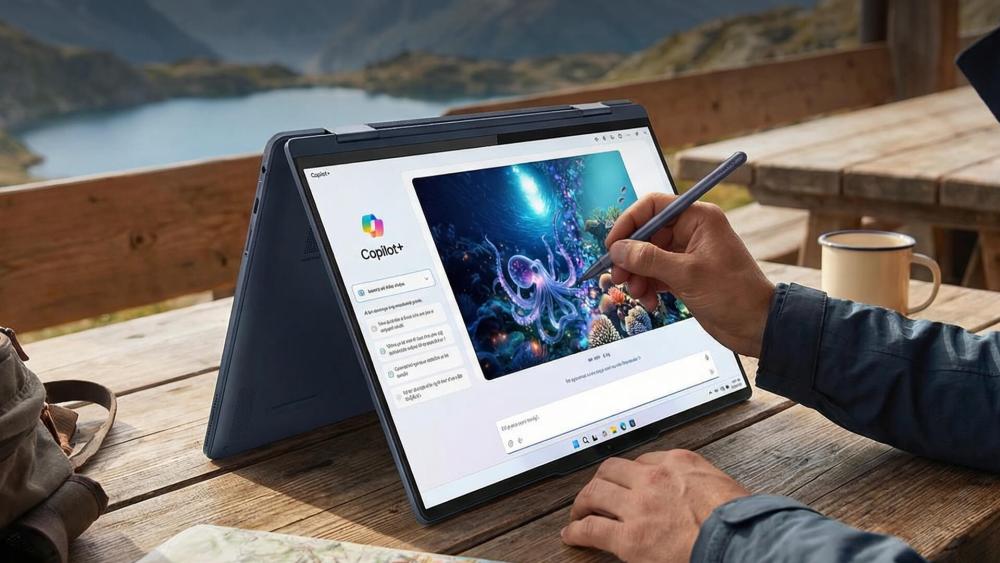
Lenovo Yoga and Slim laptops are no longer just flexible form-factor devices. They've evolved into AI-driven, premium laptops designed to handle modern workloads while staying thin, light, and versatile.
1- AI-Driven Performance and Smarter Productivity
Modern Lenovo Yoga and Slim laptops now use Intel Core Ultra processors with dedicated Neural Processing Units (NPUs). These NPUs handle AI tasks locally, reducing strain on the CPU and GPU.
This enables:
- AI-accelerated video effects, noise suppression, and background blur
- On-device AI features in Copilot+ PCs, such as live captions and AI image tools
- Lenovo AI Core, which dynamically balances performance, cooling, and battery life based on what you're doing
In everyday use, this means smoother multitasking, better battery efficiency, and consistent performance without manual tweaking.
2- Premium OLED Displays Designed for Long Sessions
Display quality has become a defining feature of the Yoga and Slim ranges. Many models now use Lenovo PureSight OLED panels with:
- Up to 2.8K or 4K resolution
- 100% DCI-P3 colour accuracy
- 120Hz refresh rates on select models
- Dolby Vision and TÜV low blue light certification
These upgrades make the laptops better suited for creative work, streaming, and extended screen time without eye fatigue.
3- Refined Design with Real-World Durability
Lenovo has focused on making these laptops easier to carry and use in multiple modes:
- Comfort Edge designs improve grip in tablet and tent modes
- Slim aluminium and magnesium alloy chassis reduce weight without feeling fragile
- Many models now meet MIL-STD-810H durability standards, despite their thin profiles
This balance allows Yoga and Slim laptops to remain portable while standing up to daily travel and frequent mode switching.
4- Everyday Improvements Through Lenovo's Premium Suite
Lenovo's Premium Suite brings subtle but important upgrades that improve daily use:
- Redesigned keyboards with 1.5mm key travel for better typing comfort
- Larger, more accurate trackpads
- Dolby Atmos quad-speaker systems for clearer audio
- 5MP IR webcams with privacy shutters and improved microphones
These features enhance video calls, typing comfort, and overall usability across work and study scenarios.
5- Clearer Focus Across the Yoga and Slim Line-ups
Lenovo has refined each range to serve specific needs:
- Lenovo Yoga laptops focus on 360-degree flexibility, stylus support, and touch-first workflows
- Lenovo Slim laptops prioritise portability and performance in clamshell designs, with some models offering dedicated NVIDIA graphics for creators
- This clearer separation makes it easier for buyers to choose a model that fits their workflow rather than compromising.
Battery life and portability are just as important. A flexible device only makes sense if it lasts a full day and is light enough to move around easily. Lenovo Yoga and Slim laptops are now designed around these expectations, not working around them.
New Tricks That Make Lenovo Yoga and Slim Laptops Stand Out
The latest Lenovo Yoga and Slim laptops (10th Gen / 2025) don't just improve on the idea of a 2-in-1; they quietly change how the laptop behaves around you. Instead of asking users to tweak performance modes, display settings, or power profiles, these machines increasingly make those decisions themselves using AI-driven hardware and software working together.
This shift is what makes the new generation feel more refined day to day. You spend less time managing the laptop and more time using it.
Aura Edition Smart Modes: Laptops That Adapt Automatically
On higher-end models like the Yoga Pro 9i Aura Edition and Yoga Slim 7i Aura Edition, Lenovo introduces Aura Edition Smart Modes. These are AI-powered profiles that detect what you're doing and optimise the system in real time.
Rather than relying on manual "performance" or "battery saver" toggles, the laptop identifies six common usage scenarios: work, creating, meeting, gaming, entertainment, and learning. Each mode adjusts CPU and GPU behaviour, memory allocation, display brightness, colour tuning, and power delivery automatically.
For example, during video calls, the system prioritises webcam processing, microphone clarity, and background noise reduction. When you switch to creative work, performance headroom is increased and the display shifts towards colour accuracy. This makes the laptop feel more responsive without users needing technical knowledge to manage it.
Smarter Hinges and Seamless Mode Switching
Yoga laptops are known for their 360-degree hinges, but the newer models improve what happens after you rotate the device. Enhanced orientation sensors and firmware allow the operating system to react instantly when you move between laptop, tablet, tent, or stand modes.
Apps resize smoothly, input methods adjust automatically, and the keyboard disables without delay. This removes the friction that previously made some users avoid tablet mode altogether. The transition feels natural, which is critical if a 2-in-1 is meant to be used flexibly throughout the day.
Camera-Under-Display Technology: More Screen, Less Distraction
The Yoga Slim 9i (14", Gen 10) introduces Camera-Under-Display (CUD) technology, hiding the webcam beneath the OLED panel. This allows Lenovo to achieve an impressive 98% screen-to-body ratio, creating a clean, uninterrupted display with no notch or bezel cut-out.
Under-display cameras traditionally struggle with image clarity because light must pass through the screen. Lenovo addresses this by pairing the hardware with AI-based real-time image enhancement, which reduces noise, improves exposure, and reconstructs facial detail during video calls. The result is a more immersive screen without sacrificing call quality.
Tandem OLED Displays: Brighter, More Efficient Visuals
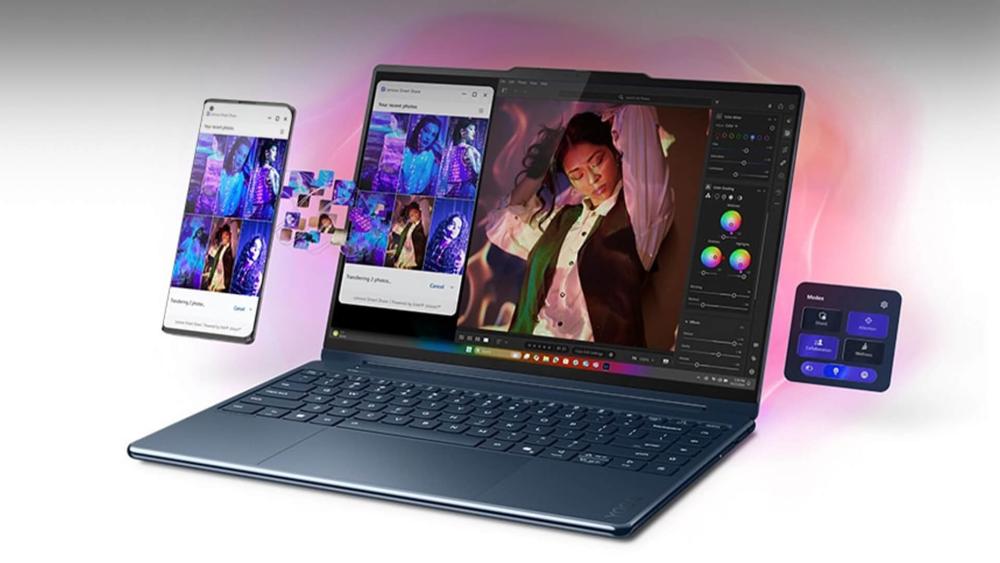
Premium Yoga models, including the Yoga Pro 9i, feature Tandem OLED display technology, which uses two stacked OLED layers instead of one. This design allows the screen to reach much higher brightness levels up to 1600 nits for HDR content without stressing a single layer.
The practical benefit is a display that stays bright and consistent when working with white backgrounds, timelines, or HDR media. It's also more power-efficient at higher brightness levels, which helps balance battery life on performance-focused 2-in-1 laptops.
ForcePad Trackpad: A Hybrid Input Surface
On selective Yoga models, the trackpad doubles as a pressure-sensitive drawing surface when a Lenovo Yoga Pen is detected. The system automatically disables palm input and repurposes the trackpad for sketching, note-taking, or precision input.
This gives creators and students another way to interact with content without fully switching into tablet mode. It's particularly useful for quick annotations, diagramming, or editing workflows where moving between keyboard and pen input is common.
Attention and Wellness Modes: AI That Looks After You
Aura Edition laptops also include Attention and Wellness Modes, which focus on reducing fatigue rather than boosting raw performance. Attention Mode limits notifications and distractions during focused sessions, while Wellness Mode uses sensors to detect poor posture, viewing distance, or prolonged screen time.
These features are subtle by design. Instead of interrupting your work, they provide gentle prompts that help maintain comfort during long study or work sessions.
Local AI Tools for Creators and Professionals
Lenovo's Creator Zone uses on-device AI acceleration to assist with tasks like image generation, enhancement, and creative workflows. Because this processing happens locally, it reduces latency and improves privacy compared to cloud-based AI tools.
This is made possible by modern processors such as Intel Core Ultra (Lunar Lake) and AMD Ryzen AI 300, both of which include dedicated NPUs (Neural Processing Units) designed specifically for AI workloads.
Smart Power Engine: Balancing Performance and Battery
All of these features are tied together by Lenovo's Smart Power Engine, which uses AI to balance performance and efficiency dynamically. When you need short bursts of power, the system can temporarily boost performance. When workloads are lighter, it shifts into efficiency-focused behaviour to preserve battery health.
This adaptive approach helps ensure the laptop feels responsive without constantly draining power, which is especially important for thin, portable 2-in-1 devices.
Why These Changes Matter in Real Use

Taken individually, each feature might seem incremental. Combined, they significantly change how Lenovo Yoga and Slim laptops behave day to day. The laptop adapts to your workflow instead of forcing you to adapt to it.
For students, this means smoother transitions between note-taking, typing, and reading. For professionals, it means fewer interruptions and better meeting experiences. For creatives, it means brighter displays, smarter input options, and AI tools that work locally without friction.
That's what makes the latest Yoga and Slim laptops feel genuinely more capable than earlier 2-in-1 designs, not because they try to do more, but because they make everyday tasks feel easier.
Lenovo Yoga vs Lenovo Slim: Which One Fits Your Style?
| Feature | Lenovo Yoga Laptops | Lenovo Slim Laptops |
| Design focus | Maximum flexibility with convertible designs | Ultra-thin, lightweight performance laptops |
| Form factor | True 2-in-1 with 360-degree hinge | Mostly clamshell (some Slim models are not 2-in-1s) |
| Usage modes | Laptop, tablet, tent, and stand modes | Primarily laptop use |
| Touchscreen support | Standard across most models | Available on select models only |
| Stylus support | Strong pen integration for notes and sketches | Limited or optional, model-dependent |
| Performance profile | Balanced performance with AI optimisation | Higher sustained performance in slimmer chassis |
| Portability | Portable, but slightly heavier due to hinge design | Lighter and thinner overall |
| Best for | Students, creatives, note-takers, hybrid workers | Professionals, travellers, users prioritising portability |
| Example | Yoga 9i, Yoga Pro 9i, Yoga Book 9i | Yoga Slim 7i, Yoga Slim 9i, Lenovo Legion Slim |
Who Should Choose a 2-in-1 Laptop Over a Traditional Laptop
2-in-1 laptops aren't for everyone, but they make sense for many users.
Students benefit from note-taking and portability. Hybrid workers enjoy switching between desk and casual use. Creatives and presenters value touchscreen interaction. Travellers appreciate having fewer devices to carry.
If you only ever work at a desk and never use touch input, a traditional laptop may still be the better option. But for many users, the flexibility of a best 2 and 1 laptop adds real value.
|
Get Yourself a Lenovo Aura Edition (If You Want the Full Experience) The 14-inch touchscreen and 360-degree hinge make it easy to switch between typing, presenting, and note-taking, while Aura Edition optimisations quietly manage performance, battery, and system behaviour in the background. It's ideal for professionals who want a premium, future-ready Lenovo laptop that adapts to how they work. View the Lenovo ThinkPad X1 2-in-1 Aura Edition at Box.co.uk |
Are Lenovo Yoga and Slim Laptops Worth It in 2026?
In 2026, Lenovo Yoga and Slim laptops, including the Lenovo Yoga Slim laptop range, feel less like experimental hybrids and more like refined, future-ready machines. They offer practical flexibility, strong performance, and features that genuinely support modern work and study patterns.
They're also a good middle ground between premium devices and the best budget laptop options, offering versatility without forcing you into a high-end workstation price bracket.
You can explore the latest 2-in-1 laptops, Lenovo Yoga laptops, and broader laptop options at Box.co.uk, where it's easier to compare flexible designs with traditional laptops in one place.
Frequently Asked Questions
What is a 2-in-1 laptop and how does it work?
A 2-in-1 laptop uses a flexible hinge to switch between laptop, tablet, and stand modes.
Are Lenovo Yoga laptops good for everyday use?
Yes, they're designed for daily work, study, browsing, and creative tasks with added flexibility.
What's the difference between Lenovo Yoga and Slim?
Yoga focuses on full 2-in-1 flexibility, while Slim prioritises thin design and portability.
Are 2-in-1 laptops as powerful as normal laptops?
Modern models offer comparable performance for most everyday and professional tasks.
Do 2-in-1 laptops support stylus pens?
Many Lenovo Yoga models support active pens for note-taking and creative work.
Are Lenovo 2-in-1 laptops worth buying?
If you value flexibility and portability, Lenovo's latest 2-in-1s are well worth considering
You can pay with:
*PayPal Credit Representative Example: Assumed credit limit £1,200, Representative 23.9% APR (variable). Purchase rate 23.9% p.a (variable).Terms & Conditions apply.


PayPal Credit and PayPal Pay in 3 are trading names of PayPal UK Ltd, 5 Fleet Place, London, United Kingdom, EC4M 7RD. Terms and conditions apply. Credit subject to status, UK residents only, Five Tech LTD acts as a broker and offers finance from a restricted range of finance providers. PayPal Pay in 3 is not regulated by the Financial Conduct Authority. Pay in 3 eligibility is subject to status and approval. 18+. UK residents only. Pay in 3 is a form of credit. Check if affordable and how you will repay. May make other borrowing more difficult or expensive. See product terms for more details.
Copyright © 1996-2026 Fivetech LTD | Terms and Conditions
box.co.uk & Box are trading names of Five Tech Limited. Registered office: Box LTD, Unit 10 Woodford Trading Estate, Woodford Green IG8 8HF