


 Menu
MenuMenu


Get Sales Advice from Mon - Fri 9am - 5:00pm:
020 3337 8950LAST UPDATED: January 27, 2026
iPhone 17 Camera Glitch Explained: What Happened, What Apple Fixed, and What to Do Now
Shortly after the iPhone 17 launch, some users began reporting unusual camera behaviour in very specific situations. Photos taken at concerts or events with extremely bright LED backdrops sometimes showed black blocks, dark patches, or oddly rendered areas. Unsurprisingly, this sparked concern about a potential iPhone 17 camera glitch.
Apple has since confirmed the issue, described it as rare, and, crucially, already rolled out a software fix. In this guide, we’ll explain what the glitch was, which iPhone 17 models were affected, how Apple fixed it, and what to do if you still notice camera issues today.
What Was the iPhone 17 Camera Glitch and Who Was Affected?
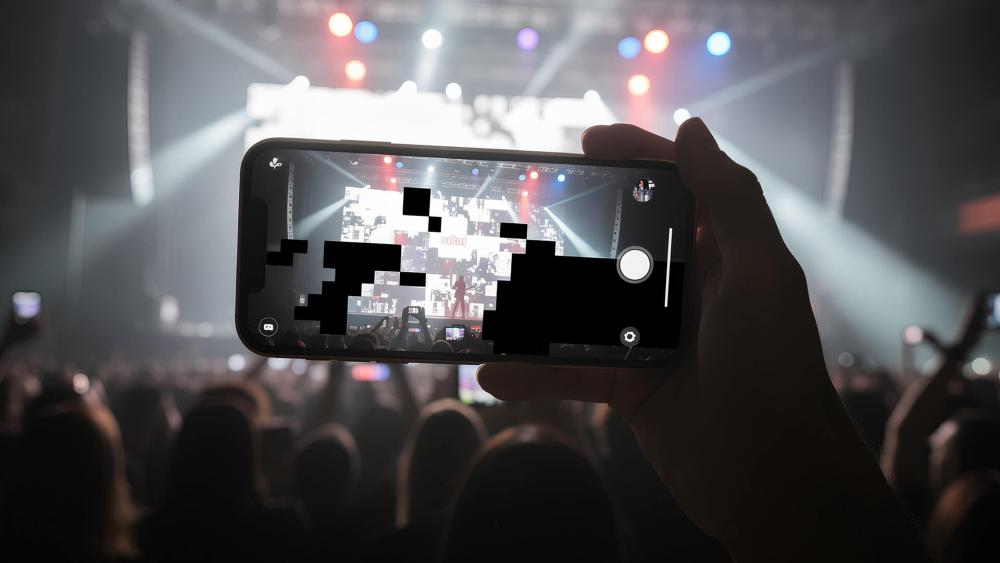
The iPhone 17 camera glitch was a software-related issue that appeared under very specific lighting conditions. Users reported:
- Black boxes or blacked-out sections appearing in photos
- Dark, blocky artefacts over LED screens or stage backdrops
- Occasional mis-rendered frames when shooting high-contrast scenes
The problem was observed on the iPhone 17, iPhone 17 Pro, iPhone 17 Pro Max, and iPhone Air. Importantly, it did not affect everyday photography. Normal indoor shots, outdoor photos, portraits, and night mode images were unaffected.
Reports suggested the issue occurred in a small percentage of photos, most often when an extremely bright LED display filled a large portion of the frame.
Why Did the iPhone 17 Camera Glitch Happen?
Bright LED Displays and Camera Sensors Don’t Always Mix
Modern LED screens refresh at high speeds and in patterns invisible to the human eye. Camera sensors, however, capture light in timed intervals. When those two systems clash, visual artefacts can appear in individual frames.
Apple’s Explanation of the Camera Issue
Apple acknowledged that the issue occurred in "very rare cases when an LED light display was extremely bright and shining directly into the camera." The company confirmed it was related to image processing rather than a faulty sensor.
What Camera Experts Believe Happened
Independent camera specialists pointed to a combination of:
- Anti-blooming systems suppressing overexposed highlights
- LED flicker interacting with sensor readout
- The iPhone 17’s new image-processing pipeline overcorrecting extreme brightness
This reinforced the idea that the glitch was software-based and fixable.
Was the iPhone 17 Camera Glitch a Hardware Problem?
No. Apple did not identify any defective camera hardware, lenses, or sensor batches.
There was:
- No recall
- No manufacturing fault
- No need for hardware replacement
The issue was tied to very specific scenes and was resolved through changes to camera processing.
Has Apple Fixed the iPhone 17 Camera Glitch?

Yes. Apple has already released a fix.
The company addressed the issue in iOS 26.0.1, which included camera stability and image-processing improvements for iPhone 17-series devices and iPhone Air.
Users who install the update should no longer see black blocks or artefacts when shooting LED-heavy scenes.
How to Make Sure Your iPhone 17 Has the Camera Fix Installed
To ensure your device has the fix:
- Open Settings
- Go to General
- Tap Software Update
- Install the latest available iOS version
Apple strongly recommends keeping iOS up to date, as camera improvements are often bundled into regular updates.
How to Check If Your iPhone 17 Camera Is Working Correctly After the Update
Once you’ve installed the latest iOS update, it’s worth doing a quick check to confirm everything is behaving normally.
Try the following:
- Take photos in bright indoor and outdoor lighting
- Shoot a short video and review playback for artefacts
- Test both the rear and front cameras
- Zoom in and out to check for rendering issues
If images look clean and consistent, the camera fix has applied correctly. This reassurance step is especially useful for users who previously noticed the glitch and want confirmation it’s gone.
Will Similar Camera Issues Happen Again on Future iPhone Updates?
Camera bugs like this are rare, but they’re not unheard of when new hardware and processing pipelines launch.
Apple regularly:
- Introduces new camera sensors
- Adjusts AI-driven image processing
- Tunes how extreme lighting is handled
Occasionally, edge-case issues slip through and are addressed quickly via updates, as happened here. Keeping your iPhone updated remains the best way to avoid long-term camera problems.
For users who rely heavily on photography or video, installing iOS updates soon after release, rather than delaying indefinitely, helps ensure you benefit from the latest fixes and optimisations.
What If You Still Notice Camera Issues on iPhone 17?
If you’re still seeing unusual behaviour after updating:
Quick Checks to Try
- Restart your iPhone
- Force-close and reopen the Camera app
- Test in different lighting conditions
When to Contact Apple Support
If issues persist in normal, non-LED environments, it’s worth reaching out via Apple’s official support channels. Users can also visit the Apple Store for iPhone deals and support if they want in-person diagnostics.
Should the iPhone 17 Camera Glitch Affect Your Buying Decision?

For most people, no.
The issue was:
- Rare
- Scene-specific
- Software-based
- Already fixed
If you’re considering upgrading, the iPhone 17 remains a strong camera upgrade over previous generations. Many buyers continue to explore the latest Apple iPhone models or browse all iPhones and related accessories without ever encountering this bug.
Those shopping more broadly may still want to shop smartphones with top features and performance, especially if camera quality is a key priority.
Is the iPhone 17 Camera Still an Upgrade After the Fix?
Yes. Once updated, the iPhone 17 camera system delivers:
- Improved detail and dynamic range
- Better low-light performance
- Enhanced processing compared to older iPhones
The brief camera glitch doesn’t define the device long-term, and Apple’s quick response reinforces that.
Conclusion:
The iPhone 17 camera glitch was a real but very specific issue that affected photos taken in extreme LED-lit environments shortly after launch. Apple moved quickly to identify the cause and has already resolved it through a software update, meaning most users will never encounter the problem again once their device is up to date.
For everyday photography, the iPhone 17 camera performs exactly as expected, and in many cases offers clear improvements over previous models. If you’ve updated to the latest version of iOS and are still seeing unusual behaviour, basic troubleshooting or a quick check with Apple support should be enough to rule out anything more serious.
In short, this was a rare launch-window bug rather than a lasting flaw. With the fix now live, the iPhone 17 remains a strong choice for users who care about camera performance, reliability, and long-term software support.
FAQs
What was the iPhone 17 camera glitch?
A rare software issue causing black blocks or artefacts when photographing extremely bright LED displays.
Is the iPhone 17 camera glitch a hardware defect?
No. Apple confirmed it was software-related.
Has Apple fixed the iPhone 17 camera glitch?
Yes. The fix was included in iOS 26.0.1.
Which iPhone models were affected?
iPhone 17, iPhone 17 Pro, iPhone 17 Pro Max, and iPhone Air.
Should I return my iPhone 17 because of this issue?
In most cases, no. Updating iOS resolves the problem.
You can pay with:
*PayPal Credit Representative Example: Assumed credit limit £1,200, Representative 23.9% APR (variable). Purchase rate 23.9% p.a (variable).Terms & Conditions apply.


PayPal Credit and PayPal Pay in 3 are trading names of PayPal UK Ltd, 5 Fleet Place, London, United Kingdom, EC4M 7RD. Terms and conditions apply. Credit subject to status, UK residents only, Five Tech LTD acts as a broker and offers finance from a restricted range of finance providers. PayPal Pay in 3 is not regulated by the Financial Conduct Authority. Pay in 3 eligibility is subject to status and approval. 18+. UK residents only. Pay in 3 is a form of credit. Check if affordable and how you will repay. May make other borrowing more difficult or expensive. See product terms for more details.
Copyright © 1996-2026 Fivetech LTD | Terms and Conditions
box.co.uk & Box are trading names of Five Tech Limited. Registered office: Box LTD, Unit 10 Woodford Trading Estate, Woodford Green IG8 8HF