


 Menu
MenuMenu


Get Sales Advice from Mon - Fri 9am - 5:00pm:
020 3337 8950POSTED: September 12, 2025
iOS 26 on iPhone 17: What’s New + Features UK Users Will Actually Use
It’s that time of year again when Apple fans across the UK set their alarms, refresh the Apple Store app, and argue over which colour finish looks best and what’s new in it. Yes, the iPhone 17 has finally landed, and it’s shaping up to be one of the most exciting launches in recent years. Apple’s latest flagship doesn’t just bring subtle refinements; it introduces some pretty eye-catching updates that are worth your attention.
The iPhone 17 doesn’t just shine because of its sleek design or powerful hardware, it’s also the first to launch with iOS 26 pre-installed. And this update is more than just a coat of digital paint; it’s a proper overhaul that changes how your iPhone looks, feels, and helps you day to day.
And don’t worry, we’ll keep it simple. No drowning in specs you’ll never use. Just the key details you’ll want before deciding if this Apple iPhone 17 is going in your pocket or not.
Official Release Timeline: When Can You Actually Get the iPhone 17 in the UK?
Apple has stuck with its tried-and-tested schedule for the 2025 iPhone release, which means there are three important dates every UK buyer needs to know.
- Announcement Date: The iPhone 17 was officially revealed at Apple’s “Awe Dropping” event on 9 September 2025. Alongside the usual dose of slick keynote visuals and carefully chosen adjectives, Apple gave us the full run-down of specs, features, and design changes.
- Pre-Order Date: The real action begins on 12 September 2025, when iPhone 17 pre-orders in the UK opened up. As always, stock will be tight for certain models (especially the Air and Pro Max), so if you’ve got your eye on one, don’t wait until your morning coffee to click checkout.
- UK Release Date: The big day is 16 September 2025, when the iPhone 17 officially goes on sale. This means you’ll start seeing the queues outside Apple Stores again, as well as next-day deliveries arriving at doorsteps up and down the country.
If you’re upgrading, trading in, or simply splashing out, these dates are crucial. Miss the pre-order window, and you could be waiting weeks for your new iPhone to ship, especially if you want the latest iPhone 17 Pro Max with all the bells and whistles.
iOS 26 on iPhone 17: A Fresh Look and Smarter Everyday Tools
iOS 26 features iPhone 17 is a bold refresh that changes how your iPhone looks, feels, and responds to daily life. Here’s what UK buyers can look forward to.
1.Liquid Glass: A Stunning New Design
Apple has given iOS a glow-up with Liquid Glass, a design that looks like it’s been sculpted from light itself. Your Home Screen and Lock Screen feel more alive, with app icons that shimmer and adapt to your wallpaper. Notifications and the clock now blend seamlessly with your chosen background, creating a fresh 3D depth effect whenever you tilt your iPhone. It’s instantly familiar, yet completely new like slipping into your favourite trainers, only shinier.
2. Home Screen Customisation: Make It Yours
For the first time, iOS gives you real freedom to personalise your Home Screen. You can now:
- Choose from new icon styles tinted to match your wallpaper, clear for a glass-like effect, or dark for a moodier look.
- Adjust icon and widget sizes, so your screen feels as spacious or compact as you like.
- Move and edit widgets freely to keep your information organised.
- Even tweak your wallpaper directly from the Home Screen for quick changes on the fly.
It’s the most flexible iPhone has ever felt, letting you design a look that matches your personality instead of sticking with a one-size-fits-all grid.
3. Lock Screen Customisation: More Personality at a Glance
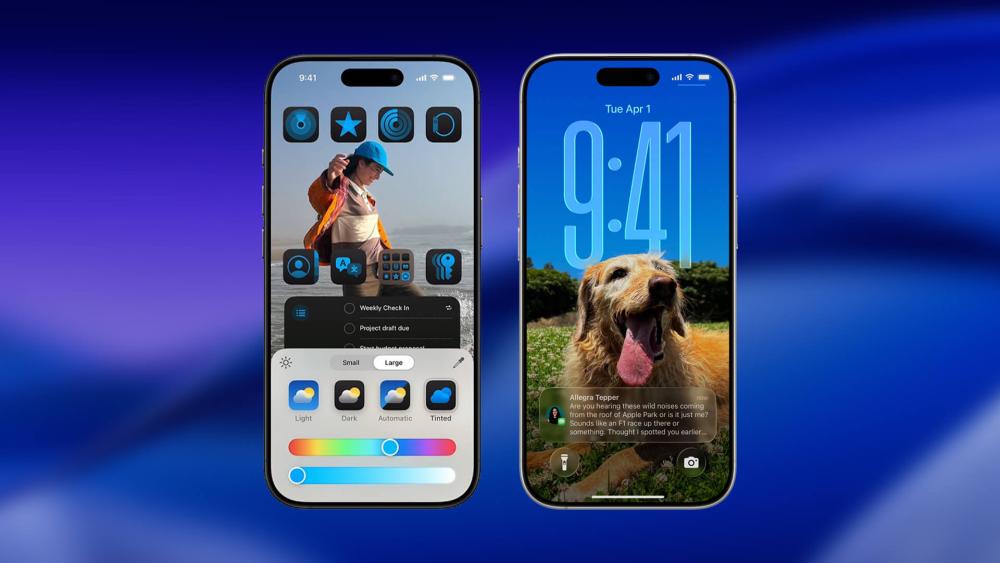
The Lock Screen also gets fresh tricks in iOS 26, making it more useful and more personal:
- 3D spatial effects let your photos come alive with depth, powered by the same clever tech behind visionOS.
- A dynamic clock adapts to your chosen wallpapers and shuffles elegantly with your photo collection.
- You can now add and arrange widgets right on the Lock Screen, so key info like weather, fitness stats, or upcoming events are always one glance away.
Together with the Home Screen changes, these updates mean your Apple iPhone 17 finally feels like your iPhone, customised exactly the way you like it.
4. Visual Intelligence: Smarter on Every Screen
iOS 26 introduces Visual Intelligence, which basically means your iPhone can now understand what’s on your screen. Want to quickly add an event to your calendar from a WhatsApp message? Or pull up more details on a landmark in a photo? Just ask. This feature ties into Apple Intelligence, Apple’s AI layer, making everyday tasks quicker and more intuitive.
5. More Fun in Messages
Group chats just got an upgrade. You can now create polls in Messages, letting everyone vote on dinner plans or the next night out. There’s also the option to set custom chat backgrounds, so you can add a splash of personality instead of staring at the same plain white bubbles. With Apple Intelligence, you can use Image Playground to generate unique background images based on your conversation. It’s simple, but these little touches make chats feel a lot more fun.
6. Less Noise in Calls and Messages
iOS 26 brings a smarter way to handle everyday interruptions. Unknown sender screening keeps texts from numbers you don’t recognise out of sight by silencing notifications and moving them to a dedicated folder, so your inbox stays clutter-free. For calls, Call Screening now answers unknown numbers in the background, asks the caller to state their name and reason, and shows you a live transcript so you can decide whether to answer. And if you’re stuck listening to endless hold music, Hold Assist waits in the queue for you and notifies you the moment a real agent picks up.
7. Live Translation Across Calls and Chats
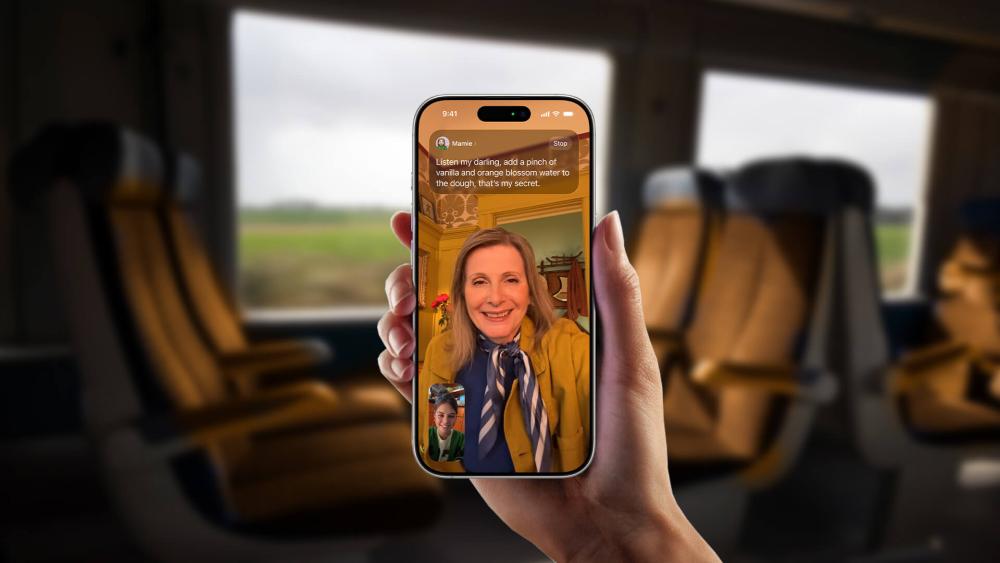
If you’ve got friends, family, or colleagues abroad, Live Translation is a game-changer. iOS 26 lets you translate texts in Messages instantly, adds live captions to FaceTime, and can even translate phone calls in real time. No more scrambling for Google Translate mid-conversation your Apple iPhone 17 handles it smoothly in the background.
8. Smarter Call Management
Spam and unwanted calls are the bane of modern life, but Apple’s added new Call Screening tools to help. Unknown numbers are asked to state their name and reason for calling before your phone even rings. You can then decide if it’s worth picking up. There’s also Hold Assist, which keeps your place in a call queue and notifies you when a real human finally answers. That means no more listening to awful hold music on loop.
9. CarPlay Gets More Useful
For drivers, CarPlay in iOS 26 is more than just Maps and music. You can now see Live Activities like flight info or delivery updates on your dashboard, and even react to messages with a quick Tapback. It’s small details like these that make the system feel less like a luxury and more like a must-have.
10. New Ways to Discover and Play
Apple has added a dedicated Games app that keeps track of all your titles, achievements, and what your mates are playing. Meanwhile, Apple Music gets clever new tools like AutoMix (seamlessly blending tracks like a DJ) and Lyrics Translation so you can finally understand what those Spanish reggaeton verses really mean.
11. Everyday Quality-of-Life Updates
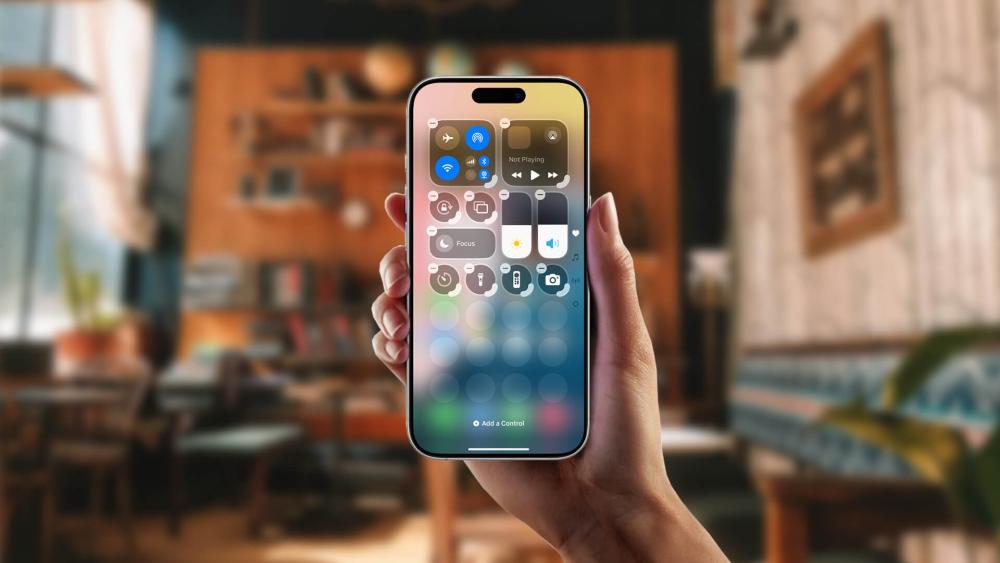
There are dozens of smaller but useful tweaks too. From customisable snooze times in Clock, to improved Reminders that categorise tasks for you, to a redesigned Photos app with easier navigation iOS 26 feels packed with thoughtful upgrades. Accessibility has also been stepped up, with better support for Braille users and tools to reduce motion sickness.
12. Photos: Easier Navigation and Smarter Recognition
The Photos app has been reworked to make finding memories faster. There are now separate tabs for Library and Collections, plus a universal search bar available in every view. You can even customise how Collections look with three different layouts, collapsing or reordering them however you like.
A clever addition is event recognition concerts, sports matches, and other outings are automatically grouped, letting you see all the related snaps and even access details about the event.
13. Camera: Cleaner Controls and Handy New Tricks
The Camera app has been streamlined, so switching between photo, video, portrait, and other modes is quicker than ever. A neat bonus is the lens cleaning hints that pop up if your lens is smudged making sure you capture the clearest possible shot (available on iPhone 15 and later).
And for those with the latest AirPods 4 or AirPods Pro 2, you can now snap a photo or start recording video by pressing the stem. No more fumbling with the screen when you’re mid-action just a quick press and you’re ready to capture the moment.
14. Protecting Kids Online: Stronger Family Controls
Apple has doubled down on child safety features in iOS 26, making the iPhone 17 a safer choice for families. Parents can now convert existing accounts into Child Accounts with ease, unlocking all of Apple’s built-in protections. Kids also get Communication Requests, which let them ask a parent’s permission before messaging or calling a new number so you stay in the loop without stifling independence.
Apps can also be tailored more smartly with age-appropriate experiences, allowing parents to let their children share an age range with third-party apps, so content and features are filtered to suit their maturity. On top of that, Communication Safety has been expanded: it now blurs nudity in Shared Albums in Photos and can even step in during live FaceTime calls if explicit content is detected.
For families, these tools mean more peace of mind, giving children freedom to connect, while ensuring parents still have the right level of control.
Final Thoughts!
The iPhone 17 is impressive on its own, but it’s the iOS 26 features for iPhone 17 owners that truly transform the experience. If you’re in the UK and ready to upgrade, the iPhone 17 with iOS 26 is easily one of Apple’s most compelling combos yet. And the best place to get yours? Right here at Box.co.uk; your home for the latest Apple tech and accessories at great value.
You can pay with:
*PayPal Credit Representative Example: Assumed credit limit £1,200, Representative 23.9% APR (variable). Purchase rate 23.9% p.a (variable).Terms & Conditions apply.


PayPal Credit and PayPal Pay in 3 are trading names of PayPal UK Ltd, 5 Fleet Place, London, United Kingdom, EC4M 7RD. Terms and conditions apply. Credit subject to status, UK residents only, Five Tech LTD acts as a broker and offers finance from a restricted range of finance providers. PayPal Pay in 3 is not regulated by the Financial Conduct Authority. Pay in 3 eligibility is subject to status and approval. 18+. UK residents only. Pay in 3 is a form of credit. Check if affordable and how you will repay. May make other borrowing more difficult or expensive. See product terms for more details.
Copyright © 1996-2026 Fivetech LTD | Terms and Conditions
box.co.uk & Box are trading names of Five Tech Limited. Registered office: Box LTD, Unit 10 Woodford Trading Estate, Woodford Green IG8 8HF