


 Menu
MenuMenu


Get Sales Advice from Mon - Fri 9am - 5:00pm:
020 3337 8950LAST UPDATED: July 01, 2026
Intel CPU Codename Explained: What They Mean and Why They Matter
Intel processor names can be tricky to understand at first. A laptop or desktop listing might show a retail name such as Intel Core i7-14700K or Intel Core Ultra 7 265K, while tech discussions may refer to names like Alder Lake, Raptor Lake, Meteor Lake or Lunar Lake.
These names are not random. An Intel CPU codename is the internal development name used for a processor family, architecture or platform before it reaches buyers under a public retail name.
Understanding Intel codenames and retail names can help you work out:
- Which processor family does a CPU belong to
- How old or new the architecture is
- Whether it is designed more for laptops, desktops or low-power devices
- Why CPU generation differences are not always as simple as the number in the product name
- Whether a chip is likely to focus on efficiency, AI features, gaming, multitasking or general computing performance
That said, a codename is only part of the picture. The exact processor model, suffix, core count, power limits and cooling design all matter when judging real-world performance.
In this guide, we’ll explain what Intel CPU codenames mean, how they differ from retail processor names, how Intel suffixes work, and why codenames matter when comparing modern Intel processors.
What Is an Intel CPU Codename?
An Intel CPU codename is a project name that identifies a specific processor architecture or platform before and during its release cycle.
Why Do So Many Intel Codenames End in "Lake"?
If you've noticed names such as Skylake, Coffee Lake, Tiger Lake, Alder Lake and Meteor Lake, that's not a coincidence.
Intel has used lake-themed codenames for many years, often drawing inspiration from real lakes and geographic locations in the United States. While the names themselves don't reveal performance or specifications, they help Intel distinguish different processor architectures and development generations internally.
Once the processor is ready for buyers, it gets a public retail name. That is the name you usually see on product pages, such as Intel Core i7-14700K or Intel Core Ultra 7 265K.
In simple terms:
| Term | What it means | Example |
|---|---|---|
| Intel CPU codename | Internal development name | Raptor Lake |
| Retail processor name | Public product name | Intel Core i7-14700K |
| Processor architecture naming | How Intel groups CPU designs | Alder Lake, Meteor Lake |
| Product family | The range sold to buyers | Intel Core, Intel Core Ultra |
Intel codenames are useful because they help explain the design behind the chip. They can point to:
- A new architecture
- A manufacturing shift
- A laptop or desktop platform
- A change in power efficiency
- A move towards newer features, such as hybrid architecture or AI acceleration
However, the codename is not the full specification. When comparing Intel processors, you still need to check the exact model, generation, suffix, core count and device design.
How to Read an Intel CPU Name
An Intel CPU codename indicates the architecture of the chip. The retail name tells you what buyers actually see on a product listing.
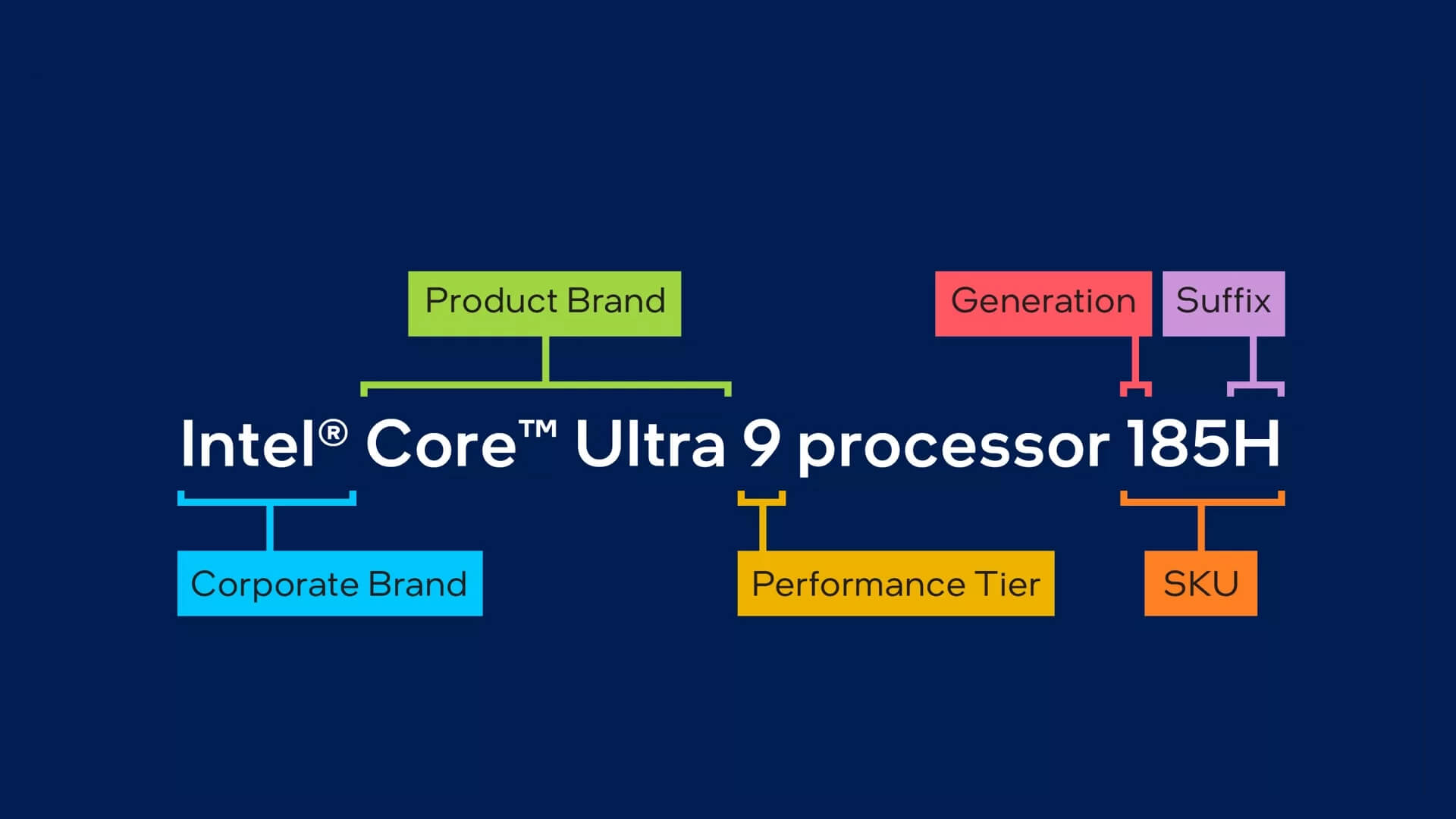
A name like Intel Core Ultra 9 processor 185H can be broken down into clear parts:
| Part of the name | What it means | Example |
|---|---|---|
| Corporate brand | The company brand | Intel |
| Product brand | The processor family | Core Ultra |
| Performance tier | The general performance level | 9 |
| Generation | The processor series or generation | 1 |
| SKU/model | The model position within the range | 85 |
| Suffix | The chip type or power class | H |
For example, Core i5 CPUs are usually strong mainstream choices, while Intel Core i7 processors and flagship Intel processors are better suited to heavier workloads.
So, Intel Core Ultra 9 processor 185H means:
- Intel is the corporate brand
- Core Ultra is the product brand
- 9 is the performance tier
- 1 shows the generation or series
- 85 is the SKU or model number
- H means it is a high-performance mobile processor
What Intel CPU Suffixes Mean
The suffix is the letter, or letters, at the end of the retail processor name. It gives a quick clue about what the chip is built for.
| Tier | General meaning | Common use |
|---|---|---|
| Core 3 / Core Ultra 3 | Entry-level performance | Basic work, browsing and simple tasks |
| Core 5 / Core Ultra 5 | Mainstream performance | Everyday multitasking, study and office work |
| Core 7 / Core Ultra 7 | Higher performance | Heavier multitasking, creative work and productivity |
| Core 9 / Core Ultra 9 | Flagship performance | Demanding workloads, gaming and high-end systems |
This matters because desktop vs laptop processors are designed differently. A laptop chip may focus on battery life and heat control, while a desktop chip can often use more power for stronger sustained performance.
When comparing Intel-powered laptops, the suffix can tell you whether the processor is built more for portability, performance or a balance of both.
Intel CPU Codenames vs CPU Generations
Intel CPU codenames and CPU generations are connected, but they are not the same thing. A generation is the public product era. A codename is the architecture or platform name behind that product era.
For example:
- Alder Lake is the codename behind many 12th Gen Intel Core processors
- Raptor Lake is linked with 13th Gen and 14th Gen Intel Core processors
- Meteor Lake is linked with the first major Core Ultra laptop generation
- Arrow Lake is linked with newer Core Ultra desktop and mobile processors
Another thing to consider here is that Intel naming is not always one-to-one. One generation can include more than one codename, and one codename can appear across different processor types.
A good example is the 10th Gen Intel Core. It included both:
- Ice Lake, which focused on 10nm mobile processors
- Comet Lake, which continued Intel’s 14nm platform for some mobile and desktop chips
That is why CPU generation differences can be confusing. Two processors may both be called 10th Gen, but they may be based on different designs. For a clearer comparison, look at all of these together:
- The Intel CPU codename
- The generation or Core Ultra series
- The full retail processor name
- The suffix at the end
- Whether it is a laptop or a desktop processor
The codename gives useful background, but the full retail name tells you what you are actually buying.
Intel CPU Codename Timeline
Intel CPU codenames are easiest to understand when they are placed in order. Here is a year-by-year comparison of different generations, codenames, and the number in the model name.
| Generation / platform era | Year first released | Core branding / codename | Number in model name | Simple meaning |
|---|---|---|---|---|
| 6th Gen Core | 2015 | Skylake | 6xxx | Older Core architecture that influenced several later Intel designs |
| 7th Gen Core | 2016 | Kaby Lake | 7xxx | A refined Skylake-era platform |
| 8th / 9th Gen Core | 2017 / 2018 | Coffee Lake | 8xxx / 9xxx | More mainstream cores and stronger multitasking |
| Low-power mobile | 2018 | Amber Lake | 8xxxY / 10xxxY | Very low-power mobile platform for thin laptops |
| 8th Gen mobile refresh | 2018 | Whiskey Lake | 8xxxU | Mobile refresh used in many older business laptops |
| 8th Gen limited release | 2018 | Cannon Lake | 8xxxU | Early 10nm platform with limited availability |
| 10th Gen mobile | 2019 | Ice Lake | 10xxxGx | Better mobile efficiency and improved integrated graphics |
| 10th Gen Core | 2019 | Comet Lake | 10xxx | Continued 14nm platform for some desktop and mobile chips |
| Hybrid low-power platform | 2020 | Lakefield | L-series style naming | Early step towards mixed-core processor design |
| Entry-level platform | 2016 | Apollo Lake | N / J series | Budget and low-power devices |
| Entry-level platform | 2017 | Gemini Lake | N / J series | Affordable laptops, mini PCs and compact systems |
| Entry-level refresh | 2019 | Gemini Lake Refresh | N / J series | Updated version of Gemini Lake |
| Entry-level platform | 2021 | Jasper Lake | N / J series | Later budget platform for simple everyday systems |
| Embedded platform | 2020 | Elkhart Lake | Atom, Pentium or Celeron embedded naming | Industrial, IoT and specialist devices |
| 11th Gen mobile | 2020 | Tiger Lake | 11xxxGx | Stronger laptop graphics and better efficiency |
| 11th Gen desktop | 2021 | Rocket Lake | 11xxx | Desktop-focused Intel Core platform |
| 12th Gen Core | 2021 | Alder Lake | 12xxx | Major hybrid architecture shift with P-cores and E-cores |
| 13th / 14th Gen Core | 2022 / 2023 | Raptor Lake | 13xxx / 14xxx | Refined hybrid architecture with stronger performance |
| Core Ultra Series 1 | 2023 | Meteor Lake | 1xxH / 1xxU | Core Ultra laptop platform with NPU focus |
| Core Ultra Series 2 mobile | 2024 | Lunar Lake | 2xxV | Efficient AI-focused laptop platform |
| Core Ultra Series 2 desktop / mobile | 2024 / 2025 | Arrow Lake | 2xxK / 2xxH / 2xxHX | Newer Core Ultra desktop and performance mobile platform |
| Core Ultra Series 3 | 2026 | Panther Lake | 3xx / 3xxH | Current Core Ultra Series 3 client platform built on Intel 18A |
| Future roadmap | TBC | Nova Lake | TBC | Future Intel roadmap codename |
| Xeon / server platform | 2019 | Cascade Lake | Xeon naming | Server and workstation-focused platform |
| Xeon / server platform | 2020 | Cooper Lake | Xeon naming | Enterprise and workstation-focused platform |
A few quick points make the table easier to understand:
- The number in the name can help identify the generation or series.
- Older Intel Core processors often use numbers such as 6xxx, 10xxx or 14xxx.
- Newer Core Ultra chips use shorter model numbers, such as 185H, 265K or 288V.
- The codename helps explain the architecture, but the full retail name still matters more when comparing exact CPUs.
- For newer AI-focused processors, model numbers can also help separate Core Ultra Series 1, Series 2 and Series 3 chips, including options such as next-gen Intel Ultra 5.
This is why an Intel CPU codename is useful, but not enough on its own. For the clearest comparison, always look at the codename, generation, model number and suffix together.
Key Intel Codenames You Should Know
Not every Intel CPU codename deserves the same level of attention. Some are mainly relevant when identifying older hardware, while others can tell you a lot about the features and capabilities of the latest Intel systems.
Skylake, Kaby Lake and Coffee Lake
These are some of Intel's most recognisable older Core-era codenames and are commonly found in refurbished PCs and second-hand laptops. If you come across one of these platforms, it is worth checking more than just the processor itself. Look at whether the system supports Windows 11, how much RAM and storage it includes, and, for laptops, the condition of the battery. While many of these machines can still handle everyday tasks comfortably, they may not be the best fit for more demanding modern workloads.
Ice Lake and Comet Lake
These platforms are a good reminder that generation numbers do not always tell the full story. Although both appeared within Intel's 10th Gen lineup, they were built differently and targeted different types of devices. Rather than focusing only on the generation, take a closer look at the complete processor name and the system it is installed in. Factors such as cooling, power limits and intended use can have a noticeable impact on the overall experience.
Alder Lake and Raptor Lake
With these codenames, Intel's hybrid architecture became a major part of the conversation. Instead of treating all cores equally, these processors combine high-performance cores with efficiency-focused cores. As a result, two CPUs with similar core counts can behave quite differently. Looking at the mix of core types, thread count, and power profile will often give a clearer picture of performance than simply checking the headline specifications.
Meteor Lake, Lunar Lake, Arrow Lake and Panther Lake
These are the codenames most buyers are likely to encounter when researching newer Intel systems. They are closely linked to Intel's push towards AI-enhanced computing, improved efficiency and more capable integrated graphics. Seeing one of these names can often indicate access to newer platform technologies and features designed for modern productivity and creative workloads. This can be particularly helpful when browsing Intel Ultra laptops, where differences in battery life, AI capabilities and graphics performance can be just as important as raw processing power.
Nova Lake
Unlike the other codenames listed here, Nova Lake remains part of Intel's future roadmap rather than a widely available product family. While early information can be interesting to follow, it is best treated as a preview rather than a buying guide. Specifications, features, and even product positioning can change before launch, so it is usually worth waiting for official announcements, independent reviews and real-world testing before drawing any conclusions.
Do Intel CPU Codenames Affect Performance?
Not directly.
A codename can be helpful when researching a processor, but it should not be used as a shortcut for judging speed or overall capability.
Instead, think of it as a way to group related processors. CPUs that share the same codename often have common design characteristics, features and technologies, but their actual performance can vary significantly.
In short, an Intel CPU codename is useful for identification and research, but it is not a direct indicator of how powerful a processor will be in real-world use.
How to Use Intel Codenames When Choosing a Processor
A codename can tell you which Intel processor family a CPU belongs to, but it does not show exactly how powerful it is. To understand how a processor will perform, you need to look at its specifications, such as its cores, clock speeds and power rating.
Use this checklist when comparing processors:
Check the exact processor model: Start with the full processor name rather than just the branding. For example, "Intel Core Ultra 7" is less useful than the complete model name, which includes the SKU and suffix.
Look at the core and thread count: More cores can improve multitasking and performance in demanding applications. Threads determine how many tasks the processor can handle simultaneously. In general:
- Fewer cores are suitable for basic everyday tasks
- More cores are beneficial for gaming, content creation and professional workloads
- High-performance Intel CPUs usually come with higher thread counts that can improve performance in heavily multitasked environments
Check the clock speeds: Clock speed is measured in GHz and indicates how quickly the processor can perform tasks. Pay attention to:
- Base clock speed
- Boost or turbo clock speed
Higher clock speeds can improve responsiveness and performance in applications that rely on single-core speed.
Understand the cache size: CPU cache is high-speed memory built into the processor. A large cache is better as it can help:
- Reduce data access times
- Improve application responsiveness
- Increase performance in certain workloads and games
Review the power rating: Power limits affect both performance and efficiency. It is important to note that:
- Higher-power processors can sustain stronger performance
- Lower-power processors prioritise battery life and reduced heat output
- Laptop and desktop CPUs often use very different power budgets
Check the integrated graphics: Some Intel processors include integrated graphics, while others require a dedicated graphics card.
Look at the suffix: The suffix provides useful information about the processor's intended use.
Use the codename for additional context: Once you understand the specifications, the Intel CPU codename can help you identify the processor's architecture, age and platform generation.
Wrapping Up
Intel CPU codenames help identify a processor’s architecture, platform and release era. They provide useful context, but they do not tell the whole story.
When comparing CPUs, focus on the full model name, generation, suffix, core count and overall specifications.
In short, the codename gives background information, while the full processor specification is what really determines performance and suitability.
Frequently Asked Questions
What is an Intel CPU codename?
An Intel CPU codename is an internal project name used for a processor architecture or platform, helping identify the design behind a processor before or during its release cycle. For example, Raptor Lake is a codename, while Intel Core i7-14700K is a retail processor name.
What is the difference between Alder Lake and Raptor Lake?
Alder Lake introduced Intel’s mainstream hybrid architecture, combining performance cores and efficiency cores, while Raptor Lake refined that design and delivered stronger performance in many models. The exact difference depends on the specific processor, power limits and device cooling.
Are Intel codenames the same as CPU generations?
No, Intel codenames and CPU generations are related but not the same. A generation is the public product era, such as 12th Gen or 14th Gen Intel Core, whereas a codename is the architecture or platform name behind that generation, such as Alder Lake or Raptor Lake.
What is the latest Intel CPU codename?
Panther Lake is Intel’s Core Ultra Series 3 client processor codename. Intel launched the Core Ultra Series 3 at CES 2026, with laptops becoming available from January 2026. Nova Lake remains a future roadmap codename, so final retail details should be checked against official Intel announcements before comparing products.
Do Intel CPU codenames affect performance?
Not directly. An Intel CPU codename can indicate which architecture or platform a processor belongs to, but it does not guarantee performance. To properly compare performance, you should look at the full processor model, suffix, core count, clock speeds, cache, power rating and device cooling.
You can pay with:
*PayPal Credit Representative Example: Assumed credit limit £1,200, Representative 23.9% APR (variable). Purchase rate 23.9% p.a (variable).Terms & Conditions apply.


PayPal Credit and PayPal Pay in 3 are trading names of PayPal UK Ltd, 5 Fleet Place, London, United Kingdom, EC4M 7RD. Terms and conditions apply. Credit subject to status, UK residents only, Five Tech LTD acts as a broker and offers finance from a restricted range of finance providers. PayPal Pay in 3 is not regulated by the Financial Conduct Authority. Pay in 3 eligibility is subject to status and approval. 18+. UK residents only. Pay in 3 is a form of credit. Check if affordable and how you will repay. May make other borrowing more difficult or expensive. See product terms for more details.
Copyright © 1996-2026 Fivetech LTD | Terms and Conditions
box.co.uk & Box are trading names of Five Tech Limited. Registered office: Box LTD, Unit 10 Woodford Trading Estate, Woodford Green IG8 8HF