


 Menu
MenuMenu


Get Sales Advice from Mon - Fri 9am - 5:00pm:
020 3337 8950LAST UPDATED: February 23, 2026
HP OmniBook: Future-Ready AI Laptop for Professionals & Creators
The world of portable computing is shifting fast, and the move toward on-device AI is easily the biggest step forward since SSDs replaced hard drives. If you’re looking for a machine that can keep up with smarter workloads, heavier multitasking, and real-time AI features, the HP OmniBook AI laptop range is built for exactly that. Designed for modern students, hybrid professionals, and creators who want more speed with less effort, it streamlines everyday tasks using intelligent performance tuning and Windows Copilot+ tools that work locally rather than relying on the cloud.
Whether you’re juggling Office apps, editing content, jumping into video calls, or using AI-powered creative tools, the latest HP laptops, especially the OmniBook adapts to how you work. It loads faster, runs cooler, stays responsive under pressure, and offers the kind of long-lasting battery life that makes it ideal for travel or remote work. As part of HP’s next generation of AI-focused notebooks, it brings together Intel Ultra processors, premium design, and HP’s business-grade security, giving you a future-ready device that feels more like a smart assistant than a standard laptop.
Ready to see what makes the HP OmniBook stand out? Let’s break it down.
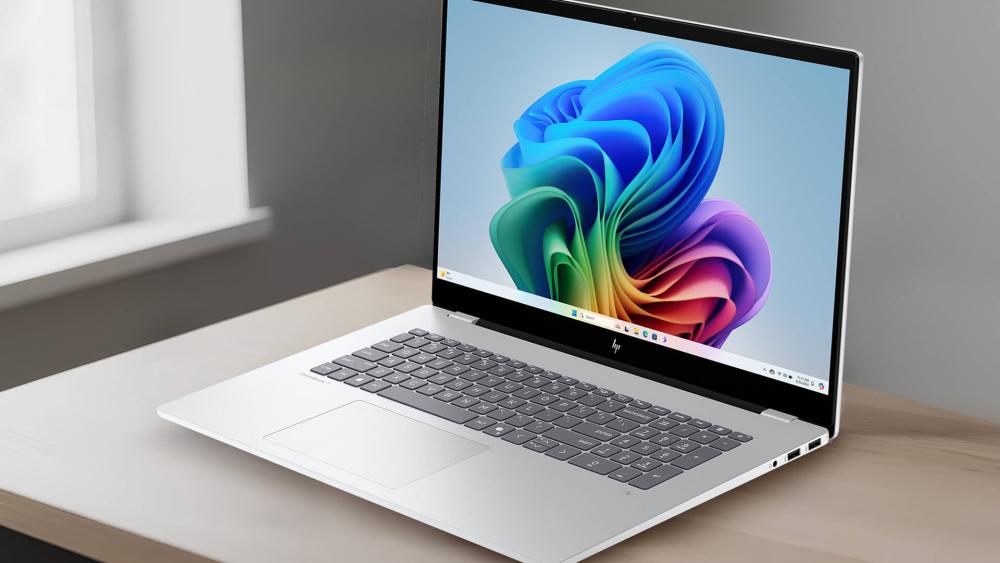
What Makes the HP OmniBook Unique?
The HP OmniBook AI laptop range is more than just a refreshed design with a new processor. It’s built around a smarter, AI-first architecture that changes how the device reacts, performs, and adapts to your daily routines. Instead of relying solely on traditional components, it brings on-device intelligence into the mix, allowing it to predict what you need, optimise performance automatically, and maintain smooth workflows even when you’re running multiple demanding apps. Below, we break down the core innovations that set the HP OmniBook apart and show how these AI-driven features genuinely improve everyday computing.
AI Designed to Work On-Device
The HP OmniBook AI laptop range stands out because it’s built to run AI tasks directly on the device rather than relying on cloud processing. With its dedicated Neural Processing Unit (NPU), it delivers quicker responses, smoother multitasking, and improved privacy. Daily tasks like voice transcription, background noise reduction, smart window organisation, and creative tools all benefit from on-device acceleration.
More Responsive Than Traditional Windows Laptops
Unlike older systems that rely solely on CPU and GPU power, the HP OmniBook series intelligently distributes workloads across its Intel Ultra processor, integrated GPU, and NPU. This three-part architecture gives it a significant edge over standard Windows laptops, especially when running modern AI features. As a Copilot+ PC, the OmniBook supports enhanced tools like Recall, Cocreator, Studio Effects, and a fully integrated Windows Copilot assistant, all of which run locally for faster, smoother performance.
Because these features no longer depend on cloud processing, the system responds more quickly to everyday tasks like searching your activity history, translating audio, or generating images. The combination of on-device AI and smart optimisation helps the OmniBook adapt to your most-used apps, boost performance when needed, and maintain efficiency to stay cool and quiet during long sessions. It feels noticeably more responsive than traditional Windows 11 machines, which is why the Copilot+ difference is so important for future-ready workflows.
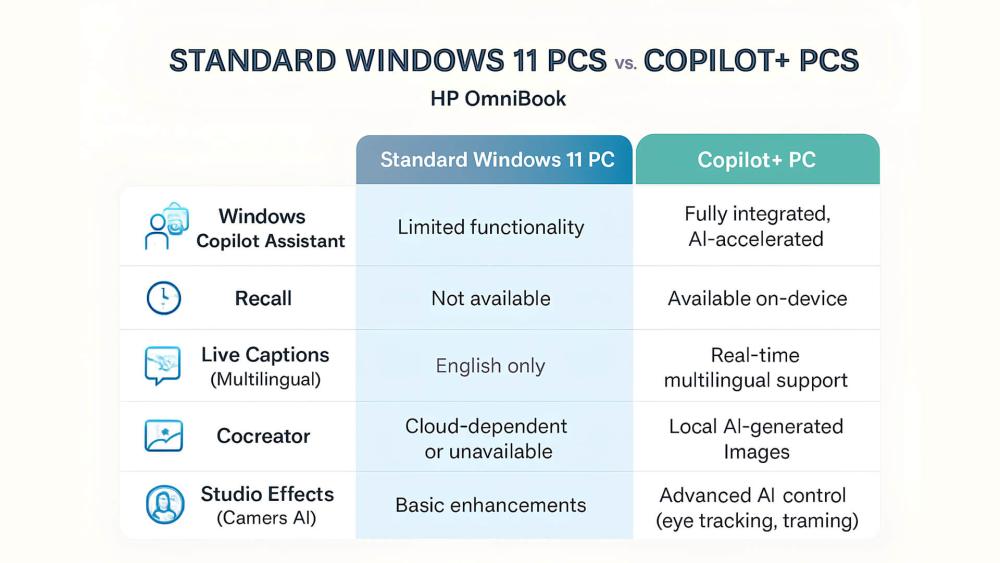
A Modern Take on a Trusted HP Line
The OmniBook name has a long history in HP’s lineup. The latest generation continues that legacy by combining durability with cutting-edge AI features. Sleek materials, improved connectivity, and HP’s fine-tuned thermals make it ideal for hybrid workers and mobile professionals. If you’re comparing it with other secure devices, you can explore more business-ready HP devices at Box.co.uk.
Key Features of the HP OmniBook
The HP OmniBook AI laptop range is designed to deliver smarter, faster, and more efficient computing for users who want a device that keeps up with modern workloads. Its hardware and software work together to unlock on-device AI, intelligent optimisation, and smoother performance across both everyday tasks and more demanding applications. Below are the key features that make the OmniBook such a future-ready choice.
Intel Ultra Processors and AI Acceleration
At the core of the HP OmniBook is the latest Intel Ultra processor, built to support next-generation AI experiences right out of the box. These chips combine performance cores, efficiency cores, and a dedicated Neural Processing Unit (NPU) that offloads AI tasks from the CPU and GPU. The result is faster on-device processing, better responsiveness, and improved battery efficiency.
For workloads that rely on graphics acceleration such as creative editing or streaming, the integrated Intel Arc graphics engine delivers a welcome performance lift. This tightly integrated hardware makes the HP OmniBook AI laptop range ideal for creators, students, and professionals who want future-proof performance with built-in AI support.
Windows Copilot+ Built-In
As a Copilot-ready system, the HP OmniBook offers a suite of exclusive Windows features designed to run smoothly thanks to on-device AI. Copilot+ tools like Recall, Live Captions, Cocreator, and Studio Effects work faster and more reliably when supported by dedicated AI hardware.
From generating artwork to improving video calls and providing real-time transcription in meetings, Copilot+ transforms the HP OmniBook AI laptop range into a genuinely intelligent workstation. Tasks feel quicker, interactions feel more natural, and the device adapts to your workflow with minimal effort on your part.
Smart Battery Life and Portability
A major strength of the OmniBook is its balance between performance and mobility. AI-assisted power optimisation learns how you use the device and adjusts its energy consumption accordingly. This helps extend battery life during long days of hybrid work or study, keeping the HP OmniBook AI laptop running longer without compromising performance.
At the same time, its slim and lightweight build makes it ideal for commuting, travel, or hot-desking. Whether you’re working in a coffee shop or taking it between meetings, the OmniBook remains comfortable to use and easy to carry.
Privacy, Security, and AI Safeguards
HP integrates advanced, enterprise-grade protections into the OmniBook, making it a strong choice for users who handle sensitive data or want extra peace of mind. HP Wolf Security provides real-time AI-driven threat detection, system isolation, and firmware self-healing to guard against modern cyberattacks.
Presence detection further improves security by automatically locking the device when you step away and waking it when you return. With these protections in place, the HP OmniBook AI laptop range becomes a reliable option for professionals reliant on secure systems. Those considering HP’s wider business range can explore more business-ready HP devices at Box.co.uk.
Performance for Modern Workloads

The HP OmniBook AI laptop is engineered to handle the growing demands of modern computing, from constant multitasking to AI-enhanced productivity and creative workloads. With its blend of Intel Ultra processing power, efficient NPU-driven acceleration, and intelligent workload distribution, the OmniBook stays responsive even when users push it harder with heavier apps and background tasks. Below, we break down how it performs across real-world scenarios.
Productivity and Office Tasks
For day-to-day productivity, the HP OmniBook AI laptop delivers noticeably smoother performance thanks to its smart workload handling. Office applications open faster, browser tabs stay responsive even when you have multiple windows active, and AI-enhanced features like real-time transcription or smart search tools can operate quietly in the background without slowing the system down.
This makes the device ideal for hybrid workers or students who rely on a mix of research, document creation, and cloud tools throughout the day. The combination of on-device AI and efficient cores results in intelligent laptop performance that adapts to your workflow rather than forcing you to adapt to the machine.
Creative Applications with AI Assist
Creatives benefit significantly from the OmniBook’s ability to assist with editing, rendering, and design tasks. The integrated Intel Arc graphics hardware provides solid acceleration for photo editing, illustration, light video work, and media playback. Meanwhile, the dedicated NPU supports AI filters, real-time upscaling, and automated content generation in supported apps.
For example, AI-powered tools in Adobe Suite or Windows Cocreator can generate visual concepts quickly without relying on cloud services, reducing wait times and improving workflow efficiency. And while the HP OmniBook’s integrated Intel Arc graphics handle creative tasks well, users working on heavier visual projects may still prefer the extra headroom offered by an AI acceleration graphics card, especially when dealing with large renders or more advanced editing workflows.
This blend of AI and GPU acceleration helps the HP OmniBook AI laptop deliver solid creative performance in a thin and light form factor.
Multitasking and Background Processing
Where the OmniBook really shines is in its ability to stay responsive under pressure. The NPU takes over many background computing tasks, allowing the CPU and GPU to focus on the primary apps you’re using. This means you can run multiple programs at once, stream content, join video calls, and perform quick edits without the device struggling to keep up.
AI-based load balancing ensures that the laptop adapts dynamically, giving you more speed when tasks become heavy and conserving energy when they don’t. This makes the HP OmniBook AI laptop a great choice for anyone who regularly switches between apps or keeps several tools open throughout the day.
Technical Specifications Overview
While the AI features and smart optimisation make the HP OmniBook AI laptop feel incredibly responsive, the hardware itself is just as important. HP has equipped the OmniBook with a balanced combination of next-gen CPUs, capable graphics, fast storage, and high-speed memory to ensure it delivers long-term performance across a wide range of workloads. Below, we break down the core specs that shape the OmniBook’s capabilities and help you decide which configuration best suits your needs.
CPU, GPU, and RAM Options
The HP OmniBook AI laptop is powered by Intel Ultra processors, combining performance cores, efficiency cores, and an NPU for handling on-device AI tasks. This hybrid architecture ensures you get the right power at the right time, whether you're editing documents, running creative tools, or multitasking between heavier applications.
For graphics, the laptop includes Intel Arc integrated GPU technology. This brings welcome improvements to media editing, light gaming, and accelerated AI features. Paired with AI-driven workload distribution, it offers solid performance without the heat and power draw of a dedicated GPU.
Memory options vary by configuration, but all models benefit from fast, efficient RAM that supports smooth application switching and stable performance. If you're exploring upgrades or comparing similar systems, you can browse high speed system memory, to enhance your system.
This combination of CPU, GPU, and memory makes the HP OmniBook AI laptop a well-rounded machine for students, professionals, and creators alike.
Storage Capacity and Upgradability
HP equips the OmniBook with rapid NVMe SSD storage, giving you quick boot times, instant file access, and smooth performance when handling large projects. Storage options typically start from 512GB and go upwards depending on the model, making it suitable for document-heavy workloads, creative projects, and multi-app workflows.
The fast storage also supports AI workloads by allowing the laptop to access data quickly for tasks like image generation or real-time video processing. Some configurations may offer upgradability, giving users more flexibility long term, though this varies between models.
If you’re managing large libraries of files, pairing the OmniBook with an external SSD or cloud service can help keep things organised without sacrificing speed.
Display and Build Quality
The HP OmniBook AI laptop offers a premium display experience across its range. Options include sharp IPS panels and vibrant high-resolution OLED displays designed for colour accuracy, deep contrast, and reduced eye strain during long working sessions. These screens are ideal for creative editing, content viewing, and everyday productivity.
Build quality is equally impressive. The sleek, lightweight chassis makes the device comfortable to travel with, and its sturdy construction ensures durability for busy work environments. Slim bezels, a refined hinge, and a clean keyboard layout give the OmniBook a modern, professional feel that suits both office desks and on-the-go setups.
Smart Accessories to Maximise Use
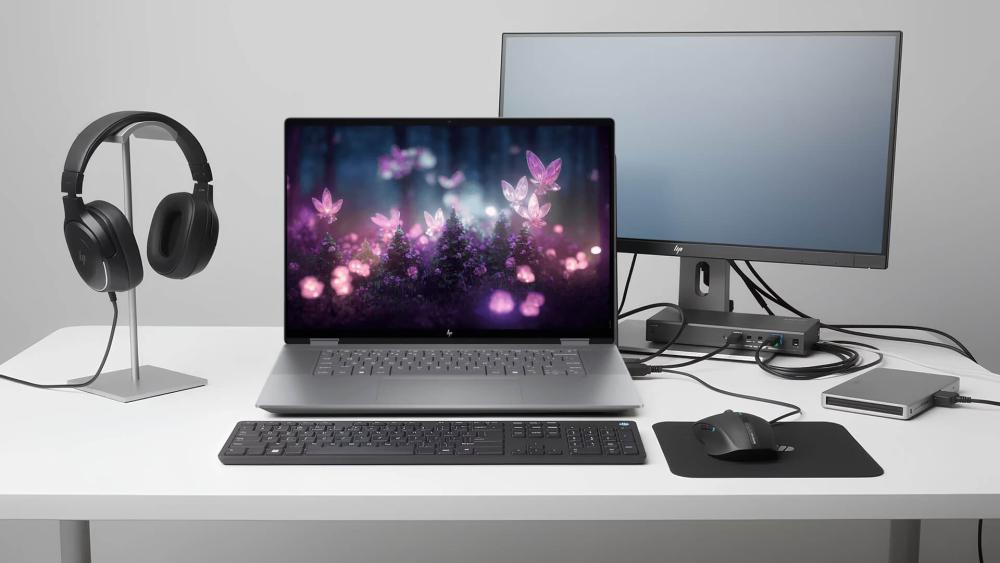
To get the most out of the HP OmniBook AI laptop, pairing it with the right accessories can make a noticeable difference in day-to-day productivity, comfort, and mobility. Whether you’re building a home office setup, improving your hybrid working routine, or preparing for travel, the right gear can elevate how the OmniBook fits into your lifestyle. Below are some accessory recommendations that complement its AI-powered performance and premium design.
Productivity Mouse and Keyboard Picks
A reliable mouse and keyboard can unlock smoother workflows, especially if you spend long hours typing, browsing, or switching between apps. Lightweight Bluetooth mice and compact keyboards pair seamlessly with the HP OmniBook AI laptop, offering a clutter-free setup for both home and office use.
These accessories help maintain the OmniBook’s comfortable, portable feel while ensuring you can work at full speed. Gamers or power users who prefer mechanical keyboards can also benefit from a more tactile experience, especially when multitasking across creative tools or productivity apps.
Recommended Headsets, Docking, and Storage
Audio clarity and seamless connectivity are key when using the OmniBook for calls, meetings, or content creation. A good wireless headset enhances video conferencing quality, particularly when paired with the laptop’s AI-powered noise reduction features. A docking station, meanwhile, can turn the HP OmniBook AI laptop into a full workstation, offering expansion for multiple monitors, peripherals, and network connections.
For large project files or frequent backups, a portable SSD is a smart addition. While the OmniBook already offers fast NVMe storage, external drives are ideal for organising photos, videos, or project archives without filling your main SSD.
If you're upgrading your setup further, you can check additional accessory options and storage solutions on Box.co.uk.
Travel and Protection Gear for Mobility
Since portability is a major strength of the HP OmniBook AI laptop range, it's worth pairing it with a case that keeps it safe on the move. A durable laptop sleeve or a dedicated HP laptop carrying case protects the device from scratches and knocks during commutes or travel.
Lightweight charging bricks, foldable laptop stands, and compact hubs also make great additions for users who rely on their OmniBook in multiple locations. These accessories help maintain comfort and efficiency without adding unnecessary bulk to your backpack.
HP OmniBook in Context: How It Compares

Choosing the right laptop often comes down to how well it stacks up against alternatives in the same brand family. The HP OmniBook AI laptop range sits at the intersection of portability, AI capability, and long-term performance, making it one of HP’s most forward-looking devices. But to understand where it truly shines, it’s worth comparing it with familiar HP ranges like Pavilion and Envy. Each one targets a different type of user, so here’s how they measure up when placed side by side with the AI-powered OmniBook.
HP Pavilion vs OmniBook
HP Pavilion laptops are generally designed for everyday users looking for affordability, solid performance, and basic portability. They suit casual browsing, light productivity, and entertainment, but they don’t include the advanced AI architecture or high-efficiency tuning you get with the HP OmniBook AI laptop range.
The OmniBook, on the other hand, offers a next-gen experience with Intel Ultra processors, on-device AI acceleration, better battery optimisation, and stronger security. If your workloads are growing more demanding or you want a device that adapts intelligently to your habits, the OmniBook is a clear step up from Pavilion models.
HP Envy vs OmniBook
The HP Envy series focuses on creators, multi-taskers, and users who need a balance between power and premium design. Envy laptops offer strong performance with traditional CPU/GPU architectures, but they lack the fully integrated AI capabilities that define the HP OmniBook AI laptop.
Envy remains an excellent choice for photo editing, content creation, and students who need dependable power. However, the OmniBook’s NPU-driven AI features, Copilot+ workflows, and adaptive performance tuning give it a long-term advantage for users who want intelligent optimisation built into their daily routines.
Should You Upgrade to the OmniBook?
If your current laptop feels sluggish with multitasking, struggles with creative tools, or lacks the speed and intelligence needed for modern workflows, upgrading to the HP OmniBook AI laptop is a smart move. Its combination of AI-enhanced responsiveness, strong battery life, and premium display options makes it well-suited to professionals, students, and creators alike.
Overall, if you want a laptop that is both future-ready and capable of handling evolving AI-powered applications, the OmniBook is the more strategic long-term choice compared to Pavilion or Envy models.
Wrapping Up:
If you’re looking for a device that feels genuinely smarter, faster, and ready for the next wave of AI-powered computing, the HP OmniBook AI laptop stands out as one of the most future-proof choices available. With Intel Ultra processors, on-device AI acceleration, and support for Windows Copilot+ workflows, it delivers a level of responsiveness that makes everyday tasks feel easier and more intuitive. Whether you're working across multiple apps, creating content, joining video calls, or studying on the go, the OmniBook adapts to your pace and keeps everything running smoothly.
Its slim build, long battery life, and business-grade security make it an excellent fit for hybrid workers and professionals, while the high-quality display options and AI-enhanced performance appeal to creators and students who need a capable all-rounder. Combined with HP’s reputation for durability and refined design, the HP OmniBook AI laptop becomes more than just an upgrade; it’s a long-term, smart investment in your productivity.
FAQs
Is the HP OmniBook a business laptop?
Yes. The HP OmniBook includes enterprise-grade security, on-device AI features, and HP Wolf Security, which make it ideal for business use. Its lightweight build, long battery life, and secure login options suit hybrid workers and professionals who need both mobility and reliability.
Is the HP OmniBook good for students?
Absolutely. Students benefit from its fast app loading, smooth multitasking, and AI tools that help with note-taking, research, and productivity. The slim design makes it easy to carry around campus, and battery optimisation ensures it lasts through long study sessions. The HP OmniBook is an excellent fit for coursework, creative projects, and remote learning.
Can you play games on an HP OmniBook?
The HP OmniBook is not a dedicated gaming machine, but its Intel Arc graphics can handle light to moderate gaming. Casual titles, indie games, and older esports titles run comfortably. For AAA gaming or higher frame rates, users may prefer a laptop with a dedicated GPU. You can explore stronger options by browsing graphics cards and performance gaming systems available at Box.co.uk.
What makes the HP OmniBook series special?
The OmniBook line is known for balancing portability, performance, and durability. The newest generation builds on this legacy by introducing on-device AI, smarter cooling, faster responsiveness, and premium build quality. This combination of intelligent features and polished hardware is what sets this series apart from previous models.
Is the HP OmniBook worth buying in 2026?
Yes. With AI-first architecture, Intel Ultra processors, and Copilot+ support, the OmniBook is built to handle the next wave of productivity tools and creative applications. Its future-ready design makes it a strong long-term investment for users who want a laptop that will stay relevant as AI workloads continue to grow.
You can pay with:
*PayPal Credit Representative Example: Assumed credit limit £1,200, Representative 23.9% APR (variable). Purchase rate 23.9% p.a (variable).Terms & Conditions apply.


PayPal Credit and PayPal Pay in 3 are trading names of PayPal UK Ltd, 5 Fleet Place, London, United Kingdom, EC4M 7RD. Terms and conditions apply. Credit subject to status, UK residents only, Five Tech LTD acts as a broker and offers finance from a restricted range of finance providers. PayPal Pay in 3 is not regulated by the Financial Conduct Authority. Pay in 3 eligibility is subject to status and approval. 18+. UK residents only. Pay in 3 is a form of credit. Check if affordable and how you will repay. May make other borrowing more difficult or expensive. See product terms for more details.
Copyright © 1996-2026 Fivetech LTD | Terms and Conditions
box.co.uk & Box are trading names of Five Tech Limited. Registered office: Box LTD, Unit 10 Woodford Trading Estate, Woodford Green IG8 8HF