


 Menu
MenuMenu


Get Sales Advice from Mon - Fri 9am - 5:00pm:
020 3337 8950LAST UPDATED: December 15, 2025
Building a PC? Here’s How to Make Sure Your GPU Actually Fits
Building or upgrading your PC is exciting, but nothing brings the process to a halt faster than discovering your new graphics card doesn’t actually fit inside your case. That’s why having a reliable GPU fit guide is essential, because the latest GPUs like the RTX 5090 and RX 9070 XT can be quite large, especially in certain partner designs. Between longer cooler shrouds, thicker heatsinks and wider slot requirements, checking measurements properly is now essential rather than optional.
A lot of users still assume that if a GPU is marketed for gaming PCs, it will fit any mid-tower PC case or motherboard. Unfortunately, that isn’t always true. Case layouts vary, PSU shrouds can block cable space, and front fans or drive cages can reduce usable GPU length by several centimetres.
This guide breaks down how to measure your case accurately, how to compare those readings with your GPU dimensions, and what to consider when choosing between different case types, cooler designs and slot widths. Whether you're building your first system or refreshing an existing setup, our PC build guide will help ensure your new display card fits without hassle and without risking damage to your components.
How to Measure Your Case for GPU Compatibility
Making sure your graphics card fits starts with accurate measurements of your case interior. Even when manufacturers list maximum GPU lengths, real-world usable space can differ because of drive cages, cable routing, or front-mounted case fans. A clear approach saves time and prevents buying a display card that won’t physically slot in. Our GPU fit guide revolves around one basic principle: always measure, always compare.
Measuring Internal Case Length and Clearance
The first step is understanding the usable horizontal space inside your PC case, not just the number shown on a spec sheet. Manufacturers typically measure from the rear PCIe bracket area to the front fan wall or drive cage, but airflow components or cable mounts can reduce this distance.
Key points to cover:
- Measure from the PCIe slot to the nearest obstruction, not just the front panel.
- Account for front fans. A 25 mm fan can reduce GPU accommodation length by the same amount.
- GPU dimensions vary by brand, even for the same model. Coolers, shrouds and backplates change the measured graphics card length, so always rely on the specific model’s listed size.
- Tools like rulers, measuring tapes or callipers provide accurate readings. We recommend these straightforward methods over guessing.
- Online databases such as PCPartPicker help compare GPU dimensions with the case’s internal space, making it easier to confirm PC case compatibility with other components like motherboards, RAM, Storage, and PSU in your build.

Checking Power Supply and Cable Clearance
Even when the GPU length matches the case specification, power connectors can complicate things. Modern cards often require 8-pin connectors or 12VHPWR plugs that extend the required space by several centimetres. If your case has a PSU shroud, the available space may be tighter than expected.
Consider the following:
- Factor in the bend radius of your power cables.
- Check how far the PSU shroud extends into the motherboard area.
- Modular PSU connectors positioned toward the GPU side can obstruct the installation if the power supply clearance is limited.
- Manufacturer specs often list GPU clearance with and without cable headroom, so review both figures.
Considering Airflow and Fan Clearance
Airflow components significantly influence usable space. Many cases mount fans or radiators at the front, and even a slim radiator can eat into your GPU clearance.
Important considerations:
- Front intake fans reduce GPU length allowance, so subtract their thickness from the case’s listed clearance.
- For larger GPUs, especially those with triple-fan coolers, leave extra breathing room to prevent heat buildup.
- Removing a front fan temporarily can help with installation, but long-term airflow matters for keeping the card cool.
- Bottom-mounted fans or drives can also interfere with lower-edge clearance, depending on your build layout.
Case Types and Their GPU Fit Limitations
PC cases offer different amounts of internal space, airflow options and layout flexibility. This means the same graphics card may fit comfortably in one case but be completely incompatible with another. This is where our GPU fit guide helps you understand how each case type affects GPU installation, especially when dealing with larger coolers or thicker heatsinks. Your choice of chassis also influences how well the system handles heat from bigger cards.
Mid-Tower Cases
Mid-tower cases remain the most common choice for gaming and workstation PCs because they balance size, airflow and component support. However, there’s no universal standard, and internal layouts vary widely. Some mid-towers allow long cards with ease, while others lose valuable room to drive cages or thick front-mounted cooling.
Key considerations:
- GPU length support can range from around 300 mm to well over 360 mm, depending on the model.
- Removable drive cages often free up valuable room for larger cards.
- If you plan on installing radiators or multiple intake fans, remember these reduce usable clearance.
- A mid-tower is generally suitable for dual-fan graphics cards and many triple-fan designs, though ultra-large cards may still be tight.
- Internal layouts influence GPU in case placement, particularly in compact mid-tower variants.
Full-Tower and Large Cases
Full-tower computer cases offer the most space for long, tall or thick GPUs, making them ideal for large-sized GPUs. These chassis are designed with airflow, radiator support and large component clearance in mind, which simplifies installation and reduces thermal constraints.
How can they help:
- A full-tower PC case offers considerably larger internal volume and supports a wide range of graphics card sizes.
- Better airflow pathways reduce thermal load on big coolers.
- Multi-slot GPUs fit more comfortably without obstructing other components.
- Vertical GPU mounts are more commonly supported, providing alternative installation options.
- These cases also minimise restrictions from PSU shrouds, enabling cleaner cable routing and improved GPU compatibility.

GPU Types and What to Watch Out For
Modern GPUs come in a wide range of cooler designs, thicknesses and slot widths, which means two cards with the same chipset can vary significantly in fit. In this GPU fit guide, we have explained how to assess video cards based on their physical characteristics rather than assuming all models share the same footprint.
Dual-Fan GPUs
Dual-fan GPUs are usually the easier option because they’re shorter, lighter and generally fall between 240 mm and 300 mm. Their two-slot design is best for setups with a tighter motherboard layout and reduces the risk of blocking nearby components. Thanks to their compact size, they’re less likely to clash with PSU shrouds, front fans, or drive cages, making them a reliable choice when building a PC using smaller or mid-range cases.
Triple-Fan or Large GPUs
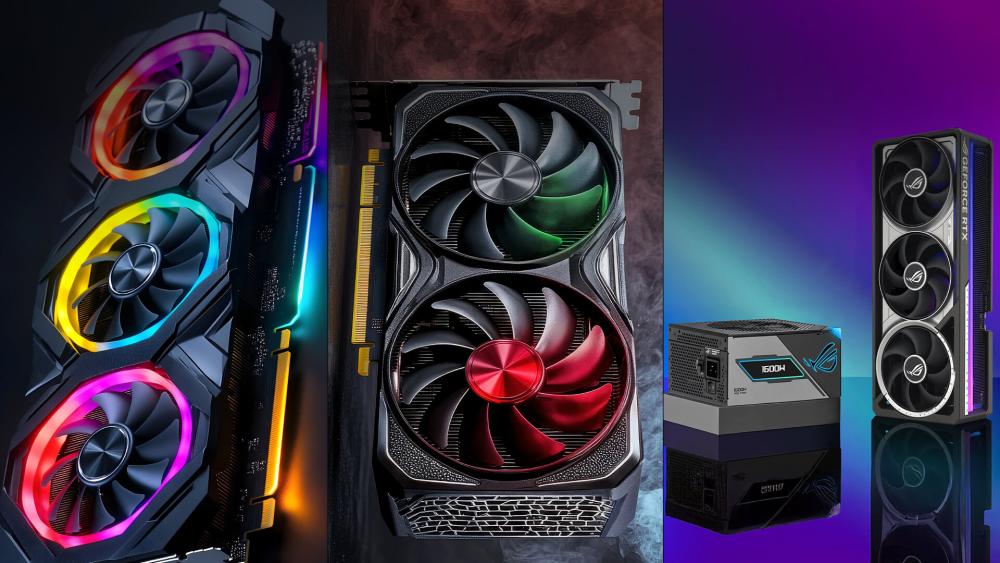
Triple-fan GPUs offer stronger cooling but often exceed 340 mm and take up 3.5 or 4 slots, so they require careful planning. Their extended shrouds and extra height can cause clearance issues with side panels and airflow components; hence, checking GPU compatibility is even more critical. Many larger cards also need a GPU support bracket to prevent sag and additional space for cable routing.
Multi-Slot GPUs
Thicker GPUs that occupy three or more PCIe slots can obstruct M.2 bays, chipset heatsinks, or secondary PCIe lanes. In smaller cases, slot spacing becomes crucial for a stable GPU installation, as a wide cooler may sit close to fans or drive cages. It is important to assess the graphics card’s size before buying a new one, as checking the full internal layout helps avoid conflicts during PC assembly.
Common Mistakes and How to Avoid Them
Many builders run into compatibility issues because they rely on assumptions rather than detailed measurements. Our GPU fit guide ensures that you don’t encounter such issues by highlighting the common problems and how to avoid them:
- Relying only on advertised maximum GPU length: Case specifications rarely account for real-world obstructions. Front fans, radiators, cable mounts and even the inner lip of the front panel can reduce usable clearance by several millimetres, which becomes critical when installing larger GPUs.
- Ignoring power connector clearance: Modern GPUs often need extra room for 8-pin or 12VHPWR connectors. The required cable bend radius can add noticeable length, especially when the PC case dimensions are small.
- Overlooking GPU thickness and slot requirements: Thicker, multi-slot cards may block M.2 slots, chipset heatsinks or secondary PCIe lanes. Checking your graphics card size in relation to the case and motherboard layout avoids conflicts later.
- Assuming airflow will be sufficient just because the GPU fits: A card that physically fits may still overheat if the PC case compatibility doesn’t support proper airflow. Reviewing the GPU dimension alongside intake and exhaust design is essential for a well-balanced build
- Not measuring the case interior before buying the GPU: Using up-to-date hardware information, accurate measurement tools, and visual checks helps prevent most problems. Confirming your case’s GPU clearance before purchasing avoids installation issues and unnecessary returns.
Final Thoughts – Build Smart, Build Right
A well-planned build always starts with accurate measurements, and this GPU fit guide ensures your graphics card fits properly without compromising airflow, cable routing or system stability. Checking your GPU’s dimensions against real internal space, considering connectors and airflow, and reviewing how your components interact within the case layout makes the entire process far smoother.
FAQs
Does a mid-tower always support dual-fan GPUs?
Not necessarily. Most mid-towers can fit dual-fan cards, but internal layouts differ, and things like front fans, drive cages or a thick radiator can reduce the available space. It’s always best to check the listed dimensions of both the case and the GPU before buying.
Does any GPU fit on any motherboard?
As long as the motherboard has a full-sized PCIe x16 slot, most GPUs will work electrically, but physical fit is another matter. Larger cards can overlap M.2 slots, chipset heatsinks or neighbouring PCIe slots depending on the board’s layout. Confirming the card’s size against your motherboard helps avoid surprises.
What if my GPU blocks case fans?
If the GPU sits too close to the front or bottom fans, airflow may be restricted, which can raise temperatures. Sometimes moving a fan, switching to a slimmer model or removing a drive cage can resolve the issue. Good planning around your case’s internal structure usually prevents this.
How do I know if a GPU will fit in a PC case?
Measure the internal space from the PCIe bracket area to the nearest obstruction, then compare that with the GPU’s length, height and slot width from the manufacturer’s specs. Don’t forget to allow room for power cables, as connector clearance can shorten the effective space available.
Is GPU length the only measurement that matters?
No. Length is only one part of the equation. Height, thickness and connector placement can all affect whether the card fits comfortably. A GPU may technically fit by length but still clash with the side panel or block nearby components if other measurements aren’t taken into account.
You can pay with:
*PayPal Credit Representative Example: Assumed credit limit £1,200, Representative 23.9% APR (variable). Purchase rate 23.9% p.a (variable).Terms & Conditions apply.


PayPal Credit and PayPal Pay in 3 are trading names of PayPal UK Ltd, 5 Fleet Place, London, United Kingdom, EC4M 7RD. Terms and conditions apply. Credit subject to status, UK residents only, Five Tech LTD acts as a broker and offers finance from a restricted range of finance providers. PayPal Pay in 3 is not regulated by the Financial Conduct Authority. Pay in 3 eligibility is subject to status and approval. 18+. UK residents only. Pay in 3 is a form of credit. Check if affordable and how you will repay. May make other borrowing more difficult or expensive. See product terms for more details.
Copyright © 1996-2026 Fivetech LTD | Terms and Conditions
box.co.uk & Box are trading names of Five Tech Limited. Registered office: Box LTD, Unit 10 Woodford Trading Estate, Woodford Green IG8 8HF