


 Menu
MenuMenu


Get Sales Advice from Mon - Fri 9am - 5:00pm:
020 3337 8950LAST UPDATED: February 02, 2026
Gaming All Night Without the Jet-Engine Noise: What’s Really New in HP Omen and Victus Laptops
You finally settle in for a long gaming session. The room’s quiet, it’s late, and everything’s perfect, until your laptop fans spin up and suddenly it sounds like a small jet engine is warming up on your desk.
That moment is all too familiar for a lot of gamers. Gaming laptop noise is still one of the biggest complaints in 2026, especially if you play at night, share a space, or just want to stay immersed without a constant wall of fan noise in the background. It’s not just about volume either, it’s the sudden ramp-ups, the high-pitched whine, and the way some laptops never seem to calm down once they get hot.
The good news is that things are changing. HP’s latest Omen and Victus gaming laptops are built very differently from older models, with smarter cooling designs, better fan control, and layouts that focus on keeping noise under control during long sessions not just short benchmark runs.
In this guide, we’ll break down what’s new in HP Omen and Victus laptops, why gaming laptops still get loud under load, and which model makes more sense if you want powerful gaming without your laptop sounding like it’s about to take off.
Why Gaming Laptop Noise Is Still a Real Problem in 2026

Despite major advances in GPUs and CPUs, gaming laptop noise hasn’t magically disappeared. The reason is simple: modern games still generate a lot of heat, and laptops have very limited space to deal with it.
Why Gaming Laptops Get Loud Under Load
When you start gaming, your CPU and GPU jump from light usage to sustained high power draw. This heat has to go somewhere. In a desktop, large fans and airflow handle it quietly. In a laptop, small high-speed fans are often the only option. As temperatures rise, fans spin faster, creating the familiar jet-engine noise many gamers complain about, especially on thinner machines.
This is why models like the HP Omen 15 fan noise or HP Victus 15 fan noise become noticeable during demanding titles. It’s not poor engineering; it’s physics combined with compact design.
How Fan Noise Affects Long Gaming Sessions
Fan noise isn’t just annoying; it’s exhausting. Over long sessions, constant high-pitched airflow can cause listening fatigue, break immersion, and push players to wear headphones even when they’d prefer speakers. For streamers or shared households, loud fans quickly become a deal-breaker.
This is where the difference between HP Victus noise and hp omen noise really matters. Sustained noise behaviour is often more important than peak performance numbers.
What Gamers Really Mean by"Jet-Engine Noise"
When gamers talk about "jet-engine" laptops, they’re usually referring to:
- Sudden fan ramp-ups during gameplay
- Loud, high-pitched fan tones rather than smooth airflow
- Fans staying loud even after load drops
- Heat buildup causing aggressive cooling responses
Older Omen and Victus models were sometimes guilty of this, which is why searches like omen laptop fan noise or HP Omen loud fan are still common. The good news is that HP has made meaningful changes in recent generations but they show up differently in Victus and Omen machines.
How HP Approaches Cooling and Noise Differently Today
Gaming laptop noise hasn’t disappeared in 2026, but HP’s approach to cooling has changed in a very real, technical way. Instead of relying purely on high-RPM air cooling, modern HP gaming laptops focus on thermal efficiency, airflow direction, and adaptive software control to keep noise lower and more consistent during long sessions.
At the core of this shift is HP’s move towards smart thermal architecture. Rather than letting heat build up inside the chassis and forcing fans to spin faster, HP designs airflow paths that isolate hot components, reduce internal air turbulence, and move heat away more efficiently. This is why newer HP Omen and Victus systems sound less like a sudden"jet engine" and more like a steady background hum under load.
Intelligent Fan Control with HP Smart Sense
HP’s Smart Sense software plays a major role in reducing unnecessary fan noise. Instead of using fixed temperature thresholds, Smart Sense dynamically adjusts fan curves based on:
- CPU and GPU load
- Application type (gaming, streaming, browsing)
- Sustained vs burst workloads
For example, during media playback or light tasks, Smart Sense lowers fan activity automatically, preventing sudden ramp-ups that can overpower game audio or voice chat. Users can also switch between Quiet, Balanced, and Performance modes, allowing a controlled trade-off between noise levels and raw performance.
Performance-Per-Watt and Lower Thermal Output
Another key change is HP’s focus on performance-per-watt efficiency. By pairing CPUs and GPUs that deliver higher output at lower power draw, HP reduces the total heat generated in the first place. Less heat means lower fan speed, fewer aggressive fan spikes, and more consistent acoustic profiles.
This matters far more for noise than raw specifications alone. Two laptops with the same GPU can sound very different depending on thermal design and airflow efficiency.
Reduced Turbulence and Steadier Noise Profiles
Older gaming laptops often suffered from erratic, high-pitched fan ramping, caused by cramped internal layouts and inefficient airflow. HP’s newer designs reduce this by:
- Using larger fans that move more air at lower RPM
- Improving vent placement for direct exhaust
- Minimising airflow obstruction around heat pipes
The result is lower-frequency, steadier fan noise that’s far less distracting during long gaming sessions.
HP Victus vs HP Omen: The Real Differences That Affect Noise

While both HP Victus and HP Omen laptops are built for gaming, they are designed with very different priorities. Those priorities directly affect fan noise, thermal stability, and how comfortable the laptop feels during long sessions.
1- Cooling System Differences
The biggest distinction starts with the cooling architecture itself. HP Omen laptops use OMEN Tempest Cooling, a more advanced thermal system that includes additional copper heat pipes, larger fans, and a multi-direction airflow layout. Heat is distributed and expelled more evenly, reducing pressure on any single fan.
HP Victus laptops use a simpler, more cost-conscious cooling setup. They typically feature fewer heat pipes and smaller fans, which means heat builds up faster around the CPU and GPU. To compensate, the system increases fan speed more aggressively, leading to higher noise levels under load.
2- Fan Behaviour and Noise Levels
In real-world gaming, this design difference becomes very noticeable. HP Omen fan noise is more consistent and lower in pitch, even when running demanding titles. Fans ramp up gradually and tend to stay at a steady level once temperatures stabilise.
HP Victus fans, by comparison, often spin up suddenly when temperatures spike. This leads to louder, sharper bursts of noise, especially during CPU-heavy scenes or background loading. The sound itself is usually higher-pitched, which many users find more distracting than steady airflow noise.
3- Chassis Size and Airflow Impact on Sound
Chassis design plays a major role in acoustics. HP Omen laptops are generally larger and more ventilated, allowing air to move freely through bottom, side, and rear exhausts. Better airflow means fans don’t have to work as hard to cool the system.
HP Victus laptops use a thinner, more compact plastic chassis. While this keeps costs and weight down, it restricts airflow. Fans must spin faster to pull air through tighter vents, which increases both volume and pitch.
4- Performance Limits and Thermal Throttling
Because Omen laptops manage heat more efficiently, they can sustain higher performance for longer periods. CPUs and GPUs are less likely to hit thermal limits, meaning less throttling and fewer sudden fan surges.
Victus models are more likely to hit thermal ceilings during extended gaming sessions. When this happens, the system either ramps fans to maximum or reduces performance to protect the hardware both of which impact the gaming experience.
What’s Actually New in HP Omen Laptops
Recent HP Omen generations show a clear shift toward thermal refinement rather than brute-force cooling. HP has focused on keeping noise predictable, controlled, and less intrusive during long gaming sessions.
Advanced Cooling Features Exclusive to Omen
Modern Omen laptops benefit from enhanced Tempest Cooling layouts, including improved vent placement and better heat pipe distribution across CPU and GPU zones. This helps avoid hot spots and spreads thermal load more evenly.
Some models also take advantage of higher-efficiency components with better performance-per-watt ratios, meaning less heat is generated in the first place. Less heat means fans don’t need to run at maximum speed as often.
Fan Tuning and Software Controls in Omen Models
The Omen Gaming Hub offers deeper fan control on Omen laptops than on Victus models. Users can select quieter profiles that smooth out fan curves without heavily sacrificing frame rates.
Instead of rapid fan spikes, Omen laptops prioritise gradual fan scaling, which keeps noise levels steady and less noticeable. This makes a big difference for late-night gaming or shared environments.
Who Should Choose HP Omen for Quieter Gaming
HP Omen laptops are best suited to gamers who:
- Play for long sessions
- Game without headphones
- Stream, record, or play in shared spaces
- Want consistent performance with controlled noise
If quiet operation and thermal stability matter more than saving money, Omen is the better fit.
What’s Actually New in HP Victus Laptops
HP Victus laptops have also evolved, but with a different goal: delivering solid gaming performance at a lower price point, even if that means accepting some compromises in acoustics.
Cooling Upgrades in Recent Victus Generations
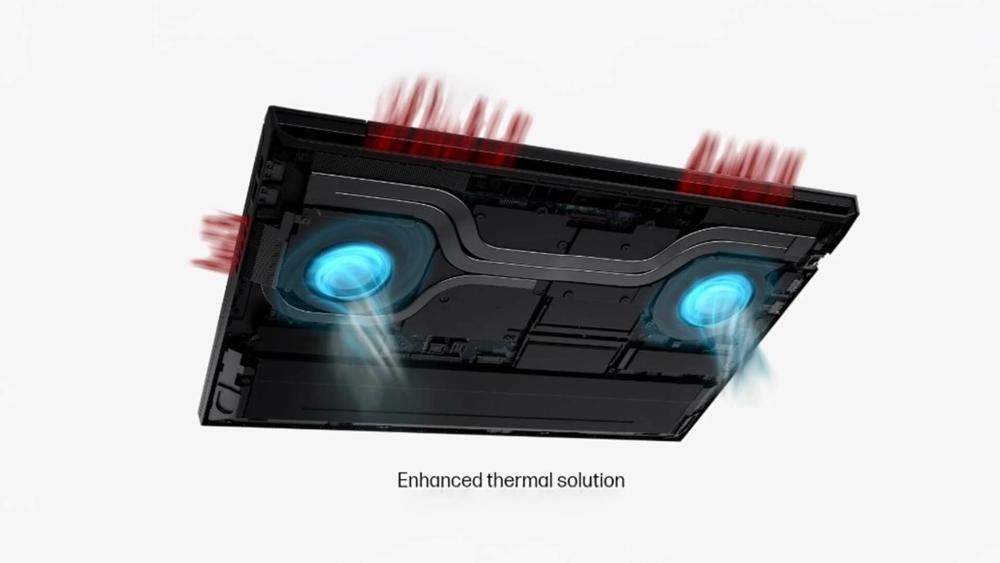
Newer Victus models feature modest improvements such as slightly larger vents and revised internal layouts. These help with short bursts of performance, but they don’t fundamentally change the cooling philosophy.
Victus cooling is still designed to prioritise cost efficiency, which limits how quiet the system can be under sustained load.
Noise Levels During Everyday and Gaming Use
During everyday tasks like browsing or streaming, Victus laptops are usually quiet or near-silent. The issue appears when gaming starts. Under load, fans tend to ramp up quickly and audibly, especially in CPU-heavy games.
The noise isn’t dangerous or abnormal; it’s simply the trade-off of pushing gaming hardware inside a more compact, budget-focused chassis.
When HP Victus Is the Smarter Choice
HP Victus makes sense if:
- Budget matters more than acoustics
- You usually game with headphones
- You play in shorter sessions
- You want solid performance without paying Omen prices
Victus isn’t "bad"; it’s just less refined acoustically than Omen by design.
Which HP Gaming Laptop Is Better for All-Night Gaming Sessions
Not all gaming laptops are built to stay comfortable after hours of play. When you’re gaming late into the night, fan noise, heat buildup, and power tuning matter just as much as raw performance. The right balance of cooling design and hardware can be the difference between an immersive session and one constantly interrupted by loud fans.
Below are three HP gaming laptops that suit different types of all-night gaming, depending on what you value most.
Best Choice for Quiet Late-Night Gaming
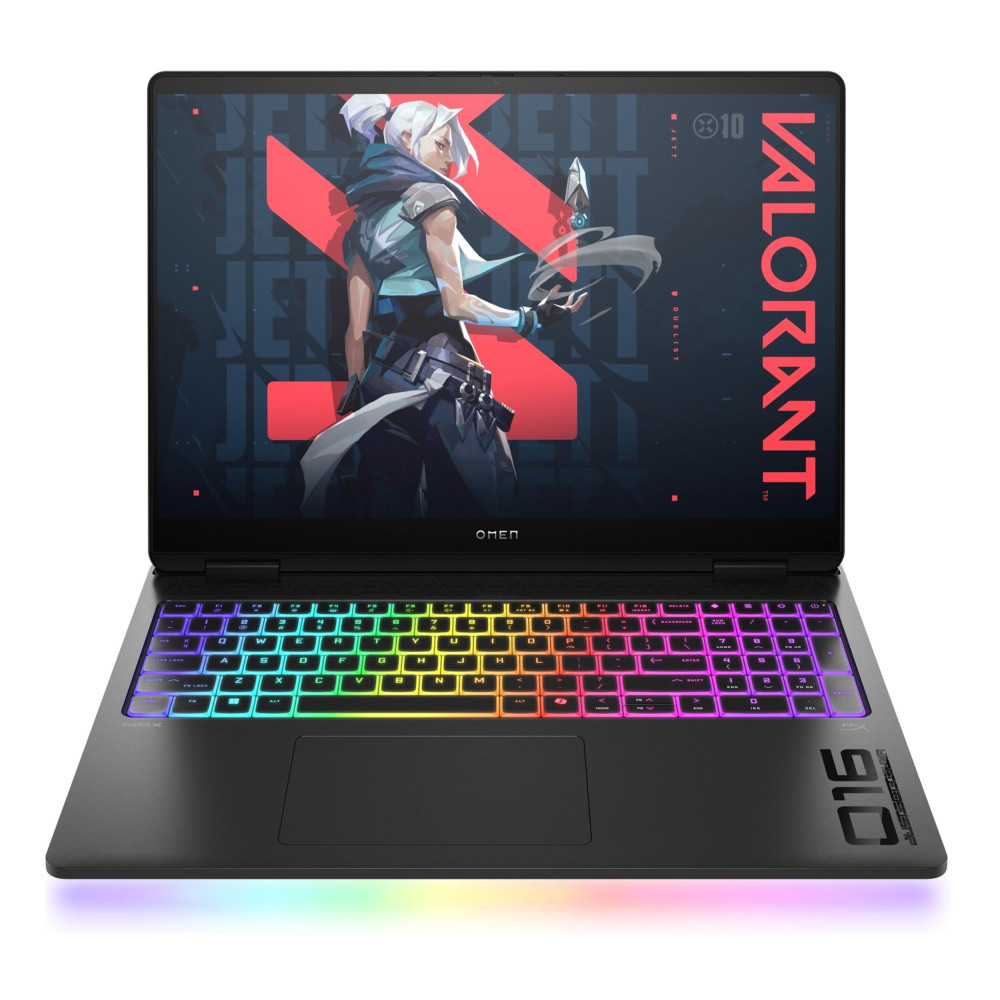
HP OMEN Gaming 16 (Ryzen 9, RTX 5070)
This OMEN 16 model is a strong option if you want high performance without aggressive fan noise. Its larger chassis and advanced cooling design help spread heat more evenly, allowing the fans to run at lower, steadier speeds during long sessions. The Ryzen 9 processor delivers excellent performance efficiency, which further reduces sudden fan ramp-ups. It’s ideal for players who game in shared spaces or prefer quieter, more relaxed sessions without sacrificing smooth gameplay.
Best for: Long gaming sessions where comfort and noise control matter most.

Best Choice for Performance-First Gamers
HP OMEN MAX 16 (Core Ultra 9, RTX 5080)
If performance comes first and noise is a secondary concern, the OMEN MAX 16 is built for you. With a higher-power GPU and more aggressive thermal headroom, it’s designed to sustain demanding AAA games at high settings for hours. While fans will be more audible under load, the cooling system is engineered to keep noise consistent rather than erratic, which many gamers find less distracting over time.
Best for: Competitive or high-end gamers who prioritise maximum performance over absolute silence.
Best Value Option Without Excessive Noise
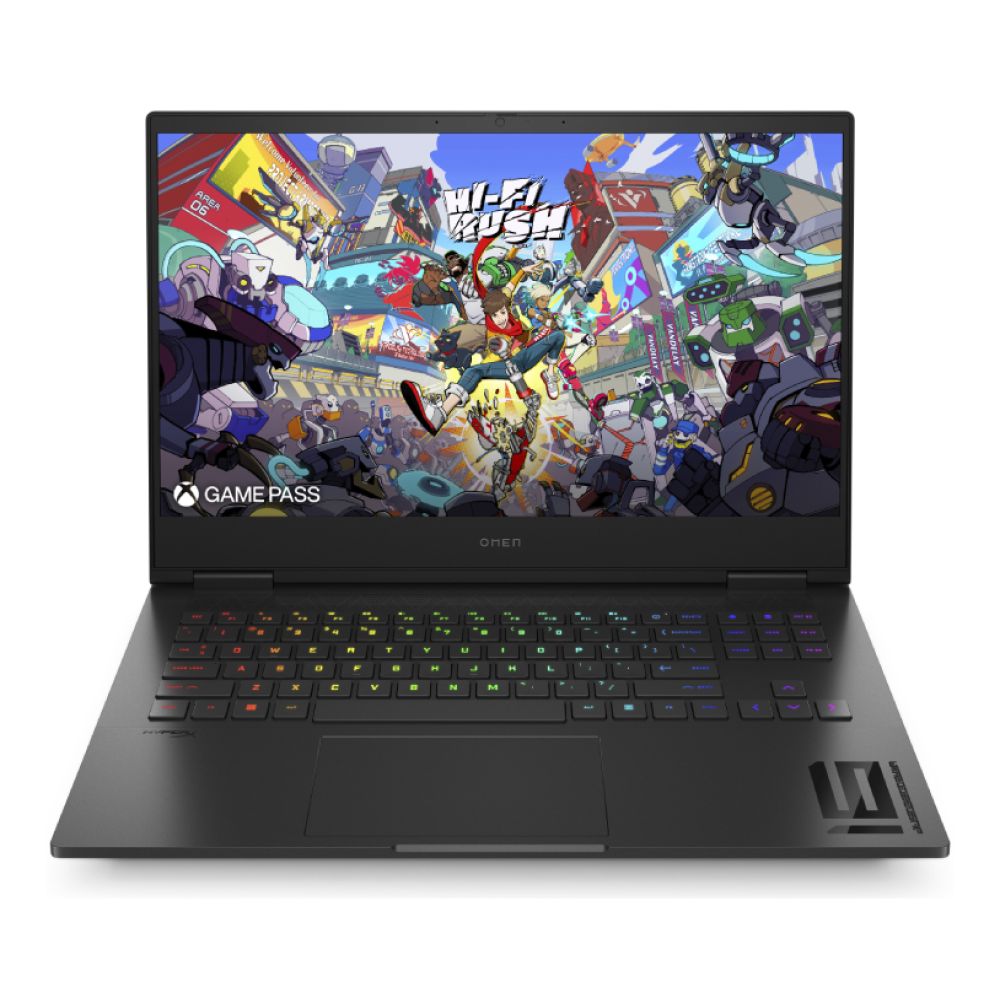
HP Victus Gaming 15 (Core i5, RTX 4050)
The Victus 15 offers a solid balance between price, performance, and everyday noise levels. It doesn’t have the same advanced cooling as the OMEN range, but recent Victus models handle moderate gaming sessions better than older generations. Fans are noticeable under load, but for casual gaming, esports titles, or shorter late-night sessions, noise stays within reasonable limits.
Best for: Gamers who want good performance on a budget without dealing with constantly loud fans.
How to Reduce Fan Noise on HP Gaming Laptops
Fan noise isn’t always a hardware problem. A few smart tweaks can significantly reduce omen fan noise and hp victus noise without killing performance.
Simple Settings That Reduce Noise Without Hurting FPS
- Switch to Balanced or Performance (not Turbo) in Omen Gaming Hub
- Cap frame rates to your screen refresh rate
- Disable unnecessary background apps before launching games
- Update BIOS and GPU drivers to improve fan curve behaviour
- On Omen models, manually smooth fan curves to reduce ramp spikes
These steps are especially useful for hp omen 15 reduce fan noise scenarios.
When Headphones or External Cooling Help
- Use closed-back gaming headsets to mask higher-pitch fan sounds
- Elevate the rear of the laptop to improve airflow
- External cooling pads help most with HP Victus 15 fan noise and compact chassis designs
- Keep room temperature low to reduce thermal ramp-ups
Common Mistakes That Make Laptops Louder
- Blocking bottom vents on beds or sofas
- Running uncapped FPS in menus
- Using Turbo mode for casual games
- Letting dust build up in vents and fans
These mistakes often exaggerate Omen 15 fan noise and HP Omen 16 fan noise over time.
Conclusion
When comparing HP Victus vs Omen, the difference comes down to refinement versus value. HP Omen systems prioritise airflow efficiency and acoustic control, while Victus models focus on accessible pricing with acceptable compromises.
Rather than focusing on model numbers alone, the smarter choice is to match the laptop to how and where you play. If low noise and comfort matter most, Omen is usually the safer long-term option. If budget and flexibility matter more, Victus offers solid performance with a few manageable trade-offs.
You can explore HP Victus gaming laptops, compare HP Omen gaming laptops for high performance, or browse the full range of HP laptops at Box.co.uk to match cooling behaviour, noise levels, and performance to how you actually play.
Frequently Asked Questions
How do I make my laptop not sound like a jet engine?
Lower fan profiles, cap FPS, improve airflow, and avoid Turbo mode unless needed.
Which gaming laptop is the quietest?
Larger, well-ventilated models like HP Omen with advanced cooling tend to be the quietest.
How to make HP Omen quieter?
Use Balanced mode, customise fan curves, keep vents clear, and avoid unnecessary background loads.
Does HP Omen overheat easily?
No. Omen laptops are designed for higher thermal loads and manage heat better than budget models.
How to cool down an OMEN laptop?
Improve airflow, elevate the chassis, update drivers, and clean vents regularly.
You can pay with:
*PayPal Credit Representative Example: Assumed credit limit £1,200, Representative 23.9% APR (variable). Purchase rate 23.9% p.a (variable).Terms & Conditions apply.


PayPal Credit and PayPal Pay in 3 are trading names of PayPal UK Ltd, 5 Fleet Place, London, United Kingdom, EC4M 7RD. Terms and conditions apply. Credit subject to status, UK residents only, Five Tech LTD acts as a broker and offers finance from a restricted range of finance providers. PayPal Pay in 3 is not regulated by the Financial Conduct Authority. Pay in 3 eligibility is subject to status and approval. 18+. UK residents only. Pay in 3 is a form of credit. Check if affordable and how you will repay. May make other borrowing more difficult or expensive. See product terms for more details.
Copyright © 1996-2026 Fivetech LTD | Terms and Conditions
box.co.uk & Box are trading names of Five Tech Limited. Registered office: Box LTD, Unit 10 Woodford Trading Estate, Woodford Green IG8 8HF