


 Menu
MenuMenu


Get Sales Advice from Mon - Fri 9am - 5:00pm:
020 3337 8950LAST UPDATED: February 02, 2026
Dell’s New XPS and AI PC Lineup: Design, Displays and On-Device AI in 2026
Premium laptops are entering a new phase in 2026, and Dell is positioning the Dell XPS range right at the centre of it. With the rise of AI PCs, performance is no longer just about raw speed. It's about how intelligently a laptop uses its power, handles everyday tasks, and supports modern workflows without relying on the cloud.
Dell's latest XPS laptops reflect this shift clearly. They combine refined design, high-end display technology, and on-device AI capabilities that quietly improve productivity, creativity, and efficiency. Rather than chasing gimmicks, Dell is focusing on making AI genuinely useful in day-to-day use.
This guide explores how the new Dell XPS laptops are evolving in 2026, what makes them true AI-powered laptops, and who they make sense for if you're upgrading this year.
Why AI PCs Are the Next Big Shift in Premium Laptops
For years, AI features in laptops mostly lived in the cloud. Tasks like image enhancement, transcription, or smart recommendations depended on internet connections and external servers. In 2026, that model is changing quickly.
AI PCs bring AI processing directly onto the device itself. This is made possible by dedicated NPUs (Neural Processing Units) built into modern processors from Intel, AMD, and Qualcomm. These NPUs handle AI workloads efficiently without draining battery or slowing down the system.
Premium laptops are leading this shift because they have the thermal headroom, battery capacity, and performance balance to support local AI processing properly. This is why many of the first true Windows AI PCs are positioned in the higher-end market.
How Dell Is Positioning XPS at the Centre of the AI PC Era

Dell has deliberately placed the Dell XPS lineup at the heart of its AI PC strategy. Rather than creating a separate "AI-only" range, Dell revived the XPS brand in 2026 to represent what a premium, everyday AI-powered laptop should feel like in real-world use.
Instead of focusing on AI as a headline gimmick, Dell's approach is to make intelligence work quietly in the background, improving performance, efficiency, and usability without changing how users work.
Built-In AI Hardware That Works Behind the Scenes
The latest XPS 13, 14 and 16 models are powered by Intel Core Ultra Series processors with a dedicated Neural Processing Unit (NPU). These NPUs can handle up to 50 TOPS (trillion operations per second) of AI workloads, allowing tasks such as video enhancement, noise reduction, image processing, and battery optimisation to run locally on the device.
By offloading AI tasks from the CPU and GPU, the system stays cooler, more responsive, and more power efficient. This also means better performance consistency during everyday multitasking, especially when switching between productivity apps, creative tools, and video calls.
"Premium" with Purpose Design Strategy
Dell has described its renewed XPS direction as premium laptop with purpose. The focus is not on adding complexity, but on refining areas that users interact with every day. This includes improvements to keyboard comfort, touchpad precision, and overall ergonomics, based directly on user feedback.
For example, the return of a physical function key row and improved touchpad etching reflects Dell's intent to balance modern design with practical usability. These changes may seem subtle, but they noticeably improve daily comfort and control.
Display Technology Designed for Creative and Professional Use
Display quality remains a core part of the XPS identity. The 2026 models introduce Tandem OLED panels, which use two OLED layers to deliver higher brightness, better power efficiency and more stable colour performance than traditional OLED screens.
This benefits creators and professionals who rely on accurate colour reproduction, while also improving readability and visual comfort during long work sessions.
Deeper Integration with Windows Copilot and On-Device AI
Dell has tightly integrated the XPS lineup with Microsoft Copilot, including a dedicated Copilot key for quick access to AI-powered tools in Windows 11. More importantly, many AI features are designed to run on-device rather than in the cloud, improving response times and protecting user privacy.
Tasks such as contextual search, content recall and real-time assistance benefit directly from local AI processing, making the experience faster and more reliable even when offline.
A Flagship Range Built for Long-Term Use
By combining advanced AI hardware, refined design, and meaningful usability improvements, Dell is positioning the XPS lineup as more than just another AI-labelled device. It is intended to be a long-term premium laptop investment, offering consistent performance, future-ready AI capabilities and a polished user experience that improves day-to-day work without demanding constant user input.
This makes the Dell XPS range particularly appealing for professionals, creators and early adopters who want the benefits of AI without sacrificing reliability, design or everyday comfort.
Design Evolution: What's New in the 2026 Dell XPS Lineup
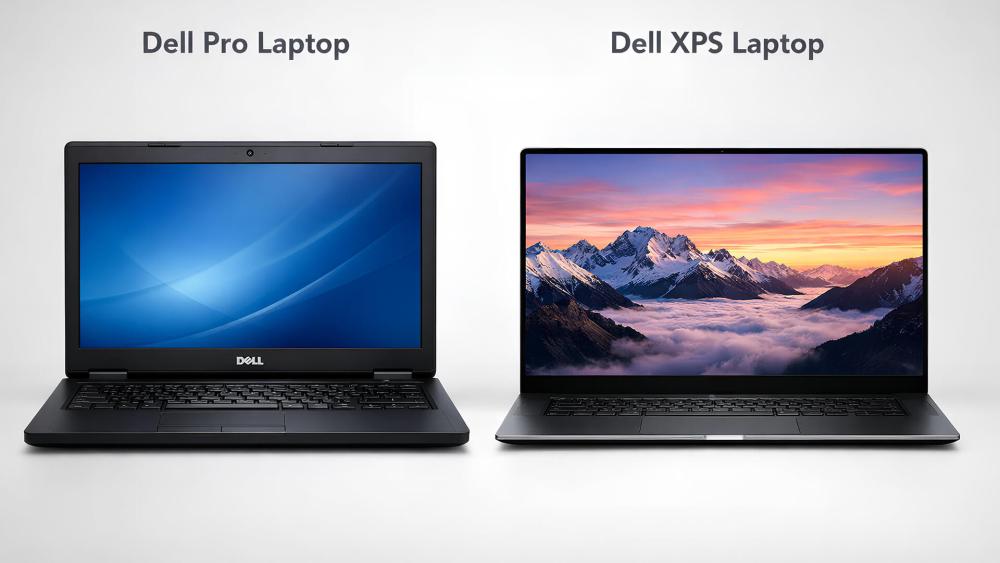
At first glance, the 2026 Dell XPS laptops don't look radically different and that's intentional. Dell hasn't tried to reinvent the XPS aesthetic; instead, it has refined the details that matter most in everyday use.
The chassis still uses CNC-machined aluminium, paired with carbon fibre or glass fibre palm rests depending on the model. These materials keep the laptops rigid while reducing weight, and they also help with thermal comfort during long sessions. The finish feels premium without being flashy, which continues to appeal to professionals who want something understated.
One of the biggest physical changes is the further reduction of display bezels. The screen-to-body ratio has increased again, making the laptop feel more immersive without increasing the overall footprint. This means you get a larger visual workspace in a bag-friendly size, which is especially noticeable on the XPS 14 and XPS 16.
Despite more powerful internals and added AI hardware, portability remains a priority. The XPS range stays thin, lightweight, and well-balanced, making it suitable for hybrid workers, commuters, and frequent travellers who want premium performance without carrying a bulky machine.
Display Technology: How XPS Screens Are Evolving in 2026
Display quality has always been a defining feature of Dell XPS laptops, and in 2026 it becomes even more central to the experience.
Many models now offer Tandem OLED displays, alongside high-end IPS options. Tandem OLED uses two OLED layers stacked together, allowing for higher brightness, better efficiency, and more consistent colour output compared to traditional OLED panels. This makes a real difference when working in bright environments or editing content for long periods.
Colour accuracy remains a strong point. XPS displays typically cover 100% of the DCI-P3 colour space, with factory calibration aimed at creators, designers, and anyone working with visual content. Text looks crisp, contrast is deep, and HDR content benefits from higher peak brightness and better shadow detail.
Combined with ultra-thin bezels and high pixel density, the display feels immersive without pushing into unnecessary resolution extremes. For buyers comparing premium laptops, this is one of the areas where Dell XPS continues to compete directly with MacBook and Surface devices.
On-Device AI: What Dell XPS AI PCs Can Do Locally
The most meaningful change in the 2026 Dell XPS lineup isn't something you can see; it's on-device AI processing.
The latest models use Intel Core Ultra Series processors with a dedicated Neural Processing Unit (NPU) capable of handling up to 50 TOPS of AI workloads. This allows many AI-driven features to run locally on the laptop rather than relying on cloud services.
Running AI tasks on-device brings three key benefits:
- Better privacy, as sensitive data stays on your machine
- Lower latency, with faster responses and real-time processing
- Improved efficiency, since NPUs use far less power than CPUs or GPUs for AI workloads
For users, this all happens quietly in the background. You don't need to manage settings or understand how the AI pipeline works; the system simply feels smoother and more responsive during daily tasks.
Everyday AI Features That Actually Matter
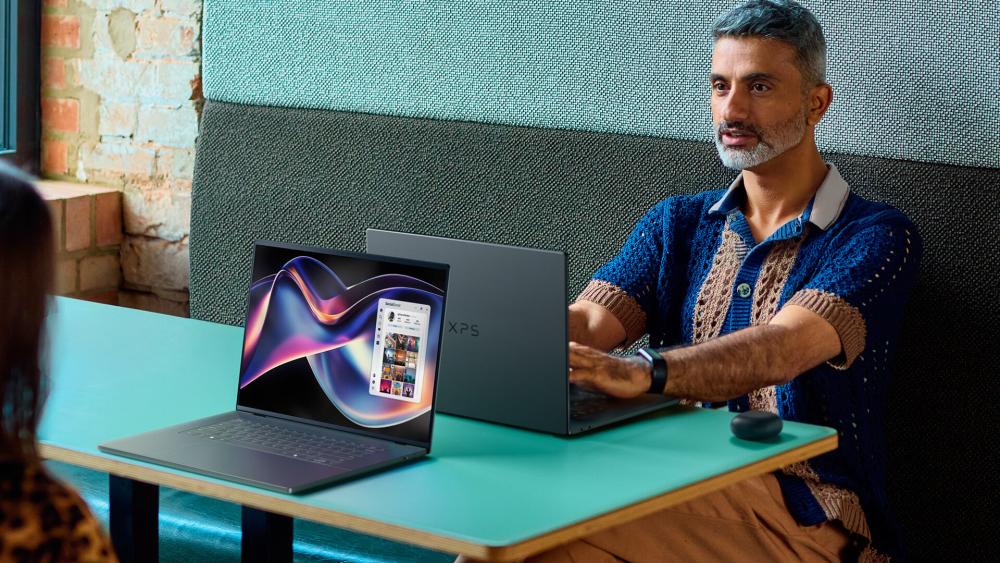
Rather than focusing on flashy demonstrations, Dell has prioritised practical AI features that improve daily workflows.
Video calls benefit from smarter background noise suppression, auto-framing, and lighting adjustments that run locally for better consistency. Productivity tools gain real-time transcription and summarisation without noticeable performance hits. Creative apps can use AI-assisted image enhancement, upscaling, and background processing without slowing the rest of the system.
Multitasking also feels more stable. The AI engine helps allocate power and resources dynamically, keeping performance consistent whether you're switching between browser tabs, editing content, or joining meetings.
These improvements may feel subtle at first, but over weeks and months they noticeably reduce friction which is exactly what Dell is aiming for with the new XPS AI PCs.
Dell XPS AI PCs vs Traditional Laptops: Key Differences Explained
| Feature | Dell XPS 13 (AI PC) (Example: Dell XPS 13 9350 – Core Ultra 7) MPN: 396CV |
Traditional Business Laptop (Example: DELL Pro 15 Essential – Core i7) MPN: 82W4F |
| Processor Type | Intel Core Ultra 7 with dedicated NPU | Intel Core i7 (13th Gen) without NPU |
| AI Processing | On-device AI via NPU (Copilot+, local AI tasks) | AI tasks handled by CPU only |
| Everyday Performance | Smoother multitasking under mixed workloads | Strong performance, but less efficient under load |
| Battery Efficiency | Better efficiency during AI-assisted tasks | Higher power draw for the same workloads |
| Thermals & Noise | Cooler and quieter due to NPU offloading | Fans engage more often under sustained use |
| Video Calls & Meetings | AI-powered noise reduction, framing, eye contact | Standard webcam and audio processing |
| Future Windows Features | Optimised for upcoming Windows AI tools | Limited support for future on-device AI features |
| Long-Term Relevance | More future-proof as Windows leans into AI | May age faster as AI features expand |
| Best For | Professionals, creators, early AI adopters | Office work, general productivity, value-focused buyers |
Who Should Consider a Dell XPS AI PC in 2026?
Dell XPS AI PCs are not designed to be "one-size-fits-all" laptops. They are premium machines built for people who will benefit from on-device AI, advanced displays, and long-term performance headroom.
Professionals and Remote Workers
If your workday revolves around video calls, documents, multitasking, and staying mobile, a Dell XPS AI PC makes a noticeable difference. The dedicated Neural Processing Unit (NPU) handles tasks like background blur, noise cancellation, and eye-contact correction locally, keeping the CPU free and the system responsive. Battery life is also a major win, with many XPS models comfortably lasting a full working day, even with frequent meetings and multitasking.
Best fit: XPS 13 for portability, XPS 14 for a balance of power and mobility.
Creators and Designers
For photographers, videographers, and designers, the XPS 14 and XPS 16 stand out. Tandem OLED displays deliver high brightness and accurate colour, while NVIDIA RTX graphics (on higher-end models) support demanding creative workloads. AI acceleration helps with tasks such as object selection, auto-enhancement, and rendering previews, reducing wait times during editing.
Best fit: XPS 14 for mobile creators, XPS 16 for heavier creative workflows.
Power Users and Early Adopters
If you like buying technology that stays relevant for years, XPS AI PCs are built with that mindset. Intel Core Ultra "Panther Lake" processors combine CPU, GPU, and NPU on advanced process nodes, making these systems ready for the growing wave of Windows AI features. On-device AI also improves privacy, as more processing happens locally instead of in the cloud.
Best fit: Any XPS AI PC with 32GB RAM for maximum longevity.
Who Should Look Elsewhere
If your budget is tight, your workloads are very light, or you prefer lots of legacy ports without adapters, a Dell XPS may be more laptop than you need. These are premium devices, and their value shows most clearly when you use the features they're designed around.
Are Dell XPS AI PCs Worth It for Everyday Work and Creativity?
For the right user, Dell XPS AI PCs are worth it in 2026, but not because of headline specs alone. Their real value shows up in how they feel during everyday use. On-device AI shifts background tasks to the NPU, which helps keep performance smooth, reduces fan noise, and improves battery efficiency. Over time, this creates a noticeably calmer, more responsive experience, especially if you regularly juggle multiple apps, video calls, and creative tools.
Those small usability gains quickly add up. Faster wake-from-sleep, smoother multitasking, clearer video calls, and high-quality displays that reduce eye strain all shape how comfortable the laptop feels during long work sessions. These aren't one-off features; they influence daily productivity and focus in subtle but meaningful ways.
Long-term relevance is another key strength. As Windows continues to integrate AI more deeply into the operating system, laptops without NPUs are likely to feel dated sooner. Dell XPS AI PCs are built to handle upcoming features locally, making them a safer long-term investment compared to similarly priced traditional laptops.
That said, they won't suit everyone. Heavy gamers, users who need lots of built-in ports, or anyone who wants to upgrade RAM later may be better served by alternative machines. With soldered memory, choosing the right configuration typically 16GB or 32GB from the start is essential.
Final Thoughts: Is Dell XPS the Right AI PC for 2026?
Dell's latest XPS lineup shows what AI PCs are supposed to be: not louder or flashier machines, but laptops that quietly improve how work and creativity feel day to day. By combining dedicated NPUs, premium OLED displays, and refined design choices, Dell has positioned XPS as one of the best Dell laptop ranges for users who want long-term value rather than short-lived innovation.
If you value portability, battery efficiency, and on-device AI features that genuinely reduce friction whether that's smoother video calls, faster creative tools, or more reliable multitasking; the Dell XPS range also sits comfortably among the best AI laptops available in 2026. It's particularly well suited to professionals, creators, and power users who want performance that stays consistent and relevant as Windows AI features continue to evolve.
You can explore Dell XPS laptops, AI-powered laptops, and other premium options at Box.co.uk, where it's easier to compare models, configurations, and use cases in one place before choosing the right setup.
FAQs About Dell XPS and AI PCs
What is an AI PC and how does it work?
An AI PC includes a dedicated Neural Processing Unit (NPU) that runs AI tasks locally, improving performance, efficiency, and privacy.
Does Dell XPS use on-device AI?
Yes, Dell XPS AI PCs run many AI features locally using built-in NPUs, reducing reliance on cloud processing.
Are AI PCs better than traditional laptops?
For everyday work and productivity, AI PCs are more efficient, responsive, and future-proof than traditional laptops without NPUs.
What makes Dell XPS displays special?
Dell XPS laptops use high-resolution OLED and Tandem OLED displays with excellent brightness, colour accuracy, and thin bezels.
Do AI PCs improve battery life?
Yes, on-device AI offloads background tasks to the NPU, helping reduce power draw and extend battery life.
Is Dell XPS good for creative work?
Dell XPS models, especially the XPS 14 and 16, are well suited for creative work thanks to powerful CPUs, optional RTX graphics, and colour-accurate displays.
You can pay with:
*PayPal Credit Representative Example: Assumed credit limit £1,200, Representative 23.9% APR (variable). Purchase rate 23.9% p.a (variable).Terms & Conditions apply.


PayPal Credit and PayPal Pay in 3 are trading names of PayPal UK Ltd, 5 Fleet Place, London, United Kingdom, EC4M 7RD. Terms and conditions apply. Credit subject to status, UK residents only, Five Tech LTD acts as a broker and offers finance from a restricted range of finance providers. PayPal Pay in 3 is not regulated by the Financial Conduct Authority. Pay in 3 eligibility is subject to status and approval. 18+. UK residents only. Pay in 3 is a form of credit. Check if affordable and how you will repay. May make other borrowing more difficult or expensive. See product terms for more details.
Copyright © 1996-2026 Fivetech LTD | Terms and Conditions
box.co.uk & Box are trading names of Five Tech Limited. Registered office: Box LTD, Unit 10 Woodford Trading Estate, Woodford Green IG8 8HF