


 Menu
MenuMenu


Get Sales Advice from Mon - Fri 9am - 5:00pm:
020 3337 8950LAST UPDATED: March 06, 2026
Best Android Tablets in the UK: Large Displays and Powerful Performance
Finding the best Android tablets in the UK isn’t about chasing the most expensive model or the biggest display. It’s about choosing a device that genuinely fits into your daily routine. Whether you’re catching up on your favourite series after work, joining virtual meetings, helping with homework, or browsing on the go, the right tablet should feel fast, comfortable and reliable.
Today’s Android tablets combine large, high-resolution displays with efficient octa-core processors, generous 128GB storage and either 4GB or 8GB RAM for smooth performance. Many models are slim, lightweight and built for everyday convenience; giving you laptop-like versatility without the bulk.
In this guide, we’ll explore some of the best large screen Android tablets available now at Box.co.uk, including popular Samsung Galaxy tablets and other powerful tablet devices designed for streaming, productivity and everyday use. If you’re comparing the latest mobile phones and tablets, this breakdown will help you choose with confidence.
Best Android Tablets in the UK for Work, Streaming and Everyday Use
If you want a tablet that feels immersive, responsive and reliable, display quality and internal performance matter most. A large touch screen Android tablet gives you more room to work, watch and browse, while strong hardware keeps everything running smoothly.
Here are three excellent options available in the UK.
Best 10–11 Inch Android Tablets for Media and Work
A 10–11 inch Android tablet is often the perfect middle ground. It gives you enough screen space for streaming, productivity and browsing, while still being easy to carry around in a bag. For most UK users, this size feels practical rather than oversized.
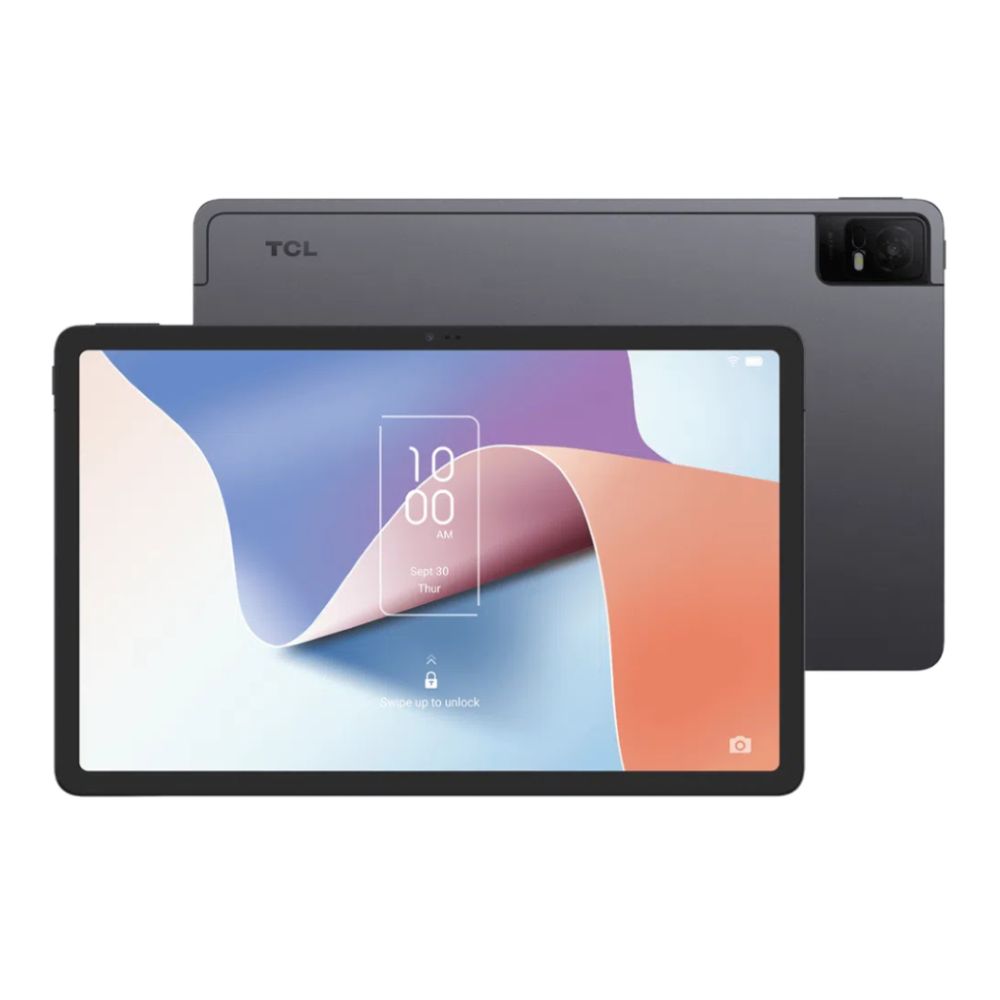
TCL NXTPAPER 11 (SKU: 9466X4-2CLCGB11): Comfortable Viewing for Longer Sessions
The TCL NXTPAPER 11 is designed with comfort in mind. Its 10.9-inch NXTPAPER display reduces glare and is easier on the eyes, which makes a noticeable difference if you spend long periods reading, watching or working. Whether you’re streaming your favourite series, reviewing documents or browsing the web in the evening, the screen feels softer and more natural compared to traditional glossy panels.
With 4GB RAM and 128GB storage, it delivers smooth everyday performance for typical tasks. It isn’t built as a high-end gaming device, but for media, reading and general productivity, it’s one of the most comfortable large screen Android tablets available at this price point.
Acer Iconia M10-11 (SKU: NT.LGMEE.001): Dependable and Affordable
The Acer Iconia M10-11 is a practical option if you want a reliable android tablet large screen device without overspending. Its 10.1-inch display gives you plenty of room for online learning, document editing and streaming, while the MediaTek processor and 4GB RAM keep everyday apps running smoothly.
For students, families or home users who mainly browse, attend video calls and stream content, this tablet offers strong value. It may not be classed as a premium device, but for everyday use, it covers everything most people actually need.
Best Android Tablets with 128GB Storage
Storage quickly becomes important once you start downloading apps, saving films for travel or storing work files. Choosing a tablet with 128GB gives you flexibility and reduces the need to constantly manage space.
All the models featured here come with 128GB storage, which is ideal for streaming downloads, documents, apps and media libraries. Many also support expandable storage, which helps extend the tablet’s lifespan. For most UK buyers, 128GB strikes the right balance between practicality and price.
Best Android Tablets for Multitasking and Productivity
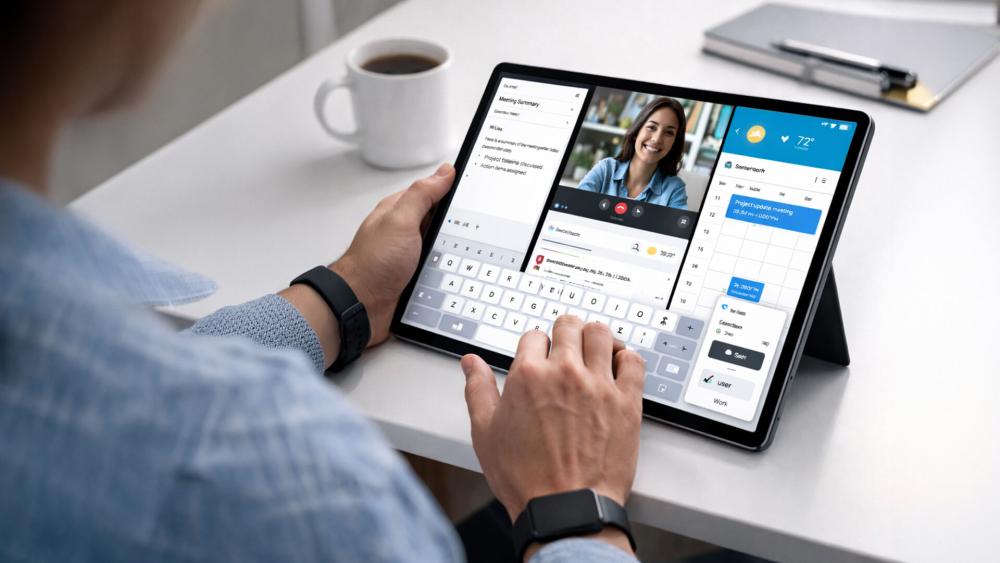
If you regularly switch between apps, join video meetings and run multiple tasks at once, RAM makes a noticeable difference to how smooth your tablet feels.
Samsung Galaxy Tab A9 (SKU: SM-X110NZAEEUB) – Compact with Stronger Multitasking
The Samsung Galaxy Tab A9 stands out because of its 8GB RAM configuration. While its 8.7-inch display is slightly smaller than the 10–11 inch models above, it delivers stronger multitasking performance. App switching feels quicker, and running split-screen features is noticeably smoother compared to 4GB models.
If you want a tablet that feels faster over time and handles work tasks more comfortably, the Galaxy Tab A9 offers a clear step up in performance while remaining compact and portable. It’s especially useful if you travel frequently or prefer a lighter device without sacrificing speed. View Samsung Galaxy tablets at Box.co.uk.

Best Value Android Tablets for Everyday Use
Not everyone needs a premium, high-performance tablet. For browsing, streaming, emails and social media, a well-balanced mid-range device is often the smarter choice.
The Acer Iconia M10-11 and TCL NXTPAPER 11 both offer large displays, 128GB storage and reliable everyday performance at accessible price points. They are excellent choices if you want a large screen Android tablet for home use, family sharing or general productivity without moving into high-end pricing.
If multitasking speed is your priority, the Samsung Galaxy Tab A9 is the stronger performer thanks to its 8GB RAM. If screen comfort and value matter more, the TCL and Acer models provide excellent day-to-day usability.
Ultimately, the best Android tablet for you depends on how you plan to use it but each of these options delivers dependable performance, practical storage and a display size that makes daily tasks more enjoyable.
Performance Comparison: Which Android Tablet Delivers the Most Value?
When comparing Android tablets, performance isn’t just about technical specifications; it’s about how the tablet feels when you use it every day. Whether you’re browsing, streaming, working or switching between apps, the right balance of RAM, processor power and storage makes a noticeable difference.
Here’s what that means in real-world terms.
Performance Benchmarks and Real-World Usage
For everyday tasks like browsing the web, watching YouTube, checking emails, and editing documents, both 4GB and 8GB RAM tablets perform well. If you mostly use one app at a time, such as streaming or reading, a 4GB RAM tablet like the TCL NXTPAPER 11 or Acer Iconia M10-11 will feel smooth and responsive.
However, if you regularly switch between apps for example, moving between a video call, a browser and a notes app, 8GB RAM provides a more seamless experience. The Samsung Galaxy Tab A9, with 8GB RAM, handles this type of multitasking more comfortably and feels quicker when jumping between tasks.
All three tablets use efficient octa-core processors, which means they are stable and reliable for general day-to-day use. They aren’t designed for heavy professional workloads, but for typical home, study, and office tasks, they offer dependable performance.
Streaming and Gaming Performance

If streaming is one of your main priorities, screen size and display quality matter just as much as internal performance. A large screen Android tablet makes films and series more immersive, improves subtitle visibility and simply feels more comfortable for extended viewing sessions.
Tablets with IPS displays offer better colour accuracy and wider viewing angles, which is particularly useful if you’re watching content with family or friends. The larger 10–11 inch models provide a more cinematic feel compared to smaller devices.
For light gaming, such as casual mobile games or app-based titles, all three tablets perform well. If you plan to game while also running other apps in the background, the Galaxy Tab A9’s 8GB RAM offers smoother multitasking and slightly better overall responsiveness.
Explore a wide range of Lenovo Android tablets and other flexible tablet options at Box.co.uk to find the right balance of performance, display size and value for your needs.
Multitasking and App Switching Speed
Multitasking is where RAM becomes especially important. If you use split-screen features, attend video meetings while taking notes, or frequently switch between work and entertainment apps, you’ll benefit from more memory.
A 4GB RAM tablet is perfectly suitable for lighter multitasking. But if you want your device to feel quicker for longer, particularly over the next few years, 8GB RAM provides better long-term flexibility. It reduces lag when switching apps and keeps performance consistent as software updates become more demanding.
For students and professionals who rely on their tablet throughout the day, that extra smoothness can make daily use feel noticeably more efficient.
Storage and Expandability Comparison
Storage directly affects how stress-free your tablet experience is. With 128GB storage, you can download apps, store films for offline travel, save work documents, and keep photos without constantly deleting files.
For most UK users, 128GB is the ideal balance between price and practicality. It offers enough room for everyday use while keeping the device affordable. Tablets that support expandable storage add an extra layer of reassurance, especially if you plan to keep your device for several years.
In simple terms, 128GB gives you freedom; freedom to download, save and use your tablet without constantly worrying about running out of space.
How to Choose the Right Android Tablet for Your Needs
The best Android tablet isn’t the most expensive one; it’s the one that fits your daily routine. A student has different needs from a commuter, and someone who streams films will prioritise different features than someone using a tablet for work.
Below, we break down what to look for depending on how you plan to use your device.
Best for Students and Online Learning
For students, reliability, screen comfort and battery life matter most. A tablet used for online lectures, note-taking, research and streaming study content needs enough power to multitask smoothly without becoming slow over time.
A 10–11 inch display is ideal because it provides enough space to read documents and use split-screen apps, while still being easy to carry between classes. Storage is also important coursework, PDFs and recorded lectures take up space quickly.
Here’s what students should look for:
| Feature | Recommended Specification | Why It Matters |
| Screen Size | 10–11 inches | Comfortable for reading and multitasking |
| Storage | 128GB | Enough space for apps, files and downloads |
| RAM | 4GB minimum (8GB ideal) | Smooth switching between apps and video calls |
| Battery Life | 8+ hours | Lasts through lectures and study sessions |
| Connectivity | Wi-Fi (Cellular optional) | Flexible access on campus |
For most students in the UK, a mid-range large screen Android tablet with 128GB storage offers the best balance of performance and affordability.
Best for Business and Productivity

If you’re using a tablet for work, performance becomes more important. Multitasking, video meetings, email management and document editing require stronger RAM and a responsive processor.
A slightly larger screen; 10–12 inches make working more comfortable, especially when reviewing spreadsheets or running split-screen apps. Choosing 8GB RAM improves long-term performance and ensures the device doesn’t feel sluggish as apps update over time.
Here’s what to prioritise:
| Feature | Recommended Specification | Why It Matters |
| Screen Size | 10–12 inches | Easier document viewing and multitasking |
| Storage | 128GB–256GB | Space for work files and business apps |
| RAM | 8GB | Smoother multitasking and video calls |
| Battery Life | 8–10 hours | Reliable all-day use |
| Connectivity | Wi-Fi + Cellular (optional) | Useful for remote work |
For professionals, investing in a slightly more powerful Android tablet provides better longevity and smoother daily performance.
Best for Streaming and Entertainment
If your tablet is mainly for Netflix, YouTube, gaming and browsing, display quality becomes the priority. A larger screen with good resolution and IPS display technology improves colour, clarity and viewing angles.
Performance still matters, but heavy multitasking may not be essential unless you game extensively. For most entertainment-focused users, 4GB RAM with 128GB storage is more than sufficient.
Here’s what works best:
| Feature | Recommended Specification | Why It Matters |
| Screen Size | 10–12 inches | More immersive viewing experience |
| Storage | 128GB | Space for downloaded films and apps |
| RAM | 4GB–8GB | Smooth playback and light gaming |
| Display Type | IPS or high-resolution panel | Better colours and viewing angles |
| Battery Life | 8+ hours | Longer binge-watching sessions |
For streaming, a large touch screen Android tablet delivers a far more enjoyable experience than smaller models.
Best for Portability and Travel
If you travel frequently or commute daily, size and weight matter more than raw performance. A compact 7–9 inch tablet is easier to hold one-handed and fits comfortably into smaller bags.
Battery life becomes crucial when you’re away from charging points. Cellular connectivity can also be useful for accessing the internet without relying on public Wi-Fi.
Here’s what to look for:
| Feature | Recommended Specification | Why It Matters |
| Screen Size | 7–9 inches | Lightweight and easy to carry |
| Storage | 64GB–128GB | Enough for travel downloads |
| RAM | 4GB | Suitable for browsing and streaming |
| Battery Life | 8+ hours | Reliable for flights and commutes |
| Connectivity | Wi-Fi + 4G/5G | Internet access on the go |
For travel, the best tablet Android choice is one that feels convenient rather than oversized.
Are Large Display Android Tablets Worth It?
Large screen Android tablets are increasingly popular, especially as more people use tablets for streaming, remote work and online learning. But bigger doesn’t always mean better for everyone. The real question is whether a larger display improves your day-to-day experience enough to justify the size and cost.
For many users, the answer is yes, particularly if the tablet is used at home, in the office or as a laptop alternative. A larger display can completely change how comfortable and productive a tablet feels.
Pros and Cons of Bigger Screens
The biggest advantage of a larger Android tablet is comfort. A 10–12 inch display gives you more space to read, stream and multitask without constantly zooming in or scrolling. Watching films feels more immersive, subtitles are easier to read, and split-screen apps feel practical rather than cramped.
For work or studying, the extra screen space makes document editing, video meetings and browsing more manageable. You can see more content at once, which reduces eye strain and improves workflow.
However, larger tablets are naturally heavier and take up more room in a bag. They may not feel convenient for travel or one-handed use. If you frequently commute or prefer something lightweight for quick browsing, a smaller model may feel more comfortable.
In short, bigger screens improve viewing and productivity, but reduce portability slightly.
Performance vs Portability Trade-Off
Screen size often influences how you use your tablet. Larger tablets are typically chosen by users who want better productivity and entertainment experiences. Smaller tablets are chosen for convenience and travel.
A 10–11 inch tablet strikes a strong balance between performance and portability. It is large enough for comfortable streaming and multitasking, yet still easy to carry.
Tablets above 12 inches begin to feel closer to a laptop replacement. They are ideal if you regularly work on documents, attend meetings or use creative apps. However, they are less compact and usually more expensive.
If your tablet rarely leaves your home or office, choosing a larger display makes sense. If you carry it daily, portability may matter more than screen size.
When to Upgrade Your Tablet
Upgrading becomes worthwhile when your current device no longer keeps up with your needs.
Common signs include slower performance, difficulty running modern apps, storage constantly filling up or battery life declining noticeably. If you find yourself waiting for apps to open or closing background apps to improve speed, your tablet may be underpowered.
Moving to a newer Android tablet with 128GB storage and improved RAM can significantly improve responsiveness and overall experience. Modern displays are also brighter and sharper, which enhances streaming, reading and general usability.
An upgrade is not just about speed; it’s about restoring convenience and reliability.
Final Buying Recommendations
- For browsing and light work, a 10–11 inch large screen Android tablet offers the best balance of usability, comfort and portability.
- For serious multitasking or want something that can replace a laptop for certain tasks, choose a larger display with 8GB RAM or more for smoother performance and better long-term reliability.
- If portability is your top priority, a compact 7–9 inch tablet may suit you better, even if it means sacrificing some screen space.
Final Thoughts: Finding the Right Android Tablet for You
Choosing the best Android tablet ultimately comes down to how you plan to use it. Whether you want a large screen Android tablet for streaming, a reliable device for online learning, or a fast and responsive tablet for work, there are excellent options available to suit every need and budget.
If multitasking and productivity are your priority, opting for higher RAM and generous storage ensures your tablet stays responsive for years to come. And if portability matters most, compact models provide convenience without sacrificing essential performance.
The key is choosing a tablet that fits your lifestyle, not just the one with the biggest specifications.
If you’re ready to upgrade, explore the latest range of Android tablets, Samsung Galaxy tablets, and other powerful tablet devices at Box.co.uk. With competitive UK pricing and a wide selection of large screen tablet devices, you can compare features, storage and performance to find the perfect tablet for streaming, work and everyday use.
Visit Box.co.uk today and discover the Android tablet that’s right for you.
FAQs
What is the best large screen Android tablet?
The Samsung Galaxy Tab S11 Ultra is widely considered the best large screen Android tablet, thanks to its 14.6-inch AMOLED display, 120Hz refresh rate and flagship performance. For most users, however, a 10–11 inch tablet offers a better balance of size, comfort and value.
Is 4GB or 8GB RAM better for a tablet?
8GB RAM is better for smoother multitasking, gaming and long-term performance. 4GB works for basic browsing and streaming, but 8GB provides a more responsive, future-proof experience.
Are octa-core processors good for tablets?
Yes. Octa-core processors combine performance and efficiency cores, delivering smooth multitasking, better gaming performance and improved battery life compared to older quad-core chips.
What screen size is best for streaming?
For tablets, 10–12 inches is ideal. It offers a more immersive viewing experience while remaining portable and comfortable to hold.
How much storage do I need in an Android tablet?
For most users, 128GB is recommended. It provides enough space for apps, films and files. Power users may prefer 256GB or expandable storage.
Are Android tablets good for work and productivity?
Yes. With a large display, 8GB RAM and features like split-screen and stylus support, modern Android tablets can handle emails, documents and video calls efficiently.
Which Android tablet offers the best value in the UK?
The Samsung Galaxy Tab A9+ is often considered one of the best value options in the UK, offering strong performance and build quality at a competitive price.
You can pay with:
*PayPal Credit Representative Example: Assumed credit limit £1,200, Representative 23.9% APR (variable). Purchase rate 23.9% p.a (variable).Terms & Conditions apply.


PayPal Credit and PayPal Pay in 3 are trading names of PayPal UK Ltd, 5 Fleet Place, London, United Kingdom, EC4M 7RD. Terms and conditions apply. Credit subject to status, UK residents only, Five Tech LTD acts as a broker and offers finance from a restricted range of finance providers. PayPal Pay in 3 is not regulated by the Financial Conduct Authority. Pay in 3 eligibility is subject to status and approval. 18+. UK residents only. Pay in 3 is a form of credit. Check if affordable and how you will repay. May make other borrowing more difficult or expensive. See product terms for more details.
Copyright © 1996-2026 Fivetech LTD | Terms and Conditions
box.co.uk & Box are trading names of Five Tech Limited. Registered office: Box LTD, Unit 10 Woodford Trading Estate, Woodford Green IG8 8HF