


 Menu
MenuMenu


Get Sales Advice from Mon - Fri 9am - 5:00pm:
020 3337 8950LAST UPDATED: May 25, 2026
What is BenQ DyAc? Motion Blur Reduction Explained for Competitive Gaming
If you’ve ever played fast-paced FPS games like CS2, Valorant or Call of Duty, you’ve probably noticed how difficult it can be to track enemies clearly during movement. Even with high refresh rate monitors, motion can still appear slightly blurred; making it harder to aim accurately.
This is exactly where BenQ DyAc (Dynamic Accuracy) comes in. Unlike standard display features, DyAc is specifically designed to improve motion clarity in gaming, giving competitive players a clearer and more stable view during fast action.
But what exactly is BenQ DyAc, how does it work, and is it worth using? In this guide, we’ll break it all down in simple terms, so you can understand how it impacts your gaming experience.
What is BenQ DyAc?
BenQ DyAc stands for Dynamic Accuracy, a proprietary technology developed by BenQ; especially found in BenQ Zowie monitors, which are widely used in esports.
The goal of DyAc is simple: reduce motion blur and improve clarity during fast movements, helping players see more clearly in high-speed situations.
Purpose of DyAc in Gaming Monitors
Unlike standard monitor features, BenQ DyAc technology is designed specifically for competitive gaming. It focuses on improving how moving objects appear on screen, rather than just increasing refresh rate or resolution.
This means when you’re tracking enemies, spraying weapons, and flicking between targets, the image remains clearer and more stable.
Why It’s Popular in Esports
Professional players rely heavily on visual clarity. Even small improvements in motion tracking can make a big difference in performance.
That’s why BenQ DyAc gaming monitors are commonly used in competitive esports displays, where precision and reaction time are critical.
How Does BenQ DyAc Work?
Understanding BenQ DyAc technology becomes much easier when you look at how it improves what you see during gameplay. Instead of focusing on complex technical terms, it helps to think about one simple goal: making fast-moving visuals clearer and easier to track.
Backlight Strobing Explained Simply
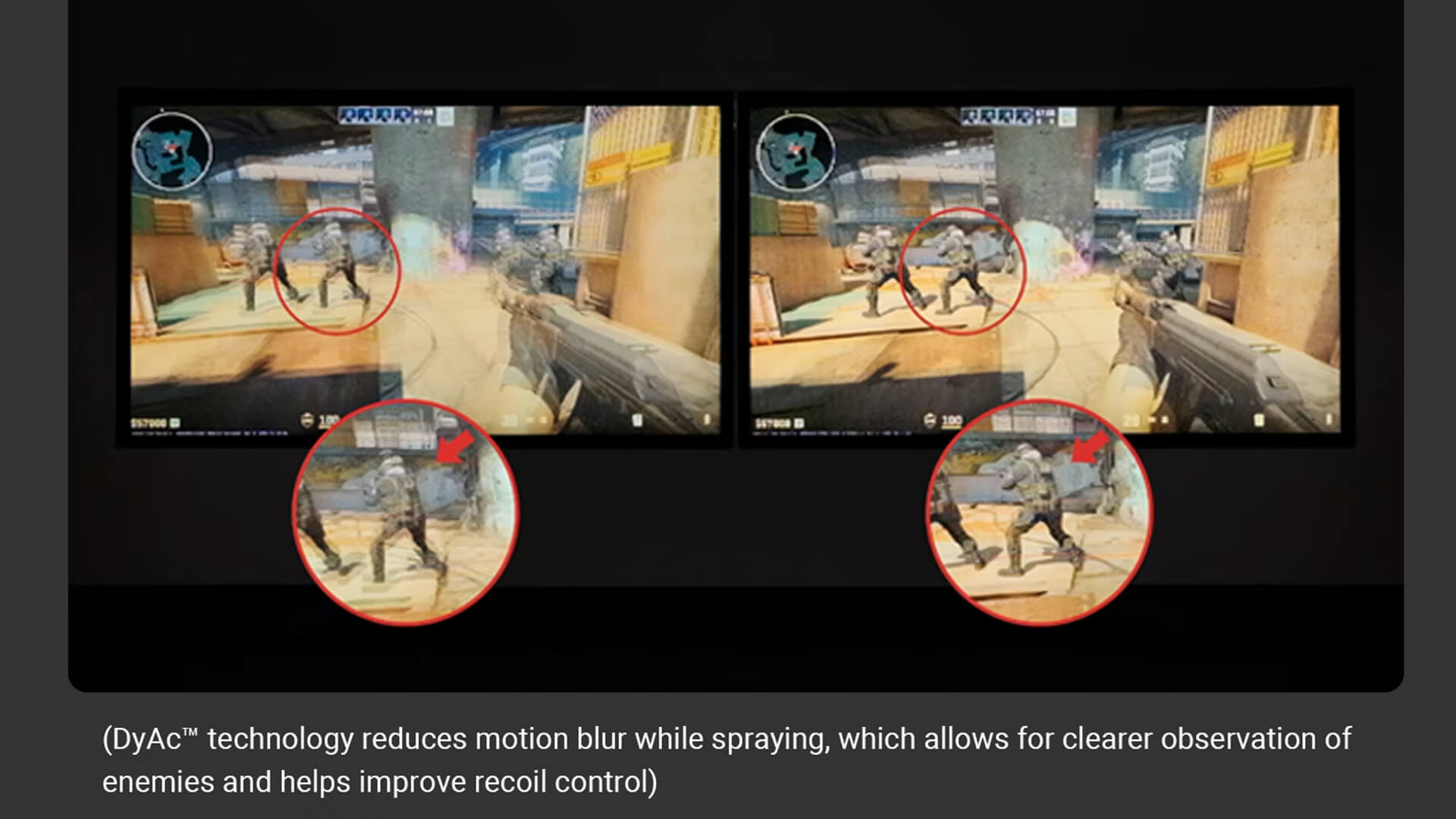
At the core of BenQ DyAc is something called backlight strobing technology, but in practical terms, it works in a very straightforward way.
Normally, a monitor keeps its backlight on continuously, meaning each frame stays visible for a short period of time. When objects move quickly, this creates a blur because your eyes are still processing the previous frame while the next one appears.
DyAc changes this by rapidly turning the backlight on and off in sync with each frame. This reduces how long each image stays visible on the screen, which helps minimise blur during motion.
For you, this means that fast-moving objects don’t smear across the screen; they appear sharper and more defined.
Frame Clarity and Motion Tracking
By reducing how long each frame is displayed, DyAc improves frame clarity, which is especially important in fast-paced games.
In real gameplay, this translates into:
- Clearer enemy movement when they are strafing or running
- Better visibility when controlling recoil during shooting
- Improved visual tracking in games, making it easier to follow targets
Instead of struggling to see where your opponent is moving, the image remains more stable, helping you react more accurately.
Why It Reduces Motion Blur
Motion blur happens because your eyes naturally follow moving objects, but the screen continues to display previous frames for a fraction of a second. This overlap creates a blur effect.
BenQ DyAc reduces this by shortening the visibility of each frame, so your eyes only see the most current image. The result is a much sharper picture during motion.
Many players describe this as feeling similar to CRT-like motion clarity, where movement appears clean and precise rather than blurred.
Why Motion Blur Happens in Gaming
To fully understand the value of BenQ DyAc motion blur reduction, it’s important to first understand why motion blur happens in the first place. Even on high-end gaming monitors, blur is a common issue, especially in fast-paced games where every movement matters.
Fast Movement and Pixel Response
In fast-paced games, objects are constantly moving across the screen whether it’s an enemy strafing, a camera flick or rapid in-game action. Your monitor needs to update and display each frame quickly and accurately to keep up with this motion.
Even with fast response times, motion blur can still occur. This is because the issue is not just how quickly pixels change, but how long each image remains visible on the screen. When frames linger for even a fraction of a second, your eyes blend them together while tracking motion, which creates a blurred effect.
For players, this means that during intense gameplay, objects may not appear as sharp as they should, making tracking more difficult.
Difference Between Blur and Ghosting
Motion blur is often confused with ghosting, but they are two different issues; and understanding this difference is key.
- Motion blur happens because images stay visible on the screen for too long while your eyes follow movement
- Ghosting happens when pixels take too long to transition from one colour to another, leaving behind faint trails
BenQ DyAc technology is specifically designed to reduce motion blur, not ghosting. This means it improves how clearly you see moving objects, even if your monitor already has a fast response time.
Why Refresh Rate Alone Isn’t Enough
Many gamers assume that upgrading to a higher refresh rate such as 144Hz, 240Hz or even 360Hz will completely solve motion blur. While higher refresh rates do make gameplay smoother, they don’t fully eliminate blur.
This is because refresh rate improves how many frames are shown per second, but it doesn’t control how long each frame stays visible.
This is where technologies like BenQ DyAc come in. By reducing the visibility time of each frame, DyAc works alongside high refresh rates to improve motion clarity gaming performance, rather than just smoothness.
Looking for a more immersive experience? Explore immersive curved gaming screens designed to enhance gameplay and visual depth.
DyAc vs Standard Motion Blur Reduction
When comparing BenQ DyAc with standard motion blur reduction technologies, the difference is not just technical; it’s something you can feel during gameplay. While many monitors offer blur reduction features, they don’t always deliver consistent results in real-world gaming scenarios.
Traditional Blur Reduction Methods
Most standard blur reduction technologies rely on backlight strobing, similar to DyAc. However, the way they implement it often comes with trade-offs that can affect your overall experience.
In many cases, traditional methods:
- Reduce brightness significantly, making the screen appear dim
- Introduce noticeable flickering, which can be uncomfortable over long sessions
- Impact overall image quality, reducing clarity instead of improving it
While these technologies do help reduce motion blur to some extent, the compromises can make them less practical for everyday gaming, especially in competitive environments where both visibility and comfort matter.
How DyAc Improves Clarity
BenQ DyAc explained simply: it takes the same concept of backlight strobing but refines it to deliver better results without the usual downsides.
Instead of sacrificing brightness or stability, DyAc is designed to:
- Maintain better screen brightness, so visuals remain clear and visible
- Reduce blur more effectively without introducing distracting flicker
- Provide a more stable and consistent image during fast movement
This makes DyAc far more usable in real gaming situations, where clarity and comfort need to work together.
Real-World Gaming Differences
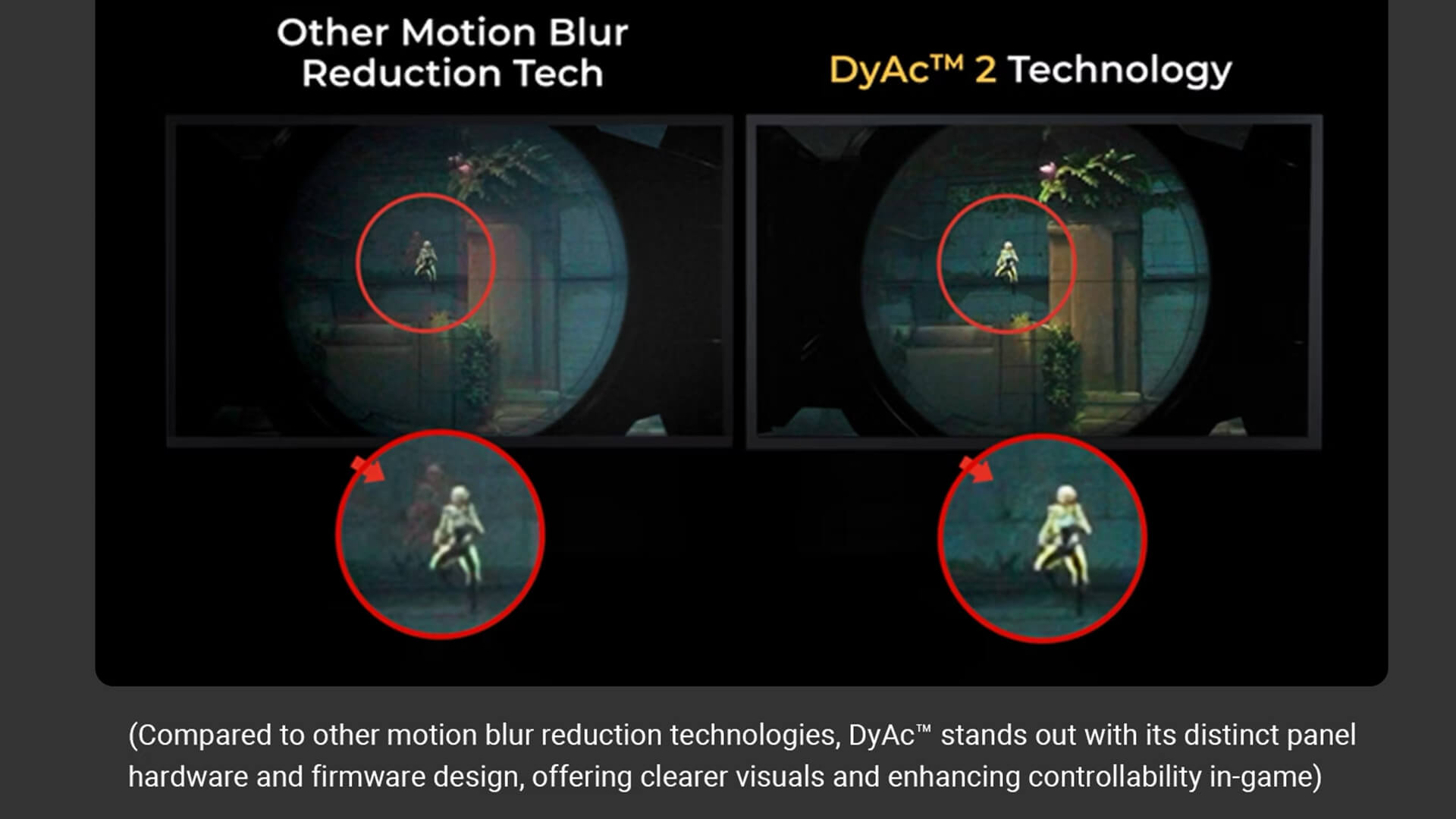
The improvements offered by BenQ DyAc technology become much more noticeable once you start playing.
With DyAc enabled, players often experience:
- Sharper moving objects, making enemies easier to see
- More controlled recoil patterns, especially in FPS games
- Improved visual tracking, helping you follow fast-moving targets more accurately
These differences may seem subtle at first, but in competitive gaming, they can have a real impact on performance and consistency.
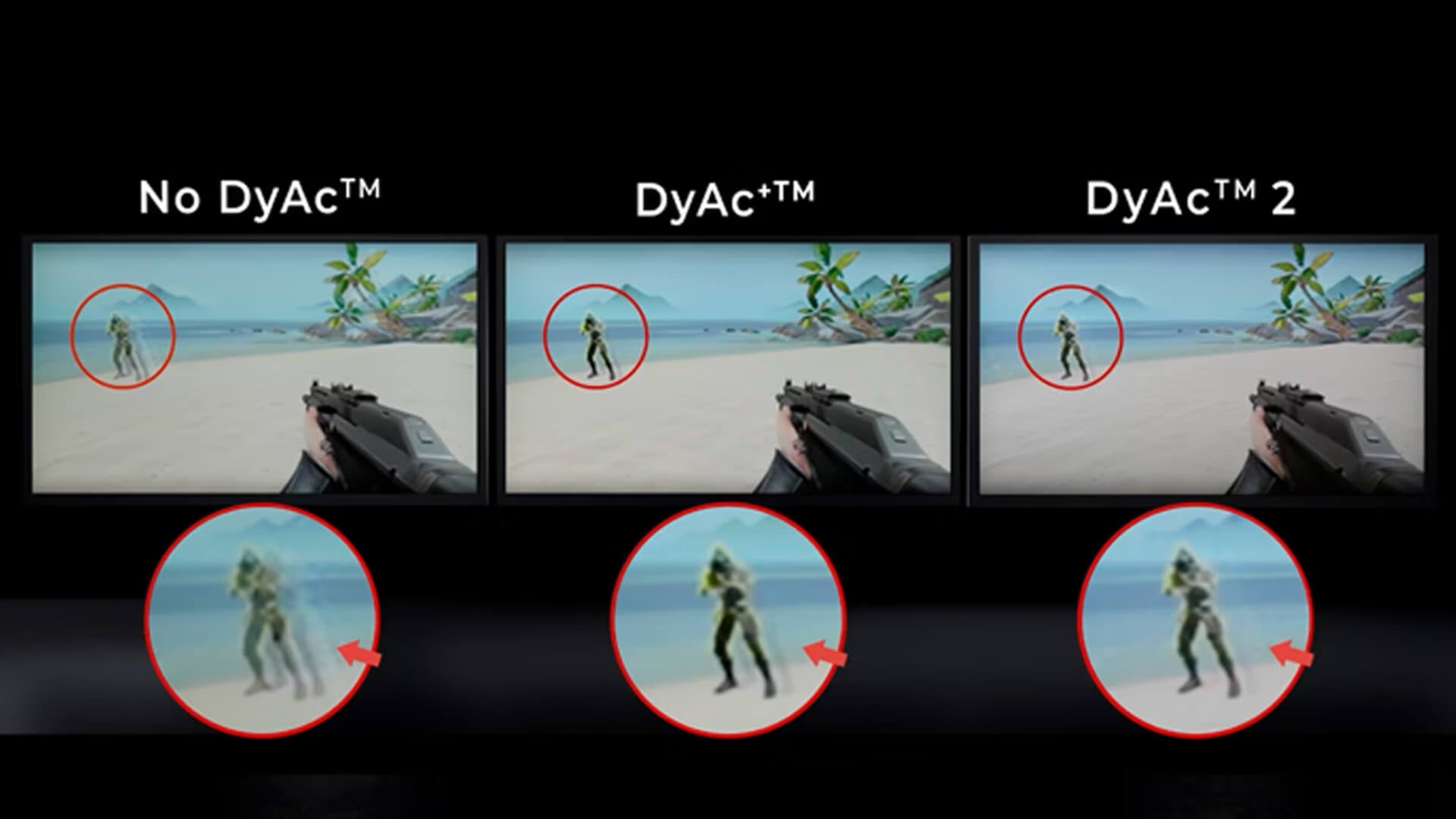
DyAc vs DyAc+ :What’s the Difference?
If you’ve come across both BenQ DyAc and DyAc+, you might be wondering whether there’s a meaningful difference between the two. While both technologies are designed to reduce motion blur and improve clarity, DyAc+ is essentially a more refined and advanced version of the original.
Brightness Improvements
One of the most noticeable upgrades with DyAc+ is improved brightness. Traditional blur reduction technologies often make the screen appear dim because of how backlight strobing works.
DyAc+ addresses this by maintaining higher brightness levels while still reducing motion blur, which makes a big difference during long gaming sessions. You don’t have to choose between clarity and visibility; you get both.
Visual Clarity Enhancements
While standard DyAc already improves motion clarity, DyAc+ takes this step further. It provides even sharper visuals during fast movement, making it easier to track enemies and maintain focus in high-speed situations.
In real gameplay, this means:
- Cleaner motion during fast camera movements
- More precise tracking of moving targets
- Improved consistency in visual clarity
Which Version Should You Choose
If you’re deciding between the two, DyAc+ is generally the better option. It offers all the benefits of DyAc but with improved brightness and clarity, making it more practical and comfortable for competitive gaming.
For most players, especially those focused on esports; DyAc+ provides the best overall experience.
Not sure which brand suits you best? Read our comparison on BenQ vs Dell monitors: which is better? to find the right display for your needs.
DyAc vs Refresh Rate (144Hz vs 240Hz vs 360Hz)
Another common question is how BenQ DyAc compares to refresh rate. Many gamers assume that simply upgrading to a higher refresh rate will solve all motion issues, but that’s not entirely accurate.
Common Misconceptions About Refresh Rate
Refresh rate determines how many frames your monitor can display per second. While higher refresh rates like 240Hz or 360Hz make gameplay feel smoother, they don’t completely eliminate motion blur.
This is because refresh rate improves smoothness, not necessarily clarity.
How DyAc Complements High Refresh Rates
This is where BenQ DyAc technology becomes important. Instead of replacing refresh rate, it works alongside it.
- Refresh rate → makes motion smoother
- DyAc → makes motion clearer
When combined, they create a much better overall experience. You not only see more frames, but each frame is also sharper and easier to track.
Which Matters More for Competitive Gaming
For competitive players, both refresh rate and DyAc are important—but clarity often has a bigger impact in fast-paced games.
Improving motion clarity gaming performance helps you track enemies more accurately, which can be more valuable than simply increasing frame rate.
Does DyAc Improve Gaming Performance?
While BenQ DyAc does not directly increase your FPS, it can still have a noticeable impact on how you perform in games.
Better Enemy Tracking in FPS Games
One of the biggest benefits of DyAc is improved enemy tracking. In fast-paced FPS games, opponents move quickly, and being able to follow that movement clearly is crucial.
With reduced motion blur, enemies appear sharper, making it easier to aim and react.
Spray Control and Recoil Visibility
DyAc also improves visibility during recoil, which is especially useful in shooting games. When firing continuously, the screen can become visually chaotic; but with clearer motion, you can better control your spray patterns.
This gives you more control and consistency during combat.
Reaction Time and Competitive Advantage
By improving overall clarity, DyAc helps you process visual information more quickly. While it doesn’t directly change your reaction speed, it allows you to see and respond to situations more effectively.
In competitive gaming, even small improvements in visibility can lead to better decision-making and performance.
When Should You Use BenQ DyAc?
| Scenario | Use DyAc? | Why It Matters (Benefits) |
| FPS Games (CS2, Valorant, Call of Duty) | Yes | Improves motion clarity, making it easier to track enemies and react quickly in fast-paced gameplay. |
| Competitive Esports Titles | Yes | Enhances visual tracking and reduces blur, giving a more precise and consistent competitive experience. |
| Fast-Paced Gaming | Yes | Keeps moving objects sharp and reduces visual distractions during rapid movement. |
| Casual Gaming | Optional | Motion clarity is less critical, so DyAc is not always necessary for relaxed gameplay. |
| Movies & Content Viewing | No | DyAc can reduce brightness and is not designed for cinematic or media experiences. |
| General Everyday Use | Optional | Can be used, but benefits are minimal compared to gaming scenarios. |
Want smarter display optimisation? Learn more about What is BenQ Brightness Intelligence Plus (B.I.+) and how it enhances viewing comfort and image qualit
Ideal DyAc Settings for Different Scenarios
| Use Case | Recommended Setting | Benefit |
| Competitive Gaming | Enable DyAc / DyAc+ | Maximum motion clarity for tracking, aiming and reaction speed. |
| Casual Gaming | Optional | Can improve clarity, but not essential for relaxed gameplay. |
| Content Viewing (Movies, Streaming) | Disable | Maintains better brightness and visual quality for media consumption. |
| Mixed Use (Work + Gaming) | Toggle as needed | Use DyAc for gaming, disable for everyday tasks for better comfort. |
Final Verdict: Is BenQ DyAc Worth It?
BenQ DyAc is one of the most effective motion blur reduction technologies available for competitive gaming.
It doesn’t just make games smoother; it makes them clearer, which is often more important in fast-paced situations.
If you’re a competitive player, especially in FPS games, DyAc can provide a real advantage by improving tracking, visibility, and overall control.
For casual users, it’s less essential but still a useful feature to have.
To explore compatible displays, you can browse BenQ displays, including BenQ Zowie monitors, BenQ MOBIUZ monitors and other performance-focused gaming monitors designed for competitive play.
Frequently Asked Questions
What is DyAc?
DyAc stands for Dynamic Accuracy, a motion blur reduction technology used in BenQ gaming monitors.
Does DyAc improve gaming performance?
Yes, it improves clarity, which helps with tracking and aiming.
Is DyAc like FreeSync?
No, DyAc reduces blur, while FreeSync reduces screen tearing.
Is DyAc the same as G-Sync?
No, they serve different purposes; DyAc focuses on clarity, G-Sync on smoothness.
Should you enable DyAc all the time?
Use it for competitive gaming, but it may not be necessary for casual use.
You can pay with:
*PayPal Credit Representative Example: Assumed credit limit £1,200, Representative 23.9% APR (variable). Purchase rate 23.9% p.a (variable).Terms & Conditions apply.


PayPal Credit and PayPal Pay in 3 are trading names of PayPal UK Ltd, 5 Fleet Place, London, United Kingdom, EC4M 7RD. Terms and conditions apply. Credit subject to status, UK residents only, Five Tech LTD acts as a broker and offers finance from a restricted range of finance providers. PayPal Pay in 3 is not regulated by the Financial Conduct Authority. Pay in 3 eligibility is subject to status and approval. 18+. UK residents only. Pay in 3 is a form of credit. Check if affordable and how you will repay. May make other borrowing more difficult or expensive. See product terms for more details.
Copyright © 1996-2026 Fivetech LTD | Terms and Conditions
box.co.uk & Box are trading names of Five Tech Limited. Registered office: Box LTD, Unit 10 Woodford Trading Estate, Woodford Green IG8 8HF