


 Menu
MenuMenu


Get Sales Advice from Mon - Fri 9am - 5:00pm:
020 3337 8950LAST UPDATED: March 13, 2026
Apple MacBook Pro 14 M5 Review: Power, Precision, and a Display Built for Creators
If you've been waiting for an Apple laptop that feels properly "done" for creative work (and can still handle a cheeky gaming session on the side), this Apple MacBook Pro 14 M5 review is for you. The latest MacBook Pro refresh keeps the 14-inch Pro formula that creators love but tunes the bits that matter most: M5 performance, storage speed, and efficiency, while sticking with Apple's excellent screen, speakers, and build. Think of it like a high-level patch that improves frame rate and loading times without changing the whole map.
If you're comparing across all Apple MacBook models, Box has you covered with an extensive selection. And if you want to shop the broader ecosystem, our Apple Store is the fastest way to find compatible accessories and Apple kit. But since you are here for the MacBook Pro 14 M5 review, let's get to it.
Overview of the 14-inch MacBook Pro M5
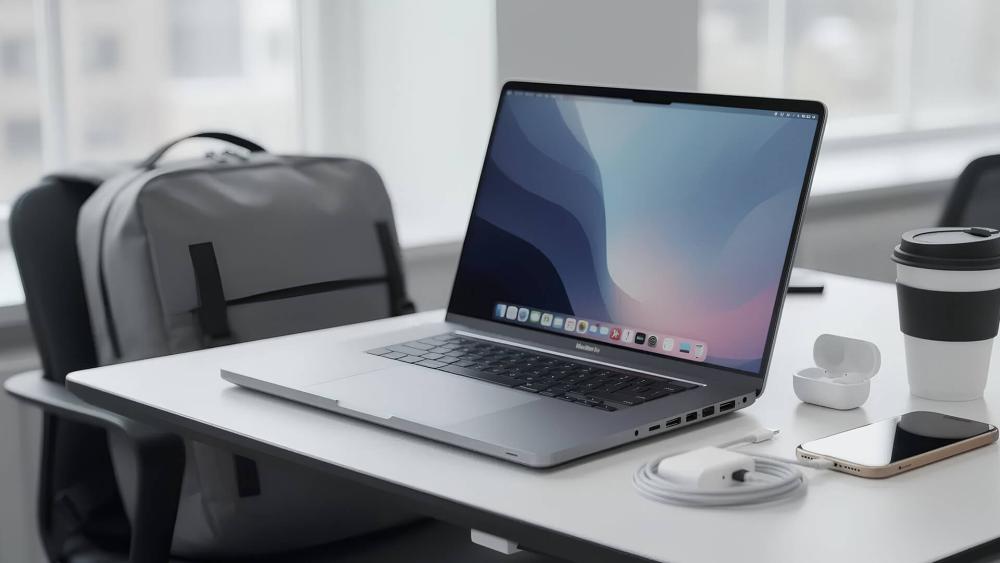
At its core, this Apple MacBook Pro 14 M5 review boils down to one thing: Apple has doubled down on the 14-inch Pro as the sweet spot for creators who want pro features without hauling a 16-inch machine. The base M5 model comes with a 10-core CPU and 10-core GPU, plus the ports creators actually use: three Thunderbolt 4 ports, HDMI, SDXC, headphone jack, and MagSafe 3. Looking at the MacBook Pro M5 specs, this combination of CPU, GPU and creator-focused connectivity highlights why the 14-inch model remains one of Apple's most balanced professional laptops.
The 14-inch chassis is still the familiar MacBook Pro design language, but that's not a bad thing. It's sturdy, understated, and feels like it'll survive commutes, client days, and "bag drop" moments that would make a cheaper MacBook cry. In the Apple spec sheet, the 14-inch model is listed at 1.55 kg, which is comfortably portable for a proper pro machine.
What's New in the M5 Model?
From a specs-and-feel perspective, the big upgrades in this Apple MacBook Pro 14 M5 review are performance and responsiveness. Apple's own tech specs list the M5 as a 10-core CPU (4 performance + 6 efficiency) and a 10-core GPU, with hardware-accelerated ray tracing and 153GB/s memory bandwidth.
Real-world testing from reviewers backs up the "this is quicker" vibe. Tom's Guide measured notable gains in Geekbench 6 versus the previous M4 generation and also reported stronger gaming results in certain titles. If you're the type to bounce between After Effects, Lightroom, and a dozen Chrome tabs, these bumps translate into fewer hiccups and faster turnaround, which is exactly what you want from a new MacBook Pro.
Price and UK Availability
For UK buyers, Apple's own store listing shows the 14-inch MacBook Pro with M5 starting at £1,599, with higher storage and memory configurations priced above that. TechRadar also reported pre-orders and availability timing around the M5 launch window, including UK pricing context.
If you're deciding whether to go Pro at all, check MacBook Pro editions, and keep the lighter Apple option in mind if your workflow is more on-the-go than heavy-duty.
Design and Build Quality
This Apple MacBook Pro 14 M5 review won't pretend the chassis is reinvented. Apple didn't need to. The 14-inch Pro still nails the fundamentals: rigid lid, no creaks, premium materials, and a clean look that suits studios, offices, and home desks alike.
It's also the kind of laptop you can confidently plug into a full battlestation. If you're running external displays, storage, and audio, the 14-inch Pro feels like a proper hub rather than a "laptop that's trying its best".
Chassis and Port Selection
Ports are a huge part of why people buy an Apple MacBook Pro instead of a thinner machine. The M5 model keeps a creator-friendly set: SDXC, HDMI, headphone jack, MagSafe 3, and three Thunderbolt 4 ports.
That matters because it reduces dongle life. Import footage via SD, run HDMI to a client display, and still have Thunderbolt/USB-C free for drives and docks. If you're building a desk setup, pairing it with display monitors for Mac makes life easier, especially if you want single-cable charging + video.
Keyboard, Trackpad and Webcam Experience
In this Apple MacBook Pro 14 M5 review, the input experience stays top-tier. Apple's specs list a backlit Magic Keyboard with Touch ID and a Force Touch trackpad, which remains one of the best trackpads in the game for precision work.
The MacBook Pro M5 webcam specs also get a practical upgrade on paper: Apple lists a 12MP Center Stage camera with Desk View support and 1080p video recording. If you're constantly on calls, recording tutorials, or streaming creative sessions, this is a nice quality boost compared to older generations.
Display and Visual Experience
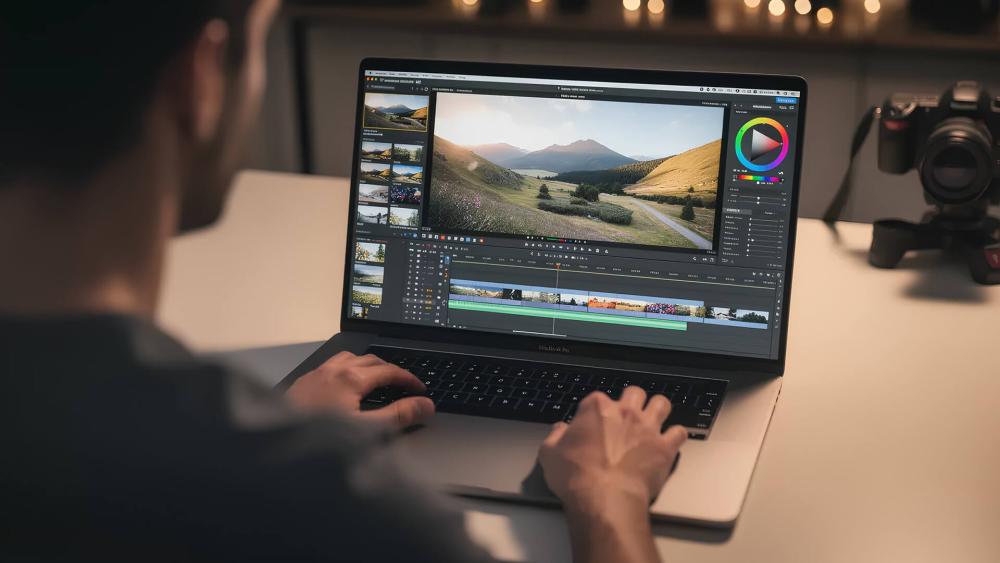
The screen is the headline for a lot of creators, and our Apple MacBook Pro 14 M5 review won't be complete without talking about it. Apple's Liquid Retina XDR remains one of the best creator laptop displays, full stop.
14.2-inch Liquid Retina XDR Specs and Brightness
Apple's tech specs list the 14.2-inch Liquid Retina XDR panel at 3024×1964, with a 1,000,000:1 contrast ratio, 1000 nits sustained full-screen (XDR), 1600 nits peak for HDR, and up to 1000 nits SDR brightness outdoors. These MacBook Pro M5 display specs highlight why the panel is considered one of the strongest displays available on a creator-focused laptop.
That brightness and HDR performance is a big deal for HDR grading, checking highlights, and simply working in bright rooms without squinting. It's also why the Liquid Retina XDR display is still a standout even when other laptops chase OLED.
Colour Accuracy, Refresh Rate and Creative Use
Apple lists wide colour (P3), True Tone, and ProMotion with adaptive refresh up to 120Hz. Looking at the MacBook Pro M5 display refresh rate and brightness, the panel supports up to 120Hz with ProMotion alongside 1000 nits sustained brightness and 1600 nits peak HDR output, making it one of the most capable creator laptop displays available today. That 120Hz isn't just a "nice" feature. Scrubbing timelines feels smoother, cursor movement is cleaner, and motion work feels less fatiguing over long sessions.
If you're bouncing between creative work and play, this is where the MacBook Pro 14 M5 starts feeling like the "best MacBook" for mixed use. You might not be buying it as a gaming machine, but a great high-refresh screen makes everything from UI animation to casual games feel more responsive, which is a subtle win in any Apple MacBook Pro 14 M5 review.
Performance: M5 Chip and Real-World Use
Here's the main event. The whole reason to care about this Apple MacBook Pro 14 M5 review is the M5 chip and what it does for real workflows: faster renders, smoother multitasking, snappier loads, and better efficiency.
CPU and GPU Performance Insights
Apple's specs outline the M5 architecture clearly: 10-core CPU (4P + 6E), 10-core GPU, 16-core Neural Engine, hardware ray tracing, and 153GB/s memory bandwidth.
In reviewer testing, the M5 MacBook Pro posts strong Geekbench results, and Tom's Guide measured a clear uplift versus M4 while also reporting better performance in certain games and creative tasks. If you want a quick "creator + gamer" reality check, PC Gamer's coverage basically sums it up: the hardware is finally less of the excuse, even if the game catalogue is still the limiter.
So, for creative pros, the performance story is simple: it's fast, consistent, and efficient. For gamers, it's "surprisingly capable", especially for integrated graphics, but still not a Windows replacement if your library is mostly anti-cheat-heavy multiplayer titles.
SSD Speed and Memory Bandwidth Gains
SSD performance is one of the sleeper upgrades in this Apple MacBook Pro 14 M5 review. Tom's Hardware reported SSD read/write speeds in Blackmagic tests hitting 6,000+ MB/s in early comparisons, with big improvements over prior generations. TechRadar also covered similar findings, noting Apple arguably undersold just how big the SSD uplift is.
In practice, faster storage helps with big project loads, scrubbing heavy media, importing assets, and reducing the "why is this taking ages" moments when you're deep in work. For creators, that's as important as raw CPU speed, and it's a major reason the latest MacBook Pro feels more responsive even outside benchmarks.
Battery Life and Efficiency

A good Apple MacBook Pro 14 M5 review should be honest about battery claims. Apple rates the M5 model at up to 24 hours video streaming and up to 16 hours wireless web. Those are ideal-case numbers, but real-world results are still genuinely strong.
Daily Endurance for Creatives and Professionals
Tom's Guide reported 18 hours 14 minutes in its web surfing battery test (with screen set to 150 nits), which is excellent for a pro laptop. For day-to-day work, that means you can do a full day of edits, admin, and meetings without anxiety, and that's a big part of why MacBook Pro M5 battery life is a key selling point.
If you're using the laptop like a creator actually does (apps open, exports happening, peripherals connected), you won't always hit "all day", but the efficiency is still a highlight. In gaming terms, it's like running on a well-optimised engine: you're getting more performance per watt rather than brute forcing it.
Comparison With Previous Generations
Compared to older Apple silicon models, the story in this Apple MacBook Pro 14 M5 review is "same great baseline, better peaks". You get strong longevity while still gaining performance headroom. Apple hasn't changed the whole identity of the 14-inch Pro, but M5 makes it feel snappier under load, and storage improvements help the whole system feel quicker.
If you're coming from M1 or Intel, this is a massive jump. If you're on M3 or M4, the decision becomes more about workload and time saved than "must-have" new features.
Audio, Connectivity, and Software Experience
This Apple MacBook Pro 14 M5 review would be incomplete without talking about the quality-of-life stuff: speakers, mics, wireless stability, and macOS. These are the parts you notice daily.
Speakers, Mic and Audio Quality
Apple's tech specs list a high-fidelity six-speaker system with force-cancelling woofers and a studio-quality three-mic array. In real use, this is ideal for creators who need to monitor audio without immediately reaching for headphones, and it's excellent for calls, podcasts, and quick edits.
For casual play, the speakers are also great for single-player titles, indie games, and streaming, where you want loud, clear sound without distortion. It's a "small thing" that adds up over time, and it's one reason an Apple MacBook Pro often feels more premium than similarly-priced Windows laptops.
Connectivity (Thunderbolt/USB-C, Wi-Fi, Bluetooth)
Wireless is solid but not bleeding edge. Apple lists Wi-Fi 6E and Bluetooth 5.3 for the M5 model. For most people, that's absolutely fine: fast Wi-Fi, stable peripherals, and reliable audio.
On the wired side, Thunderbolt 4 remains the standard on the base M5 model, and Apple details the port capabilities and external display support in its spec sheet. If you're building a creator desk setup, you'll likely want a dock and a good USB-C display. Box's display monitors for Mac category is handy for finding the right pairing, especially if you want one cable for power + display.
Who Is the MacBook Pro 14 M5 Best For?
This Apple MacBook Pro 14 M5 review really lands on one key takeaway: the 14-inch Pro is built for people who create, edit, and ship work, not just browse and stream.
Creatives and Content Creators
If you're editing video, working in audio, creating graphics, or doing photography, the combo of Liquid Retina XDR display quality, fast SSD performance, and efficient M5 compute is exactly what you want. Apple's spec sheet highlights creator-friendly hardware like ProRes encode/decode engines and broad media format support.
Also worth noting: if you're comparing with other Apple kit, Box has an existing MacBook Air review that can help you decide whether you need Pro at all: Apple MacBook Air M3 review.
Power Users and Productivity Workloads
For heavy multitaskers, developers, and people who live in big spreadsheets, codebases, and browser tabs, this Apple MacBook Pro 14 M5 review is an easy recommendation if you value speed and stability. The 14-inch form factor is practical, and the port selection reduces friction.
If your workflow is mostly office apps and web, you might still be better with the lighter Apple Air option. But if you want headroom for years, the MacBook Pro M5 is a safer bet, especially when macOS updates keep getting more capable.
Final Verdict - Worth the Upgrade or Not?
So, is it worth it? This Apple MacBook Pro 14 M5 review says yes, with one big caveat: it depends what you're upgrading from.
- Upgrade immediately if you're on Intel, M1, or an older Apple MacBook Pro that struggles with modern creative workloads. The performance, efficiency, and overall experience are a huge leap.
- Strongly consider upgrading if you value faster storage and smoother performance under load, especially if your work involves big files and frequent imports/exports.
- Maybe hold if you're on M3/M4 and your current machine is already smashing your workload. You'll still get gains, but the "wow" factor depends on how much time the upgrade saves you week to week.
- Software also matters. macOS Tahoe 26 introduced a new design direction and upgrades that benefit power users and creatives, including improvements to Spotlight and a dedicated Games app, plus Metal 4 enhancements aimed at better game performance. If you want your MacBook to feel current for years, this is part of why the 14-inch Pro remains such a safe buy.
FAQs
Is the MacBook Pro 14 M5 worth buying in 2026?
Yes, for creators and power users it's one of the most balanced Apple laptops you can buy. Apple's spec sheet backs up strong battery ratings and a top-tier display, while reviews show meaningful performance gains in real use.
How does the M5 chip compare to the M4?
Independent testing shows clear uplifts in CPU performance and strong gains in certain workloads, with reviewers reporting higher benchmark scores and faster task completion times on the M5 model.
What are the key improvements in the 14-inch M5 display?
The Liquid Retina XDR panel remains the star: 3024×1964 resolution, 1000 nits sustained XDR brightness, 1600 nits peak HDR, and ProMotion up to 120Hz.
How long does the battery last on real-world usage?
Apple rates up to 16 hours of wireless web and up to 24 hours of video streaming, but real-world testing varies. Reviewers measured 18 hours 14 minutes in its web-browsing test at 150 nits.
Should creative professionals choose this over other laptops?
If you prioritise display quality, battery efficiency, and creator-friendly performance, it's an excellent pick. If you need top-end GPU performance for specific 3D pipelines or a wider game library, a Windows laptop with a discrete GPU may still suit you better, which is a key point raised in gaming-focused coverage.
Does the MacBook Pro M5 have Thunderbolt 5?
It depends on the configuration. The base MacBook Pro with the standard M5 chip uses Thunderbolt 4, supporting fast data transfer, charging and external displays through USB-C ports. However, M5 Pro and M5 Max models introduce Thunderbolt 5, offering significantly higher bandwidth and improved support for multi-display creator setups.
You can pay with:
*PayPal Credit Representative Example: Assumed credit limit £1,200, Representative 23.9% APR (variable). Purchase rate 23.9% p.a (variable).Terms & Conditions apply.


PayPal Credit and PayPal Pay in 3 are trading names of PayPal UK Ltd, 5 Fleet Place, London, United Kingdom, EC4M 7RD. Terms and conditions apply. Credit subject to status, UK residents only, Five Tech LTD acts as a broker and offers finance from a restricted range of finance providers. PayPal Pay in 3 is not regulated by the Financial Conduct Authority. Pay in 3 eligibility is subject to status and approval. 18+. UK residents only. Pay in 3 is a form of credit. Check if affordable and how you will repay. May make other borrowing more difficult or expensive. See product terms for more details.
Copyright © 1996-2026 Fivetech LTD | Terms and Conditions
box.co.uk & Box are trading names of Five Tech Limited. Registered office: Box LTD, Unit 10 Woodford Trading Estate, Woodford Green IG8 8HF