


 Menu
MenuMenu


Get Sales Advice from Mon - Fri 9am - 5:00pm:
020 3337 8950POSTED: February 05, 2026
Chasing Higher FPS and Cooler Temps? A Real-World Look at Alienware’s CES Gaming Laptops
CES announcements are often packed with big promises: higher FPS, smarter cooling, cleaner designs. And while real-world gaming always tells the full story, these launches are usually where meaningful improvements start to take shape; the kind you actually feel once you sit down and play.
Performance on paper doesn't always translate to smoother gameplay, and better specs don't always mean quieter fans or cooler temps after three hours of gaming.
Alienware's CES 2026 refresh feels different not because it reinvents gaming laptops, but because it focuses on the things gamers notice day to day: sustained FPS, thermal headroom, display quality, and noise control. Instead of chasing ultra-thin designs alone, Alienware has split its lineup into clearly defined performance paths, giving buyers more control over what they're really trading off.
This guide breaks down the Alienware CES announcement, what's genuinely new in the refreshed models, and how the latest Alienware CES gaming laptops stack up once you move past the spec sheet and think about real-world gaming.
The Alienware Refresh in One Minute
Alienware didn't throw out its playbook at CES; it refined it. The 2026 update is less about surprise launches and more about tightening the lineup around clearer performance goals.
What's Refreshed vs What's Teased
The refresh focuses on updated internals, cooling layouts, and display options across existing designs. At the same time, Alienware teased future directions rather than launching everything at once, especially around ultra-slim gaming notebooks and more accessible entry-tier systems.
The Lineup: Area-51 (16 & 18) and 16X Aurora
Alienware CES gaming laptops now sit in two camps. The Alienware Area-51 16 and 18 models double down on size, airflow, and power limits, while the Alienware 16X Aurora targets gamers who want strong performance without carrying a full desktop replacement.
Two Concept Directions: Ultra-Slim and Entry Tier
Alienware also hinted at two strategic directions: thinner gaming laptops designed for portability, and more affordable systems aimed at bringing Alienware's design language to a wider audience. These aren't fully realised yet, but they signal where the brand is heading beyond this refresh.
Area-51 vs Aurora: Two Very Different Ideas of "Performance"

Alienware's CES gaming laptop refresh makes one thing very clear: not all performance is built the same way. The Area-51 and Aurora lines are chasing different goals, even though both sit under the same premium Alienware banner. Understanding that difference matters far more than just comparing GPU names.
Area-51: Bigger Cooling Headroom, Higher Ceilings
The Alienware 16 Area-51 is designed as a desktop-class replacement, not a portable first gaming machine. Everything about it from the chassis size to the cooling philosophy prioritises long-session stability over short bursts of speed.
At its core, the Area-51 pairs Intel Core Ultra 9 processors with RTX 5080 or RTX 5090 GPUs, backed by up to 64GB of RAM. In real gameplay, this translates to consistently high frame rates even before DLSS or frame generation is enabled. Titles like Cyberpunk 2077 and Doom: The Dark Ages can already hold strong native performance, with DLSS 4 simply unlocking extreme refresh-rate headroom rather than acting as a crutch.
Cooling is where Area-51 really separates itself. The larger chassis allows for higher airflow, lower fan noise under load, and far less aggressive throttling once thermals stabilise. That's why, in extended sessions, performance feels steady instead of spiky. You're not constantly hearing fans ramp or watching frame-times wobble after 20 minutes.
The design reinforces premium positioning. The anodised aluminium chassis, Liquid Teal finish, Aurora-inspired RGB lighting, and Gorilla Glass window aren't just cosmetic; they signal that this is a machine meant to live on a desk, plugged in, and pushed hard. The downside is obvious: it's expensive, heavy, and battery life takes a back seat. But for users who want maximum performance with minimal compromise, that trade-off is intentional.
Who it's for: Enthusiasts, competitive players, creators, and anyone who wants a laptop that behaves more like a high-end tower than a portable device.
16X Aurora: Performance Meets Practicality
The Alienware 16X Aurora takes a very different Aapproach. Instead of chasing absolute thermal headroom, it aims for high performance that's easier to live physically, financially, and acoustically.
Aurora models typically pair Intel Core Ultra 7 or 9 CPUs with RTX 5060 or RTX 5070 GPUs, targeting strong 1440p/1600p gaming rather than brute-force excess. Performance is still excellent, especially when DLSS 4 is enabled, but the focus shifts toward efficiency and balance. You're getting high frame rates without the size, weight, or cost of the Area-51.
The big CES upgrade here is the anti-glare OLED display. With reduced reflections, near-instant response times, and much deeper contrast than IPS panels, the Aurora now feels far more premium in everyday use. For single-player titles, cinematic games, and mixed work-and-play setups, this upgrade arguably impacts perceived quality more than raw FPS numbers.
Cooling is competent, but physics still applies. The slimmer chassis means less thermal mass and lower sustained power limits compared to Area-51. In long, demanding sessions, the Aurora may settle into lower clocks sooner not dramatically, but enough that competitive players will notice the difference over time.
Who it's for: Gamers who want strong modern performance, better portability, and a more approachable price point without giving up Alienware's design language or build quality.
Which One Matches Your Gaming Style
Choosing between Area-51 and Aurora comes down to how you actually play. If most of your gaming happens at a desk, you run high resolutions, lean heavily on ray tracing or frame generation, or value long-session stability over everything else; the Area-51 makes sense. Its larger size directly supports higher GPU power limits and more consistent performance under load.
If, however, you want a laptop that still handles modern games comfortably but fits more naturally into everyday life, quieter, lighter, and easier to move; the Aurora 16X hits a more practical middle ground. It offers better "bang for your buck" for most gamers, while the Area-51 remains the no-compromise option for those who want the highest ceilings Alienware currently offers.
You can also browse the latest Dell laptops at Box.co.uk to compare Alienware models with Dell's wider performance and productivity lineup.
The FPS Story: Bursts vs Sustained Performance
One of the most common mistakes gamers make when comparing Alienware CES gaming laptops or any gaming laptop is focusing only on peak FPS numbers. Those headline figures look impressive, but they don't always reflect how a laptop performs after an hour of real gameplay.
Why Short Boosts Can Be Misleading
Modern CPUs and GPUs are designed to boost aggressively for short periods. In quick benchmarks or launch-day reviews, this often results in eye-catching frame rates that look fantastic on paper. The problem is that these boosts rely on thermal and power headroom that doesn't last indefinitely. Once heat builds up inside the chassis, clocks begin to drop to stay within safe limits. This is why two laptops with identical GPUs can feel very different during longer sessions one holds performance; the other slowly fades.
What "Sustained FPS" Actually Means in Practice
Sustained FPS is about consistency, not peaks. Alienware's larger designs, particularly the Area-51 line, are built to maintain stable clock speeds once temperatures settle. Instead of constantly ramping up and down, the system reaches a thermal equilibrium and stays there. For gamers, this means fewer sudden dips, smoother camera movement, and better frame-time consistency, especially noticeable in competitive titles and demanding open-world games.
What to Watch in Real Benchmarks
Average FPS only tells part of the story. Frame-time graphs, 1% lows, and behaviour after extended load are far more revealing. A laptop that averages high FPS but suffers frequent micro-stutters will feel worse than one with slightly lower averages but smoother delivery. Noise levels under load also matter if aggressive cooling profiles can hold performance, but at the cost of distracting fan noise during long sessions.
Cooling Changes You Can Actually Feel
Alienware's CES refresh puts cooling at the center of the experience; not just as a spec-sheet bullet point, but as something users actively notice during play.
The Cooling Design Focus of This Refresh
Instead of chasing thinner designs at all costs, Alienware has focused on improving airflow paths, expanding vapor chamber coverage, and better separating CPU and GPU heat zones. This reduces heat saturation inside the chassis and helps prevent one component from dragging the other down. The goal isn't silent operation, but predictable thermals that don't fluctuate wildly under load.
Temps, Fan Noise, and Throttling in Real Use
Bigger cooling systems don't just lower temperatures; they slow down how quickly heat builds up. This results in steadier fan behaviour and fewer sudden spikes in noise. When fans do ramp up, they tend to stay at a consistent level rather than constantly pulsing. More importantly, the system is less likely to hit thermal limits that force sharp clock reductions mid-game.
Portable Designs vs Cooling Capacity
Slimmer Alienware models still deliver strong performance, but physics can't be ignored. Less internal space means less room for airflow and heat dissipation. Alienware's refresh makes this trade-off clearer: thinner machines prioritise portability and visual upgrades, while larger models prioritise sustained performance and lower thermal stress. Knowing which side you value more is key.
OLED Is Back and It Changes the Feel of Gaming
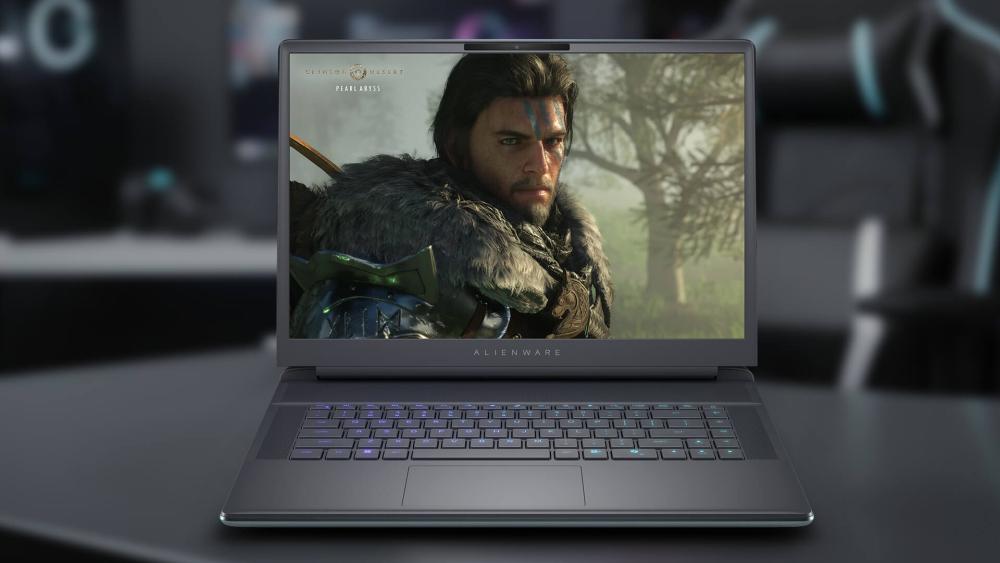
The return of anti-glare OLED panels is one of the most noticeable upgrades Alienware has made, especially for users who game in varied lighting conditions.
Why Anti-Glare OLED Is the Headline Upgrade
OLED panels deliver perfect blacks, infinite contrast, and instant pixel response, which dramatically improves image clarity in dark scenes and fast motion. The addition of anti-glare coatings addresses a long-standing weakness of OLED laptops by reducing reflections and making them more usable in brighter rooms. This makes OLED practical, not just impressive.
Refresh Rate and Response Time in Real Gameplay
High-refresh OLED panels combine smooth motion with near-instant response times. In fast-paced shooters or competitive games, this improves motion clarity and reduces perceived blur, even at slightly lower FPS. The result is a display that feels more responsive, not just more colourful.
If display smoothness is a priority, pairing a laptop with a high refresh screen can make competitive gaming and fast-paced titles feel noticeably more responsive.
OLED vs IPS: Choosing What Fits Your Setup
IPS panels still have their place. They're often more power-efficient and handle bright environments well. OLED, however, excels in immersion. Story-driven games, cinematic titles, and visually rich worlds benefit enormously from the contrast and colour depth OLED provides. The right choice depends less on specs and more on how and where you play.
Silicon and GPU Configurations: What's Actually New Here
Under the hood, Alienware's refreshed laptops move to newer platforms that emphasise efficiency under sustained load, not just short-term boosts.
Intel Core Ultra 200HX Across the Refreshed Models
These processors focus on balancing performance and power efficiency during extended workloads. Instead of chasing the highest boost clocks, they aim to deliver stable performance that pairs well with Alienware's cooling strategy. This results in fewer performance drops once thermals stabilise.
RTX 50 Series Laptops and What They Mean for FPS
The move to RTX 50 series laptop GPUs brings improved ray tracing efficiency and more capable frame generation. At 1440p and higher resolutions, these improvements help maintain smoother frame delivery without pushing power limits as aggressively as previous generations.
Why TGP Matters More Than the GPU Name
Two laptops with the same GPU badge can perform very differently depending on their power limits. Higher TGP configurations allow GPUs to sustain performance longer, while lower limits prioritise efficiency and thermals. Alienware's larger models benefit most here, as their cooling systems allow GPUs to operate closer to their full potential without excessive throttling.
If you're unsure whether 16 inches is right for you, it helps to compare. Smaller models, like top 13-inch laptops, are great for travel but can feel cramped for all-day work. Best 14-inch laptops strike a balance between portability and usability.
A 16 inch laptop goes one step further, offering a more immersive and comfortable experience without tipping into bulky territory. If you want a bigger screen while still valuing a clean, modern design, it's often the best choice.
The Ultra-Slim Tease: What to Expect (and What to Doubt)
Alienware's CES refresh hinted at a slimmer gaming direction, and while that's exciting on paper, it's also where buyers need to be the most cautious. Ultra-slim gaming laptops promise portability and modern design, but they come with unavoidable trade-offs that matter a lot once the novelty wears off.
Why Thin Gaming Laptops Often Cap Performance
Thin gaming laptops struggle not because of weak components, but because of thermal and power limits. High-end CPUs and GPUs generate sustained heat that slim chassis simply can't dissipate efficiently for long periods. As a result, performance is often front-loaded: strong FPS in short bursts, followed by clock reductions once temperatures climb. This leads to fluctuating frame rates, louder fans, and a less consistent experience during longer gaming sessions. Even with modern vapor chambers and smart fan curves, physics still sets a hard ceiling.
Who an Ultra-Slim Alienware Could Suit
An ultra-slim Alienware makes sense for gamers who prioritise portability over sustained peak performance. If your usage involves shorter gaming sessions, esports titles at moderate settings, or a hybrid workflow where gaming shares time with travel, study, or office use, a slimmer design can be appealing. It's also a good fit for users who dock their laptop at a desk and rely on external monitors, keyboards, and cooling to offset internal limits.
What Specs Would Make It Credible for Real Gaming
For a slim Alienware to be taken seriously as a gaming machine, it would need realistic power targets rather than headline specs. That means mid-tier RTX 50-series GPUs with sensible TGP limits, a strong focus on frame generation and upscaling, fast OLED or high-refresh IPS panels, and well-tuned cooling that prioritises stability over silence. Without those compromises being clearly communicated, ultra-slim gaming laptops risk disappointing buyers expecting desktop-class behaviour.
| For a complete setup, upgrading peripherals like gaming keyboards can further improve input consistency and overall control during long sessions. |
Quick Picks: Which Refreshed Alienware Is for You

Alienware's refreshed lineup isn't about one "best" laptop; it's about choosing the right fit for how and where you play.
Competitive Players (Stability + High Refresh)
If you play esports or fast-paced shooters, consistency matters more than visual spectacle. High-refresh-rate displays paired with CPUs that sustain clocks under load are critical. Larger Alienware models with robust cooling deliver steadier frame-times, lower latency, and fewer drops during long competitive sessions. OLED is nice here but refresh rate and thermal stability matter more than pure contrast.
AAA and Ray Tracing (GPU Tier + Cooling Headroom)
For cinematic games, ray tracing, and high-resolution play, GPU tier and cooling capacity are the deciding factors. Higher-TGP RTX 50-series configurations paired with spacious cooling designs allow ray tracing and frame generation to run without constant throttling. This is where Alienware's bigger chassis models shine, maintaining performance even after hours of gameplay.
Travel + Desk Setup Hybrid (Portability + Noise Balance)
If your laptop moves between desk and backpack, a balanced model makes more sense. These systems trade some sustained performance for reduced size and weight while still offering strong 1440p gaming. Fan noise and thermals become more noticeable here, so choosing efficient GPU tiers and avoiding overpowered configs helps keep the experience comfortable.
What to Check Before You Buy (So You Don't Get the "Wrong" Config)
Most gaming laptop regret doesn't come from the brand, it comes from choosing the wrong configuration.
Screen Choice Comes First (OLED vs IPS, Refresh Rate)
Your display shapes every interaction. OLED delivers unmatched contrast and motion clarity, especially with anti-glare coatings, while IPS offers reliable brightness and often better battery efficiency. Competitive gamers should prioritise refresh rate, while story-driven players benefit most from OLED's visual depth.
GPU Tier Second (Target Resolution and FPS)
Choose your GPU based on the resolution you actually plan to play at. A higher-tier GPU running at a restricted power limit may not outperform a slightly lower-tier GPU with more thermal headroom. Matching GPU tier to display resolution avoids overspending and disappointment.
Cooling Headroom Third (Sustained Performance)
Cooling determines whether advertised performance lasts beyond benchmarks. Larger heat sinks, vapor chambers, and airflow matter more than boost clocks. If sustained FPS and quieter operation are priorities, cooling capacity should outweigh thinness or aesthetics.
Verdict: Is the Refresh Worth Caring About?
Alienware CES announcement isn't about chasing flashy specs for marketing slides. It's about refining how performance holds up in real play; long sessions, heavy ray tracing, and high refresh gaming where thermals, noise, and frame consistency matter more than short benchmark bursts. Improvements like anti-glare OLED panels, smarter cooling layouts, and better power tuning make these laptops feel smoother and more stable day to day, not just faster on paper.
If you're upgrading from an older Alienware, especially a model that's two or more generations back; the jump is meaningful. Better sustained FPS, quieter operation, and modern display options can completely change how demanding games feel over time. The Area-51 suits players chasing maximum headroom, while the Aurora refresh delivers a more balanced experience that fits everyday gaming and work setups.
If you're comparing configurations or weighing alternatives, you can explore the best gaming laptops range at Box.co.uk, where Alienware models sit alongside other high-performance options for easier side-by-side comparison before committing.
You can pay with:
*PayPal Credit Representative Example: Assumed credit limit £1,200, Representative 23.9% APR (variable). Purchase rate 23.9% p.a (variable).Terms & Conditions apply.


PayPal Credit and PayPal Pay in 3 are trading names of PayPal UK Ltd, 5 Fleet Place, London, United Kingdom, EC4M 7RD. Terms and conditions apply. Credit subject to status, UK residents only, Five Tech LTD acts as a broker and offers finance from a restricted range of finance providers. PayPal Pay in 3 is not regulated by the Financial Conduct Authority. Pay in 3 eligibility is subject to status and approval. 18+. UK residents only. Pay in 3 is a form of credit. Check if affordable and how you will repay. May make other borrowing more difficult or expensive. See product terms for more details.
Copyright © 1996-2026 Fivetech LTD | Terms and Conditions
box.co.uk & Box are trading names of Five Tech Limited. Registered office: Box LTD, Unit 10 Woodford Trading Estate, Woodford Green IG8 8HF